How-To Guide
How can a solo iOS founder do EU creator outreach without a home address on the App Store?
How a solo iOS founder can reach EU creators without publishing a home address: what Apple's DSA trader page shows, address options, and a first message.
By the Superdirector editorial team. Apple pages read November 6, 2026.
At a glance
How can a solo iOS founder do EU creator outreach without a home address on the App Store?
Sort out your App Store page first, because EU creators will check it. If you are a trader, Apple shows an address, phone number and email on your EU product page. Individuals can show a P.O. Box or another address they can document; a company shows its D-U-N-S address instead. Then send outreach from the same name and email the page shows, link the app, and make one clear ask. This is practical guidance, not legal advice.
- Individuals: Apple accepts an address or P.O. Box for display, and asks every trader to upload a document; a P.O. Box also needs a receipt or bill.
- Organizations: the D-U-N-S address displays automatically.
- Match the outreach name and email to the App Store page before sending.
Fix what the App Store shows, then write from it
You can do it, but sort out the App Store page first, because that is where an EU creator checks who you are. If you are a trader, Apple shows your address, phone number and email on your EU product page. As an individual you can show a P.O. Box or another address you can prove is yours. Or you can enroll a company, whose D-U-N-S address appears instead. Then write your first message from the same name and email the page shows, link the app, and say plainly what you are asking for. A creator who can match your email to your App Store page has one less reason to ignore you.
This is practical guidance, not legal advice. Apple's help page says the same of its own text and leaves the trader decision to you. Apple pages were read on November 6, 2026.
See what Apple shows EU visitors
Apple's trader help page says Articles 30 and 31 of the Digital Services Act require Apple to verify and display trader contact details, and that once verified they appear on your product page wherever the app is offered in any of the 27 EU territories. What appears depends on how you enrolled.
| Enrolled as an individual | Enrolled as an organization | |
|---|---|---|
| Seller name | Your legal name, per Apple's enrollment page | Your legal entity's name; Apple does not accept DBAs or trade names |
| Address shown | An address or P.O. Box you enter for display | The address tied to your D-U-N-S Number, shown automatically |
| Phone and email | Entered by you, each checked with two-factor authentication | Entered by you, each checked with two-factor authentication |
| Proof you upload at the trader step | A current document with your business name and address, and for an alternate address such as a P.O. Box, a receipt or bill linking you to it | D-U-N-S verification and a work email on your organization's domain at enrollment, then the same document upload at the trader step |
| Changes membership details? | No, Apple says display details are for display only | No; to change the physical address you contact Apple |
Look at your own EU product page before you write to anyone. That page is your business card for this campaign.
When enlarged, scroll horizontally to read the diagram.
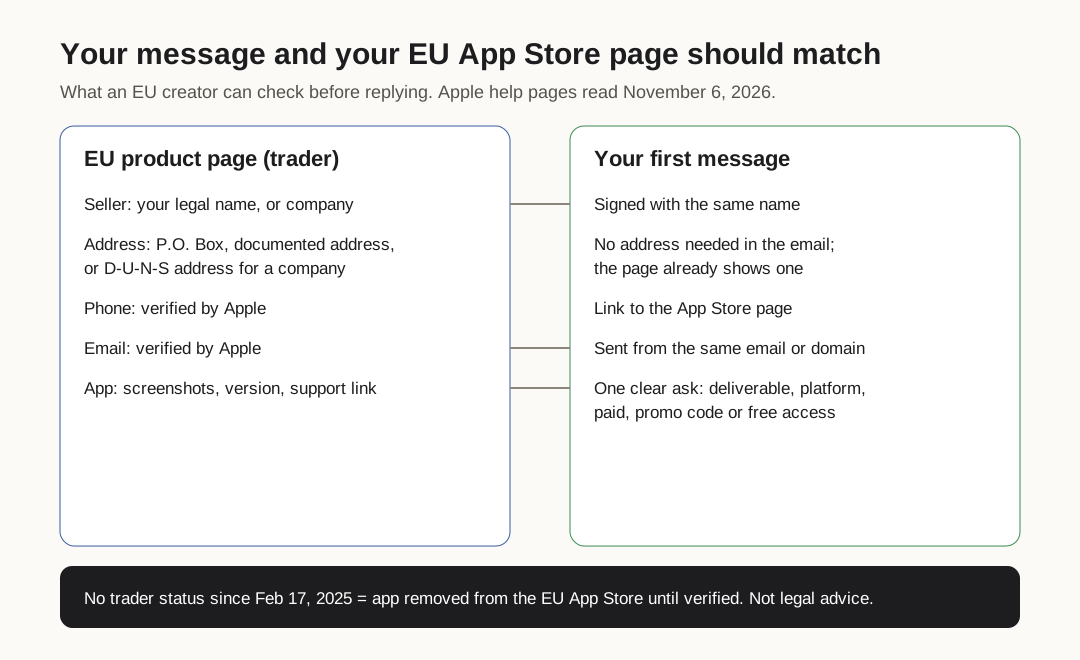
Original diagram. Rules from Apple's App Store Connect help and enrollment pages, read November 6, 2026; not legal advice.
Original visual by Superdirector editorial team. Creation date not recorded.
Choose an address you are willing to publish
- A P.O. Box (individuals). Apple's form asks individuals for an "Address or P.O. Box". For an alternate address it also wants a document that ties you to it, such as a receipt or bill. Note that Apple's enrollment step itself does not accept P.O. boxes, so this is a display choice, not a change to your account.
- A mail-address service. Some services issue a letter confirming your association with the address. The Digital PO Box, for example, prices its annual plan at EUR 7.50 a month and argues that a plain PO Box may lack the proof platforms expect. Apple's help page names no accepted providers, so keep the receipt and any association letter in case it asks for proof.
- A company. Enrolling an organization needs a legal entity, a D-U-N-S Number, a working website and a work email on your organization's domain; Apple lists the program at 99 USD per membership year, with prices that may vary by region. The D-U-N-S address is what shows, so register the company at an address you are happy to publish.
- Not a friend's address. TDPB points out you cannot prove association with someone else's address when asked for documents.
Declaring yourself a non-trader to avoid the address is not a shortcut. Apple's non-exhaustive list of factors includes revenue from In-App Purchases, paid or ad-sponsored apps, especially in large volumes, and says non-trader status tells EU customers that consumer-protection rights will not apply to contracts with you. If you charge money, assume you need an answer here; if unsure, ask a lawyer.
Check what a creator sees before they reply
A creator who gets your message will often open the app link. Before you send, open your product page from an EU storefront and check it the way they will.
- The seller name. If you enrolled as an individual, it is your legal name. Sign your message with that name, or with the company name if you enrolled one.
- The email address. Send outreach from the address the page shows, or one on the same domain. A message from a personal inbox that does not match the page looks like a scam.
- The address and phone number. Make sure they are current and that someone answers.
- The app itself. Recent screenshots, a working support link and an up-to-date version tell the creator the app is alive.
- Your public profiles. If you mention a website or social account, the name there should match too.
Our pre-send consistency check lists these items with a column for what the page shows and what your message says.
Write a first message that names a business contact
Keep it short, specific and checkable. Every fact in it should match the App Store page.
- Who you are: "I'm [legal or company name], the developer of [app], on the App Store here: [link]."
- Why them: one sentence about a video of theirs that fits the app.
- What you ask: one deliverable, the platform, and whether you pay, offer a promo code or offer free access.
- How to reach you: the same email and, if you want, the support page listed on the App Store.
- An easy no: tell them it is fine not to reply.
For the rest of the outreach, see the influencer outreach email template, a stop rule for unanswered outreach, and how to measure creator traffic that ends at an App Store page.
Know what happens if trader status is missing
Apple opened the trader status form on March 21, 2024. From October 16, 2024 it was required to submit app updates, and since February 17, 2025 apps without trader status are removed from the App Store in the EU until the status is provided and verified. An app that is not live in the EU cannot be the link in your creator outreach there, so settle this before the campaign, not during it.
Apple also lets you change trader status for each app. If one of your apps is a free hobby project and another is paid, you can set them separately. That is your assessment to make; Apple says you must make it yourself, with a legal advisor if you are unsure.