How-To Guide
How do you market a mobile app on TikTok organically (slideshows, faceless demos, founder videos)?
Post problem-first slideshows, faceless screen demos and founder videos, send viewers to a store page that matches the post, and judge it on downloads.
By Bell Chen, founder of Superdirector — how the analysis works.
At a glance
How do you market a mobile app on TikTok organically (slideshows, faceless demos, founder videos)?
Pick one problem your users already feel and post about it most days in three formats: slideshows that list the problem and its fixes with your app as one honest item, faceless screen recordings that show the app doing one task, and short founder videos about why you built it. Send viewers from your profile to an App Store page whose screenshots match what the post showed, using an App Store Connect campaign link or a custom product page so you can count downloads. Run it as a four-week test, change one thing at a time, and judge it on downloads, not views.
- TikTok says follower count is not a direct recommendation factor, so a new app account can be seen.
- Show real screens and say only what the app does today.
- Views are the start; store-page conversion and downloads are the result.
Choose the three formats that suit an app
Most advice on marketing an app on TikTok is about ads. Organic posting needs less money and more repetition. Three formats do most of the work for founders who make their own content:
| Format | What it shows | Effort | Best for |
|---|---|---|---|
| Slideshow (photo post) | A problem, its fixes, your app as one of them | Low: screenshots and text | Saves, lists, comparisons |
| Faceless screen demo | A screen recording of the app doing one task, with text or voice-over | Low to medium | Showing exactly how it works |
| Founder video | You, talking to the phone about the problem and why you built this | Medium: a face and a voice | Trust, comments, a reason to follow |
Run all three for the first two weeks, then keep the one your audience answers. TikTok's explainer on the For You feed says neither follower count nor previous high-performing videos are direct factors in what it recommends, so a new app account is not held back by its follower count alone, though reach is never guaranteed.
Make slideshows that sell without sounding like ads
Slideshows are the cheapest format for an app because the product is already on a screen. The pattern that works is a genuinely useful list with your app as one honest item. ReelFlood's playbook puts it as your app appearing in slot 2 or 3 of a good list, with your ownership disclosed in the caption.
- "5 mistakes people make with [the problem]", one mistake per slide, your app as the fix on one slide only.
- "Before and after": the messy spreadsheet or a dozen browser tabs, then the same task in your app.
- "The feature nobody uses": one real feature treated as a tip.
- "I tried 4 ways to [task]": real alternatives, including free ones, and an honest verdict.
Keep every claim checkable. AttentionClaw's guide makes the useful point that a screenshot can prove a control exists but cannot by itself prove the feature saves time; say what the screen shows, not what it will do for someone's life. Be wary of format hype too: TikTok told creators that carousel posts got 2.9 times more comments than videos, as Modern Retail reported, but that is TikTok's own claim, and AttentionClaw notes TikTok does not state that photo posts get a universal distribution advantage.
Record faceless demos of one task
A faceless demo is a screen recording of one task from start to finish, with large on-screen text explaining each step. It suits founders who do not want to be on camera and apps whose value is visible in the interface.
- Record one task only: "split a bill three ways", not a tour of every tab.
- Open on the finished result, then show the steps; people stay to see how it was done.
- Use real, current screens. If you show a mock-up or a beta feature, label it.
- Add a voice-over or a cleared sound; TikTok lists sounds, captions and hashtags among the content information its system reads.
Demo length matters less than whether people finish it. TikTok says a viewer watching a longer video from beginning to end counts as a strong sign of interest, more than weak signals such as location. Our guide to product-first Reels for an app shows the same idea applied to a fitness app.
Film short founder videos
Founder videos give an app a person behind it. Talk to the phone for 20 to 40 seconds about one thing: the moment you noticed the problem, a user message that changed the roadmap, what broke this week. No script on screen, no pitch until the last line.
These also feed the other formats. A founder video that gets comments tells you which problem to turn into a slideshow next. If you want ideas for openings, the TikTok ideas for SaaS page has more post ideas for software products.
Send viewers to a store page that matches the post
A post that shows one feature should land people on a store page that shows the same feature. Apple's custom product pages let you publish up to 70 extra versions of your App Store page, each with its own screenshots, promotional text and a unique URL to share. Apple reports a 2.5 percentage point average increase in conversion when developers send people to a custom product page, against a 1.6% average on default pages; that is Apple's own figure across its developers, not a promise for your app.
- Make one custom product page per theme you post about, with screenshots that repeat the post's main screen.
- Put that page's URL where your profile lets you add a link, and change it when your best-performing theme changes.
- Submit the page for review before you need it; Apple says custom product page metadata must be reviewed, though not with an app update.
- On Android, Google Play's custom store listings can be shown to people who arrive through a unique listing URL.
If a custom product page is approved but people still see the default page, our custom product page checklist walks through the usual causes, and checking the whole sign-up route catches broken steps after the install.
Measure installs without fooling yourself
Organic TikTok posts do not come with install-level attribution. Branch's guide describes TikTok as a self-attributing network, which applies to its ad campaigns, with a seven-day attribution window by default. For posts you do not pay for, use the App Store's own tools:
- Campaign links: App Store Connect's campaign links send people to your product page and count the downloads tied to each link.
- Small numbers stay hidden: a campaign metric only appears once it reaches 5 in the date range, so a new app may see nothing for days.
- No data, no link: Apple says the Campaigns feature becomes available only after your app has received analytics data.
- Custom product pages: App Analytics shows impressions, downloads, redownloads and conversion rate for each page.
Read the trend over weeks, not post by post. If store-page impressions rise in the weeks you post and conversion holds, that is a sign TikTok is helping; check that nothing else, such as a feature or a press mention, changed in those weeks. Once you know which screenshot set converts best, Apple's product page optimization can test up to three alternate versions of your default page against the original.
When enlarged, scroll horizontally to read the diagram.
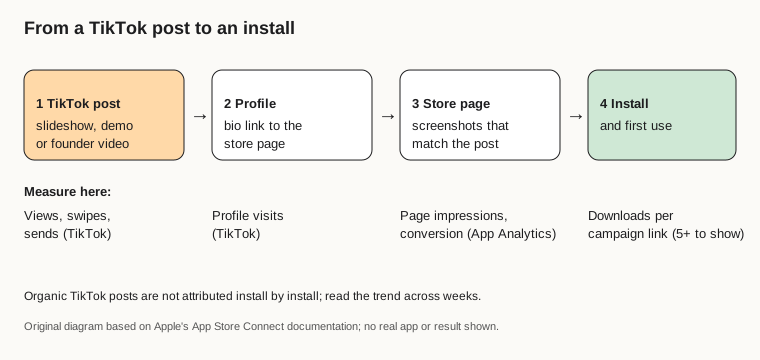
Original diagram based on Apple's App Store Connect documentation; no real app or result shown.
Original visual by Superdirector editorial team. Creation date not recorded.
Run a four-week test
Treat the first month as one experiment. Post about five times a week, change one thing at a time, and write down the decision you will make before the results arrive; AttentionClaw recommends a decision log with the hypothesis, the single variable changed, the destination and the review window. A four-week test log is free to copy.
| Week | Posts | What changes | Where viewers go |
|---|---|---|---|
| 1 | 3 slideshows, 1 screen demo, 1 founder video | Nothing: this is the baseline | Default page with a campaign link |
| 2 | Same mix | Only the style of the first slide or first line | Same campaign link |
| 3 | More of the best format from weeks 1 and 2 | Only the mix: more of the format that did best | Same campaign link |
| 4 | Same as week 3 | Only the destination | Custom product page matching the winning theme |
At the end, decide one of three things: keep the format and theme, switch theme, or put a little money behind the best post. TikTok's Spark Ads are built to boost organic posts, and our TikTok ad campaign guide covers the paid side. Make each post its own version; TikTok says it does not recommend duplicated content.
Where Superdirector fits
Superdirector, the site you are reading, is our product, built for founders and app owners doing this themselves. It watches Instagram, TikTok, YouTube and X for the formats taking off in your niche and remakes them in your brand as carousels, X posts, video scripts and storyboards. On the Growth plan it posts Instagram carousels and single X text posts for you; it does not post to TikTok, and finished AI video and full autopilot are coming soon, so you film and upload TikTok posts yourself. You remain the publisher. See how it works.