How-To Guide
A creative brief template you can hand to a short-form video maker
Copy a twelve-field short-form creative brief, use an editable blank worksheet, and check a filled example for message, evidence, outputs and review owners.
By the Superdirector editorial team. Sources read 5 November 2026; examples and worksheet are original and fictional, not production results.
At a glance
What should a creative brief template include for a short-form video?
Use a short-form creative brief to agree who the video is for, its one message, the evidence that can be shown, the maker’s freedom, the exact outputs and who resolves feedback. Copy the twelve-field worksheet below and its fictional filled example. Keep product claims tied to current evidence and count every requested cut; a filled brief does not prove results or grant rights.
- Editable blank HTML and CSV downloads, with no signup.
- One message → source → demonstration → limit, rather than unsupported outcome promises.
- A worked two-opening/two-CTA request produces four cuts; count extra file treatments separately.
Copy the brief, then make the production choices
Use this template when a marketer needs an editor, designer or on-camera maker to understand one short-form video request. It is built for the creative decision and handoff. If you are negotiating a creator partnership, use the separate UGC creator deal brief alongside the actual agreement; this worksheet does not set fees or grant usage rights.
Open the editable blank brief or download the CSV worksheet. The HTML version has editable boxes and a print layout; keep a saved copy after editing. You can also copy the field table below into a document your team already shares. There is no required software or signup.
Keep the brief short enough to use during production. Link the full evidence, brand rules and agreement instead of shrinking them into the page. Twelve fields are our editorial arrangement, not a mandatory industry standard. A tiny resize of an approved asset may need only a clear task with the current source file, new size, deadline and owner.
The twelve-field creative brief template
| Field | Fill it with a decision |
|---|---|
| Project and current version | Name, brief date/version, owner, current document link. |
| Audience and viewing situation | One specific audience, its actual question, intended channel/placement. |
| Objective and measurement | One desired next action; metric definition, data source, owner, review date. Target is an aim, not a prediction. |
| One message | The single idea the viewer should be able to repeat. |
| Evidence to show | Allowed statement, exact source/version, visible demonstration and limits. No source means no factual promise. |
| Opening and tone | What the opening must establish; a concrete tone example and what to avoid. |
| Must-say / must-show / must-not-say | Short separate lists. Include pronunciation, current offer, disclosure and prohibited unsupported claims where relevant. |
| Creative latitude | Which wording, setting, performance or edit choices the maker owns. |
| Deliverables and variants | Count finished cuts; length, aspect, resolution, captions, audio and file format; source files only if agreed. |
| Assets and permissions | Accessible current assets, people/music/screen permissions and intended use; link the actual permission or agreement. |
| Dates and feedback | Brief confirmation, first cut, consolidated feedback, final files and intended publish window; owners and time zones. |
| Resources and review owners | Available budget/resources; content/fact owner, creative reviewer and final decision owner; unresolved decisions with owner/date. |
Write “unknown — owner — answer due” where a choice has not been made. That gives the maker a usable question. “TBC” everywhere gives them a guessing exercise. If one missing answer prevents a truthful demonstration, change the creative idea or resolve that specific answer before filming it.
The shared foundation is familiar: Asana includes audience, message, deliverables, stakeholders, budget, timeline and distribution; Wrike turns those into requester questions. Our added working unit is the evidence row below. It connects the proposed message to what the viewer can actually be shown.
Make one message demonstrable
An instruction such as “make the product look life-changing” does not tell a maker what they may honestly show. For each factual point, join the wording to a specific source and to a feasible visual. A proposed line can remain an editorial idea until the product owner verifies it. Do not turn an unverified promise into a production requirement.
| Proposed statement | Evidence and visual | Limit to carry into the brief |
|---|---|---|
| Fictional app: “Move a saved item into a named folder.” | Assume the feature is verified in the exact build being filmed; capture that action on a test account. Record the build and source owner. | A visible action does not establish time saved, higher output or customer results. Do not invent a testimonial. |
| Fictional skincare product: “This is a pump bottle.” | Assume the actual supplied pack and approved pack photograph show the pump. Film the physical object. | Pack construction does not prove skin effects. Do not add a treatment, cure or comparative-result claim. |
| “Our team saves two hours every week.” | No evidence has been provided in this example. | Remove the line from this brief. A neat screenshot or persuasive delivery cannot supply missing outcome evidence. |
Both product examples are invented teaching cases. They describe how to bind a permitted statement to evidence; they are not claims about a real app, cosmetic, customer or Superdirector feature. Replace their assumptions with your actual product facts.
For an endorsement reaching U.S. consumers, the FTC’s disclosure guide says a speaker cannot describe product experience they have not had or invent claims requiring proof the advertiser lacks. It also addresses paid and free-product relationships, disclosure inside a video and the limits of relying only on a platform tool. Put the applicable disclosure and claims review into the brief; this worksheet alone does not establish compliance in any market.
A filled example for an in-house app demonstration
The following is a fictional working request for Ledge, an invented bookmark app. The feature, test build and account route are teaching assumptions, not tested product or Instagram behavior. Dates, people and outputs are illustrative. In a real brief, replace the named asset references with the actual URLs and confirm the navigation on the actual account. There is no measured performance result.
| Brief field | Filled example |
|---|---|
| Project / version | Ledge folder demonstration, working v2, 5 November 2026. Owner: Alex, brand marketer. This is the current working copy; budget and permissions remain open below. Earlier copies are marked superseded. Alex and the maker confirm the resolved scope on 9 November. |
| Audience / situation | People who already save links but cannot find a saved recipe when they need it. One organic Reel on the fictional brand’s Instagram account. For this example, assume Jo has confirmed a working profile link labeled “Folder demo”, leading through a measured redirect to the approved feature walkthrough (asset W1). W1 stands for the actual destination URL that belongs in a real brief. |
| Objective / measurement | Both CTA endings direct viewers to “Folder demo” in the profile links. Jo reports total recorded clicks from that link’s redirect log for 18 November 2026 at 10:00 through 25 November at 10:00 Pacific time: seven 24-hour periods. These are recorded click events, not unique people or signups. The profile link can receive visits from elsewhere; do not attribute its total to this Reel or a cut. State filtering and missing-log coverage; no target or uplift is promised. |
| One message | A saved item can be moved into a folder named by the user. |
| Evidence / must-show | Product owner confirms that action on test build demo-01. Show one test recipe moving into the “Weeknight” folder. Use invented account data and an approved screen capture. |
| Opening / tone | Opening A: “Where did I save that recipe?” Opening B: “Move a saved recipe into your Weeknight folder.” Both lead to the same verified demonstration. Tone: matter-of-fact and helpful. Avoid frantic failure acting or claims that other apps lose files. |
| Must-say / must-not-say | Name Ledge once and keep folder labels legible. Do not say faster, guaranteed, “I use this every day” or that the app saved a measured amount of time. |
| Creative latitude | Maker uses the two named openings and CTA endings and chooses transition, tabletop setting and the connecting phrasing around the verified action. CTA 1: “Open Folder demo from our profile links.” CTA 2: “See the walkthrough at Folder demo in our profile links.” Alex checks that both match the agreed route and selects one of the four cuts for the single Reel. Replacing the message, CTA route or verified feature is a brief change. |
| Deliverables | All four pairings: A+CTA1, A+CTA2, B+CTA1, B+CTA2, each a 20–30 second cut. These are options for one selected Reel, not four promised posts or a performance test. One 9:16, 1080×1920 MP4 per cut with burned-in captions; no second aspect ratio or source-project delivery included. These are chosen specs, not platform limits. |
| Assets / use | Current logo, demo-01 screen capture and proposed audio identified in the shared folder. Intended use: the named brand account’s organic Reel. Unknown — Alex — 6 November: confirm and link the actual asset permissions and intended-use scope, or replace the asset. Naming an audio file does not establish its license; this example grants none. |
| Dates / feedback | Example dates in 2026, all Pacific time: resolved brief confirmed 9 November; first cuts 12 November; one consolidated response 13 November; final files 16 November; intended selected Reel 18 November at 10:00; click-log review 25 November after 10:00. Maker confirms feasibility when the resolved scope is agreed; intermediate delivery times are set in that discussion. |
| Resources / owners | Marketer plans to supply approved footage and existing equipment; no new location, performer or music purchase assumed. Unknown — Alex with the maker — 6 November: record the available budget and whether this scope is feasible within it; change the work or agree the resources if not. Product owner checks feature/facts; creative lead checks execution; Alex resolves consolidated feedback. |
The objective is a next action, the metric is a count to observe, and the product message is a demonstrable feature. They do different jobs. The four cuts make the production request countable; they do not create an attribution experiment. A shared profile-link total cannot identify which post or cut produced each click. A click target, if you add one, is a goal rather than proof that this video will cause it.
Count versions before calling the brief complete
“Two hooks and two CTAs” is ambiguous until you say how they combine. In the example, each opening pairs with each ending: 2 × 2 = 4 finished cuts. If instead you want only two specific pairings, name those two. The maker cannot price, schedule or export a vague combination.
Specify whether captions are burned in, supplied separately or both; whether you want a clean export; and whether another aspect ratio needs a new layout. Four edits are not four separate creative concepts. Two file treatments for each of four cuts would mean eight exported files, while the shooting work may still be shared. Describe the work and the files separately.
A reference link needs a reason: “borrow the clear step-by-step demonstration; keep our verified feature and original words.” It is not permission to copy footage, music, a distinctive script or a person’s likeness. Check that the maker can open the actual approved assets, rather than only seeing filenames.
When enlarged, scroll horizontally to read the diagram.
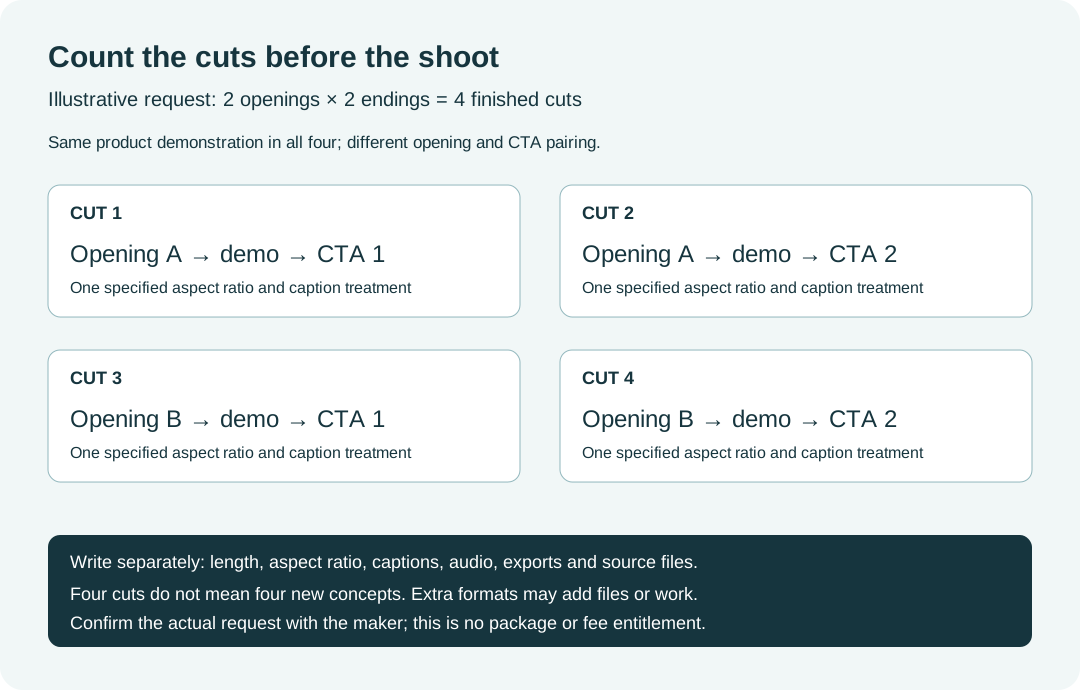
Original illustrative output count: two openings × two endings = four cuts, with a single stated aspect ratio and caption treatment. This is not a vendor package, fee or permission.
Original visual by Superdirector editorial team. Creation date not recorded.
Use the brief to resolve a real disagreement
Split feedback into three kinds. A missing required feature demonstration is a correction against this brief. A new target audience or a different product promise changes the brief. A preference between two allowed transitions is creative feedback. That distinction lets the team identify which decision moved without pretending the template determines the commercial result.
Monday’s guide distinguishes fundamental parameter changes from small creative iterations; Ziflow recommends naming the feedback route. In practice, record the changed line, the decision owner, when it was agreed and any effect on deliverables, dates or resources. Keep one current shared version and retain the previous version for context.
The requester checks business intent and supplies accurate inputs. The maker checks whether the requested visual and delivery are feasible. A qualified claims or rights owner reviews those specific issues when applicable. Name who makes the final call when feedback conflicts; do not assume the editor can decide what the product legally or technically promises.
Review the first cut against the actual required message, evidence, outputs, permissions and agreed current version. A complete brief is a record of decisions. It is not a guarantee of strong creative, a substitute for a contract, or evidence that the finished post has worked.
What this template is based on
The editorial team read four complete creative-brief guides from Asana, Wrike, monday.com and Ziflow, the FTC disclosure guide, and three current Superdirector brief pages on 5 November 2026. The four outside guides were cited in one saved Gemini answer to “creative brief template” on 3 November. That is one search observation, not a popularity ranking or proof that a layout earns citations.
This worksheet and the examples are original editorial work. The sources informed the field structure and limits; their efficiency claims were not tested or promoted into a result for this template. No production campaign, reader trial, conversion lift or revision reduction was measured. Source pages were read as extracted text; live desktop and phone layouts remain outside that source review.
Superdirector publishes this article. You can use the blank worksheet without the product. If you use a tool to draft it, supply the verified facts and references, then check the result with the people responsible for the work. A generated brief cannot confirm a product claim, a license or a delivery commitment.