How-To Guide
What to inspect when a creator delivers both raw and edited media files
Build a manifest with one row per delivered file: exact bytes, the raw clips behind each edit, and the rights words copied from the signed agreement.
What should an agency inspect when a creator delivers both raw and edited media files?
Build one manifest row per delivered file and answer three questions on each row. First, exact bytes: the file name, size, a SHA-256 hash and the container and stream details a probe tool prints. Second, origin: which raw clips each edited file was made from, or unpaired. Third, allowed use: the rights words copied from the signed agreement, or no clause. A hash proves which bytes arrived, not who owns them. Give every file its own decision so one missing item does not hold up the rest.
- Compare the folder with the deliverable lines before opening any file.
- Hash and probe each file once and keep the printed output.
- Copy rights words from the signed agreement, never from memory, and decide file by file.
Direct answer
Short answer: inspect a creator’s handoff with one manifest row per delivered file, and answer three questions on every row. First, exact bytes: the file name as delivered, its size, a SHA-256 hash and the container and stream details a probe tool prints. Second, origin: for each edited file, which raw clips it was made from, or “unpaired” when you cannot say. Third, allowed use: the rights words copied from the signed agreement for that file, or “no clause.” Then give each row its own decision: accept, hold or return.
This is for an agency or brand producer who has just received a folder or a download link that holds both finished videos and the clips behind them, and who has to say what was actually received and what may be done with it. The decision is narrow: which files are accepted as delivered, and on what stated permission. It does not decide whether raw footage should have been requested, whether the edit meets the brief or what any file is worth. Those questions have their own pages, listed in the boundary section.
A delivery with raw and edited files mixed together fails in a predictable way: one person opens the folder, sees many files and writes “received.” Later someone asks whether the clip in a new ad is the creator’s original take, whether the edited cut is the one that was approved, or whether the agreement ever covered that clip. A manifest turns “received” into a list a colleague can check. Use the blank handoff card, the CSV manifest and the handoff map to keep the work in one place.
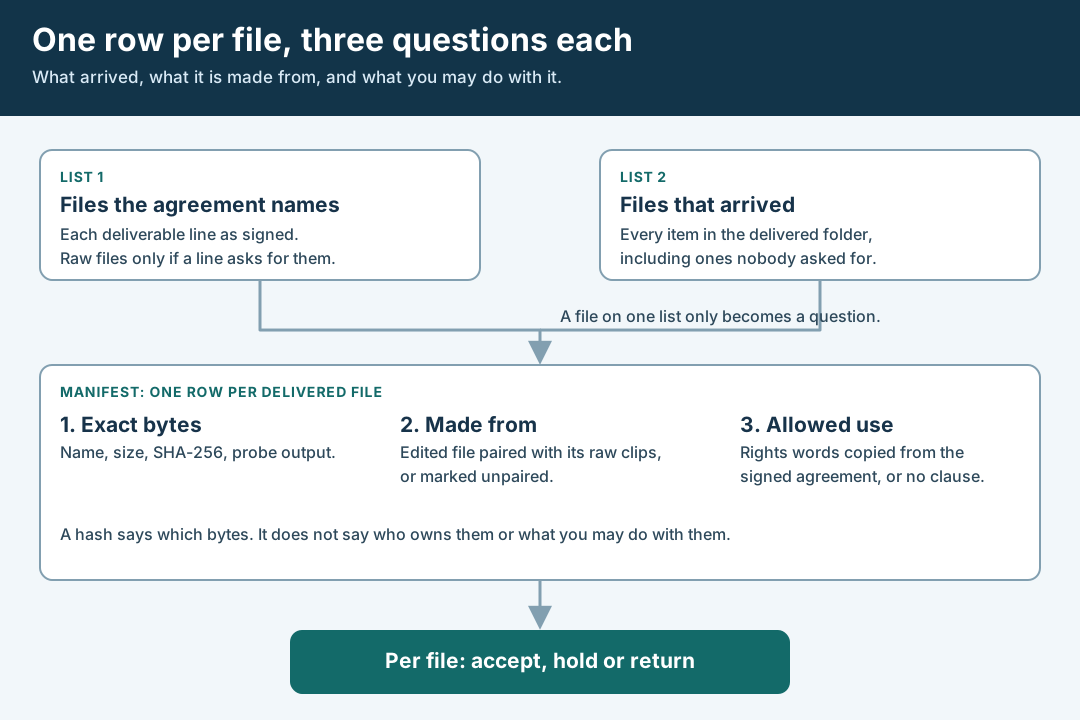
An original editorial map. Each file gets its own row and its own decision.
Open the blank file handoff card (HTML)Download the blank handoff manifest (CSV)
 Superdirector
Make it work for your brand
Find it. Remake it. Post it. Superdirector turns the viral formats in your niche into your brand's carousels, X posts and video scripts, and keeps the calendar full.
Compare what arrived with what the agreement names
Work from two lists, built before you open any file. List 1 is every deliverable line in the signed agreement, copied as written: the finished video or videos, any cutdowns, and raw or other files only if a line names them. List 2 is everything in the delivered folder, pasted from a directory listing, including items nobody asked for such as project files, audio exports, stills, caption files or a folder of clips with camera-style names.
Compare the lists line by line. A file that appears on both lists is expected. A file on List 1 but not on List 2 is missing. A file on List 2 but not on List 1 is unlisted. Treat the second and third cases as questions, not as conclusions. A missing file may be a late upload, a broken link or a misunderstanding of a line, and an unlisted file may be a courtesy, a mistake or an assumption that raw clips come with the edit. Write the question beside the file and send it in plain words: “The agreement names X. We received Y and not X. Is X coming, and what is Y for?”
Keep the delivery record itself. Write who received the delivery, by what route (a download link, a shared folder, a drive), the date, the time and the time zone. A link to a shared folder is not a version, because whoever owns the folder can replace a file behind the same link. Download the files you are inspecting and work from your copies. If the agreement asks for raw files in a separate line, the guide on splitting raw footage into its own line explains how that line is written; here you check that the line was met.
Pair each edited file with the raw clips behind it
An edited video is built from clips, and the clips are what you may later want to reuse, so the pairing is the part of a mixed delivery that is easiest to lose. For each edited file, list the raw clips that went into it. Say how you paired them. There are three honest levels. Stated by the creator: they sent a list or wrote “these clips make up cut 1.” Observed by you: you watched the edit and matched each segment to a raw clip. Unpaired: you cannot say. Write the level on the row. A file name that happens to match is a hint, not a pairing.
Watching is slower than reading names but it is the only way to move from “stated” to “observed.” Match segments by what is visible and audible, such as a distinctive moment, a spoken line or a visible object, and note the clip and the point where it appears. You do not need to match every second. You need enough matches to say which clips contribute, and to notice a segment that comes from no delivered clip. That last case is the one to catch. A segment with no raw source may be stock footage, another creator’s clip, a screen recording or a take the creator kept. You cannot tell which from the edit alone, so it becomes a question about where that segment came from.
| File kind | What to record on its row | What the row cannot tell you |
|---|---|---|
| Edited video | Name, size, hash, probe output, the raw clips it was made from and how you paired them | Whether it is the cut anyone approved; use the approval receipt for that |
| Raw clip | Name, size, hash, probe output, which edited files use it, or unused | Whether anything in the frame or sound belongs to a third party |
| Audio file | Name, size, hash, which video it belongs to, and whether it is spoken words, music or both | Whether music in it is licensed for the planned use |
| Still or cover image | Name, size, hash, the video it was taken from or made for | Who appears in it or whether a person agreed to its use |
| Caption or text file | Name, size, hash, the words as delivered | Whether the claims in it are supported |
| Anything else | Name, size, hash, and the creator’s own description of what it is | Whether the agreement mentions it at all |
Fingerprint and probe every file
For each file, record its name as delivered, its size in bytes and a SHA-256 hash. Microsoft’s documentation for Get-FileHash says the cmdlet computes a hash value for a file with a specified algorithm, that the default is SHA256, and that file names and extensions can change without altering a file’s content. It also says that if the hash values of two files are identical, their contents are identical. A hash therefore identifies the bytes you received, so a later file that is “the same clip” can be checked against it. The same page says MD5 and SHA1 are no longer considered secure and should be used only for simple change validation, so prefer SHA-256 for files you may need to defend.
Then probe each media file to see what it contains, rather than trusting its extension. The ffprobe documentation describes the tool as one that gathers information from multimedia streams and prints it in human- and machine-readable form. Its -show_format option prints information about the container format and -show_streams prints information about each stream in the file, and the -of json option selects JSON output. Save the output as it printed, with the command you ran, next to the row. This page does not say which fields a given file will show, and it does not rank any value as good or bad. The probe tells you what is in the file. Whether that suits a planned use is a separate question.
Use the probe to answer plain questions that bear on the handoff. Does the file open at all? How many streams does it hold, and does an edited file have the audio stream you expected? Do two raw clips that the creator describes as one take look like one file or two? If a value surprises you, write it down and ask. Do not open a file in an editor and save it, rename it in place or re-export it. Each of those can produce a different file, and your hash will no longer describe what the creator sent.
Write the rights for each file in the signed words
Receiving a file and being allowed to use it are different facts, and each row needs both. Title 17, section 202 of the US Code, as published by Cornell’s Legal Information Institute, says ownership of a copyright is distinct from ownership of any material object in which the work is embodied, and that transferring the object does not of itself convey any rights in the copyrighted work. 17 U.S.C. § 202. A drive, a folder or a download link is such an object. So the row for each file needs the permission that applies to it, and the file’s arrival is not that permission.
The same title says that a transfer of copyright ownership is not valid, other than by operation of law, unless an instrument of conveyance, or a note or memorandum of the transfer, is in writing and signed by the owner of the rights conveyed or the owner’s duly authorized agent. 17 U.S.C. § 204. That is one reason to work from the signed words. It is not advice on what your agreement achieves, whether it transfers ownership or grants a licence, or whether a particular clip qualifies for any category of work. Those are questions for counsel, and the manifest only has to hold the text the parties signed.
For each file, copy the sentence or clause that governs it from the agreement, exactly as written, and paste it in the row. Where the agreement covers the edited video by a line but says nothing about raw clips, write “no clause” on the raw clips’ rows. Do not extend the video’s permission to the clips by inference, and do not write a summary in your own words, because your summary becomes your reading of the agreement. If a row’s permission depends on channel, term or territory, send it through the rights matrix guide and link the result.
Add a column for third-party material as the creator states it. Ask whether any file contains music, another person’s footage, a logo or a recognisable person other than the creator, and write the answer as the creator gave it. Do not decide for them what is cleared. A creator’s statement is a statement, and an unanswered question is “not answered.” If a raw clip’s audio carries music playing in the room, the music is part of that file even if the edited cut replaced it, and the music reuse guide covers that check for paid placement.
Accept, hold or return each file on its own row
Give every row one decision. Accept means the file is on the agreement’s list, opens, was hashed and probed, is paired or marked unpaired, and has its rights words or “no clause” recorded. Hold means a question is open, such as an unlisted file, an unpaired segment or an unanswered third-party question. Return means the file cannot be used as delivered, for example it will not open, it is not the file the agreement names or it was corrupted in transfer. Write the question, the person who owns it and the date you asked beside every hold or return.
Decide file by file so that one missing item does not hold up the items that check out. The edited cut can be accepted while a raw clip stays on hold. The reverse also holds: a raw clip can be perfectly in order while the edit is returned for a missing audio stream. If a decision is “accept” on a file whose rights row says “no clause,” the decision is about the delivery only, and the row should say that no permission for use is recorded. Do not let a green decision be read as permission to publish, edit or advertise with the file.
Walk through a fictional handoff
Fictional exercise: no real brand, creator, agreement, file or result was inspected. A made-up brand, Brand A, hired Creator Q for one finished video with one cutdown. The agreement’s List 1 has two lines and says nothing about raw clips. Creator Q’s download folder, List 2, holds the two videos, six clips with camera-style names, one audio file and a text file of captions. The producer marks the two videos as expected, the six clips, the audio file and the caption file as unlisted, and sends one question per group asking what each is for.
She downloads every file, records name and size, hashes each with SHA-256 and runs a probe, saving the printed output. One clip fails to open, so its row goes on hold with the printed error and a request for a fresh copy. Watching the finished video, she pairs five of the six clips with segments she can see, marks the sixth clip as unused and notes one eight-second segment that matches no delivered clip. Creator Q replies that the segment is a screen recording from her phone. The producer records that as the creator’s statement and asks for the original file.
For rights she pastes the clause that covers the finished video into its row and the cutdown’s row, and writes “no clause” on every raw clip, the audio file and the caption file. Decisions: the two videos accepted as delivered, the five paired clips on hold pending a written answer about use, the unopened clip returned, and the screen recording on hold. The exercise shows a method only. It predicts nothing about any real creator, file or agreement.
What this page does not decide
This page is a delivery-day manifest for a folder that mixes raw and edited files. It does not decide whether raw footage should be a deliverable and a priced line, and the raw footage line guide covers that choice before a quote is agreed. It does not prove which edited cut a client approved; the approval receipt guide binds an approval to one file’s hash and leaves every other file in a delivery alone. It does not write channel, term and territory rows; the asset rights matrix guide does that for planned uses.
Other checks sit next to this one. Whether the edit meets the brief is the first-cut review guide. Whether a video fits each placement is the crop review guide. Who owns what is a legal question, and the statute pages cited above are quoted only for what they say about material objects and signed writings. We did not read your agreement, and we make no statement about whether any clause transfers ownership, grants a licence or covers raw footage.
Nothing here measures how often deliveries arrive incomplete, how many creators send raw files or what any file is worth. Those figures are not available to us and are not claimed. The page is an editorial method for keeping three things apart on one row: the exact bytes received, how the files relate to each other and the permission written for each, so that each statement about a delivery rests on its own evidence.