How-To Guide
An influencer marketing spreadsheet you can keep accurate
Use a free HTML and CSV template for creators, deliverables, metric snapshots and events, with stable IDs, source windows and explicit missing-data states.
By the Superdirector editorial team. Source texts reviewed November 5, 2026.
At a glance
What should an influencer marketing spreadsheet track?
Keep four linked tables: one row per creator, one per agreed content unit, one per dated metric snapshot and one per source-system business record. Use stable IDs, source references, exact metric/window definitions and explicit unknown states. The free HTML and CSV starter below supports that manual recordkeeping without claiming automatic data collection.
- A refreshed metric is another observation, not another published post.
- Count an order once even when code and link evidence both describe it.
- The template checks structure; source facts and campaign decisions still need your records.
Give each row one job
An influencer marketing spreadsheet should keep creators, promised deliverables, metric observations and business events as different row types. Give each record a stable ID and link it to the relevant creator or deliverable. Keep the source, time window and missing-data state beside every result. Repeatedly updating one giant row makes it too easy to count a refreshed report as another post or to replace an unknown with zero.
Start with the working HTML template or the four blank CSV files: creators, deliverables, observations and events. The HTML lets you add rows, check structural IDs and export each table as CSV. It has no account, server connection or automatic saving; download your entries before closing it. This HTML cannot import or reopen saved CSVs. After export, continue editing in your chosen spreadsheet application, or re-enter rows if you want another HTML structural check. The CSVs contain headers only, without native spreadsheet formulas, validation or automation.
This is a manual campaign-record template, distinct from our tracking-tool comparison. It does not collect platform data, send outreach, certify an agreement or decide who caused a sale.
Use four tables with explicit row units
| Table | One row means | Key fields |
|---|---|---|
| Creators | One person or organization you have identified | creator_id, display_name, primary profile, owner, contact reference |
| Deliverables | One agreed content unit within one campaign | deliverable_id, creator_id, campaign_id, format/unit, brief/agreement references, planned and actual publication |
| Observations | One source-defined metric snapshot for one deliverable and window | observation_id, deliverable_id, metric, value, unit, start/end/timezone, captured_at, source/status |
| Events | One business record from its named authority, such as one order or lead case | event_id, source_system, source_event_id, kind/state, occurred_at, evidence, association rule; optional deliverable link |
A Story set and a Story frame are different units. Choose the deliverable unit the agreement actually names and record it; do not expand frames into extra committed sets. A creator with two posts still has one creator record and two deliverable records. If you cannot establish that two profiles belong to one person, leave the identity unresolved rather than merging on a similar name.
Modash’s template guide separates recruitment, content and other campaign uses; Grist’s own template links influencer opportunities to interactions. We use those purpose and relationship ideas here. This plain template does not inherit either product’s native automations.
Make IDs stable, not dependent on row number
Use simple internal labels such as c-001, d-001, obs-001 and evt-001. Keep each ID unique within its table. Do not renumber after sorting or reuse a deleted record’s ID for another person. These internal labels are your organizational keys, not proof of identity. Keep the native profile URL or source-system record reference alongside them.
The HTML structural check detects repeated internal IDs, missing creator/deliverable links and repeated exact (source_system, source_event_id) pairs. It cannot discover that two different handles are the same person, validate an order, or resolve a case-sensitive identifier. Source IDs remain exact; do not lowercase them merely because your internal IDs are lowercase.
If you use Google Sheets, create dropdowns for controlled fields after import. Google’s dropdown instructions describe values from a range or an entered list, with reject or warning behavior. For a duplicate-ID warning in a chosen ID column, an example formula is =IF(A2="","",COUNTIF($A$2:$A$5000,A2)>1). It flags repeated entered labels in that bounded range; adapt the range as it grows and do not treat it as a person-matching algorithm. Google documents COUNTIF as case insensitive; use the example for the suggested lowercase internal IDs, not a case-sensitive native event key. The CSV files do not install this formula.
Google’s duplicate-cleanup page lets you choose the columns used for comparison and notes that identical values with different letter cases can be treated as duplicates. Work on a copy and inspect the key before removing anything. Two snapshots of the same post are often valid separate observations.
Keep windows, evidence and unknowns visible
In Observations, preserve the source’s exact metric name and unit. A public view count is not automatically reach, and reach is not a sale. Store window_start, window_end, timezone and captured_at separately. This template uses an inclusive start and exclusive end for a defined reporting window. If a source supplies only a lifetime counter, leave unsupported window boundaries blank and explain that scope in the note; do not invent a seven-day number.
| source_status | Value field | Required context |
|---|---|---|
| observed | The value actually read, including a genuine zero | Source reference, definition, scope and capture time |
| awaiting | Blank | Who will supply it and when it was requested |
| not_available | Blank | What access or source limitation prevents collection |
| conflict | Blank until resolved for the summary | Keep competing evidence references and name the resolver |
These are suggested editorial labels, not a platform workflow. A status is a statement about your evidence. Write zero only when the source supports zero for the relevant scope. A missing screenshot or an incomplete window is not a zero-performing creator. If you need competing numeric observations, retain each source as its own row and explain the unresolved conflict.
For links, store the exact agreed destination and tagging convention with the deliverable. Google’s campaign URL guidance explains source, medium, campaign and content labels and their case sensitivity. Tags label an observed path; they do not establish a sale or complete attribution. Use our UTM setup guide for the implementation.
Fictional example: one creator, two posts, three snapshots
This is invented teaching data, not a campaign result or a template customer. Creator c-001 agrees two content units: d-001 and d-002. A platform report supplies one metric snapshot for d-001, then a later refresh for that same post. A third snapshot concerns d-002. The sheet has one creator, two deliverables and three observations. It does not have three published posts.
| Record | Related record | Meaning |
|---|---|---|
| c-001 | — | One identified fictional creator |
| d-001 and d-002 | c-001 | Two distinct agreed content units |
| obs-001 and obs-002 | d-001 | Two capture times for the same metric/post; not values to add |
| obs-003 | d-002 | A separate post’s observation |
| evt-001 | Native order record shop-a / Order-7 | One order with code and link evidence references; not two orders |
One filled fictional observation: observation_id=obs-001, deliverable_id=d-001, metric_name=video_plays, value=125, unit=plays, captured_at=2026-11-10T12:00:00Z, timezone=UTC, source_status=observed and source_reference=fictional-export-A. The note says “cumulative lifetime counter as captured”; window_start and window_end are blank because that invented export provides no interval. This is a made-up export definition, not a claim about any platform’s metric. A second invented capture, obs-002, reads 180 at 2026-11-11T12:00:00Z from fictional-export-B. Retain both dated rows; 305 would be a double-counted total.
If the two snapshots for d-001 are cumulative view counts, select the appropriate dated snapshot for the report; adding them would count the earlier views again. If a report is genuinely interval-specific, combine only compatible, non-overlapping windows with the same metric definition. The template does not choose that rule for you.
For the fictional order, retain both evidence references on its one Events row. Reconcile the underlying order before entering its current payment/refund state. If the creator or deliverable association is ambiguous, keep those links blank and explain it. Our one-order reconciliation guide handles mismatched IDs, repeated source rows and cancelled/refunded-order rules. That specialist ledger is the input to this campaign sheet, not a second total to add.
When enlarged, scroll horizontally to read the diagram.
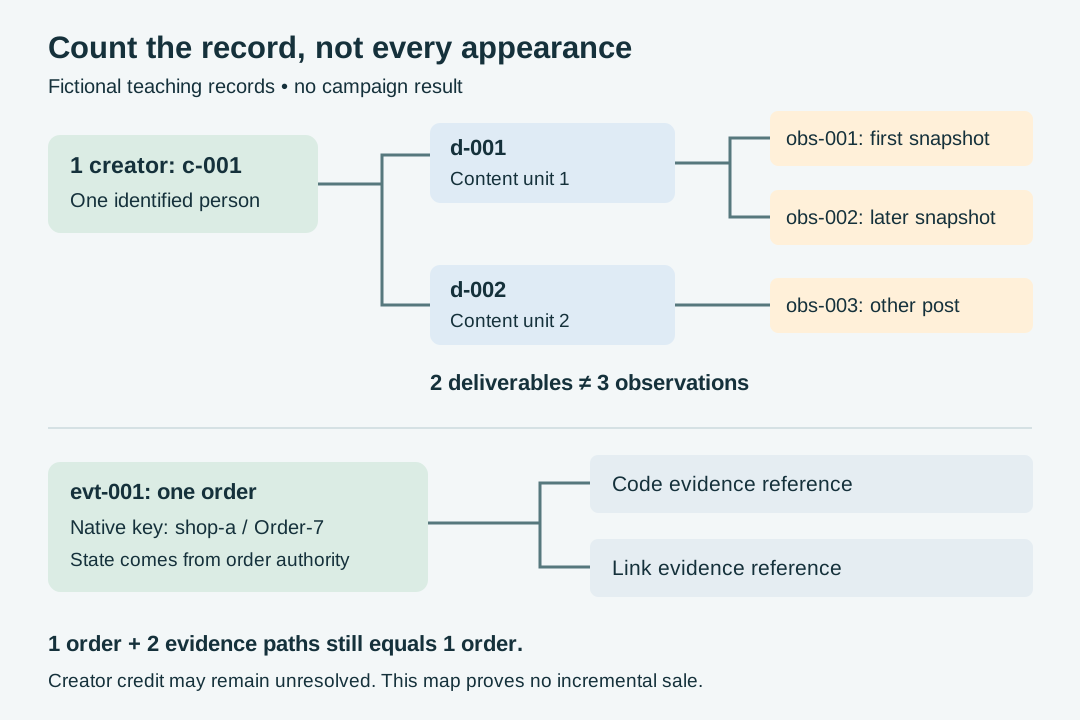
Original fictional record map. Different capture times and evidence paths remain distinct from the person, content unit and business event they describe.
Original visual by Superdirector editorial team. Creation date not recorded.
Enter one real case before filling a roster
- Create one creator and two deliverable records. Confirm both deliverables refer to the same existing creator ID. The sheet must still show one person.
- Enter a dated observation, then a later snapshot with a new observation ID. Keep the original source/window and do not overwrite history merely to update a headline.
- Try a repeated internal ID and a nonexistent deliverable reference. The HTML structural check should identify them. Correct the problem; a clean structure still does not validate the source facts.
- Export the populated CSVs and inspect them in your chosen spreadsheet application. Confirm IDs, dates, Unicode text and line breaks survived as intended. Restore dropdowns or formulas you choose to add there; CSV is a data transfer, not a full workbook.
- Keep the original exports and agreements in their existing authorized storage. Use references in the sheet instead of copying unnecessary private contact, address or payment details into every shared view.
The HTML export treats entries as text, including strings that could otherwise be interpreted as spreadsheet formulas. Its notes explain that protective prefix. A leading apostrophe added for export is protective text, not a new source identifier or value. Check the imported native-key and value cells against their source before matching; do not blindly strip apostrophes or disable spreadsheet protections. It does not transmit or automatically retain your entries. Its structural checker covers record relationships, not formulas, completeness or business truth. The delivered source and CSV structure were inspected locally; there was no browser, Google Sheets or Excel user trial for this article.
Review the sheet without turning it into another system
Choose an owner and a refresh cadence that match the decisions you need to make. Filter upcoming deliverables by agreed date, review unresolved source states and prepare a client summary from compatible windows. If you already have a CRM, agreement store, payment authority or campaign system, keep it authoritative and link its records. Do not maintain a competing copy of its business status just because a blank column is available.
SARAL, Impulze and Smartsheet offer different template sets and upgrade advice. Their creator-count or maintenance-time cutoffs do not establish when your team must buy software. Consider a tool when a specific task—capture, collaboration or reconciliation—fails often enough to justify it, then test that task.
This starter has no ROI formula, payment ledger or automatic creator ranking. A money calculation needs an agreed cost scope, currency, source outcomes and treatment of refunds. Adding views, sessions and orders or dividing attributed revenue by an undefined “investment” would conceal those decisions. Use the client report guide for the later summary and keep uncertainty visible.
Sources and scope
The complete retained texts of the nine external sources were read on November 5, 2026. The five template publishers are firsthand sources for their own published instructions, not independent tests of campaign performance. The Impulze extraction repeats large text blocks; that is one source, not corroboration. Google documents dropdown, cleanup and tag behavior. The four-table design, structural checker, blank files and fictional records are original editorial material. No vendor template was downloaded or tested, and no live campaign, native spreadsheet application or user outcome was observed.