How-To Guide
How can a small business do social media with no budget?
Focus on one useful channel, create posts from customer questions and everyday work, and track signals tied to your business.
By the Superdirector editorial team.
At a glance
How can a small business do social media with no budget?
Start with one customer-facing channel and one business goal. Make useful posts from real questions and everyday work, reply to people, and record a signal tied to your goal. The cash cost can be zero, but the work takes time; no supplied evidence establishes that this routine guarantees reach, leads, or sales.
- Use a notebook or spreadsheet to plan and review; paid scheduling is optional.
- Treat engagement and inquiries as observations, not proof that social activity caused a sale.
Start with one business goal and one channel
A small business can begin social media without ad spend or a paid tool. The tradeoff is owner time: you still have to decide what to say, make it, publish it, and respond. No routine can promise attention or sales. Start small enough that you can learn without turning social media into a second full-time job.
Write down one outcome you want social media to support: for example, helping nearby customers understand what you offer, answering common questions, or getting people to ask about availability. Buffer’s small-business content strategy guide recommends aligning social goals with business objectives and choosing a small number of priorities. For a lean start, one clear goal is easier to act on than a list of unrelated targets.
Choose one channel based on where your customers already ask questions or discuss the kind of service you provide, and on what you can make comfortably. A local shop might use a visual channel; a consultant might prefer a text-friendly one. This is a decision to test, not a universal platform ranking. Buffer’s small-business strategy advice also recommends concentrating effort on one or two platforms rather than spreading it thinly.
Before publishing, write a one-line check: “This post should help [customer] understand or do [useful thing].” If you cannot complete the sentence, save the idea for later.
Make useful posts from work you already do
Your first content source can be the work already happening in the business. Keep a running list of questions customers ask, points they seem unsure about, and ordinary steps that explain how your service or product works. Buffer’s small-business content ideas include drawing ideas from customer questions and showing regular operations. These are prompts, not evidence that any particular post will perform.
- Answer one question. Give the useful answer in the post itself; do not make a reader hunt for basic context.
- Show one real process. Use a photo or short explanation of a normal task, with details you are comfortable sharing.
- Explain an offer plainly. Say what is available, for whom, and how to ask about it. Avoid invented urgency or unsupported claims.
- Invite a response. Ask a genuine, easy-to-answer question, then make time to reply.
Use what you have: a phone photo, a short text post, or a simple image made with a tool you already know. Adapt the post to the channel rather than assuming the same format or wording suits every platform. If you share a customer message, image, or testimonial, get permission and represent it accurately. Before reusing someone else’s work, check the relevant rights, licence, and circumstances.
Work through a hypothetical bakery week
The following is a hypothetical example, not a customer story or a result claim. Imagine a neighborhood bakery whose owner wants nearby customers to understand how to ask about custom cake orders. The owner picks one channel they already use and works from a recurring question: “How far ahead should I ask?”
| Moment | Post idea | Useful next step |
|---|---|---|
| Customer question | Answer what details help start a custom-order conversation. | Invite people to message with their date and general idea. |
| Ordinary work | Show a real, non-sensitive step in preparing a cake order. | Explain what viewers are seeing in plain language. |
| Offer clarity | Describe how to ask about available sizes or flavors. | Point people to the bakery’s usual contact method. |
| Reply and learn | Respond to genuine questions and note what remains unclear. | Add repeated questions to the next idea list. |
The owner does not need to post every row as a separate campaign or promise a schedule they cannot maintain. They can choose one useful post, see whether people understand it, and make the next post answer a real follow-up. The worksheet is the process: question → helpful explanation → genuine reply → note for next time. There are no invented views, orders, or customer quotations in this example.
When enlarged, scroll horizontally to read the diagram.
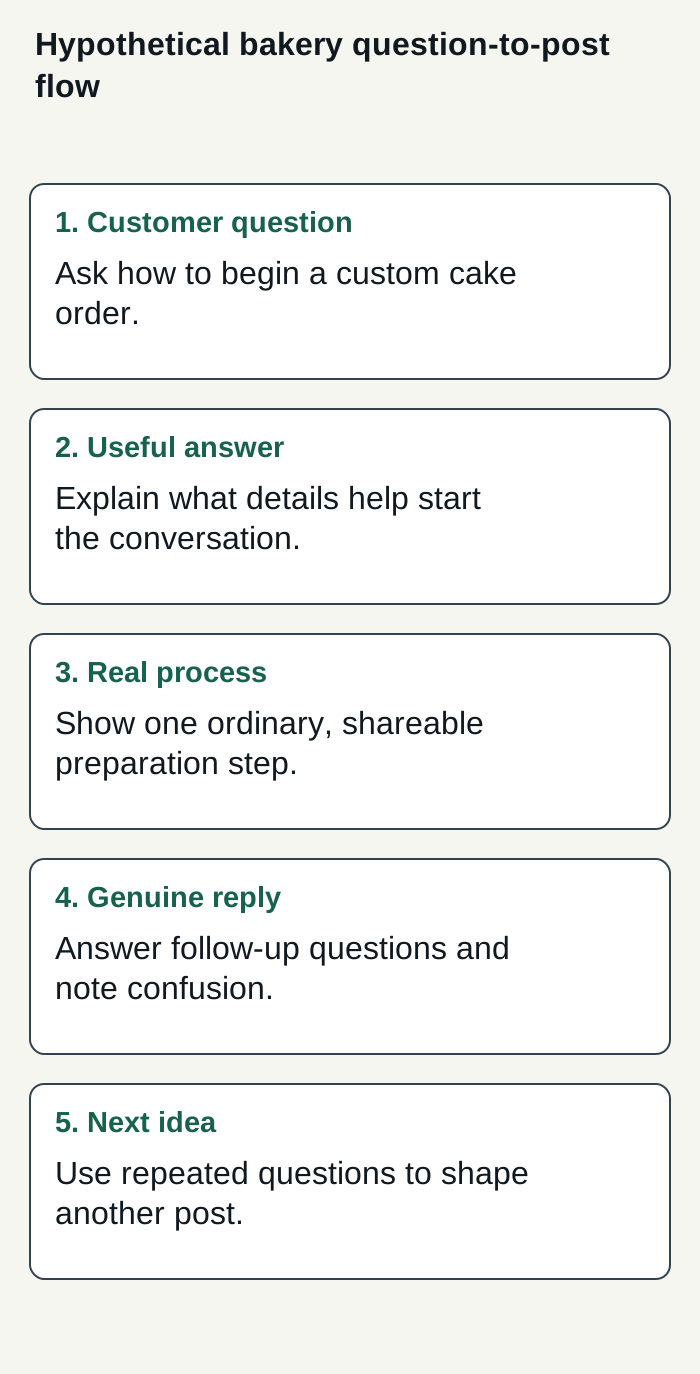
Hypothetical bakery example: a customer question becomes a useful explanation, an authentic reply, and a next content idea; no performance result is implied.
Condensed original editorial illustration. Read the surrounding guidance for qualifications and the complete procedure; any example is fictional and shows no verified customer outcome or product screen.
Illustrative worked example by Superdirector editorial team. Created 2026-11-09.
Set a routine you can actually sustain
A routine does not need a paid calendar. Put four headings in a notebook or spreadsheet: idea, draft, published, follow-up. When a customer asks a useful question, record it under idea. Before publishing, check that the answer is accurate, the image or wording is yours to use, and the next step is clear. Afterward, note questions or replies that could inform another post.
Reserve a short, realistic work period when your business is quieter, rather than copying an online posting quota. Use it to select an idea, make a post, and check replies. If you cannot sustain the process, reduce its scope: fewer posts, simpler formats, or one channel instead of several. The relevant constraint is not only cash; it is also the time and attention you can spare.
Be present where you publish. Social activity can create questions that deserve a response, and Buffer’s beginner strategy guide includes replying to comments among its community practices. Do not imply you monitor messages continuously if you do not. If a question needs a private or more detailed answer, offer the appropriate contact route.
Review useful signals before changing course
Pick one or two observations that could help you make the next decision. If your goal is to make an offer clearer, write down the questions and misunderstandings people raise. If you want to encourage inquiries, record how many relevant inquiries you receive and where they say they found you, when they volunteer that information. Reach, likes, saves, and comments may add context, but none by itself proves a business result.
Review at a pace that gives you enough material to compare, rather than reacting to every individual post. Buffer’s strategy guide recommends monthly metric reviews; treat that as practitioner guidance, not a rule or a promise of impact. Compare similar posts and ask what to test next: a clearer opening, a different customer question, or a more useful explanation. Small observations can guide experiments without proving that one change caused a result.
Keep the record simple: date, topic, format, replies or inquiries worth noting, and your next adjustment. If no useful signal appears yet, that is information about what you can currently observe—not proof that social media cannot work for your business.
Decide whether paid help fits the constraint
Free owner-operated social media and paid automation solve different problems. If you have more time than money, start with the manual routine above and tools you already have. If the repeated planning and publishing work is displacing important business tasks, compare a paid service’s price and actual scope with the time it could save. Measure whether delegating is worthwhile for your business; do not assume a tool will produce better results or remove the need for oversight.
If you are weighing a customizable AI-run channel at about $200 a month, compare that goal with what Growth currently handles: $199 per month for two accounts, with no trial (pricing). Publishing is limited to eligible Instagram image carousels and single X text posts, either approved per post or covered by an account’s enabled Auto-post rule. Before enabling Auto-post, verify that the account’s first manually approved post is live; this is an implementation requirement, explained in the publishing guide.
Research, brand context, and draft creation can reduce some repeated work, but you still need to judge whether drafts fit your business and whether the time saved justifies the cost. Finished video—including TikTok, YouTube, and Reels methods—and full autonomy are upcoming, not current publishing capabilities. Selected source cards and the connected account define what can publish; turning Auto-post off stops unsent posts, and Pause posting holds the queue. See the publishing guide for details. Track your review effort and customer-defined signals to decide whether delegation is worthwhile; neither results nor minimal oversight are guaranteed.