How-To Guide
Rehearse a creator’s call to action against the first screen a viewer sees
Split a creator’s spoken CTA into promise parts, tap the real link, and mark each part against the first screen, so you reword the line or fix the page.
By the Superdirector editorial team. WCAG 2.2 pages and Apple’s screen-recording page reviewed October 30, 2026.
At a glance
How should a creator rehearse a call to action against its destination?
Freeze the exact spoken call to action, split it into promise parts (action, object, qualifiers and any place cue), then tap the real link on a phone and capture the first screen before any scroll. Mark each part matched, mismatched, not shown or unknown, and write what the screen shows. Name the first real control a viewer can use. Then reword the line or change the page, depending on who owns the gap, and rehearse again.
- Split the sentence; every qualifier is its own claim.
- Judge the first screen before any scroll, on a real tap.
- Fix the words or the page, then repeat the same rehearsal.
Direct answer
Short answer: treat the creator’s call to action as a set of small promises, and check each one against the first screen a viewer reaches after tapping. Freeze the sentence exactly as it will be spoken. Split it into its action, object, qualifiers (free, new, today, a version) and any place cue (“link in bio”, “tap below”). Tap the real link on a phone, capture what appears before any scroll, and give every part one verdict: matched, mismatched, not shown or unknown. Then decide who owns each gap, the script or the page, and repeat the rehearsal after the change.
This is for an agency or brand marketer who is writing or approving a creator’s call to action. The decision is narrow: does the opening screen make the spoken promise recognizable, and does it offer a first control that starts the promised task? It does not decide whether the offer is good, whether the creator’s audience will act, or whether the whole task works. A viewer who hears one thing and lands on something that reads differently has to work out whether they are in the right place, and that doubt costs nothing to remove before the post goes out.
Use the blank CTA-to-first-screen card, the CSV register and the journey map. All three are blank or fictional teaching aids. None represents a real campaign, creator or page, and nothing in this guide reports a result.
Freeze the sentence the creator will say
Start from words, not from the page. Write the call to action exactly as it will be spoken, including filler that carries meaning (“right now”, “for free”, “the new one”). Add any text that will sit on screen beside it, such as a caption or an overlay, because a viewer hears and reads them together. Record the brief version, the date and who approved the line. If the creator will improvise around a required line, record the required part and mark the rest as the creator’s own words, since you can only rehearse what is fixed.
Then record how the viewer gets from the video to the page. Name the surface: a tappable link in a profile, a link in the post, an on-screen button, or a spoken instruction to find something. Record the label the viewer will see on that control. A line such as “tap the link in my bio” points to a place, and the label on that link is a second promise. If the profile carries a link whose label says something different from the sentence, you have found a mismatch before opening a single page.
Keep this separate from the brief itself. How to write the brief is covered by the UGC content brief guide, and the product facts a creator should be handed before filming are in the versioned product facts guide. This step only needs the final sentence, frozen, so that every later observation refers to the same words.
Split the line into promise parts
A sentence like “Grab the free planner today” looks like one instruction. It is at least four claims. Grab is an action the viewer should be able to take. Planner is an object they should recognize by name. Free is a qualifier about cost. Today is a qualifier about timing. Write each on its own row of the card with its kind. A single page can satisfy two of them and contradict a third, and a single overall impression of “seems fine” hides that.
| Kind | Example words | What the first screen would need to show | Common way it goes missing |
|---|---|---|---|
| Action | Get, join, book, watch, try | A control whose label names that action, or a clear equivalent | The page offers a different verb, such as “contact us”, so the viewer must translate |
| Object | Planner, demo, checklist, trial | The same noun, or a plainly equivalent one, near the top | The page uses an internal product name the creator never said |
| Qualifier | Free, new, today, version 3, limited | Visible support for the exact qualifier, not just a related one | The qualifier appears only below the fold, or in terms the viewer has to open |
| Place cue | Link in bio, tap below, swipe up | The cue names a place that exists on the surface the viewer uses | The surface has no such link, or several, so the cue is ambiguous |
Be strict about what counts as one part. “Free” and “today” are separate even though they sit side by side, because a page can be free and not available today. Likewise “book a demo” is a different promise from “see a demo”: one needs a calendar, the other needs a video. If you cannot decide whether two words are one promise or two, split them. A split that turns out to be unnecessary costs a row, while a merge that hides a mismatch costs a confused viewer.
Include what the line leaves unsaid only if the brief requires it. If the agreement says the call to action must mention a price or a condition, add that as a part. Do not add parts the creator was never asked to say; judging a sentence against promises it never made is the same error as judging a cut against a taste you never wrote down.
Tap the real link and capture the first screen
Now go to the page the way a viewer would. On a phone, from the actual surface, tap the link and stop at the first screen: what is visible before you scroll or tap anything else. Record the device, the app or browser, the locale, whether you were signed in, and the date and time with a time zone. A screen recording is the clearest capture because it shows the tap and the page arriving together. Apple’s screen-recording page, which shows a published date of September 17, 2026, describes starting a recording from Control Centre and, after you tap and hold the Record button, turning on the microphone. The same page says some apps may not allow audio or video to be recorded and that you cannot record your screen and use screen mirroring at the same time. If a capture is blocked, write that down and use a note or a photo of the screen instead of guessing.
Read the first screen as a stranger would. Say aloud what the page seems to be about, then compare it with the frozen sentence. Capture a second view only if a condition that changes the first screen applies to your audience, such as a different locale or a signed-out visit, and label it a separate rehearsal. One capture shows what appeared in that setting at that time, not what every viewer will see.
Stay at the front door. This rehearsal does not follow the link through redirects, check campaign tags, complete the task or look for an analytics event. Those are covered by the prelaunch destination test before the post and the live link trace after it. Use them for what they check. Here you only need to know which page the tap reached and what its opening screen says.
Mark each promise part against that screen
Go down the rows and give each part exactly one verdict. Matched means the first screen shows the same thing or a plainly equivalent one, and you can point to the words or control. Mismatched means the screen shows something that contradicts or replaces the part. Not shown means nothing on the first screen speaks to it, though it may exist lower down or behind a link. Unknown means you could not tell, for example because the screen changed while loading or you could not view it in your context. Next to every verdict write what the screen actually says, in its own words.
Keep not shown and mismatched apart. A qualifier that appears only after scrolling is a different problem from a qualifier that the page contradicts, and the fix differs. Also keep unknown honest: it is a valid answer, and it is better than a tick you cannot defend. An unknown row belongs on the open-questions line with an owner.
Then look at the first real control: the first thing a viewer can do toward the promise. Name it, copy its label, and note how big and how close to other controls it is on this device. WCAG 2.2’s Link Purpose criterion is a Level A requirement that the purpose of a link can be determined from its text, or from the text plus its programmatic context, with an exception where the purpose is ambiguous to users in general. It is a web-accessibility criterion for the page’s authors, not a conversion rule, but it is a useful standard for the question you are asking: does the control’s label tell the viewer what happens next? WCAG 2.2’s Target Size (Minimum) criterion is Level AA and asks for pointer targets of at least 24 by 24 CSS pixels, with listed exceptions such as spacing, equivalent controls and inline text links. Note a small or crowded control as an observation for the page owner. Do not claim a conformance result from a quick look; that takes a real audit.
Check the label against the spoken action. If the creator says “get the planner” and the first control reads “Continue”, the page may be fine, but the viewer has to infer the link between the two. Record it as a mismatch of wording, and decide in the next step whether to reword the line, the label or neither.
When enlarged, scroll horizontally to read the diagram.
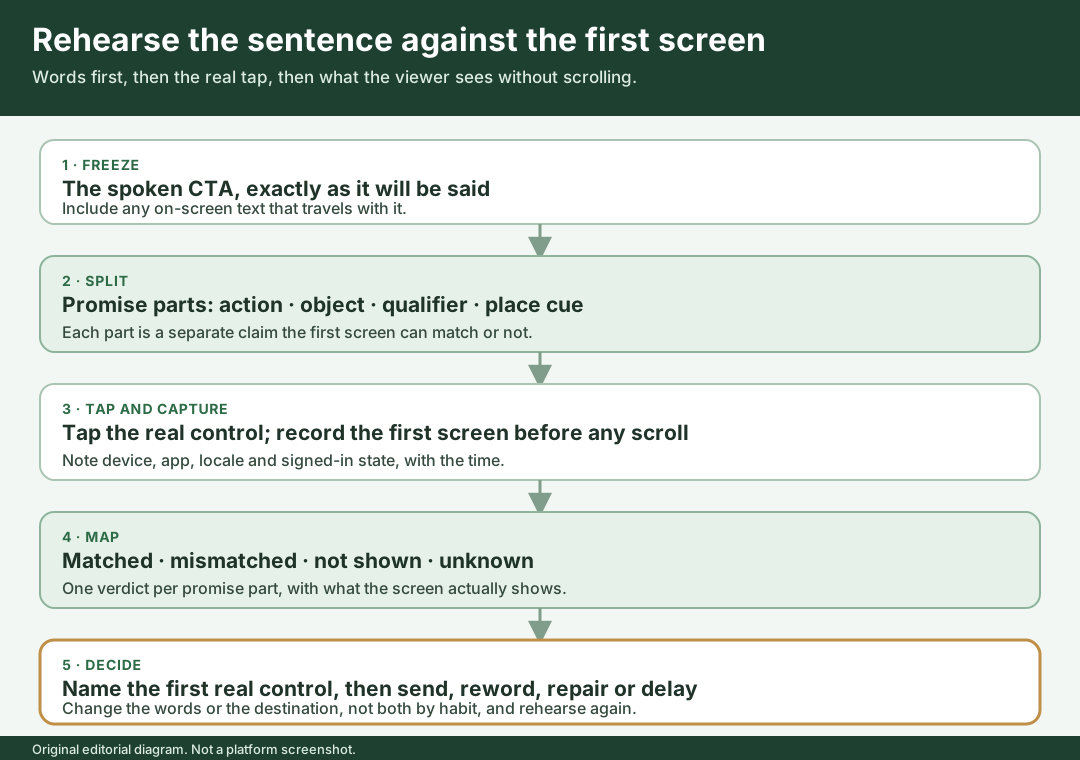
An original editorial journey map. The rehearsal ends at the first real control.
Original visual by Superdirector editorial team. Creation date not recorded.
Walk through a fictional rehearsal
Fictional exercise: no real brand, creator, page or result was inspected. Brand A is a made-up maker of a made-up weekly planning template, and Creator Q is a made-up creator. The domain is a placeholder, and every observation below is invented to teach the method.
Creator Q’s approved line is: “Grab the free planner today, link in my bio.” The card splits it into five rows: grab (action), planner (object), free (qualifier), today (qualifier) and link in my bio (place cue). In the imagined rehearsal, the tester opens Creator Q’s profile on a phone in the platform’s app and finds a single link labeled Our story. It is the only link, so the place cue is satisfied, but its label says nothing about a planner. The tester records the cue as matched and notes the label as a wording mismatch.
The tap reaches a page whose first screen shows a large heading, Plan your week your way, a short paragraph, and a button reading Learn more. There is a smaller line reading “Weekly planner template”. In this invented capture, the word free and any mention of availability today are not on the first screen. The tester marks planner as matched because the equivalent line is visible, grab as mismatched because the button offers a different action, and free and today as not shown. The first real control, Learn more, leads to a longer page; the tester notes that the promised task does not start here.
Now the owners decide. The page owner can change the destination so that the first screen carries the planner name, the free qualifier and a button reading Get the planner. The profile-link owner can change the label of the link. The brand does in fact offer the planner for free in this story, so nothing in the script needs to be reworded for accuracy. Had the planner required a paid plan, the fix would have been to reword the creator’s line, not to dress up the page. After the invented changes, a second rehearsal repeats the same tap on the same device, and the card keeps both passes as separate rows with their times. The example shows a method. It does not suggest that any real page behaves this way, nor that a changed label improves anything.
Reword the line or fix the page, then repeat
For every row that is not matched, decide which side owns the gap and write it down. Reword the line when the creator promises something the brand does not offer, offers only under a condition, or says it in words the page never uses. Change the destination when the brand does offer it and the first screen hides it, labels it differently or leads with something else. Change the link label or surface when the profile or post control sets the wrong expectation before the page loads. Give each change an owner and a date. If both sides could reasonably change and nobody can decide, send it to the person who owns the deal rather than letting the creator or the page owner settle it alone.
Prefer one change at a time on the same rehearsal. If the line, the label and the page all change between two passes, a later match cannot tell you which change closed the gap. Keep the failed pass on its own row and add the new pass beneath it with its own time, as you would in a destination test. Do not rewrite the first row to say it always matched.
Record one of four decisions for this tap. Send when every part is matched or the remaining gaps are accepted by the deal owner with a note. Reword when the line needs to change and the page should stay. Repair when the destination or link label needs a change and the line should stay. Delay when the promise cannot be met by any available page. Keep the decision narrow: it covers this sentence, this tap surface and this device at this time. A creator who later edits the line, or a brand that changes the page, starts a new rehearsal.
What this page does not decide
This rehearsal checks the match between a spoken sentence and an opening screen. It does not check that a form accepts input, that a file arrives, that a payment completes or that a tag records a visit; the destination test covers the task and the live link trace covers the published link. It does not review the video itself against the agreement; the first-cut review guide does that. If the call to action sits over a software demonstration, the software proof screens guide covers which screens the video should show.
It also makes no claim about audiences or outcomes. A matched first screen does not show that anyone will tap, finish a task or buy. We have no measure of how often spoken promises and landing pages disagree, and we do not claim one. The page offers an editorial method for removing a mismatch you can see, with a record that shows which part you checked, on which device and when.
Sources were checked on October 30, 2026. The WCAG 2.2 pages support only the descriptions of Link Purpose (In Context) and Target Size (Minimum) above, and Apple’s page supports only the recording steps and limits it is cited for. The rehearsal order, the four verdicts and the Brand A example are original teaching material.