How-To Guide
Which AI social media tools actually publish for you, and which only draft?
Compare AI drafting, scheduling, approval-based publishing and standing autopost rules, then test a tool before delegating publishing.
By the Superdirector editorial team.
At a glance
Which AI social media tools actually publish for you, and which only draft?
Some tools help write posts but leave publishing to you; others schedule posts, publish after approval, or publish under a standing rule. The label “AI social media tool” does not tell you which workflow applies. Check the specific platform, account, format, plan, and final action. Provider pages describe capabilities, not independent proof of successful publishing or business results.
- Separate drafting, scheduling, approval-based publishing, and standing autopost rules.
- Check whether a person must act at posting time for that account and format.
- Confirm the post in the social platform; a scheduled status is not the same as a live post.
Start with the action at publish time
To tell whether a tool actually publishes for you, ask one practical question: what happens when it is time for the post to go out? A text generator may stop at a draft. A scheduler may hold a post for you to send. Another workflow may publish after your approval, or under a standing rule that does not ask you about every post. Those are different levels of delegation, even if product pages call them all “publishing.”
| Workflow | Who acts at posting time | What to verify |
|---|---|---|
| Draft | You move the content to a platform or scheduler | Does the tool do anything after creating text or media? |
| Scheduled handoff | You may need to act on a prompt or notification | Does the post go live without another action? |
| Approval then publish | You approve; the tool handles the scheduled send | What exactly are you approving, and for which slot? |
| Standing rule | The tool sends eligible posts without per-post approval | Which formats and accounts does the rule cover? |
Classify each combination of tool, account, and format—not just the brand name. A product can draft one kind of post and publish another, or provide a reminder workflow for one connected profile and direct publishing for another.
Compare what vendors say they publish
The supplied provider descriptions illustrate why a feature label is not enough. Buffer describes publishing integrations and separately describes its AI Assistant as a way to brainstorm, rewrite, and craft posts. That supports calling Buffer both a publishing workspace and a drafting aid; it does not establish that the assistant independently operates a channel. See Buffer’s publishing and AI Assistant overview.
Later’s retained help documentation distinguishes automatic TikTok publishing from push-notification publishing: the former is described as going live at the scheduled time, while the latter asks a person to complete the process in TikTok. Because this is retained provider documentation, treat it as a description to check against the current account setup, not as independent testing or a guarantee for every connection. Read Later’s TikTok scheduling and publishing instructions.
SocialBee’s retained Reel guide makes the account distinction especially clear: it describes direct publishing for Instagram Business Profiles and reminders for Creator and Personal Profiles. The person receiving a reminder still finishes publishing in Instagram. Review SocialBee’s profile-specific Reel workflow. These provider pages help compare stated workflows; they do not establish which product is most reliable.
Check the account, format, and handoff
Before paying or enabling automation, write down the exact use case: social platform, connected account, media format, and who must take the final action. Then ask the vendor whether that specific combination supports direct publishing, notification publishing, or only a draft. Do not generalize from a Reel guide to carousels, from one account type to another, or from one vendor plan to another.
- Name the account. Confirm which profile is connected and that the tool’s stated workflow applies to that profile type.
- Name the format. Ask about the actual post you want to publish, not just the platform in general.
- Find the final action. Look for terms such as approve, schedule, send notification, or Auto-post. Ask what a person must still do.
- Check the plan. Confirm the feature is included in the plan you are considering and whether a trial is available.
- Define proof. Decide how you will check the live post and who will notice and handle a failed or incorrect publish.
Keep evidence in proportion: a vendor page tells you what the vendor says the product can do. It does not show that your account connection is working, that every post will publish, or that publishing will produce a worthwhile business result.
Work through a hypothetical shop post
Hypothetical example—not a customer result: imagine a neighborhood bookstore wants to answer a recurring question about how to reserve a book for pickup. The owner wants an Instagram carousel, and would like to reduce repetitive publishing work without accidentally promising a service the shop does not offer.
- Write down the approved answer in the shop’s own words: what a customer should do, what information the shop needs, and where the owner can confirm the process.
- Use an AI workflow to propose a short carousel from that answer. The owner checks each slide against the actual shop process and removes unsupported details.
- Before choosing autopublishing, confirm the selected tool and account support Instagram carousels. The supplied SocialBee reference concerns Reels, not carousel eligibility; do not use it as proof for this format.
- Choose the publishing action. If the tool requires a per-post approval, review the finished carousel before approving. If considering a standing rule, verify its coverage and decide whether the shop is comfortable with that level of delegation.
- After the scheduled time, open Instagram and confirm the post is visible on the intended account with the correct slides and caption.
The decision is not simply “AI or no AI.” The shop can delegate research and drafting while keeping final approval, or delegate publishing for a narrowly defined eligible format after checking the workflow. It should also count the work that remains—checking facts, approving content, and confirming publication—rather than assume the process has no oversight.
When enlarged, scroll horizontally to read the diagram.
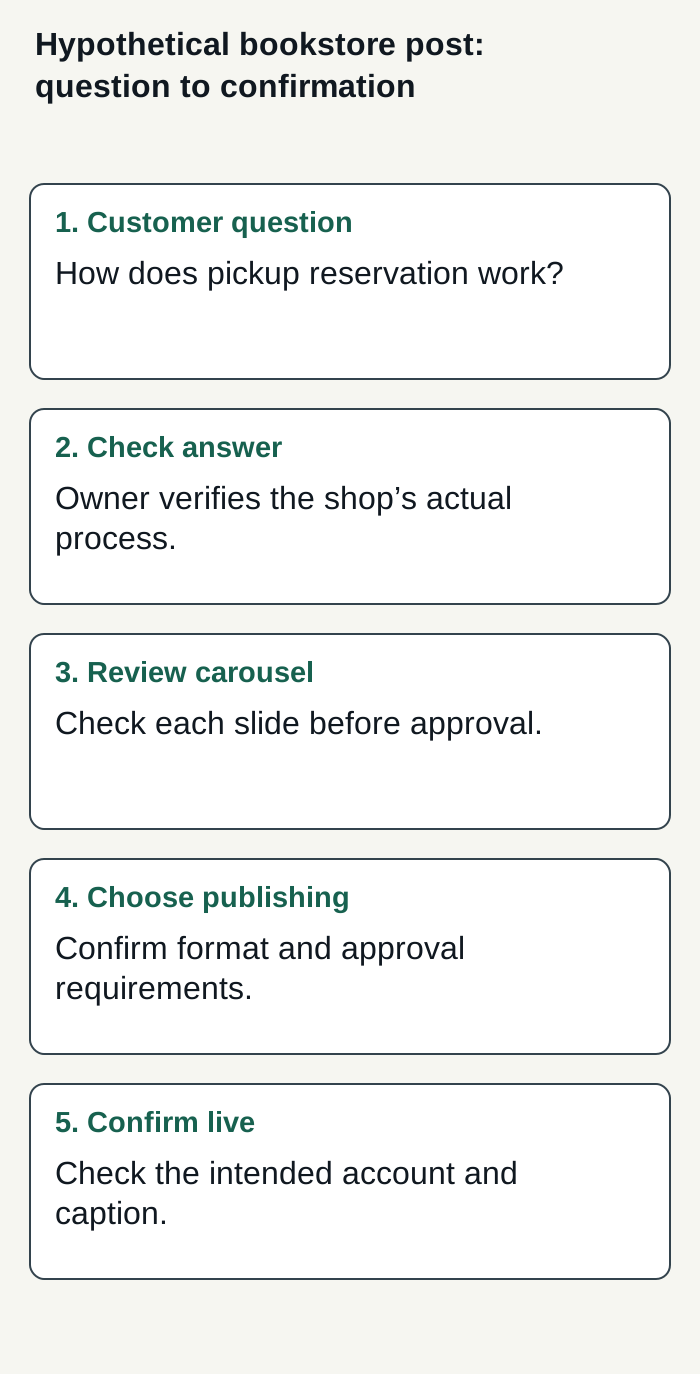
Hypothetical bookstore workflow; the diagram shows a decision process, not a customer result.
Condensed original editorial illustration. Read the surrounding guidance for qualifications and the complete procedure; any example is fictional and shows no verified customer outcome or product screen.
Illustrative worked example by Superdirector editorial team. Created 2026-11-09.
Run a small publishing trial
Use a post you are comfortable making public and an account you are authorized to manage. Do not treat a demonstration or scheduled status as a successful publish. Record what the tool says it will do, what action you took, and what you observed in the platform.
| Trial field | Hypothetical bookstore entry |
|---|---|
| Post | Carousel answering the pickup-reservation question |
| Tool claim | Record the vendor’s stated workflow and source |
| Human action | Record whether approval or a notification was required |
| Observed result | Check the live account for the correct slides and caption |
| Decision | Keep approval, change workflow, or consider a covered standing rule |
Choose how much to delegate
A sensible starting point is to use more approval for content where a mistake would be costly to correct, and less hands-on publishing only for formats you have checked and are comfortable delegating. This is a recommendation, not a platform rule. Make the decision per format, not as an all-or-nothing setting for an entire channel.
To decide whether a paid tool is worthwhile, compare its cost with the work it actually removes. Track the time spent researching, correcting drafts, approving posts, handling reminders, and checking live publication. Separately note whether the content helps with the business goal you selected. This gives you a basis for deciding whether paying for delegation is worthwhile; it does not guarantee growth, engagement, or a particular result.
For a business seeking a customizable AI-run channel around $200 a month, Superdirector Growth is $199 monthly for two accounts, with no trial. It can research and create content, but current publishing is limited to eligible Instagram image carousels and single X text posts. You can approve each piece or enable account Auto-post; finished video and fully autonomous channels are upcoming, not current capabilities. See Growth pricing.
For more context on choosing a workflow, see our guides to AI marketing agents for small-business social media, AI tools for social media marketing, and content calendar automation.
Account connection and selected source cards define which posts can publish. Before enabling Auto-post, verify that the account’s first manually approved post is live; this is an implementation safeguard. Turning Auto-post off stops unsent posts, and Pause posting holds the queue. See the publishing workflow documentation for setup details. Finished TikTok, YouTube, and Instagram Reel videos are outside current publishing scope. Measure review effort and customer-defined results rather than assuming either. AI credit use varies by task.