How-To Guide
Which AI tools should a small brand use for social media marketing?
Choose AI tools by the job: planning, writing, editing, scheduling or reporting. Compare primary-source plans, billing units and the handoffs left to you.
By Bell Chen, founder of Superdirector — how the analysis works.
At a glance
What are the best AI tools for social media marketing for a small brand?
Start with the unfinished job. Buffer is a first shortlist for AI-assisted copy and distribution, Descript for recorded-video editing, and Hootsuite Professional for its described custom scheduled-report workflow. Canva is an uncosted visual candidate because its current plan quote was unreadable. Superdirector, which we sell, fits brand-context research and creative planning. These are conditional document-based picks as of November 5, 2026, not hands-on quality rankings.
- Name the required output before buying an AI feature; a draft, exported file, scheduled item and verified result are different.
- Price the complete required plan in its own units: channels, people, annual term, media hours and supplier-specific AI credits.
- Current prices and access gaps stay visible. Finished Superdirector AI video and fully autonomous channels are upcoming, not available yet.
Choose the unfinished job first
The best AI tools for social media marketing depend on the output you cannot finish today. Start with Buffer when a solo operator needs help writing and distributing existing content; Descript when recorded footage needs editing; and Hootsuite when social signals, custom reports and a wider management workflow must meet in one place. Canva is a visual-design candidate whose current required-plan price we could not verify. Superdirector, our product, is discussed separately for brand-context research and creative planning.
Publisher disclosure: Superdirector publishes this guide and sells software in this category. The recommendations use supplier documents read on November 5, 2026. We did not trial these products or compare the quality of their AI output. The order follows the work a small brand might need to finish, not a measured performance league table or an exhaustive market ranking.
Write one unfinished job and its required output. A list of ideas is different from an editable video; a scheduled draft is different from a published item; a performance summary is different from verified sales. Buy help for that handoff before replacing the whole stack.
| Job | Usable output to request | Evidence still needed |
|---|---|---|
| Plan | A source-backed idea and specific brief for your brand | Current product facts, references and a human decision about the idea |
| Write | Editable post copy that fits the intended account | Supported claims, correct facts and the actual final wording |
| Edit | A playable exported asset from the intended footage | Continuity, captions, sound, product accuracy and permissions |
| Schedule | The correct version on the correct account and date | Actual publishing route, account eligibility and publication observation |
| Report | A source-defined result with its item and window | Metric definition, paid/organic boundary and destination records for business outcomes |
The original handoff map below keeps these five outputs visible. A tool may cover several boxes, but its AI label does not prove that it completes the next one. Use the editable stack-choice card or blank CSV to record the specific gap. These manual aids have no account connection or automatic saving.
When enlarged, scroll horizontally to read the diagram.
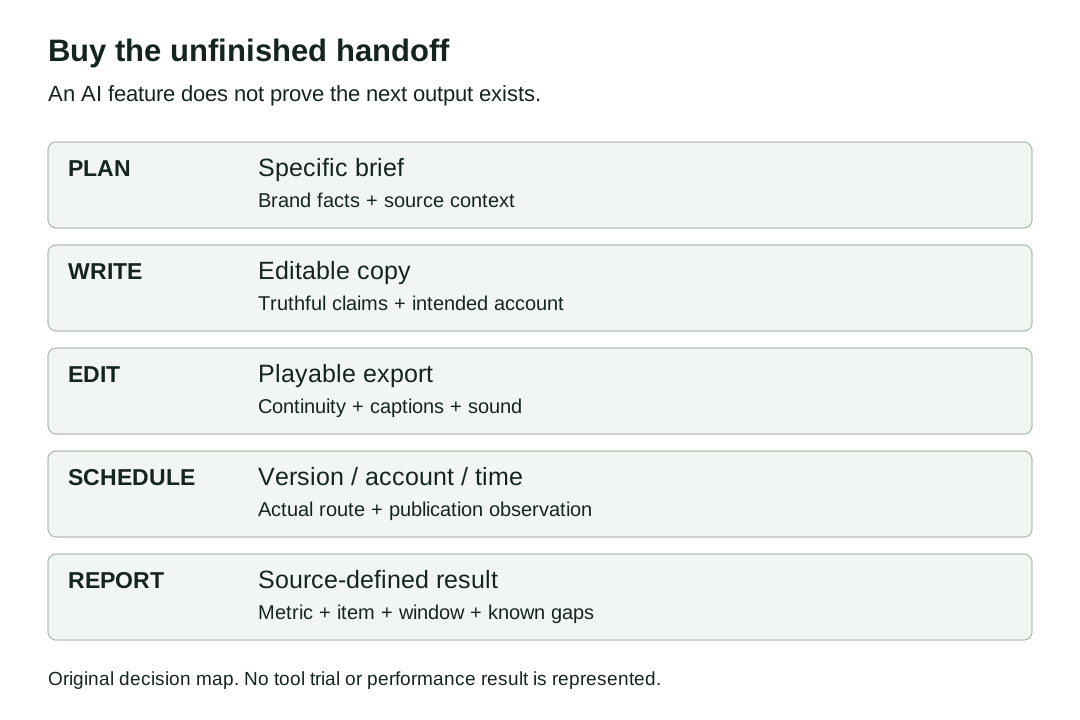
Original decision map: choose the unfinished output and preserve the evidence needed at the next handoff.
Original visual by Superdirector editorial team. Creation date not recorded.
Match the job to a tool and a complete plan
These are conditional picks for one small brand, not interchangeable subscriptions. The required plan below names the job being bought. A feature on a product page and a cheap entry price elsewhere do not establish one complete offer. Prices use the dollar symbol printed by the supplier; confirm the billing currency, taxes and checkout terms for your region.
| Candidate | Best reason to shortlist it | Required plan for this stated job | Boundary to resolve |
|---|---|---|---|
| Buffer | Write/repurpose posts and manage their distribution | Free for one user within three channels and ten queued posts/channel; Essentials for report exports; Team for approvals | Queue capacity is not a monthly post allowance; analytics differ by network |
| Descript | Edit existing recorded video through text and AI tools | Hobbyist for one person, ten media hours/month and 1080p watermark-free export | AI credits are a separate allowance; editing a recording does not verify its claims |
| Hootsuite | Use social context with custom scheduled reports | Professional for the described custom/scheduled-report job; Advanced when team approvals are required | Current price/currency confirmation and any extra seats; Wisdom does not auto-publish |
| Canva | Create or adapt visual designs | Current required-plan and price not established by our readable pricing capture | Treat it as an uncosted candidate, not a complete competing quote |
| Superdirector (ours) | Research and plan content from a brand’s context | Starter for research/ideas/scripts using a compatible AI client connected to Superdirector; Growth adds the stated Instagram/X posting scope | Check client/account access and any outside cost separately; finished AI video and fully autonomous channels are upcoming, not available yet |
If your actual purchase is a weekly TikTok/Reels calendar, use the narrower AI content calendar comparison. If you need agency-branded delivery across many clients, use the agency reporting tools comparison. Those pages solve account, approval and client-delivery details; this page decides which job in a small-brand stack deserves another tool.
Buffer: start here for text and distribution work
Buffer’s AI Assistant page describes brainstorming, rewriting, changing tone and repurposing a post for different channels. It says AI is optional: posts are not automatically rewritten unless the user opens the assistant. It also says its core posting, scheduling and planning features are not AI-powered. That makes the useful pairing explicit: AI helps with copy; the surrounding management tool carries the queue.
The pricing page and published pricing text give Free one user, up to three channels and ten scheduled posts per channel at one time. A slot becomes available after publication. AI Assistant is included without a credit limit. Free can therefore be a practical first shortlist when you already have content and can work inside that queue.
For one user who needs report exports, Essentials starts at $6 per channel/month on monthly billing, or $5 per channel/month on annual billing for the first ten channels. Team is $12 or $10 on those same bases and adds unlimited members, approvals and access controls. Buffer’s table puts branded report covers on Team. All connected paid-plan channels are paid channels, including ones previously connected on Free.
Limit: do not assume that the same report exists for every network. Buffer’s pricing table names basic versus advanced analytics separately; TikTok and YouTube Shorts do not have the same advanced-analytics coverage as every Instagram account type. A scheduler also cannot supply missing footage, product evidence or a verified order record.
Descript: choose it when the recording is the bottleneck
Descript’s pricing page describes text-based editing and AI tools including Studio Sound, Remove Filler Words and Create Clips. Hobbyist includes ten media hours/month, 400 AI credits/month, one person and 1080p watermark-free export. Media hours track imported or recorded media; AI credits track use of AI features. Ten hours of footage is not a promise of ten hours of AI processing or a count of finished clips.
The public pricing HTML has Annual selected with $16 per person/month visible for Hobbyist; its alternate monthly price is $24. Annual billing is a year commitment, not a cancelable $16 month. Creator shows $24 annual equivalent or $35 monthly per person, with thirty media hours, 800 AI credits and 4K export. Extra people are billed separately. We read these toggle and price states in the public HTML; we did not operate the editor or checkout.
Pick Hobbyist for the defined one-person 1080p editing task if its media and AI allowances fit; choose a higher plan only for a required output or capacity it actually adds. Before buying, process one representative recording and record AI consumption and any export limitation. The page does not give one fixed credit charge for every finished social clip, so this guide supplies none.
This is a recorded-content editing choice. A product-link ad generator or synthetic presenter is a different purchase, as is commissioning a person’s real experience. Editing, generated illustration and a genuine testimonial do different jobs; a polished export does not establish an experience that never happened.
Hootsuite: choose the reporting and context plan deliberately
Wisdom’s current page describes content recommendations, social-context questions, brief drafts and report summaries. It expressly answers that Wisdom cannot publish content automatically. Its Nest customer-care and Parliament advocacy connections are marked coming soon. Read that current description instead of treating an older OwlyWriter or OwlyGPT mention as an unchanged product entitlement.
The current plan page gives Standard ten social accounts and places customizable scheduled/exported reports on Professional. Advanced adds team review and approval. The FAQ prints starting figures of $99 Standard, $199 Professional and up to $399 Advanced; the plan labels say per user/month and the price note says annual billing. The retained currency field is empty and the monthly alternative is not readable, so these are published starting figures, not a complete regional quote.
For the reporting job here, shortlist Professional and request the exact currency, annual total, required networks, users and report output. Do not budget the custom-report job at Standard’s lower headline. If a second person must approve content, ask for the complete Advanced seat configuration. The page notes that some features need multiple seats, so buying one seat with an approval label is not proof of a working two-person workflow.
Limit: a vendor’s explanation of connected signals does not prove the quality of its advice, data completeness or an outcome for your brand. We ran no live account journey. A small brand that only needs a queue and copy assistance may have no reason to buy this wider suite.
Canva: a visual candidate without a verified current plan quote
Canva’s Magic Studio announcement describes prompt-led design, Magic Grab subject separation, image edits and Magic Write drafts. Those are useful visual-production jobs to consider. The announcement is a launch explanation, not evidence of today’s complete plan entitlement or current price.
Our Canva pricing request returned a short shell without usable plan cards. We therefore give no current Canva price, credit allowance or required-plan claim. If you already use Canva, check whether your existing plan covers the exact design/editing output before adding another subscription. If you need a new plan, resolve that quote first; the candidate cannot be included in a firm stack total from this read.
Where Superdirector fits in this decision
Superdirector is our product. The current public workflow describes tracking on Instagram, TikTok, YouTube and X, and brand-context carousels, X posts, reports, video scripts and creator research. The pricing page lists Starter at $29/month with 300 monthly credits, and Growth at $199/month with 2,000 monthly credits. Starter is the stated route for research, ideas, scripts and downloads using a compatible AI client, such as Claude or ChatGPT, connected to Superdirector; Growth adds scheduled work and the qualified posting scope. The $29/month quotes the Superdirector subscription. Check access to the selected client/account and any outside cost separately; the reviewed sources do not establish a separate client price or an included client usage allowance.
Today Growth can post Instagram carousels and single X text posts by approval or an enabled standing Auto-post. Finished AI video, video posting to TikTok/YouTube/Instagram and fully autonomous channels are upcoming, not available yet. Scripts can go on the calendar; a video script is not finished footage. Choose a final editor or filming route for that output.
Shortlist it when the missing job is deciding what to make from brand and source context. If you already have the brief and only need to cut a recording or queue finished files, buy the relevant job above. Read the social-media workflow overview for this adjacent planning route; no product here is claimed to guarantee growth or verified sales.
Price the exact handoffs, accounts and users
Fictional buying brief: one brand, one operator, two social accounts, recorded footage to edit, and basic content/report work. There is no client portal, paid ad campaign or guaranteed video volume in this brief. Write the output and account requirements before adding prices. These are component calculations from the cited pages, not a tested end-to-end stack.
| Component decision | Monthly-billing calculation | Annual comparison | What is excluded |
|---|---|---|---|
| Two Buffer channels, one user, report exports | 2 × $6 Essentials = $12/month | 2 × $5 = $10/month equivalent; $120 across a year | Media production, other networks, taxes; exact network report coverage must fit |
| Two Buffer channels, approvals/more members instead | 2 × $12 Team = $24/month | 2 × $10 = $20/month equivalent; $240 across a year | This replaces Essentials; do not add both subscriptions |
| One Descript Hobbyist editor | $24/person/month | $16/month equivalent; $192 across a year | AI/media overage needs and any additional editor; no fixed clips-per-credit promise |
| Custom scheduled Hootsuite reports | Monthly alternative not established in retained text | Professional starting figure $199/user/month under the page’s annual note; full regional quote needed | Currency, seats and required output confirmation prevent a firm complete quote |
| Canva visual production | Not established | Not established | Current plan and allowance unresolved |
Keep each supplier’s currency and annual commitment on its own row until confirmed. We do not add those rows into one supposedly verified total: the Hootsuite quote and Canva entitlement are unresolved, and these candidates overlap. If Team replaces Essentials, the correct decision is the difference between complete plans, not two simultaneous Buffer charges. Include staff time and handoff work separately if they matter to your budget.
An AI credit is a supplier-specific meter. Buffer’s unlimited assistant, Descript’s 400 monthly credits and Superdirector’s monthly credits do not buy the same unit. The useful comparison is the complete output you need, its actual usage and who still moves it to the next tool.
Try the same small task before committing
This is a suggested buyer exercise, not a test we ran. Use your actual permitted source material and an account you are authorized to operate. A saved draft, export or report is enough to inspect a handoff before making a longer commitment; a trial does not require a public campaign.
- Give two shortlisted routes the same brief: audience, one supported product point, intended account and the output required. Record what you supplied and which parts the tool actually returns.
- For an editor, inspect a playable export with the intended captions and sound; record media and AI usage. For writing, read the whole draft against the current facts, not only its tone.
- For distribution, confirm the exact account/format route and whether it auto-publishes or needs native completion. Keep the trial’s actual limits separate from the paid plan.
- For reporting, keep the native metric, source item, date window and missing fields. A summary about reach or views does not establish orders.
- Choose the route that completes your unfinished job with acceptable work and an explicit quote. Retain the manual handoff if it is simpler than another subscription.
Use the how-to library for the individual planning, publishing and measurement tasks. The decision card’s final line is the next output and its owner, so the result of this article is a smaller buying question you can answer.
Sources, method and limits
We read the selected retained AI-answer references and current supplier texts on November 5, 2026. A saved November 4 small-business answer cited Buffer, Canva and Hootsuite; two additional launch announcements were in its source list, which is a different observation from an inline citation. The old Buffer and Hootsuite launches supplied structural context only. Current feature/plan statements above come from the linked supplier pages; none is a quality benchmark.
The public Descript HTML was used to distinguish its annual selected price from the alternate monthly figure. Canva’s pricing shell and Hootsuite’s empty currency field remain visible gaps. No editor trial, data-accuracy test, live publication, conversion result or source-page phone-layout review was performed. The handoff map and manual worksheet are original editorial work.