How-To Guide
What should you send a small horror game creator so they can decide on a demo in two minutes?
A five-line, one-link message a small horror creator can judge in two minutes: demo length, time to first scare, access, permission and no payment.
By the Superdirector editorial team. Steamworks documentation on demos, keys, Curator Connect, Playtest, Next Fest and store assets, 16 CFR Part 255, and four indie press kit guides read November 6, 2026. Method only; the example game is invented.
At a glance
What should you send a small horror game creator so they can decide on a demo in two minutes?
Five short lines and one link. Say why their channel, what the demo is and how long, how many minutes until the first scare, platform and access (a public demo needs no key), and that they may stream and monetize with no payment and no obligation. Link the Steam page with the demo, or your press kit if the demo is not public.
- Time the first scare yourself on a fresh play and put the minute in the message.
- Public Steam demos need only the store link; Playtest invites or press keys cover a demo that is not public.
- Curator Connect shows curators your first three screenshots and your message, so order the screenshots on purpose.
The short answer
Send a small horror creator five short lines and one link. Line one: why their channel, naming one video of theirs. Line two: what the demo is, in genre, setting and length. Line three: how long until the first scare or tense moment. Line four: platform and access, either "public Steam demo, no key needed" or the key itself. Line five: they may stream and monetize, with no obligation to cover it and no payment offered. The one link goes to the Steam page with the demo button, or to your press kit if the demo is not public.
That is enough for a creator to decide in two minutes whether the demo fits their channel and their next recording slot. Everything else, from the trailer to the logo pack, can sit behind the link. A small creator is not a journalist with a deadline. They are deciding whether this will make a good video for their audience, and the time to the first scare is the detail that answers it fastest.
The five lines, one at a time
| Line | What it answers | Example |
|---|---|---|
| 1 Why them | Did you actually watch my channel? | I liked how you played the lighthouse level in your last indie horror stream. |
| 2 What it is | What kind of horror, and how long? | Hollow Tide is a first-person coastal horror game; the demo is about 25 minutes. |
| 3 First scare | Will it give me a reaction early enough? | The first chase starts about 4 minutes in, after a short walk on the pier. |
| 4 Platform and access | Can I play it tonight? | Windows, on Steam, controller supported. The demo is public, so no key needed. |
| 5 Permission, no obligation | Can I monetize it, and what do you expect? | Stream and monetize freely. No payment, and no obligation to cover it. |
The example game is invented to show the shape; write your own numbers. Time the demo yourself: play it fresh, as a new player would, and note when the first scare lands and when the demo ends. If the first tense moment comes after ten minutes of exploring, say so honestly. Some creators want slow burns.
Steam's own advice for messages to curators is to get to the point and say why their audience will care and what is special about the game, per the Curator Connect documentation. Immutable's press kit guide limits an opening email to between four and six sentences, and Steam Page Analyzer puts the press kit and Steam links in the first three lines. Five lines and a link sits inside both.
Use the pitch fields sheet to fill in each line, with a check for each one before you send.
When enlarged, scroll horizontally to read the diagram.
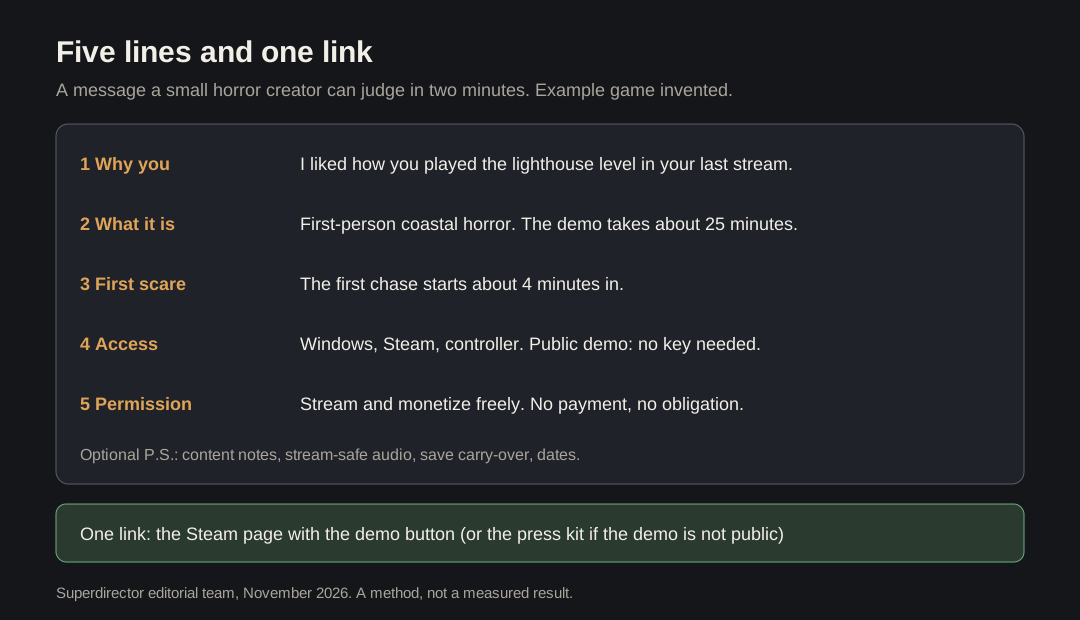
Original diagram with an invented example game. Write your own timings.
Original visual by Superdirector editorial team. Creation date not recorded.
Choose the one link
Which link to send depends on whether the demo is public.
| Your situation | Send | Why |
|---|---|---|
| Public Steam demo | The Steam store page | Anyone can download a public demo free from the store page; no key is needed |
| Demo not public yet | A Steam Playtest invite or a press key, plus the press kit | Playtest lets you gate access; Release State Override keys are for press and influencer access |
| Creator runs a Steam Curator page | A Curator Connect offer | It sends a licence through Steam with no key, once your store page is live |
| During Next Fest Press Preview | The store page | Press can play a publicly available demo from 11 days before the festival |
Steam's demo documentation describes demos as free, so customers can try before they buy, and as a separate App ID linked to the full game. Steam's key documentation says Release State Override keys are intended for small beta tests and press or influencer access, are generally limited to 2,500 in total and must never be sold. It also says developers launching their first game on Steam must wait three weeks after creating an App ID before they can request keys, so plan ahead if your demo is not public.
If you send a key, put it in the message itself, not behind a form. Our guide to screening Steam curator key requests covers the other direction, when strangers ask you for keys.
Make the first three screenshots do the work
Whatever you send, the creator will glance at your store page. Curator Connect shows curators a preview of the game, the first 3 screenshots on your store page and your message, so those three images are part of the pitch. Steam's graphical assets rules say screenshots should show only gameplay.
- Screenshot 1: the setting, so the creator knows what kind of horror it is.
- Screenshot 2: the threat, or the moment just before it, without spoiling the scare.
- Screenshot 3: the player doing something: hiding, running, solving, holding a light.
Keep a short clip ready behind the link as well. Indieformer's guide suggests clips for social under 30 seconds; for horror, a clip that stops just before the scare tells a creator more than a full trailer.
Permission, payment and disclosure
Line five removes the two questions a small creator will not always ask. Immutable advises saying outright that people may stream the game and earn money from their videos, and GameStart's checklist asks for one sentence giving press permission to use your assets. Say it in the message, not only in the press kit.
Do not promise payment, a revenue share or a feature on your channels unless you mean to give it, and do not hint at one. "No payment, no obligation" is honest and lets the creator decide on the game alone. If you later do pay or gift something beyond the demo, write that as a separate agreement.
A free copy still counts for disclosure in some markets. In the US, the FTC's endorsement guides list free products among the possible material connections, whether or not an endorsement is required, and say that disclosures on social media should be unavoidable. A free public demo that anyone can download is different from a free copy of the full game; if you send a key for the paid game, tell the creator they may need to say they received it free.
What to add after the five lines, if anything
A short P.S. can carry what a horror creator needs to know before recording, without slowing the decision.
- Content notes: flashing lights, gore, or themes they may want to warn viewers about.
- Audio: whether the music is safe to stream, and any setting that changes it.
- Save carry-over: Steam lets a demo's saves carry into the full game's cloud storage, if you set it up; say so if you have.
- Dates: when the full game or a Next Fest appearance is planned, as a window if not fixed.
Leave out everything else: long feature lists, review quotes, and wishlist counts. After they play, track what happened without counting sent links as coverage; our guide to tracking Steam review copy outcomes shows how.