How-To Guide
Track Steam review-copy outcomes without counting sent keys as coverage
A spreadsheet can contain every key you distributed and still tell you very little about whether someone tested the game.
By the Superdirector editorial team.
A spreadsheet can contain every key you distributed and still tell you very little about whether someone tested the game. “Sent,” “activated,” “feedback received” and “review published” answer different questions. Combining them into a single green status makes a campaign look complete before its useful outcome exists.
Build a ledger that preserves those differences. This workflow starts after you have decided who should receive access. It is not another creator-discovery or request-screening guide, and it does not authorize sending more keys or chasing recipients.
Begin with the question you actually need answered
An indie developer described keeping a key-to-playtester ledger while seeing only aggregate status in Steamworks, then asked whether a per-key status list was available. That is a concrete operator problem, but a single discussion does not establish demand volume. Developer key-tracking question
The useful next question is narrower than “Did the campaign work?” You may need to know whether access was sent to the right person, whether activation was observed or whether a promised test report arrived. Choose the question before choosing a dashboard number.
For a fictional tester record, “sent Tuesday; activation not checked; no feedback received” is a complete and honest status. It is more actionable than “in progress,” because it identifies exactly what is known and what remains unknown.

A partial fictional review-copy record distinguishes sent access from unknown activation and missing feedback. No key, outreach result or coverage total is shown. Original AI-generated editorial illustration.
Original visual by Original editorial illustration generated with OpenAI’s built-in image tool. Created 2026-10-24.
Keep six evidence fields separate
Use a stable internal record ID and these fields:
- Allocated: access reserved for the agreed recipient and purpose.
- Sent: evidence of the actual delivery action, including date and channel.
- Activated or accepted: the channel-specific access observation, if checked.
- Useful test: evidence that the intended task was attempted or completed.
- Feedback: the received report or message, if any.
- Public coverage: an accessible post or review URL with observation date.
These are reporting definitions, not six stages every recipient must pass through. A private tester may never publish coverage. A creator may publish without sending a private report. A received message may contain a question rather than useful testing feedback.
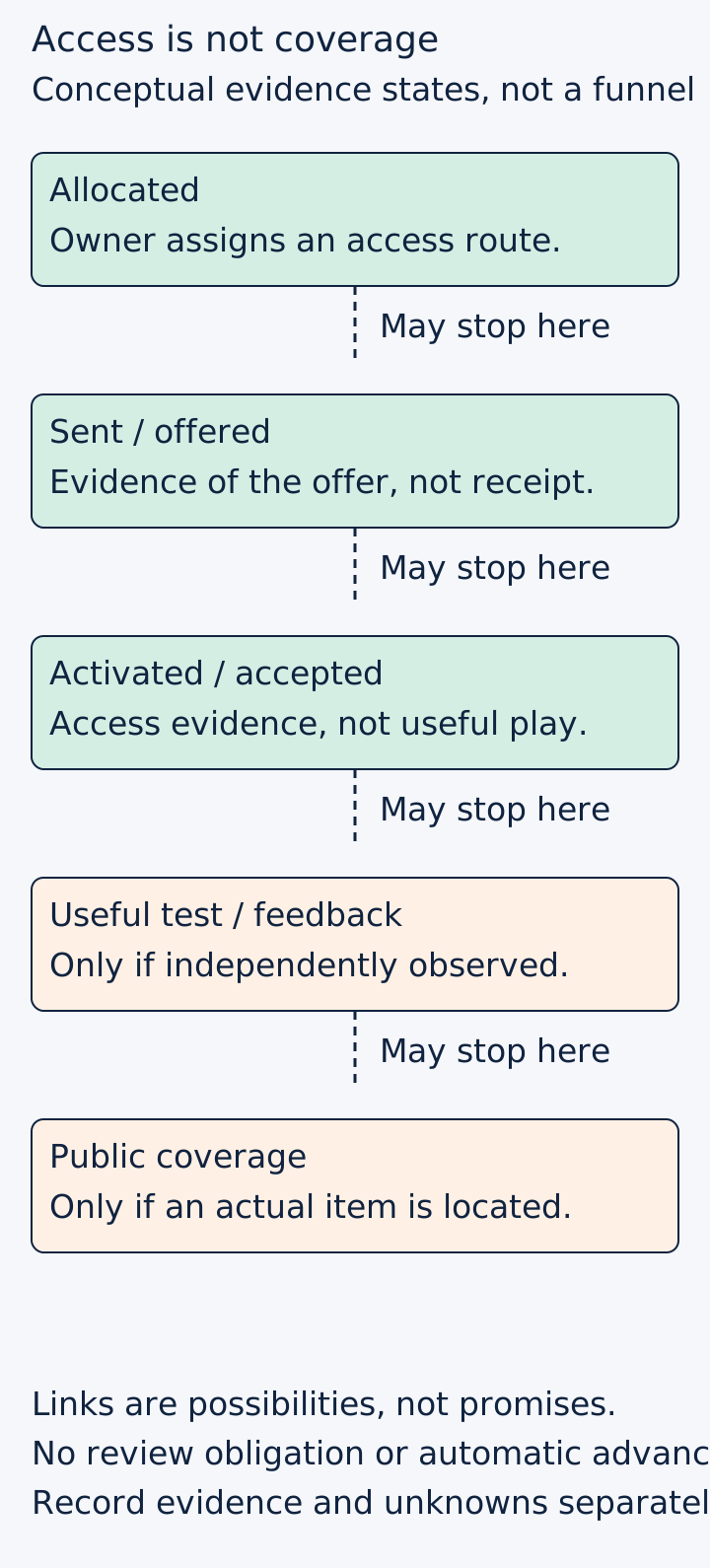
Original reporting model, not a conversion benchmark. The diagram groups useful testing and feedback visually; record them as separate ledger fields. Records can remain unknown, and not every outcome applies to every recipient.
Original visual by the Superdirector editorial team. Creation date not recorded.
Define the purpose on each row. Otherwise the team may judge a private playtester against a publicity outcome they never agreed to deliver.
Protect the key while making the record useful
Put full product keys in the team's existing protected storage. In the editorial or campaign worksheet, use an internal alias such as “batch-A/item-07.” Do not paste keys into a public issue, image, article draft or unfamiliar checking service.
Keep the mapping to the intended recipient only where the authorized team needs it. The public campaign summary does not need a person's private address or full key. The internal record needs enough custody evidence to prevent accidental duplicate distribution, not a collection of unrelated personal details.
For the fictional item07, the record can show “tester access; sent; activation unknown; next check assigned to the authorized owner.” That does not require exposing the license string to everyone reviewing the article or outreach report.
Query only what the platform and permissions support
Valve's documentation describes an aggregate key-statistics view and a separate single-key query. The query requires the appropriate Steam Keys permission and rights over the relevant key or application. It does not document the desired bulk per-recipient status list in this workflow. Do not promise that a spreadsheet import will produce one. Steam Keys documentation
Have an already authorized owner perform the relevant check and record its observation date. If the check is unavailable, use “not checked” or “permission unavailable,” not “unactivated.” An invalid-key error can also reflect insufficient permissions, so do not automatically interpret it as evidence of fraud.
Activation remains an access observation. It is not proof of time spent playing, completion of the requested task, satisfaction or public coverage. Update only the field the evidence supports.
Do not mix direct keys with Curator Connect
Curator Connect delivers licenses through its own workflow rather than ordinary product-key strings. Record that channel separately. An accepted review copy and a public review are still different observations; accepting access does not obligate a curator to publish a review. Steam Curator Connect documentation
For a fictional creator row, the useful status might be “Curator Connect acceptance observed; no public post located as of the recorded date.” Do not translate that into “key redeemed” merely to make it fit an existing column heading. A channel-specific acceptance field is clearer.
A reply in a developer forum suggesting Curator Connect does not make it interchangeable with tracking access distributed to private playtesters. Keep the recipient's actual purpose and delivery channel intact.
Close the loop without inventing a result
When a post appears, open it and record the URL, date, product discussed and what it actually contains. A link to a channel homepage is not the same as a specific review. Do not assume positive sentiment, a backlink or attributed visits from the fact of publication.
For private testing, link the actual report and record whether it addresses the requested task. “Cannot reach the second room” can be useful feedback even though the test did not complete. Preserve that distinction rather than replacing it with a simple success flag.
A summary should report separate counts with the same cohort and observation window. For example, report records allocated, deliveries confirmed, access observations available, useful reports and public posts. Use actual numbers only after reconciling the rows. Do not reuse the allocated count as the denominator for a different population without explaining it.
Decide the next action from the missing evidence
If delivery is uncertain, inspect the existing receipt first. If activation is unknown, consider whether checking it would change a decision. If feedback is absent, review the original agreement and any existing follow-up permission before sending a reminder. Do not automate new contact merely because a cell is blank.
Keep revocation outside routine reporting. Valve explicitly warns about removing legitimate customer access, and a missing review is not a reason to punish a recipient. Never use a negative outcome column as an automatic instruction to ban keys.
The deliverable is a reconciled, protected ledger and a bounded next action for each useful open loop. Adapt the illustrative records to your actual distribution process and retain unknowns where evidence is unavailable.