How-To Guide
Your Steam demo notification cannot wait for an indefinitely better build
Check the first-playable date, one-time notification window and creator upload dependency before saving a Steam demo email for a later build.
By the Superdirector editorial team.
If your demo is already publicly playable, first check when that happened—not when you plan its next update. Steam's one-time demo wishlist notification has a limited sending window. A later polished build, a creator's upload date or a festival appearance does not give the team an indefinitely reserved email opportunity.
For a small studio arranging YouTube coverage, Instagram clips or X announcements, the useful decision is whether an available notification can support a playable demo now, can wait for a specific improvement inside its remaining window, or should be left unused. This is not a rule to release unfinished work or a promise that pressing a button creates an audience.
Separate the three events on your workback
A demo becoming publicly playable, an operator triggering its notification, and a creator publishing a video are different events. Record each separately. Valve permits one demo notification within two weeks of the demo's first public release. Disabling and re-enabling the demo does not create a fresh opportunity. The date on the demo app landing page is the reference to inspect. Valve's demo release and notification guidance.
Do not use the date of your latest upload as a substitute for the first playable date. Likewise, a creator's embargo is an agreement about publication, not a mechanism that pauses a platform window. Ask the authorized Steamworks owner to confirm the actual recorded date and available action; a shared spreadsheet cannot establish account eligibility.
Two developer conversations illustrate the decision. In one, a developer had already released a demo for a themed event and thought the notification could be saved for a substantially updated demo months later. Read the original timing question. In another, the Peregrino developer was choosing when to notify existing wishlisters after the demo was available, including how the send related to other announcements. Read the operator's question and follow-up. These are separate self-reported planning situations, not experiments establishing the best weekday or a visibility lift.
Make a send-window card before promising a coordinated launch
Use one compact card with the following fields:
- First publicly playable: the recorded date, time if available, and its timezone.
- Notification state: unused, already triggered, unavailable or not yet verified.
- Action deadline: the actual window boundary confirmed by the authorized owner; mark ambiguity rather than guessing at an inclusive final day.
- Demo offered: the public build and the specific playable experience the invitation describes.
- Remaining change: one concrete correction, its owner and the evidence needed to call it complete.
- Creator publication: agreed date or explicitly unconfirmed availability.
- Nearby notification event: planned full release or another relevant event, checked separately from creator publication.
- Decision and owner: send, wait until a named check, or do not use this opportunity.
An unavailable field is not a reason to fill the card with estimates. It is the next verification task. In particular, do not schedule the only person who can act to return after the uncertain boundary. Leave practical review time instead of making a last-minute click part of the creative concept.
When enlarged, scroll horizontally to read the diagram.
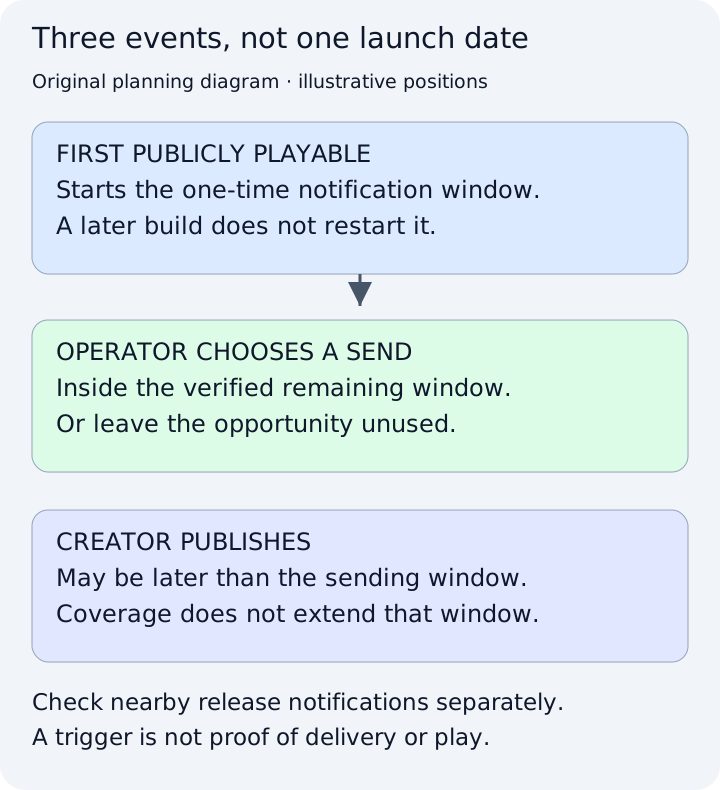
Original planning diagram. The event positions are illustrative, not dates from a real Steam account, a platform interface or a measured campaign.
Original planning diagram. Event positions are illustrative, not a real Steam account, platform interface or measured campaign.
Original visual by Superdirector editorial team. Creation date not recorded.
Work through a delayed-creator example
Consider the fictional game Mosslight Station. Its public demo is playable on the first date recorded on the team's card. A creator can publish a YouTube demonstration later, but the agreed upload now falls after the verified notification window. The team has three different pieces of work: maintaining a usable demo, deciding whether to trigger the remaining notification, and preparing accurate coverage for that later video.
It should not keep waiting for the video while describing the email as “saved for launch.” Instead, the owner decides whether the current public demo supports a useful invitation before the window closes. The creator can still show that demo later if it remains available and the scope is accurate. Coordinating every surface on one day is optional; inventing another notification opportunity is not.
Now change the example: a specific first-puzzle defect is being repaired, and the proposed check is inside the confirmed window. Waiting may be reasonable, but the decision needs a result: can an unfamiliar player complete that interaction in the distributed build? “The art will be better soon” is not an executable condition. If the repair fails or the window ends, do not substitute an untested build merely to avoid leaving a promotional action unused.
Check the full-release relationship without promising delivery
Valve documents an email cooldown for customers recently notified about the same app ID; high-traffic periods can extend it. Its demo guidance recommends spacing the demo notification from other notification-triggering events, including release. Email verification and customer preferences also affect receipt. Steam wishlist notification conditions.
Consequently, a demo send close to full release deserves an explicit owner decision. Do not tell creators that every wishlister will receive both messages, or that a two-week gap guarantees delivery. A calendar can expose a conflict; it cannot inspect each customer's notification state or prove that an email was read.
Keep the launch promise independent of the mailbox. A YouTube description can identify the currently playable demo and the full game's actual release status. An Instagram caption or X post should make the same distinction. “The demo is playable now” is a product-availability statement to verify; “everyone has been emailed” is a different claim and should not be inferred from it.
Retain the decision, not an imaginary result
After any authorized action, retain the actual trigger record alongside the public build and creative revision. Valve identifies notification reporting in the detailed wishlist breakdown and traffic reporting for store visits. Those observations are not proof that a particular creator caused purchases or that every notified person played. Wishlist reporting and notification questions.
If the opportunity expires unused, record that plainly. Do not describe a later demo update as a second email launch. The next content brief can explain the genuine improvement through available channels without misrepresenting the platform action.
Start with the recorded first-playable date and one unresolved dependency. If you need to organize the verified demo scope into a creator brief and channel-specific explanation, see how Superdirector works. That planning work does not trigger Steam notifications, extend their window or guarantee coverage.