How-To Guide
Screen Steam curator key requests without treating every reviewer as a scammer
A newly released indie game can attract requests for review copies before the developer has a reliable way to assess them.
By the Superdirector editorial team.
A newly released indie game can attract requests for review copies before the developer has a reliable way to assess them. The useful question is not “Does this message look professional?” It is “What evidence connects this requester to relevant editorial work, and what access am I willing to provide?”
Use the following screening process to separate identity, audience fit, access and editorial outcomes. It is an original operating worksheet, not a fraud-detection model. An unresolved request belongs in an “unverified” queue, not on a public blacklist.
Start with an identity record, not a follower threshold
For each request, record the claimed publication or curator name, the message’s actual sender, the public profile claimed and the specific game requested. Keep the raw message privately where it arrived rather than copying personal details into a public spreadsheet.
Open the claimed organization’s public page independently. Does it identify the sender or a matching contact route? Does the curator profile connect to the same publication? A familiar logo, a display name and a link supplied in the request are not three independent confirmations.
If the link between sender and organization remains unclear, leave identity unverified. Where your outreach permissions allow it, ask for confirmation through a contact route already published by the organization. You can also decline to provide access without accusing anyone. Do not open an unexpected attachment or disclose account credentials to prove that your studio is genuine.
Review the work that matters to this game
Look at several relevant pieces, not just the most flattering quote. Write a short fit statement: “This publication explains cooperative puzzle games to English-speaking PC players,” for example. That is more useful than recording a large follower count without knowing who follows it.
Steam cautions against judging curators by audience size alone. Curator Connect supports direct review-copy licenses inside Steam, and multiple copies can be legitimate for reviewer teams or multiplayer evaluation. Acceptance creates no obligation to play or review the game. Steam Curators and Curator Connect
Accordingly, do not use “small audience,” “multiple copies” or “no promised review date” as an automatic fraud verdict. Instead record which uncertainty each fact creates. Multiple copies may require an explanation of the review setup. A broad audience may weaken editorial fit. Neither establishes dishonesty.
Check the requested access against the actual review job
Ask what the proposed reviewer needs to evaluate. A solo campaign review and a cooperative session have different access needs. Keep “requested quantity” and “approved quantity” as separate fields, with a reason for the decision.
For a Steam curator, consider the documented Curator Connect route rather than emailing transferable keys. For other press access, check the package and key type before approval. Steam distinguishes ordinary release keys, release-state override keys and developer keys; the latter are not intended for customer distribution. Steam Keys
Before using Curator Connect, check that the game has a public coming-soon or released store page, an uploaded playable build and an operator with Generate CD Keys permission. Curator Connect prerequisites
This is not a recommendation to distribute a particular package automatically. Confirm what it contains, whether its access timing matches your intention and who may authorize it. A verified identity does not justify accidentally supplying developer-only access or content outside the agreed review scope.
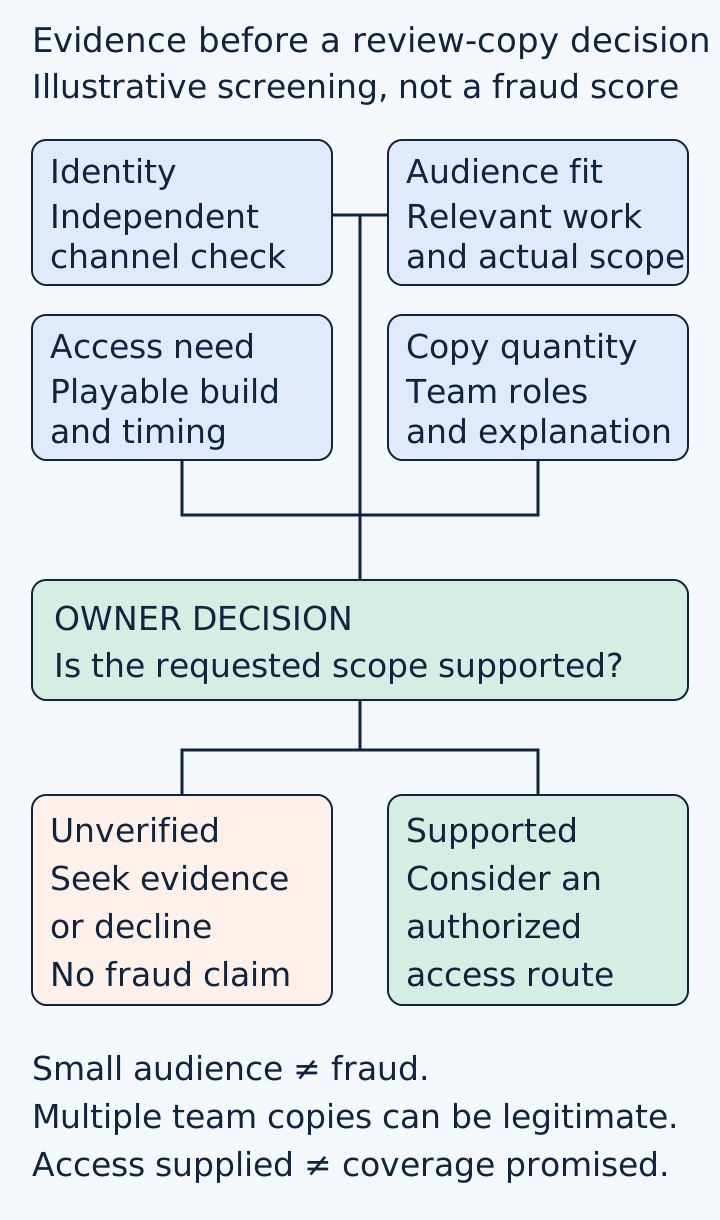
Original screening worksheet. It records evidence and uncertainty without assigning a numerical fraud score or promising coverage.
Original visual by the Superdirector editorial team. Creation date not recorded.
Work through two contrasting cases
Illustrative case A: a small cooperative-games publication asks for several copies. Its published contact route confirms the sender, and its recent work demonstrates relevant multiplayer reviews. The next question is whether the requested copies match the planned evaluation and your permitted distribution route. Its modest audience is not a reason to call it fraudulent.
Illustrative case B: a message claims to represent a large outlet, but the sender cannot be connected to that outlet through a known route. Its polished signature does not close the gap. Keep the request unverified and withhold access pending a proportionate check, or decline. You do not need to decide publicly that the person is a scammer to protect your release.
Neither case is a real investigated requester. The purpose is to make the decision depend on evidence rather than on message style.

A fictional screening desk puts verified contact route and relevant review work beside the access request. Audience size alone is not the decision. Original AI-generated editorial illustration.
Original visual by Original editorial illustration generated with OpenAI’s built-in image tool. Created 2026-10-24.
Keep distribution separate from results
Maintain a compact record:
- Identity: checked route, observation date, remaining uncertainty.
- Fit: relevant work link and one-sentence audience match.
- Access: package or distribution route, quantity and approving owner.
- Distribution: prepared, approved, sent and accepted as distinct states.
- Editorial outcome: no result observed, published coverage, or an explicitly declined opportunity.
Steam’s dashboard can show offers and accepted copies; those states do not establish coverage. Steam also says accepted Curator Connect copies cannot be revoked, while an unaccepted offer can be expired. Treat the approval step accordingly. Curator Connect FAQ
If coverage appears, save its actual URL and date, and assess whether it discusses the intended game accurately. A missing review is not proof of resale. A review link is not proof of attributable sales.
Improve the screening process without expanding the inbox
Review your own decisions after a release period. Which requests remained unverified because a field was missing? Which approved recipients produced relevant work? Which package checks caught an access mismatch? Use the answers to simplify the worksheet rather than inventing a universal “safe curator” score.
Start with one existing request. Complete the identity, fit, access and quantity fields, then make an explicit approve, seek evidence or decline decision. You have finished screening when the decision and its basis are clear, not when you have sent the maximum number of keys.