How-To Guide
What can an AI social media manager actually do in 2026, and what still needs you?
A job-by-job audit of AI social media managers in 2026: what they research, write, design and post today, what platform rules limit, and what stays with you.
By the Superdirector editorial team. Vendor and platform source captures were read November 6, 2026; their dates remain historical. Offer framing was revised November 9. Workload, trial instructions, X campaign condition and matching checklist/illustration revised November 10, 2026; this edit is not a fresh vendor or platform-policy check.
At a glance
What can an AI social media manager actually do in 2026, and what still needs you?
Tools sold as AI social media managers offer different combinations of research, content planning, channel-specific copy, images and carousels, publishing, message triage and reports. Check the selected product and plan job by job; that list does not mean one subscription performs every job. You still set the account's direction, verify claims and offers, decide who may publish, handle sensitive conversations and judge business value. Require a representative output and evidence of the promised workflow before assuming finished video or unattended account operation is included.
- Start with the nine-job audit: specify the account, formats, cadence and responsibilities you want to delegate.
- Replies need a separate check. X's rules require recipient opt-in and an opt-out route, restrict automated replies to one per interaction, and require prior written approval for AI reply bots.
- The account owner remains responsible under X's rules. Check the linked TikTok, YouTube and Meta disclosure rules for the content you intend to publish.
Nine jobs, and how far AI goes with each
Use these nine jobs to specify what a selected plan takes on. The status labels are editorial shorthand for cited examples, not measured workload or market coverage. 'Mainstream' and 'common' identify functions in those examples; 'partial', 'early' and 'upcoming' flag work to demonstrate separately. None establishes a plan's availability, quality or dependability.
| Job | Editorial assessment of cited examples | What AI tools do today | What still needs you |
|---|---|---|---|
| Research and trend spotting | Mainstream | Listening tools scan public conversations and tracked accounts, then summarise what is rising | Deciding which trend fits your brand and which to ignore |
| Ideas and a content plan | Mainstream | Drafts a month of post ideas or a full calendar from your brand inputs | The positioning: who the account is for and what it will never post |
| Writing posts and captions | Mainstream | Drafts per channel, with the channel's length limit and a chosen tone | Facts, offers and anything that sounds like a promise |
| Images and carousels | Common | Generates images or carousel drafts from prompts; some cited examples offer layout and colour controls | Taste, and whether the visual says something true about the product |
| Finished video | Early | Some tools assemble video posts, for example from stock clips; quality and control vary widely | Any filming, voice work or final editing that the selected plan does not deliver to your accepted standard |
| Scheduling and posting | Mainstream | Queues and publishes through each platform's official API, within its limits | Approval of what goes public, or a standing rule you set on purpose |
| Replies, comments and DMs | Partial | Sorts messages by urgency and drafts replies; can auto-reply in narrow, opted-in cases | Complaints, refunds, anything legal or personal, and real conversations |
| Reporting | Mainstream | Summarises results in plain language and suggests what to change | Judging whether the results moved the business, and what to stop |
| Running the account with no one in the loop | Upcoming | Treat a no-oversight promise as something to demonstrate separately; an automation label does not transfer the account responsibility stated in X's rules | You stay responsible for what the account publishes |
The AI social media manager checklist (CSV) retains the nine jobs and vendor questions. Its status labels describe the cited examples; the unscaled illustration separates candidate work from customer checks without measuring workload, market coverage or reliability.
When enlarged, scroll horizontally to read the diagram.
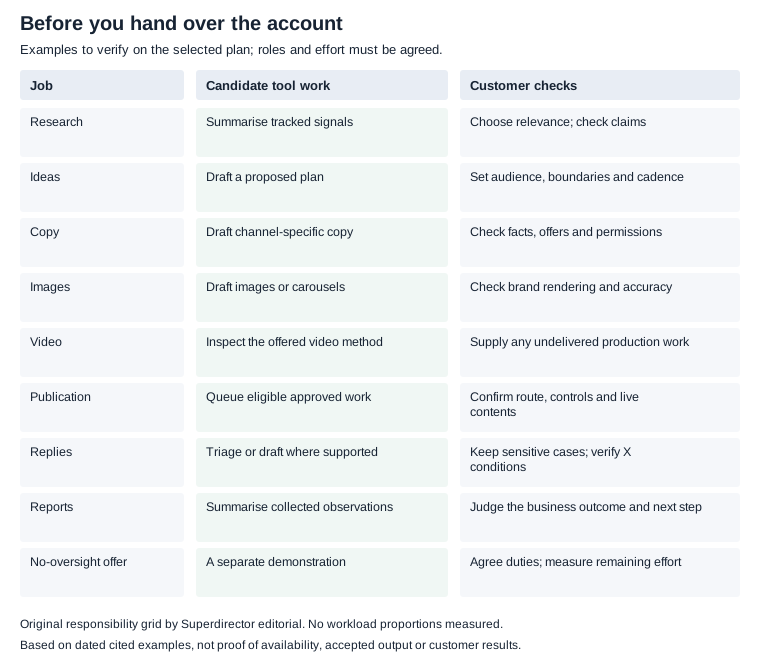
Original responsibility grid based on the cited examples; no workload proportions, performance or reliability measured.
Original visual by Superdirector editorial team. Creation date not recorded.
What the tools actually do today
For research and listening, Hootsuite's AI page says it analyses conversations in 187+ languages and offers an agent that delivers cited reports. For writing, Buffer's October 2023 AI Assistant announcement says it works in the composer and adapts suggestions to the channel, including its character limit. That is a vendor description, not our reliability test: check the length and meaning of an actual draft before publishing.
Zapier's roundup, dated September 24, 2026 describes Predis.ai creating text, images and stock-based video posts, and Publer offering AI image generation. It also describes Eclincher triaging DMs and comments by urgency and sentiment. These are examples from that review, not evidence that every tool or plan includes them. For replies, ask whether the selected workflow sorts, drafts or actually sends, and under which platform conditions.
Evaluate finished video separately from captions, scripts and storyboards. Zapier describes a stock-library method in its Predis.ai example; that does not establish every tool's current video methods. If a vendor offers finished video, ask for an output using material like yours and identify any filming, voice work, factual corrections and final edits you must still supply.

Conceptual deliverable types, not outputs from a product. A script or image does not establish delivery of a finished video; evaluate the output you actually need.
Original visual by Superdirector editorial team. Created 2026-11-10.
Agent or scheduler with a writing button?
PostEverywhere's comparison proposes four agent properties: taking goals, reading analytics/history/brand guidelines, deciding what to create and when, and acting before using outcomes in a later decision. PostEverywhere sells a tool it ranks. Investigate the workflow rather than adopting its rankings or treating a label as proof.
First confirm whether the evaluation includes analytics/history access and publishing; do not assume a free trial admits both. Give it a goal, such as answering your app's setup questions at an agreed cadence, plus approved product facts, brand guidance, past posts and dated analytics where available. Asking for missing information is appropriate. A plan and drafts alone demonstrate only planning and creation.
- Inputs: identify the actual posts, date range, metrics and brand instructions used. With no usable history, record that limitation and treat the plan as a hypothesis.
- Decision: ask why the topic, format and timing serve the goal. Check drafts against your approved facts and format requirements.
- Authorized action: if included, approve an eligible post or apply a deliberate standing rule, then check the destination and failure status. Drafted or scheduled is not verified live. Record customer edits/prompts separately from service-side intervention.
- Feedback: after the agreed observation period, ask it to use actual results and your corrections in its next proposal, naming evidence and uncertainties. Too little data calls for a provisional plan, not a claimed winning formula.
Mark any unavailable data, publishing or feedback step untested and request a suitable demonstration; trial restrictions do not prove a missing feature. Completing the loop shows the observed workflow. Worthwhile results, continuing reliability and lower owner effort need repeated evidence against your baseline.

An evaluation loop to demonstrate, not an observed run. Identify the inputs, decision, authorized action and subsequent feedback; mark unavailable steps untested.
Original visual by Superdirector editorial team. Created 2026-11-10.
What platform rules let software do
The selected tool must satisfy the rules for the platform, account, content format and integration it actually uses. The following examples come from the November 6 source captures; confirm the applicable current route before relying on a publishing limit.
- Instagram: the captured content publishing API guide describes professional-account publishing and counts a carousel as one post. Its general rate-limit section says 100 API-published posts in a moving 24-hour period, while its carousel section says 50. This guide does not resolve that discrepancy for your login/API route. Have the vendor confirm the applicable rule and current account usage before scheduling; neither number is a universal allowance for a selected tool.
- TikTok: content posted through the Content Posting API by an app that has not passed TikTok's audit is restricted to private viewing, so check that a tool's TikTok posting is live for public posts.
- X: the automation rules say OAuth alone is not consent for automated actions and ban duplicative or substantially similar posts. Automated replies require recipient opt-in, an easy opt-out and prompt honoring of it, and only one reply per interaction; if the campaign is based on users replying to your post, the automated reply or mention must reply to the user's original post. Replies based on keyword searches alone are not permitted. AI reply bots also require prior written, explicit approval from X. Do not assume an inbox feature or account connection supplies that approval.
- AI labels: Meta adds 'AI info' labels when it detects AI indicators or people disclose AI content (Meta); TikTok requires a label on AI-generated content showing realistic-looking scenes or people; YouTube requires creators to disclose realistic AI-generated or altered content at upload.
The same X page says you are ultimately responsible for actions taken with your account or associated applications. Agree who handles exceptions and corrections rather than treating an autonomy label as a transfer of responsibility.
What still needs you
- What the account is for: the audience, the point of view and what it will never post. AI drafts inside those lines; it should not draw them.
- Approval of anything public, or a standing rule you chose on purpose for formats you have already approved.
- Claims and offers. Prices, discounts, results and comparisons need someone who knows they are true.
- Real conversations. Complaints, refunds, press and anything personal go to a person.
- Being on camera. Your face, voice and product in use are the hardest things for a tool to supply honestly.
- Judging results. A report can say what happened; deciding what the business should do next is yours.
For a deeper split of your own week into jobs to hand over and jobs to keep, see which organic social jobs to give AI.
Set up an AI manager without losing control
- Write a one-page brief: who the account is for, the topics it should cover, words you never use, and claims you can prove. Agree the account, formats, cadence and which jobs the service will perform.
- Connect only the accounts and sources needed for that scope, on the platforms you actually use. Confirm access to the history or analytics the proposed workflow needs.
- Let it draft an initial batch. Read each post before scheduling, and identify missing product facts or material you must supply.
- Approve the first batch post by post and record corrections. Check whether later drafts actually retain the corrections; do not assume that a tool learns from feedback.
- Use standing auto-posting only where the tool supports it and you deliberately choose it for the agreed scope. Keep sensitive replies with a person and agree how urgent exceptions reach you.
- At the review interval you agree, compare results with the goal, baseline and observation window you chose. Do not cut the lowest-ranked format from one small week alone: check comparable posts, audience exposure and the format's purpose. Keep conclusions provisional when the evidence is thin; test a defined change when the evidence supports it.
A weekly content review is a possible arrangement, not a promise about all account work. Claims, conversations, failed posts and changing product facts may need attention sooner. Measure briefing, checking, corrections and exceptions, separating customer effort from operator work; adjust the cadence to observations. See AI tools for social media marketing or AI content calendar tools for TikTok and Reels.

A conceptual review arrangement, not an included alert feature or workload promise. Agree the review rhythm, the exception route and its owner; measure the actual effort.
Original visual by Superdirector editorial team. Created 2026-11-10.
Where Superdirector fits
For our own product, the declared $199/month offer is one AI-run social account: AI handles most content creation and regular posting within the supported workflow and agreed cadence, in your brand's direction. You still supply that direction and check whether the work is useful. The separate $29/month offer is MCP access and basic hands-on asset creation for people directing individual jobs; it excludes native repeated channel workflows. Connected-account slots do not buy more operated accounts. The public subscription pricing page still describes Growth as including two accounts and extra account capacity. That wording does not establish two operated accounts under the declared $199 one-account service offer. Confirm the operated account, agreed jobs and current service availability separately before paying. Confirm the specific jobs, accepted formats, cadence, revisions and exception handling separately; the nine-job inventory above is not a list of included $199 entitlements.
For publishing today, assess the documented Growth route for Instagram image carousels or single, link-free X text posts on your connected owned account. A post requires approval or an enabled Auto-post rule; the first manually approved publication must be verified live before that rule can be enabled. Do not include finished video or full autopilot in a present delivery claim while the public product still marks them upcoming. Use the current publishing requirements to check the account and format.
Ask to see accepted work and verified live posts from the workflow being evaluated. Record customer corrections and operator interventions separately, then compare the account result with the baseline you chose. Neither one successful post nor a large credit balance establishes dependable continuing operation or business growth.