How-To Guide
Best AI content planning and calendar tools for TikTok and Reels in 2026
Eight content calendar tools compared for TikTok and Reels teams: AI planning, approvals, price and posting limits, from vendor pages read November 4, 2026.
By the Superdirector editorial team. Vendor pages read November 4, 2026. Superdirector is our product; see the disclosure in the first section.
At a glance
What are the best AI content planning and calendar tools for TikTok and Reels in 2026?
For a small team posting weekly to TikTok and Reels, Buffer leads a four-check score drawn from what each vendor publishes, with Later and SocialBee tied behind it: TikTok and Reels named, approvals on a named plan, a price with its billing basis, and a free option. No vendor page we read shows its AI filling a week of dated slots. Buffer has a free plan for one user and approvals on Team at $12 per channel a month for 1 to 10 channels on monthly billing; Later has approvals on Growth at $37.50 a month billed yearly. The score is a shortlist filter, not a grade of quality. Superdirector, our own product, is not ranked.
- Scores out of 4: Buffer 4, Later and SocialBee 3, Flick, Metricool and Planable 2, FeedHive and Predis.ai 1; for Metricool, Planable, FeedHive and Predis.ai we found no statement that both TikTok and Reels publish.
- Predis.ai Core's card says No Auto Posting beside Publish to 10 channels. SocialBee lists direct posting for its single-video format and Reminders for its “Multiple videos” format, whose grouping is unclear; do not read that as one direct post per week.
- Every figure is from vendor pages as read on November 4, 2026.
Short answer
Short answer: in the vendor material we could read, none of these tools is shown to fill a week of dated calendar slots with AI. SocialBee's TikTok page comes closest, with a before-and-after line of 30 posts queued in 10 minutes that we did not test, and FeedHive lists a “posting plan” allowance; the other AI claims are ideas, generated posts and captions. What the pages do settle is which tools name TikTok and Reels publishing, which have an approval step and what each costs. On those, a small team that posts every week to both TikTok and Instagram Reels should start with Buffer, Later or SocialBee. Buffer is cheaper to start: it has a free plan for one user, and approvals need its Team plan at $12 per channel a month for 1 to 10 channels on monthly billing. Later puts approvals on Growth at $37.50 a month billed yearly, which covers two social sets (a set is 8 profiles, one of each platform) and two users, but its Starter plan gives only 5 AI credits a month. SocialBee puts approvals on Accelerate at $49 a month on monthly billing, but lists one user. The units differ, so convert them to your own channels and seats in the pricing section below.
How to read the scores. The score counts four things a vendor's own pages state: TikTok and Reels both named, approvals on a named plan, a price with its billing basis, and a free plan or allowance. Treat it as a shortlist filter, not a verdict: two of the four checks, a legible price basis and a free plan, measure how a vendor packages its page more than how well it fits your job, and Buffer's lead owes something to a free plan your team would outgrow once it needs approvals. Metricool, Planable, FeedHive and Predis.ai are the four tools whose pages did not confirm both TikTok and Reels publishing for us, so check that first if Reels are your main format. All eight vendors describe AI that goes beyond captions; the table shows that, but it does not score.
Each tool has a catch. SocialBee has the AI planning claim, but its “Multiple videos” format uses Reminders and the page does not define that grouping. This does not establish a one-video-per-week limit. Instagram posts publish automatically only for Professional accounts. Three others fit one job each. Metricool suits a free start for one brand, but the free plan stops at 20 posts a month and we found no Reels publishing statement. Planable suits a team where a manager or client must sign off every post (required approval is on Pro, listed at $49 per workspace a month); its pages name Instagram and TikTok scheduling but we found no Reels publishing statement. Flick, FeedHive and Predis.ai are covered below.
Disclosure: we publish this page and sell Superdirector. We left it out of the ranking because it does not schedule TikTok or Reels posts. The eight tools are compared only on the pages each vendor publishes, as read on November 4, 2026, and we ran no trial of any. The scores say what vendors state, what plans include and what they cost; they say nothing about how good an AI-made weekly plan is, so test that yourself.
How we compared the eight tools
We scored each tool on four checks, each answered only from that tool's own pages:
- TikTok and Reels named. Does the vendor's page name both TikTok publishing and Instagram Reels scheduling? A tool earns this point only if both are named, and the table says which half is missing.
- Approvals on a named plan. Which plan adds a sign-off step?
- Price with its billing basis. The entry plan, with the monthly or yearly basis stated in the page text. A figure whose basis the text does not state earns no point, even when the page shows a monthly and yearly switch.
- Free plan or allowance. A free plan, or free posts with no time limit, as opposed to a time-limited trial only. Planable calls its 50 free posts a trial but sets no time limit, so we counted it.
A fifth question, AI beyond captions, is shown in the table but not scored. Does the vendor say the AI proposes ideas, posts or a plan, or only writes captions? All eight pass, so it separates none of them. The score is the number of yes answers out of four, and tools with more points come first; tools on equal points are listed alphabetically and should be read as tied.
We borrowed one yardstick from MydropAI, which says a real planning tool “generates ideas tied to your brand, fills a calendar in bulk, and repurposes proven posts.” Storyflow separates planning (what to make) from scheduling (when to post), while MydropAI says a tool that cannot schedule what it generates is a writing tool. Both are vendor views, so they shape our questions and prove nothing about any product.
“Not stated” means no sentence on the pages we stored says it, which differs from “no”. Several pages we tried did not load: the four Metricool TikTok and Instagram URLs returned 404, Planable's Instagram page returned a server error (520) and FeedHive's Instagram scheduler page returned 404. A “not stated” on Reels publishing may therefore be a gap in what we could read rather than a missing feature.
Our reading list was written by sellers: Storyflow ranks its own product first, MydropAI and Buffer's guide each list their own tool among the picks, and Influencer Marketing Hub links an advertising disclosure. We used them for definitions and structure only. Every fact about a tool below comes from that tool's own pages, which each section links.
Eight tools side by side
Both tables hold vendor facts as the pages stood on November 4, 2026; each tool's section links its pages. Prices are in the currency and on the billing basis each page shows.
| Tool | 1 TikTok and Reels named | 2 Approvals on a named plan | 3 Price with billing basis | 4 Free plan or allowance | Score (of 4) | AI beyond captions (not scored) |
|---|---|---|---|---|---|---|
| Buffer | Yes | Yes (Team) | Yes | Yes | 4 | Yes |
| Later | Yes | Yes (Growth) | Yes | No free plan found (14-day trial) | 3 | Yes |
| SocialBee | Yes | Yes (Accelerate) | Yes | No free plan found (14-day trial) | 3 | Yes |
| Flick | Yes | Not stated | Yes | No free plan found (7-day trial) | 2 | Yes |
| Metricool | Not stated (Reels publishing) | Yes (Advanced) | Not stated (billing basis) | Yes | 2 | Yes |
| Planable | Not stated (Reels publishing; Instagram and TikTok scheduling named) | Yes (optional on Basic, required on Pro) | Not stated (billing basis) | Yes (50 posts) | 2 | Yes |
| FeedHive | Not stated (Instagram Reels) | Not stated (plan) | Yes | No free plan found (7-day trial) | 1 | Yes |
| Predis.ai | Not stated (plan) | Not stated | Yes | No free plan found (3-day trial, card taken) | 1 | Yes |
| Tool | Pick for | What the AI is said to do | Entry price and free option |
|---|---|---|---|
| Buffer | A small team on a budget (the free plan and Essentials have one user; approvals and extra users need Team) | AI Assistant on every plan, free included; 100 ideas stored on the free plan | Free: 3 channels, 10 scheduled posts per channel. Essentials from $6 per channel a month, Team from $12 (monthly billing) |
| Later | A visual calendar with Reels and TikTok, and approvals in one plan | 1 AI credit makes 3 ideas or 1 caption; 5 credits a month on Starter, 50 on Growth | 14-day trial. Starter $18.75 a month, Growth $37.50, both billed yearly |
| SocialBee | A posting plan the AI proposes, with categories that rotate | “Let AI plan your TikTok content”; an AI Copilot that generates a strategy with posts; unlimited AI content generation on every plan | 14-day trial. Bootstrap $29 a month, Accelerate $49 (monthly billing) |
| Flick | An Instagram-first creator: the page lists hashtag tools and Instagram-only analytics | Iris assistant for “strategy, planning, content creation” | 7-day trial. Solo £11 a month billed yearly, 30 scheduled posts per social a month |
| Metricool | A free start for one brand, with analytics | AI assistant that can brainstorm ideas; 5 credits per brand a month on the free plan | Free: 1 brand, 20 posts a month. Starter from $20 a month (up to 5 brands) and Advanced from $53 (up to 15 brands), or $25 and $67 on the page's other price set; the text labels neither set as yearly (the lower set is probably yearly, our inference) |
| Planable | A team where someone must approve every post | An AI assistant that gives post ideas from your previous content, generates posts from a prompt and writes captions, rewrites and hashtags | First 50 posts free (called a trial, no time limit). Basic listed at $33 per workspace a month; the text does not show whether that is the monthly or yearly figure |
| FeedHive | A creator who reuses top posts and wants a posting-plan feature | A “posting plan” allowance (10 on Creator); 2.5K AI credits a month on Creator, before the page's launch bonus | 7-day trial. Creator $15 a month billed $180 annually |
| Predis.ai | A team that wants ads and videos made from a prompt | Makes posts and videos from a link, prompt or image; its home page leads with ads | 3-day trial with a card. Core $19 a month on yearly billing; its card reads No Auto Posting beside Publish to 10 channels |
When enlarged, scroll horizontally to read the diagram.
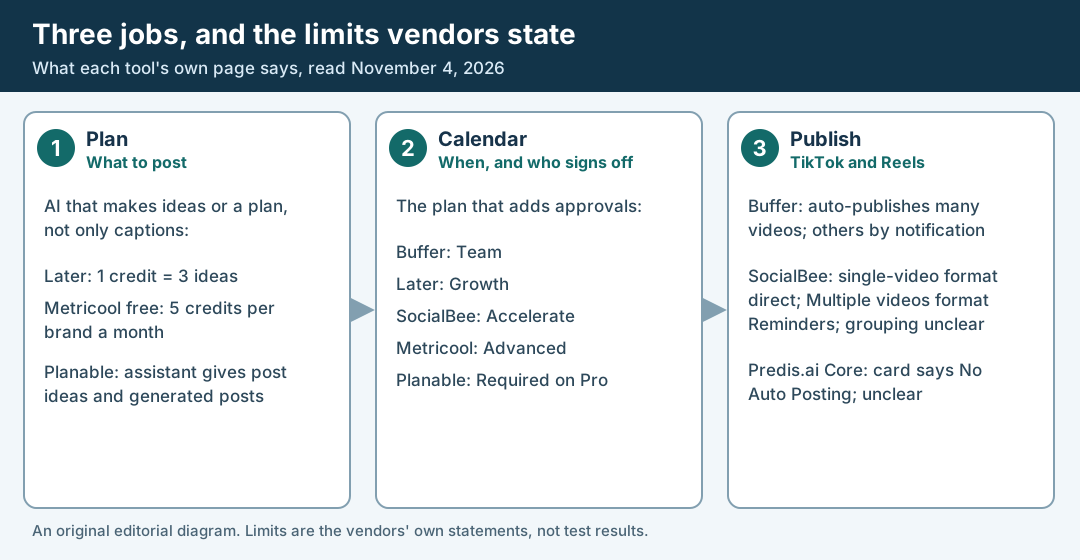
An original editorial diagram of the limits vendors state on their own pages, read November 4, 2026. It is not a test result.
Original visual by Superdirector editorial team. Creation date not recorded.
Buffer: pick for a small team on a budget
Buffer's pricing page shows a free plan for up to 3 channels and 10 scheduled posts per channel at a time, for one user, with the AI Assistant and 100 stored ideas. Buffer's machine-readable pricing page describes the assistant as unlimited use on every plan. Its AI Assistant page says the tool helps generate ideas, repurpose posts and summarize long content. For TikTok, Buffer says it can auto-publish many TikTok videos that meet TikTok's publishing requirements, while videos that need TikTok-only features such as trending sounds or in-app effects must be posted manually using notification publishing. Its Instagram page offers the same two options for reels; with a notification you finish the post yourself in the app.
Approvals and extra users come only with the Team plan; Essentials lists one user. On the machine-readable pricing page, Team is $12 per channel a month on monthly billing for 1 to 10 channels, or $10 on yearly billing, with unlimited team members. Watch for: the Buffer pages describe ideas and rewrites, not a feature that fills a week of dated slots, so you build the week yourself, and the free plan has no approval step and one user.
Later: pick for a visual calendar with Reels and TikTok
Later's pricing page lists scheduling for Instagram Reels, TikTok posts and YouTube Shorts. Its AI is metered in credits: one credit generates 3 ideas or 1 caption. Starter gives 5 credits a month, which is 15 ideas if you spend them all on ideas, and Growth gives 50.
Starter lists $18.75 a month billed yearly, for one user and up to 30 posts per profile each month. Growth lists $37.50 billed yearly, adds internal and external approvals, and includes two social sets (16 profiles in total, two of each platform) and two users. The page has a Bill Monthly toggle, but the text we read shows only the yearly plan figures. Extra-user pricing conflicts on that same page: the Growth card says $3.75 per user a month, while the FAQ says $5 per additional user without giving a period in that sentence. Confirm the price and billing period before budgeting for a third person. It offers a free 14-day trial, and we saw no free plan. Watch for: a team that asks the AI for ideas every week can run through the 5 Starter credits quickly.
Flick: pick for an Instagram-first creator
Flick's pricing page lists scheduling for Instagram posts and Reels, Facebook, TikTok and LinkedIn, with analytics for Instagram only. Its home page describes the Iris assistant as help with strategy, planning and content creation. Solo is £11 a month billed yearly, with 4 social profiles and 30 scheduled posts per social each month. Pro is £24 a month billed yearly and lists unlimited scheduled posts. Every plan has a 7-day trial.
Watch for: the pages we read mention no approval step, and TikTok gets scheduling but not analytics.
Metricool: pick for a free plan and analytics
Metricool's pricing page has a free plan of 1 brand, up to 20 scheduled posts a month, 5 competitor profiles, 30 days of analytics and an AI assistant. Its AI page gives 5 AI credits per brand a month on Free, 20 on Starter and 35 on Advanced, and says the assistant can brainstorm ideas and adapt posts to each platform. The post approval system is listed on the Advanced plan, and TikTok appears among the networks a brand can connect.
The pricing page shows two price sets, with euro and dollar versions of each. In dollars, one set lists Starter from $20 a month (up to 5 brands) and Advanced from $53 (up to 15 brands); the other lists $25 and $67 for the same brand counts. The text does not label either set as yearly, though the page offers up to 24% off for annual billing, so the lower set is probably the yearly one; that is our inference, so read the toggle on the page. Tiers are set by the number of brands, so a one-brand team pays the entry price of the tier. Starter lists unlimited content publishing, subject to a fair-use policy. Watch for: the free plan allows 20 posts a month for the brand, which is about four or five a week, and no page we read says whether one post sent to two networks counts once or twice. We found no Reels publishing statement: the pricing page lists Reels and Stories analytics only, and the TikTok and Instagram scheduler pages we tried returned 404.
Planable: pick for teams that need sign-off
Planable's pricing page says the first 50 posts are free with no time limit and no card, and its FAQ calls that a free trial. Basic is listed at $33 per workspace a month with 60 posts per workspace a month, unlimited users, 4 social pages and optional approval. Pro allows 150 posts and 10 social pages and adds required approval; it is listed at $49 per workspace a month. The page has a Monthly and Yearly switch (“2 months free”), and the text we read does not show which one the $33 and $49 belong to, so check it.
The same FAQ says Planable supports scheduling for Instagram and TikTok among other networks, and Planable's TikTok page says teams plan, create and approve TikTok videos with clients. That page's FAQ says an unlimited AI assistant gives post ideas based on your previous content, generates posts from a prompt, writes captions from images or videos, rewrites text and generates hashtags. We found no sentence saying Planable publishes Reels; its Create with AI text says it can create reels, which is not publishing. It therefore scores 2: no point for Reels publishing and none for price, because the billing basis cannot be read. Watch for: if your hard requirement is a client or manager signing off before anything posts, it may fit better than tools that score higher.
FeedHive: pick for reusing your best posts
FeedHive's pricing page lists Creator at $15 a month billed $180 annually, with 4 social accounts, 2.5K AI credits a month, 14-day future scheduling and 30 scheduled posts. The page also shows a limited launch bonus that doubles AI credits for three months, so the current figure may read 5K. Its plan table limits “Create a posting plan” to 10 on Creator and 100 on Brand. The home page lists TikTok and Instagram among its channels and says teams can review drafts and approve content before it goes live, without saying which plan carries that. The trial is 7 days.
Watch for: the home page feature list names Facebook Stories and Reels, but we found no Instagram Reels publishing statement, and Creator holds 30 queued posts with a 14-day scheduling horizon. That is queue capacity, not a monthly posting allowance; it fits a rolling week better than loading a whole month at once.
Predis.ai: pick for ads and videos made from a prompt
Predis.ai's home page leads with ads: video ads, UGC ads and product ads made from a link, a prompt or an image, and says you can schedule and autopost from the calendar. Its pricing page lists TikTok among its channels, plus a calendar view and Instagram Reels in its planning rows, but the text we read does not tie those rows to a plan, so we do not count the TikTok and Reels point. Core is $19 a month on yearly billing (the page's own yearly total is $230, and $32 is also shown) with 1,300 credits a month. Its card says “No Auto Posting” and also “Publish to 10 channels”, and we could not tell from the page whether Core posts by itself, so check before you buy. Rise is $40 a month on yearly billing (yearly total $474 on the page, $79 also shown) with 3,200 credits a month; the page's yearly totals do not equal 12 times the monthly price exactly, so we quote the page. Every plan starts with a 3-day trial that takes a card and charges it when day 3 ends.
Watch for: the home page leads with ad creative, so it reads as a tool for teams whose bottleneck is making the video rather than scheduling it. That is our reading; the pricing page still lists scheduling rows.
Write your week and name who approves
Before you open another pricing page, write the week you want to post. The example below is fictional and rests on one assumption: one brand, three people, one Instagram account and one TikTok account, five posts a week.
| Day | Format | Account | Who approves |
|---|---|---|---|
| Monday | Reel | Brand lead | |
| Tuesday | TikTok video | TikTok | Brand lead |
| Wednesday | Reel, same footage recut | Brand lead | |
| Thursday | TikTok video | TikTok | Brand lead |
| Friday | Reel | Brand lead |
Five posts a week is about 22 a month (5 × 52 ÷ 12 ≈ 21.7). Metricool's free plan stops at 20 posts a month for the brand, so it falls short of that cadence; three a week is about 13 a month and fits the stated allowance. Flick Solo allows 30 posts per social per month and Later Starter 30 per profile, so the fictional two-account week fits both monthly caps.
Queue capacity is a different limit. FeedHive Creator holds 30 scheduled posts and lets you schedule 14 days ahead: the five-post week fits, but you cannot load an entire month of dated posts. Buffer's free plan holds 10 scheduled posts per channel at a time and refills as posts publish, enough for this week's three Reels and two TikToks. Neither comparison establishes the approval step this team needs; Buffer's free plan lacks it. Use the seasonal content calendar guide to set dates and lead times before loading a tool.
Check what the AI produces, and whether it can schedule it
Use MydropAI's test in each trial: a tool that cannot schedule the drafts it makes only writes copy, whatever its label says. Then give the AI your fictional week, in the tool's own AI or planning screen, with the five posts and their days written out. You want dated drafts on the calendar in the right formats, not a list of ideas to copy out by hand.
Two limits can change the answer. Later meters AI in credits, one credit for 3 ideas, so ask how many credits one week costs. And treat any vendor time claim, such as SocialBee's 30 posts queued in 10 minutes, as an illustration to time on your own account. Our weekly content plan guide shows what a good week contains if you want a benchmark; judge the draft the tool returns against it: right formats, right days, nothing you must retype.
Confirm TikTok and Reels publishing on your plan
Vendors describe four different things under “supports TikTok and Reels”. Look on the vendor's TikTok or Instagram page, then on its pricing page for your plan, and check which one you get.
- Auto-publish or notification. Buffer says it can auto-publish many TikTok videos that meet TikTok's publishing requirements, and that videos needing TikTok-only features such as trending sounds or in-app effects go by notification. It says the same two options apply to reels.
- Single-video format versus an unclear grouping. SocialBee says a post with one MP4 or MOV TikTok video under 3 minutes and 50 MB posts directly. Its “Multiple videos” format uses Reminders, but the page does not define the grouping; do not assume this limits your second single-video post of the week. Ask support to confirm the two separate posts on your actual dates. Images, up to 12 in one post, use Reminders. Its Instagram page says posts publish automatically for Professional accounts and Personal accounts get a mobile reminder.
- Unclear on the entry plan. Predis.ai's Core card says “No Auto Posting” beside “Publish to 10 channels”; we could not tell which holds, so confirm how Core publishes.
- Create, but publishing not stated. Planable says it can create reels. We found no sentence saying it publishes them.
For Metricool and Planable we found no Instagram Reels publishing statement (Planable names Instagram scheduling in general), and for FeedHive none beyond a Facebook Reels mention. Predis.ai's Reels rows are not tied to a plan. If a page is silent, write “not stated” in your notes and ask support before you buy, in these words: “On the plan I would buy, does a Reel or a TikTok video publish by itself, or do I get a reminder?”
Price your channels and seats
Vendor prices are not comparable at face value, because vendors price per channel, per workspace, per social set or per bundle of brands. Convert each to one assumed setup: the fictional team above, with Instagram and TikTok (two channels), up to three people, and an approval step. The table shows how many users each price includes, the price for the two channels and the cost once a third person is added; where a page lets us compute the number, the formula is in the last column.
| Tool | Plan with approvals | Users included | Price for the two channels | Cost with three people | How computed |
|---|---|---|---|---|---|
| Buffer | Team | Unlimited team members | $24/month billed monthly, or $20/month billed yearly | Same: $24/month billed monthly or $20/month billed yearly | 2 channels × $12/month on monthly billing or × $10/month on yearly billing (Buffer's 1 to 10 channel rates) |
| Later | Growth | 2 | $37.50 a month, billed yearly | Not settled: confirm the extra-user price and billing period | Growth includes two users. Its card says $3.75 per extra user a month; its FAQ says $5 per additional user without a period. We do not select one or compute a firm total. |
| SocialBee | Accelerate | 1 per workspace | $49 a month on monthly billing | $69 a month on monthly billing | $49 plus 2 extra users × $10 a month on monthly plans; up to 10 profiles |
| Metricool | Advanced | Not stated in the text we read | $53 or $67 a month; billing basis not labelled | Not computed, because no user count is stated | Flat price for up to 15 brands; a one-brand team pays the tier price |
| Planable | Basic (optional approval) or Pro (required) | Unlimited | $33 or $49 per workspace a month; billing basis not readable | Same as the two-channel price | Per workspace, not per seat |
Flick, FeedHive and Predis.ai are not in the table: we found no plan with an approval step named for Flick or Predis.ai, and FeedHive does not say which plan carries it. Two other cases bracket this. In a low case with no approval step, such as a solo poster, Buffer's free plan ($0, up to 3 channels), Metricool's free plan ($0, 20 posts a month) and Planable's 50 free posts cost nothing, within the caps above. In a high case with a third channel such as YouTube Shorts, Buffer Team rises to 3 × $12 = $36/month billed monthly or $30/month billed yearly, while Later Growth stays at $37.50 because each social set holds one profile per platform.
Ask each vendor for the monthly and the yearly figure for the same plan, because the gap is real: for two channels, Buffer Team is $24/month billed monthly against $20/month billed yearly. Also add what approvals cost, because the cheap entry plan often lacks the sign-off step: Buffer needs Team, Later needs Growth, Metricool needs Advanced and SocialBee needs Accelerate. Monthly equivalents on yearly billing are Buffer Team at $20 for two channels, Later Growth at $37.50 for two users and 16 profiles, and SocialBee Accelerate at $490 a year, about $40.83 a month, for one user.
Run one real week before you pay for a year
Trial lengths differ, which decides how you test. Flick and FeedHive give 7 days, SocialBee and Later 14 days, and Predis.ai 3 days with a card charged at the end. Buffer and Metricool have free plans and Planable gives 50 free posts. Buffer's free plan has no approval step, but its paid plans, Team included, start with a 14-day free trial, which is how you test approvals there. Pick two tools, load the same fictional week into both, and note four things: minutes spent, whether the AI draft landed on the calendar, which posts published directly and which needed a reminder, and how many AI credits the week used.
Decide from that week, not from the table. The table tells you what each vendor says. The trial tells you whether it holds for your accounts.
What Superdirector covers in a TikTok and Reels plan
Superdirector is our product, so weigh this section accordingly. It is not a scheduler for TikTok or Reels. Its pricing page says that today it writes video scripts and storyboards from your brand and puts them on your calendar, and that nothing video posts yet; AI video generation is listed there as upcoming. Its FAQ says that on Growth it posts Instagram carousels and X text posts, by your approval or a standing Auto-post you turn on, and the plan cards read “Posts to Instagram and X”, which does not include video. Plans start at $29 a month.
So it fits the step before the scheduler: deciding what to film and why, from what is working across Instagram, TikTok, YouTube and X. You would still publish through one of the tools above. Superdirector's social media marketing page describes that workflow. If you only need a place to schedule and approve, skip it.
What we could not confirm
We read vendor pages and did not trial any tool, so we cannot say how good any AI-made weekly plan is. The plan tables for Planable, FeedHive and Predis.ai lose which plan owns which row when read as text, so we quote only rows whose plan is named beside them and do not score Predis.ai's TikTok and Reels rows. We found no Instagram Reels publishing statement in the pages we read about FeedHive, Metricool or Planable, and the Instagram pages we tried for those three failed to load. Metricool's two price sets are not labelled by billing basis in the text, and Planable's billing switch could not be read, so neither earns the price point. Later's extra-user prices conflict between its card and FAQ, so we leave the three-person total unresolved. The AI pages we tried for Later, Flick and SocialBee (later.com/ai-social-media-tools, flick.social/iris, flick.social/ai-social-marketing-tool and socialbee.com/ai-assistant) returned 404, so what we say about their AI comes from their pricing, home and TikTok pages. We did not compare Hootsuite, Sprout Social, Notion or other tools, or Reels-specific features such as cover choice, audio, first comments, hashtag limits or short-video analytics. Vendors change prices often, so recheck each page when you decide.
SocialBee: pick for an AI-proposed posting plan
SocialBee's TikTok page is headed “Let AI plan your TikTok content” and shows a before-and-after line of 30 posts queued in 10 minutes, which is the vendor's illustration; we did not time it. The same page says content categories rotate through the week. SocialBee's pricing page lists an AI Copilot that generates an entire social media strategy with ready-to-use posts, and unlimited AI content generation on every plan. For Instagram, SocialBee's Instagram page lists Reels among the formats you can queue, and its FAQ says posts publish automatically for Professional accounts, while Personal accounts, and any post that cannot publish directly, get a mobile reminder to post it yourself.
The TikTok page lists direct posting for its single-video format: one MP4 or MOV video under 3 minutes and 50 MB. Its “Multiple videos” format uses Reminders and is described as more than one video at the same time; the page does not define that grouping. Its image format allows up to 12 images in one post, through Reminders. These format rows do not establish a limit of one direct TikTok post per week. For our fictional Tuesday/Thursday schedule, ask: “Will two separate eligible single-video posts on different days both auto-publish, and what exactly counts as Multiple videos?” On the pricing page, Bootstrap is $29 a month on monthly billing for 5 profiles. Accelerate is $49 and adds post approval and 10 profiles, but lists one user per workspace, with an extra user at $10 a month on monthly plans; Pro lists 3 users per workspace at $99 a month on monthly billing. The trial is 14 days with no card. Watch for: the AI plan is the vendor's claim, and we did not test whether the categories fill a week the way your accounts need.