How-To Guide
When should a brand stop following up with a creator who has not replied?
Write the reply definition, touch limit and spacing before the first message, give each follow-up one new thing, log silence as a fact and date the stop.
By the Superdirector editorial team. FTC, Google and YouTube pages reviewed October 30, 2026.
At a glance
When should a brand stop following up with a creator who has not replied?
Stop at a limit you wrote down before the first message, not when the silence starts to feel long. Put four things on a card first: what counts as a reply, the route you used, the number of touches and the gap between them. Send a follow-up only if it adds something new and lets the person decline. Log silence as a count, never as a verdict. At the limit, write a dated stop entry with an owner and one reopen condition, and send nothing more until that condition is met. Any opt-out or decline ends the sequence at once.
- Write the reply definition, touch limit and spacing before touch 1.
- Every follow-up carries one new thing and a plain way to say no.
- The stop is a dated entry with a reopen condition, not a mood.
Direct answer
Short answer: stop following up at a limit you wrote down before the first message went out. Do not stop because the silence feels long, and do not keep going because one more nudge feels free. The tool is a one-page stop rule card with four fields filled in before touch 1: what counts as a reply, which route you used and what it can show you, how many touches you will send including the first, and the spacing between them. After that, each follow-up has to carry one new thing and a plain way for the person to say no. At the limit you write a dated stop entry with an owner and one reopen condition, and you send nothing further until that condition is met.
This is for an agency or brand marketer who has sent a first message to a creator and heard nothing, and who is about to send a second, a third or a fifth by instinct. The decision is narrow: when to stop an unanswered sequence, and how to write that stop so it is honest. It does not tell you how to write the opener, what to offer or what a good response rate is. We have no verified source for a correct number of follow-ups, so the card leaves those numbers blank for you to set.
The reason to decide in advance is that silence gives you no signal to react to. Each extra message is chosen by the sender, not caused by anything the creator did. A limit set before sending is the only version of the decision that is made without the pressure of an empty inbox. Use the blank stop rule card, the CSV register and the stop rule map to keep the rule and the log in one place.
Define what counts as a reply and a route
Start with the route, because the route decides what silence can mean. Write the address or handle you used and where it came from: a business contact the creator published, a manager’s address, a direct message to the account, a form on a site. A route the creator chose for business is a different starting point from a route you found by guessing. On YouTube, for example, Google’s help page says you can see a channel’s email address only if the channel owner has provided one. YouTube Help: business inquiry emails. So when no address is shown on the About section, a missing address is a fact about the channel and your sequence has no email route to run.
Next, write what the route can and cannot show you. An email route may tell you nothing about whether the message was opened. A direct message may be delivered somewhere other than the creator’s main inbox; Instagram’s Help Center has a page on message requests, but we could not load its text while preparing this article, so we make no claim about where an unfollowed account’s message lands or what the sender can see. Check the platform’s current help page and record what you found and when. The practical rule is that anything you cannot see goes on the card as unknown, and the stop rule must not depend on it.
Then define a reply in one sentence, and make it wide: any answer from a person, including a no, a question, a request for different terms or a pass to a manager. A reply of any kind ends the silence. It moves the work to a different page: a budget question goes to the budget reply guide, and a message from someone speaking for the creator goes to the manager authority check. Automatic replies and delivery failures are not replies from the creator. Record a delivery failure as a failed route and look for another one before you count it as a touch.
Fix the touch limit and spacing before the first send
Write the limit as a number of touches including the first message, and the spacing as the gap you will leave before each next one. Put the name of the person who owns the card next to them. These are your numbers, and the same card should apply to every creator on the same kind of brief so that no one gets a longer sequence because you liked their last video. We deliberately give no recommended count or interval. We did not find a source we could verify that sets one for creator outreach, and any figure from us would look like a benchmark when it would be a guess.
Choose the numbers by what an extra message costs you, and record the reasoning in a line. A creator contacted many times for a minor placement costs you goodwill and may cost deliverability; a creator who is the only fit for a dated launch may justify a different route, not more messages on the same one. For the second case, change the route and say so on the card: if a manager’s address is published, a message there is a different route, not a repeat on the first. Write each route’s own limit.
Account for deliverability. Google’s email sender guidelines set extra requirements for senders of more than 5,000 messages a day to Gmail accounts (the page’s heading says “5,000 or more”, its body says “more than 5,000”): marketing and subscribed messages must support one-click unsubscribe, and the page says to keep spam rates reported in Postmaster Tools below 0.30%. Google: email sender guidelines. Whether a small team falls under that volume line is for your email administrator to say, not this page. The takeaway for the card is simpler: each unwanted follow-up is a message a person can mark as spam, and a limit is how you keep that count small. Write the limit down before the first send, not after the first complaint.
When enlarged, scroll horizontally to read the diagram.
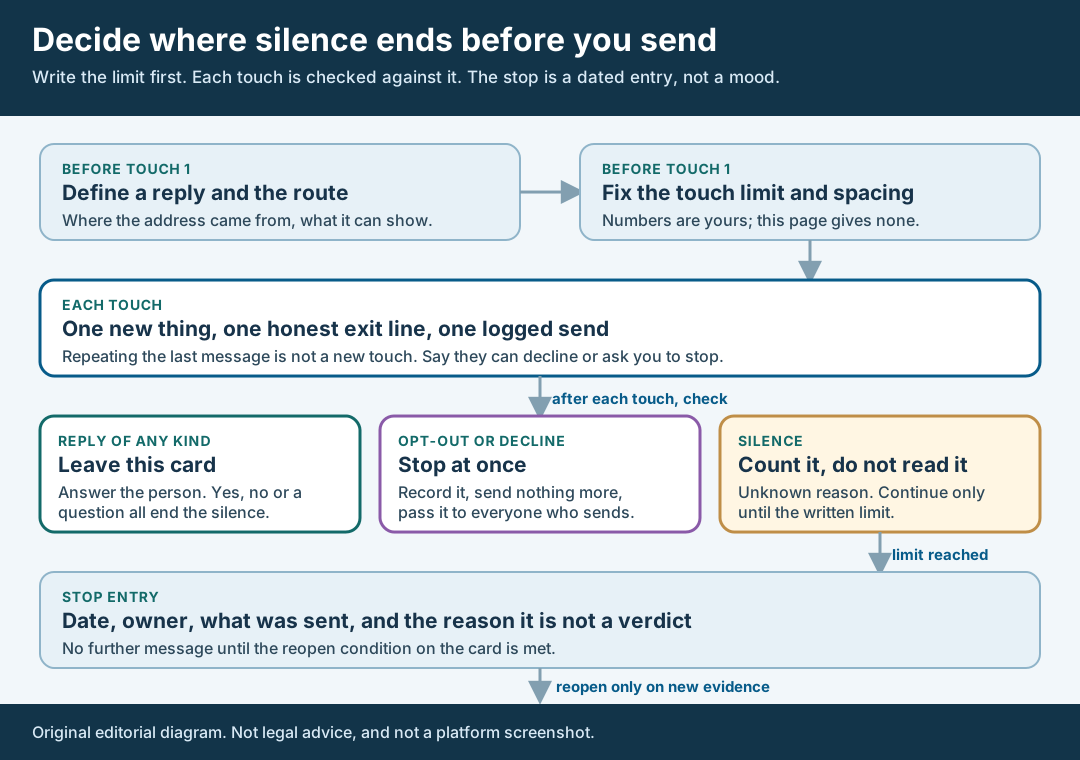
An original editorial map. The limit is written before touch 1, and the stop is a dated entry, not a mood.
Original visual by Superdirector editorial team. Creation date not recorded.
Give every follow-up one new thing and one honest exit
A follow-up is a touch only if it adds something the last message did not. Acceptable additions are a fact that was missing, a corrected detail, a clearer ask in one line or a different route with an explanation of why you are using it. “Just checking in” and a re-send of the same text add nothing. They change the count and the pressure and leave the information the same. Write on the card what is new in each touch before you send it. If you cannot fill that field, the touch is not ready, and the right move is to wait or to stop.
Every touch should give the person a plain way to say no. One line is enough: they can decline, or ask you to stop writing, and you will. This is also where the law becomes relevant for email. The FTC’s CAN-SPAM guide says the Act covers all commercial messages and makes no exception for business-to-business email. It says a recipient’s opt-out request must be honored within 10 business days, that you cannot charge a fee or ask for more than an email address to process it, and that any opt-out mechanism must be able to process requests for at least 30 days after you send the message. It also says a message must carry a valid physical postal address and must not use false header information or deceptive subject lines. FTC: CAN-SPAM Act compliance guide for business. The guide states that each separate email in violation can be subject to penalties of up to $53,088.
Read that as a reason to build the exit line into the card, not as a legal opinion about your messages. Whether a given outreach email is a commercial message, and what you owe, is a question for counsel, and this page does not answer it. What the card can do is make sure the exit line is present in every touch, that an opt-out or decline is recorded with its date, and that the person who sends for you learns of it. An opt-out given to one teammate has to reach everyone who writes to that creator, including other tools and other sequences. The card holds one owner for that reason.
Log silence as a fact, not a verdict
For each touch, record the send date and time with its time zone, the route, what was new in it and whether the exit line was present. Then record what came back: a reply, an opt-out or decline, a delivery failure, or nothing. “Nothing” should be written as no reply received by that date, which is a count and a date. It should not be written as ignored, uninterested or rude. Each of those words claims a reason that your evidence cannot give.
Keep a reply or a decline exactly as written, with the date it arrived. If a creator answers later than your limit, the late answer still counts as a reply and you answer it, whatever your card says. A stop entry ends your outreach; it does not close the person’s door. This is also why the card keeps the creator’s words separate from yours: a quoted no is the person’s decision, and a silence is only your measurement.
Use the log to catch your own drift. If the log shows that a follow-up added nothing, or that a second route was used without a note, the sequence has already left its rule. Fix the card for the next creator rather than editing the entry. If you are running the same sequence for many creators, the same blank register serves them all, one row per touch. Look at the rows together only to see whether your own process followed its rule, such as how often a touch was sent without a new thing. Do not read a reason for silence into the counts. They measure what you did.
Write the stop entry and the reopen condition
When the touch limit is reached with no reply, or at once on a decline or opt-out, write the stop entry. It has five parts: the date, the owner, a plain list of what was sent and when, the reason in plain words and the reopen condition. The reason should read like “limit of the card reached with no reply received,” or “creator declined on this date,” and nothing more. Then send nothing else on that sequence. A last “final reminder” sent after the limit is a touch beyond the limit, and the card should show it as one.
The reopen condition is the one piece of new evidence that would justify a fresh, single message later. It must be something you could check: a changed brief, a dated launch window that now exists, a new product the creator’s audience would care about, or a reply to someone else’s message. It must not be “maybe they will be interested now,” which is the same hope as before. Add a check date and an owner so the entry is looked at once rather than forgotten or reopened by whoever remembers first.
If a creator declined, the next step is a different page. A decline is an answer, and the declined creator guide covers when new evidence could justify another approach. If the person asked you to stop, do not reopen on your own evidence at all. If a stop entry is simply a limit reached, the card keeps the question open for the reopen condition and nothing else.
Walk through a fictional stop rule
Fictional exercise: no real brand, creator, campaign or result was inspected. A made-up brand, Brand A, plans to approach Creator R about a single short video. Before any message is sent, the owner fills in the card. Route: the business email shown on Creator R’s channel About section, noted as provided by the channel owner. What the route shows: nothing about whether the message was opened. Reply: any answer from a person, including a no or a pass to a manager. For the illustration only, Brand A writes a limit of two touches and a spacing of a gap the owner chose and wrote down. These values show where the numbers go and are not a recommendation.
Touch 1 is the opener, with an exit line saying Creator R can decline or ask Brand A to stop. Touch 2 is sent after the written gap and adds one new thing: the brief now has a confirmed delivery window. It carries the exit line again. The log records both sends with their time zones and, after the second, no reply received by that date. It does not record that Creator R ignored the message.
The limit is reached, so the owner writes the stop entry: the date, the two sends, the reason as “limit reached with no reply received,” and a reopen condition: “Brand A has a funded second window and a changed brief.” A check date is set. Weeks later, Creator R replies to touch 2 on their own. The card’s rule applies: a late reply is still a reply. Brand A answers the person and moves to the budget or scope page, and the stop entry stays on file as what happened to that sequence. The scenario predicts nothing about any real creator.
What this page does not decide
This method decides when an unanswered sequence ends and how that end is recorded. It does not write the message, set what you offer or say how many creators should be contacted. For a first message whose launch date is still uncertain, the availability message guide covers what to say about dates and when you will write again. That page sets one next-write date inside a single thread. This one sets a limit across the whole sequence and the record of what happens at it. If you want to decide who to contact before a sequence starts, the task-based shortlist guide covers it.
Three neighboring cases belong elsewhere. A creator who has replied with a budget question moves to the budget reply guide. A creator who has declined is covered by the declined creator guide. A reply from a manager or agent is covered by the manager authority check. None of those pages sets a stop rule for silence, which is the one artifact here.
Nothing here measures how often creators answer a follow-up, how many touches work or what a normal response rate is. Those numbers are not available to us and are not claimed. We did not verify Instagram’s message request behavior, any TikTok or X route, or the law outside the US email guide quoted above, so this page says nothing about them. The legal references show where to look, not what applies to you. For email, messaging and privacy rules in your market, ask counsel.