How-To Guide
How do you read X analytics to decide what to post next?
Connect X metrics to one goal, compare similar posts and turn a pattern into a careful next-post test, with a worked click-rate example.
By the Superdirector editorial team.
At a glance
How do you read X analytics to decide what to post next?
Choose a goal first, then compare similar X posts using metrics relevant to that goal. Impressions indicate how often a post was shown, not how many unique people saw it. Look at actions such as replies, reposts, profile visits, or link clicks in context; treat them as clues, not proof of why a post performed as it did. Turn a recurring pattern into one focused next-post test.
- For traffic, pay attention to link clicks and, where available, what visitors do on your site.
- For conversation, read replies and quotes as well as the total engagement figure.
- Use a consistent comparison window and metric definition; access and available analytics can vary.
Start with the decision you need to make
Analytics are useful when they help you choose what to do next. Before opening a dashboard, write down the purpose of the post: start a conversation, send interested readers to a booking page, explain an offer, or build familiarity with your work. Then choose the signal closest to that purpose. For a booking page, link clicks are more relevant than likes; for conversation, replies and quotes may be more informative than impressions alone.
Keep the main question narrow: “Should the next post explain the booking process more clearly?” is easier to investigate than “How do we grow on X?” Later recommends tying a limited set of core measures to a goal, and presents a cycle of observation, hypothesis, action, and result. Use that as a planning aid, not a guarantee that a metric predicts outcomes.
Decide what would count as a useful signal before reviewing results. For example, if a post asks people to visit a booking page, record link clicks and any attributable bookings you can reliably observe. If you cannot see the downstream action, say so in your notes; do not treat clicks as completed bookings.
Find post metrics you can actually access
Use the metrics available for your own account and posts. The supplied guides describe post-level analytics and broader account dashboards, but their access descriptions differ and may become outdated. Check the current interface on your account; do not assume that another account has the same dashboard or that every metric is available to you.
For each post, note its wording or topic, format, publication date, review window, impressions, and the action tied to your goal. You might also note replies, reposts, profile visits, follows, or link clicks when visible and relevant. Keep the metric definition consistent: a reported engagement total can combine different actions, so it is not a complete explanation of what people did.
Impressions count displays, not unique people. Do not rename them reach or infer that a particular number of individuals saw a post. If your account does not provide the measure you want, work with what you can observe or keep that question open rather than filling the gap with an estimate.
Compare like with like
A simple worksheet makes the comparison explicit. The following is a hypothetical example for a small business that wants more visitors to its appointment-booking page. All figures are invented for demonstration; they are not customer results or a benchmark.
| Hypothetical post | Impressions | Link clicks | What the numbers suggest |
|---|---|---|---|
| A: A short explanation of what happens at a first appointment | 800 | 12 | More displays and clicks in this small comparison |
| B: A direct reminder that appointments can be booked online | 500 | 15 | Fewer displays but more clicks in this small comparison |
If the immediate goal is getting people to the booking page, B is a useful idea to test next: it received more clicks despite fewer impressions in this small hypothetical comparison. That does not establish why. The wording, audience, timing, or ordinary variation could explain the difference. Nor do clicks establish that anyone completed a booking.
For a quick comparison, calculate clicks divided by impressions: A is 12 ÷ 800, or 1.5%; B is 15 ÷ 500, or 3%. These are hypothetical click-through rates for this example, not recommended targets. The calculation is only comparable if both posts use the same definitions and review window. A small difference across two posts is a prompt to investigate, not proof of a reliable pattern.
To make a more useful worksheet, add a few similar posts and calculate the median for the selected metric. A median is the middle value after sorting the observations, and is less pulled by one unusually large result than an average. Compare text with text, or posts with a similar purpose, rather than treating every post as interchangeable. If you have only a few observations, note that limitation.
Turn a pattern into one next-post test
Write down the observation, a plausible explanation, and the next action separately. For the hypothetical booking example: “Observation: the direct booking reminder had more clicks in this pair. Hypothesis: making the next step explicit may help interested readers act. Action: publish another booking-focused post that changes the explanation, while keeping the destination page and call to action consistent.” This is a testable idea, not a conclusion about what X rewards.
Change one main feature at a time where practical. If the next post changes its topic, wording, offer, and timing together, the comparison will not tell you which difference mattered. Organic distribution also varies beyond your control, so even a careful comparison is imperfect. Buffer’s discussion of social media experiments makes this limitation explicit.
Do not convert someone else’s benchmark or timing recommendation into a rule for your account. The supplied Buffer guide includes vendor-reported benchmarks, but the dossier does not establish them as universal or independently validated. Your own comparable observations are more relevant to your specific question, while still not proving cause and effect.
Review the result and keep a useful record
Use a small log: date, post goal, topic, format, review window, impressions, goal-related action, comparison group, observation, and next decision. Add a note about anything that could have affected the comparison, such as a different offer or a timely conversation. Reviewing a series of posts can reveal a pattern worth testing; a single standout post is an anecdote.
For the hypothetical booking workflow, the next decision might be: if another clear booking explanation also earns clicks, try a related explanation; if it does not, inspect whether the post made the next step clear and whether the destination page matches it. If available, check downstream booking data separately. Do not claim the post caused a booking without evidence connecting the two.
If you manage only X, the native metrics available to your account and a spreadsheet may be enough for this routine. A third-party dashboard can be useful when you genuinely need cross-platform reporting, but confirm which metrics it provides and how it defines them. A tool can organize observations; it cannot supply missing account-level evidence or guarantee a business result.
Where Superdirector fits
For someone weighing a customizable AI-run channel around $200 a month, Superdirector could help with parts of this analytics workflow: prepare eligible X text posts for a next-post test and publish them on Growth. Growth is $199/month for two accounts, with no trial. Publishing currently supports only eligible Instagram image carousels and single X text posts, either with per-piece approval or an enabled account Auto-post rule. Finished videos—including TikToks, YouTube videos, and Reels—and fully autonomous channels are upcoming, not current publishing options. Whether delegating saves review time or contributes to results depends on your own assessment; track review effort and customer-defined outcomes rather than assuming either.
Account connection and the source cards you select determine what can publish. Verify that the first hand-approved post is live before enabling Auto-post; you can turn Auto-post off to stop unsent work or pause posting. See Growth pricing and the publishing guide for setup details. For this article’s workflow, compare any delegated effort with your own analytics review and judge results against the goal you set.
When enlarged, scroll horizontally to read the diagram.
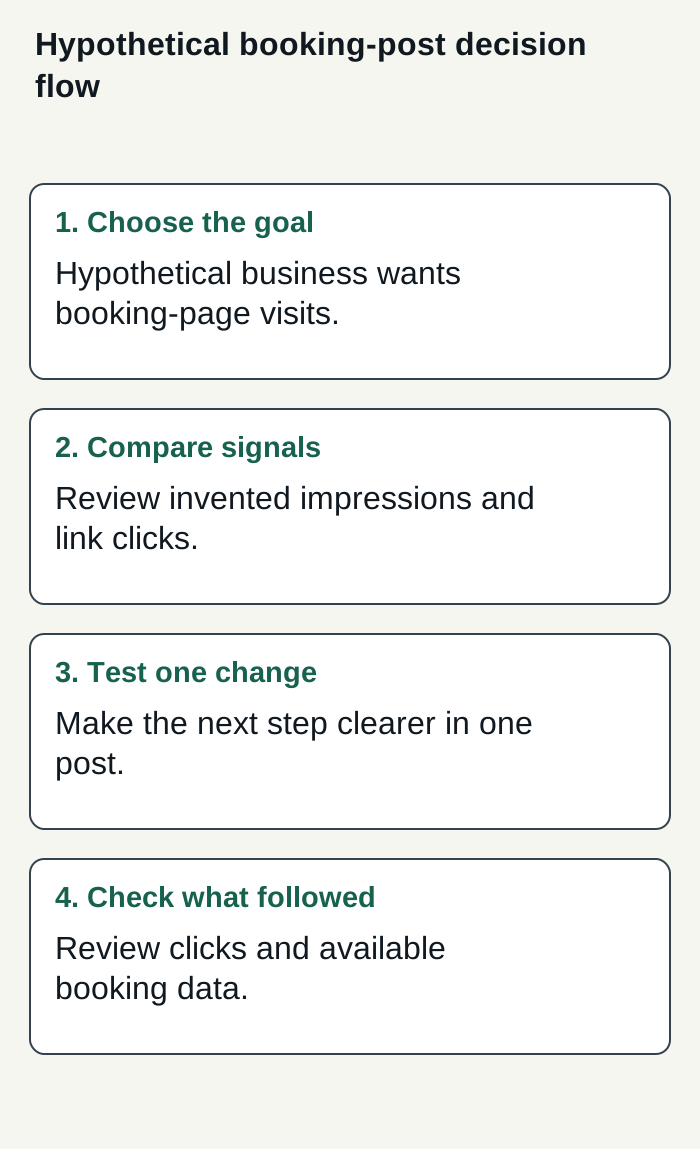
Original editorial diagram of a hypothetical booking-page workflow; example figures are invented, not customer results.
Condensed original editorial illustration. Read the surrounding guidance for qualifications and the complete procedure; any example is fictional and shows no verified customer outcome or product screen.
Illustrative worked example by Superdirector editorial team. Created 2026-11-09.