How-To Guide
How do you read Instagram Insights to decide what to post next?
Connect a goal to Instagram metrics, compare similar posts and choose a next-post test. Includes a worked repair-and-booking example.
By the Superdirector editorial team. Meta and Instagram documentation and the cited practitioner guides were reviewed November 9, 2026.
At a glance
How do you read Instagram Insights to decide what to post next?
Start with the outcome you want, compare similar posts over the same kind of time window, and read the metric that best represents that goal. Check distribution, audience response, and any relevant action such as a profile visit or link tap. Use repeated patterns to choose one next-post experiment; do not treat a high-view post or a single comparison as proof of what will work.
- Match the metric to the goal: discovery, interaction, profile interest, or a measurable next action.
- Compare like with like and record the post's format, topic, age, and any paid or promotional context.
- Check for delay or missing data before drawing a conclusion; an unavailable value is not necessarily zero.
Start with the outcome you want
Instagram Insights helps you examine account-level and individual-content performance. To decide what to post next, first name the outcome you want. A post intended to introduce your account to new people should be judged differently from one meant to prompt saves, conversation, profile visits, or booking-page visits.
Then follow the evidence in order: distribution, audience response, and the action closest to your goal. Compare posts that are reasonably alike, look for a recurring signal rather than a lone outlier, and write one testable idea for the next post. This is a decision method, not a formula for predicting a winner. Meta's help page says Insights can be viewed for the account as a whole or for individual posts over preset or custom periods.
| If your goal is… | Start by checking… | Then ask… |
|---|---|---|
| Discovery | Views or reach; followers versus non-followers where available | Which topics or formats reached people beyond the existing audience? |
| Useful interaction | Saves, shares, comments, or other available interactions | What did people choose to keep, pass along, or discuss? |
| Account interest | Profile visits and follows where available | Did the post prompt people to look at or follow the account? |
| A website or booking action | Relevant link activity and your own booking records | Did people move beyond Instagram to the action you care about? |
These are practical interpretations, not official Instagram rules. If your goal is a sale or booking, a post metric alone cannot confirm that outcome. Pair it with a suitable record outside Insights, such as tracked link visits or bookings, when you have one.
Open Insights and choose a fair comparison
Open your profile dashboard and select Insights. Meta's instructions describe dashboard routes for professional and personal accounts, but the labels can vary. You need a public account to view Insights according to Meta's help page. Select an insight, then choose a preset timeframe or set a custom start and end date.
Set up a comparison you can interpret. Compare the same format where possible, use comparable post ages, and keep the reporting period consistent. A new carousel and an older Reel may differ for reasons beyond their topics. Note unusual context too: a promotion, collaboration, seasonal event, or a change in the offer can complicate a simple comparison.
- Choose the question first. For example: which kind of post prompts more people to visit the booking page?
- Use the same reading point. Compare posts after a similar amount of time rather than mixing a new post with one that has accumulated activity for weeks.
- Keep a simple log. Record date, format, topic, opening idea, the chosen metric, and any relevant context. Meta says eligible public accounts with a Meta One subscription can look back beyond 90 days and export Insights; do not assume those options apply to every account.
If you are checking audience demographics, Meta says to use a preset timeframe and have reach or engagement above 100 viewers. This is a condition for that demographic information, not a general threshold that makes every post comparison reliable.
Read distribution, response, and next actions
First ask whether people saw the content. Views and reach are not interchangeable: the Meta developer documentation defines Reel reach as the estimated number of unique Instagram users who saw the Reel, while Reel views count plays. Read the definition for the media type and Insights view you are using. Use the label shown in the relevant Insights view and avoid treating one as a substitute for the other.
Next, inspect the response that matches your content and goal. Likes, comments, saves, and shares are different actions; an overall interaction total can hide that mix. A practical interpretation might be that saves make a how-to post worth examining for reference value, while comments suggest a topic prompted conversation. Neither action proves the reason someone responded. Use the pattern to shape a question, not to assign a guaranteed meaning.
Finally, check the next action relevant to your goal. Profile visits or follows may help when you are trying to build account interest; link activity may matter when a post points to a booking page. If the metric is not available for a particular post or view, do not enter zero in your log. Meta's developer documentation says unavailable requested data can return an empty dataset rather than zero.
Separate organic from paid context when comparing results. Meta's developer documentation states that certain documented interaction metrics report organic interactions only, while some total metrics can include promoted or ad activity and have specific availability conditions. Do not assume a metric includes paid interactions simply because a post was promoted; check the metric's scope and record what you know about the post.
Work through a hypothetical example
The following figures are invented for illustration; they are not account results or a benchmark. Imagine a neighborhood bicycle-repair shop that wants more visits to its appointment page. The team compares three recent organic carousel posts, each at seven days old, and waits another 48 hours before reviewing Insights to allow for possible data delays. For this fictional example, each post uses a distinct tracked appointment-page link; the shop counts visits to each link during that post's first seven days. These are attributed link visits, not total appointment-page visits or confirmed bookings.
| Hypothetical post | Views | Saves | Profile visits | Attributed link visits |
|---|---|---|---|---|
| A: workshop photo and general caption | 1,200 | 8 | 12 | 2 |
| B: checklist for a flat-tire kit | 760 | 31 | 9 | 1 |
| C: before-and-after repair with booking prompt | 690 | 12 | 24 | 7 |
Post A has the most views, but that alone does not make it the best choice for the stated goal. Post B has the most saves in this small example, which makes a practical checklist a reasonable idea to investigate further. Post C has fewer views than A and B but more profile visits and booking-page visits in this invented comparison, so it is the clearest candidate for a follow-up booking-action test.
The next experiment could keep the before-and-after repair format while changing the example: show a different common repair and use a similarly clear booking prompt. Log the same measures at seven days old, wait another 48 hours before reviewing Insights, and use a distinct tracked appointment-page link for the new post. If the pattern appears again, it gives the shop a stronger reason to test that approach further; it still does not prove the format caused bookings or guarantee a repeat result. One comparison is a clue, not a verdict.
When enlarged, scroll horizontally to read the diagram.
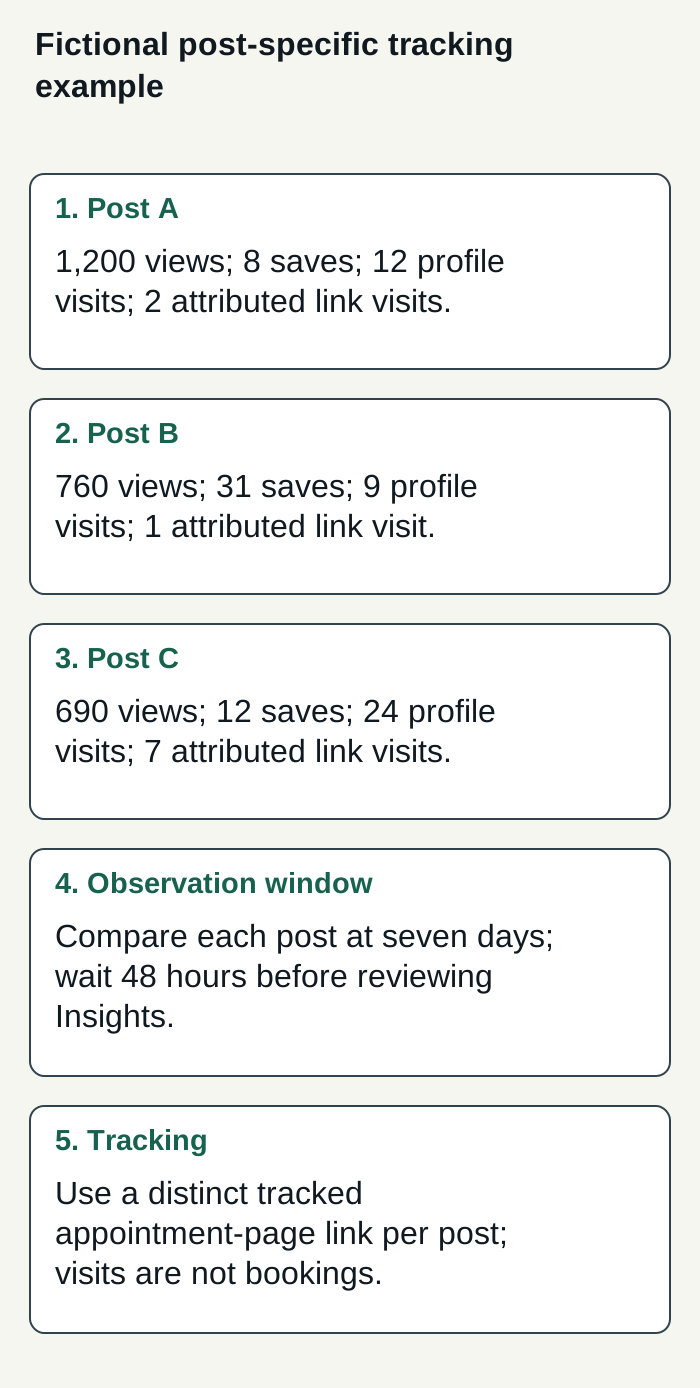
Invented figures compare three organic carousel posts at seven days; link visits are attributed through distinct tracked links.
Condensed original editorial illustration. Read the surrounding guidance for qualifications and the complete procedure; any example is fictional and shows no verified customer outcome or product screen.
Illustrative worked example by Superdirector editorial team. Created 2026-11-09.
Turn the pattern into one test
Before planning, write the observation and the proposed explanation separately. For example: “The repair carousel had more booking-page visits in this comparison” is an observation. “A specific before-and-after example plus a clear prompt may be helping people find the booking page” is a hypothesis. Keeping those statements distinct makes it easier to avoid claiming that Insights proves a cause.
- Find a repeated pattern among comparable posts; do not build a plan around one unusually high or low result.
- Choose one element to test next, such as the topic, opening, format, or call to action. Changing several at once makes the result harder to interpret.
- Use the metric tied to the goal and record it at a consistent point. Add any context that could affect the comparison.
- After the test, decide whether the evidence supports another test, a revision, or dropping the hypothesis. Keep the decision proportional to the amount and quality of data.
This approach is consistent with the practitioner guidance in Socialinsider's Instagram Insights guide, which recommends objective-matched metrics, comparisons over equivalent periods, contextual notes, and recurring patterns rather than reacting to a single outlier. Comparing similar posts is this guide’s additional practical suggestion. Treat that as a useful analysis recommendation, not proof that a particular posting choice will improve results.
Know what Insights cannot tell you
Insights describes activity on your account; it does not provide a universal rule mapping a metric to the next successful post. It also does not, by itself, establish why people responded or whether a post caused a business outcome. Use account data to form and refine hypotheses, and use separate records for outcomes that happen outside Instagram.
Timing and availability matter. Meta's developer documentation says data used to calculate metrics can be delayed by up to 48 hours and that unavailable data can be returned as an empty dataset rather than zero. For a fair review, avoid treating a very recent figure as final; if a value is missing, mark it unavailable and check again instead of recording it as no activity.
Metrics and reporting views can also have specific definitions or limitations. For example, Meta's developer documentation marks impressions deprecated for media created after July 2, 2024. Avoid relying on an older guide's label without checking whether it applies to the content and view you are using. Where paid distribution is involved, verify whether the metric you selected includes it before comparing it with organic posts.
Where Superdirector fits
For a business considering a customizable AI-run channel around $200 a month, Growth currently costs $199 monthly for two accounts and has no trial. It can publish eligible Instagram image carousels and single X text posts, either after per-piece approval or under an enabled account Auto-post rule. Finished video—including TikToks, YouTube videos, and Reels—and fully autonomous channels are upcoming, not current publishing capabilities. The supplied product documentation does not establish access to private Instagram Insights or verification of audience response. Judge the service against results you define and the review effort it actually takes.
Account connection and the selected source cards define what can be published. Before enabling Auto-post, verify that the account’s first hand-approved post is live; turning Auto-post off stops unsent posts, and Pause posting holds the queue. To assess fit, track your own defined results and the time spent reviewing—not assumed outcomes or minimal oversight. AI credit use varies by task. See Superdirector's pricing and the publishing guide for current setup and controls.
The publishing setup connects selected source cards to the chosen account; Instagram requires a Business or Creator account. When you enable Auto-post for that account, finished eligible posts from those cards, including posts made in chat, can publish at their calendar times without individual approval. Turning it off stops unsent posts; Pause posting holds the queue. These controls define current delegated publishing, rather than promising a fully autonomous channel or business results.