How-To Guide
What are the best Buffer alternatives in 2026?
Buffer alternatives sorted by the job you need, with each tool's monthly price at 3, 5 and 10 channels from vendor pages and a checklist for switching.
By the Superdirector editorial team. Vendor pricing pages read November 6, 2026.
At a glance
What are the best Buffer alternatives in 2026?
Pick the alternative by the Buffer limit you hit. At 10 channels Buffer Essentials is $60 a month and Team $120, while Postiz ($39) and Metricool ($25 for one business) cost less for one person. For approvals, evergreen repeats, an Instagram grid or a shared inbox, a specialist tool does that one job better; if your queue sits empty, Superdirector (ours) makes carousels and X posts and posts them. One person on one to three channels can stay on Buffer Free.
- Past 10 channels Buffer drops to $4 a channel, so 25 channels cost $120 on Essentials.
- Queued Buffer posts can still go out after you switch, so delete them channel by channel.
The short answer: leave Buffer for the tool that fixes the limit you hit
Pick a Buffer alternative by the Buffer limit you keep paying around. Buffer bills every channel ($6 a month each on Essentials, so 4 channels cost $24 and 10 cost $60), gives Essentials one user, and keeps approvals on Team at $12 per channel. If the channel bill is the problem, Postiz ($39 for 10 channels) or Metricool ($25 for one business) cost less at 10 channels. For approvals, Planable or Loomly. SocialBee repeats evergreen posts, Later plans an Instagram grid, and the larger suites add a shared inbox. If what you lack is the posts themselves, Superdirector (ours) makes carousels and X posts and posts them.
Buffer is still a good pick for one person with one to three channels. Its pricing page lists a free plan for up to 3 channels and Essentials at $6 per channel a month, with a 14-day trial on paid plans.
Name the Buffer limit you hit
Buffer publishes its plan rules in plain text, and most reasons people give for leaving trace back to five of them.
- You pay for every channel. Paid plans bill per channel, and when you upgrade from Free you pay for the three free channels too. A channel is one connected profile or page, so five brands with an Instagram account and a Facebook page each are 10 channels: $60 a month on Essentials and $120 on Team with monthly billing.
- Essentials has one user. Free and Essentials include one user each. A second person means Team, which doubles the per-channel rate for the first 10 channels.
- Approvals and branded reports are Team-only. Buffer's feature table marks both No on Free and Essentials.
- The free plan is small. Up to 3 channels and 10 scheduled posts per channel at any one time.
- The inbox is for comments. Buffer describes its community inbox as a place to manage and reply to comments. Metricool's comparison adds that it does not handle direct messages, and SocialPilot's says Buffer's analytics cover only Facebook, Instagram, X and LinkedIn with no competitor benchmarking. Both are rivals, so treat those two as their readings.
Before you leave, note what Buffer gives you that a cheaper tool may not. Its AI Assistant is unlimited on every plan, Free included; every plan has API access (1,000 requests per channel a month on Free); Essentials schedules a first comment on Instagram and LinkedIn posts; nonprofits get 50% off; and 'unlimited' scheduling has a stated fair-use cap of 5,000 posts per channel, which Buffer says no one has exceeded. Its prices were last changed in November 2025, so the per-channel rates above have held for a year.
Price your own channel count in each tool
Every vendor prices by a different unit: Buffer by channel, Metricool by brand, SocialBee by profile count, Planable by workspace, the big suites by user. To compare them, we priced the same three setups for one user with monthly billing, using only each vendor's own pricing page on November 6, 2026: Buffer, Postiz, Metricool, SocialPilot, SocialBee and Loomly.
| Tool | Billing unit | 3 channels | 5 channels | 10 channels |
|---|---|---|---|---|
| Buffer Essentials | per channel | $18 | $30 | $60 |
| Buffer Team | per channel | $36 | $60 | $120 |
| Postiz | plan by channel count | $29 | $29 | $39 |
| Metricool Starter | brand (one profile per network) | $25 | $25 | $25 |
| SocialPilot Essentials | plan + $4 per extra account | $30 | $30 | $42 |
| SocialBee | plan by profile count | $29 | $29 | $49 |
| Loomly Starter | plan | $65 | $65 | $65 |
Read the Metricool row with care. A Metricool brand is one business with one profile on each network, so a single company posting to 3 to 10 different networks fits in one brand (X needs a paid add-on on Starter, which this table leaves out); an agency with 10 clients needs 10 brands ($45 a month, or $36 billed yearly). Tools whose pages show only yearly-billed prices (Later), a per-user price, or a per-workspace price (Planable) are left out because they do not map to a channel count; they are covered below. The cost worksheet has the same rows with a blank line for your own setup.
Past 10 channels, Buffer's own volume pricing changes the math. Channels 11 to 25 cost $4 each on both Essentials and Team, so 25 channels come to $120 a month on Essentials and $180 on Team, and yearly billing takes about two months off. If you run many channels for one team, price Buffer Team at your real count before you leave: the per-channel bill that hurts at 6 to 10 channels flattens out above them.
When enlarged, scroll horizontally to read the diagram.
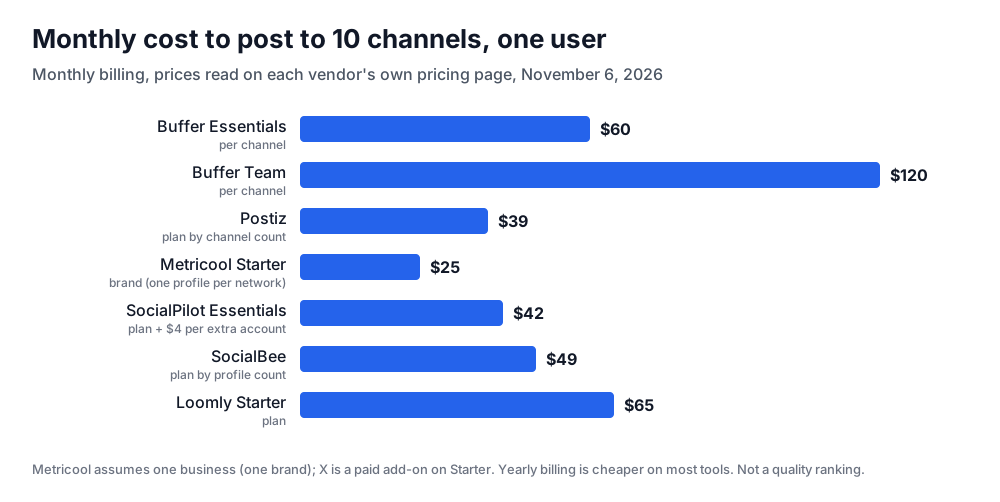
Original chart from each vendor's pricing page, read November 6, 2026, monthly billing. A price comparison, not a quality ranking.
Illustrative worked example by Superdirector editorial team. Creation date not recorded.
Pick the tool built for that limit
Each limit points to a different kind of tool. Starting prices below are from each vendor's own page on November 6, 2026; the sections after the table cover each pick.
| If you need | Look at | Starting price on its own page (Nov 6, 2026) |
|---|---|---|
| Lower cost at 5 to 10 channels | Postiz, Metricool, SocialPilot | Postiz $29/mo (5 channels); Metricool Starter $25/mo (5 brands); SocialPilot $30/mo (7 accounts) |
| Approvals and more than one user | Planable, Loomly | Planable $33 per workspace/mo; Loomly $65/mo billed monthly (12 accounts, 3 users) |
| Evergreen posts that repeat | SocialBee | $29/mo billed monthly (5 profiles) |
| A visual Instagram planner | Later | $18.75/mo billed yearly (Starter) |
| Inbox, listening and team reports | Hootsuite, Sprout Social | Hootsuite $99 per user/mo billed yearly (Standard); Sprout $99 per seat/mo billed monthly |
| Carousels and X posts made for you, then posted | Superdirector | $29/mo Starter; $199/mo Growth posts to Instagram and X |
If the per-channel bill is the problem: Postiz, Metricool or SocialPilot
These three are the closest like-for-like swaps: schedule posts, see basic analytics, pay less as you add channels. Figures come from the Postiz, Metricool and SocialPilot pricing pages.
| Tool | What you get at the entry price | Watch for |
|---|---|---|
| Postiz | Standard $29/mo: 5 channels and unlimited posts; Team $39/mo: 10 channels. Every plan includes an MCP server, CLI and API, so an AI agent can schedule for you. | 7-day trial, shorter than most |
| Metricool | Starter $25/mo billed monthly for up to 5 brands ($20 yearly), $45 for 10 ($36 yearly). The Free plan covers 1 brand and 20 posts a month. | Free excludes LinkedIn and X; on Starter, X is a paid add-on |
| SocialPilot | Essentials $30/mo billed monthly ($25.50/mo billed yearly): 7 accounts, 1 user, then $4 per extra account. | One user on Essentials, like Buffer |
The saving grows with your channel count. At 5 channels, Buffer Essentials is $30 against $29 for Postiz and $30 for SocialPilot; at 10 channels it is $60 against $39 and $42. Metricool stays at $25 for one business at any of these counts.
If you need approvals and a second user: Planable, Loomly or Buffer Team
If a cofounder, freelancer or client has to sign off before a post goes out, Buffer sends you to Team at $12 per channel. Two tools are built around that review step.
- Planable (pricing) prices per workspace (one client, brand or location), from $33 a month, and the first 50 posts are free with no time limit and no card.
- Loomly (pricing) Starter is $65 a month billed monthly ($49 yearly) for 12 accounts and 3 users, with approval workflows and roles.
- Buffer Team stays reasonable for a small team on three to five channels: $36 to $60 a month with unlimited users.
If you want evergreen posts to keep running: SocialBee
Buffer's queue publishes each post once; to repeat one, you duplicate it by hand. SocialBee is the pick when you want a library of posts, such as tips, testimonials or product explainers, to repeat on a rotation by category. Bootstrap is $29 a month billed monthly for 5 profiles and one user; Accelerate is $49 for 10 profiles and adds post approval. It has a 14-day free trial.
If you plan Instagram as a grid: Later
If Instagram is your main channel and you plan by how the grid will look, Later is the specialist. Its pricing page lists Starter at $18.75 a month billed yearly, with 30 scheduled posts per profile a month, and a 14-day free trial. Compare the yearly figure with Buffer's monthly one before you decide. Our comparison of Sprout Social, Hootsuite and Later covers Later against the larger suites.
If you need an inbox, listening and reports: Hootsuite or Sprout Social
These are bigger tools, not cheaper Buffers. Hootsuite Standard is $99 a user a month billed yearly for up to 10 accounts; Sprout Social Essentials is $99 per seat billed monthly ($79 yearly). On yearly billing, one Hootsuite seat ($99) costs about twice as much as 10 channels on Buffer Essentials ($50), and three seats ($297) about three times Buffer Team ($100, unlimited users). Pick one when several people answer comments and messages every day or you report to clients; for a founder scheduling their own posts, the extra money buys features you will not open.
If the real gap is knowing what to post: Superdirector
Some founders who leave Buffer have a full calendar tool and an empty queue. Swapping schedulers will not fix that. Superdirector, which publishes this guide, makes the posts: it tracks the accounts, competitors and keywords you name on Instagram, TikTok, YouTube and X, and turns the formats taking off into carousels and X posts in your brand. Growth ($199 a month, two accounts, $99 per extra account) posts Instagram carousels and single X text posts after you approve the first one, or under a standing Auto-post setting. Starter ($29 a month) has a 7-day free trial with 100 credits (card required).
It does not replace Buffer for LinkedIn, Facebook, TikTok or YouTube posting, which it does not do today; AI video and full autopilot are coming soon. You stay the publisher and label AI content where a platform requires it, and you can keep Buffer Free for the other channels. See how it works.
Move the queue without double-posting
Buffer's own rules shape a safe switch. The step people miss is the queue: Buffer says scheduled posts still publish after a trial ends as long as the channels are not locked, so a queue you re-create elsewhere can go out twice.
- List what you have. Write down every connected channel, who has access, and how many posts are queued on each.
- If you are on a legacy Buffer plan, test before you touch it. Buffer's help center says it cannot move you back to legacy pricing once you switch plans, and suggests testing on a free account under a different email.
- Trial the new tool on two channels. Hootsuite, SocialBee and Later offer 14 days, Postiz 7. Post real content for a week.
- Re-create the queue, then delete the Buffer copies of every post you moved, channel by channel.
Keep Buffer Free for a month, then cancel
Do not cancel on the day you switch. Drop Buffer to Free for a month as a fallback: Free keeps 3 channels with 10 queued posts each and locks any channels beyond 3, so keep your three most important channels connected to cover a gap if the new tool fails to publish. Cancel once the new tool has posted on schedule for a few weeks, and re-check its price at checkout, because several prices above are billed yearly and the monthly figure is higher.