How-To Guide
What are the best AI social media post generators for a small brand in 2026?
AI social media post generators compared for small brands on brand fit, formats, posting and price from vendor pages, with a five-line brand-fit scorecard.
By the Superdirector editorial team. Vendor pages and the guides cited were read November 6, 2026.
At a glance
What are the best AI social media post generators for a small brand in 2026?
Choose by the post you publish, then test. Caption writers inside a scheduler: Buffer's AI Assistant, Later's Caption Writer and SocialBee. Designed images and carousels: Predis.ai, Piktochart AI and Marky. When the hard part is deciding what to post, hand the tool a format that is already winning among accounts your buyers follow. Then run the same five briefs through two tools and keep the one whose drafts need two edits or fewer.
- A blank prompt returns the average post; start from a format your buyers already reward.
- Score drafts on look, voice, facts, platform fit and edits needed, 0 to 2 each.
- Prices were taken from each company's website on November 6, 2026.
The best AI post generator depends on the post you need
For a small brand, the right AI post generator is the one whose drafts you would publish after two small edits at most, in the format you really post. That is a property of your brand as much as of the tool: a generator fed a vague prompt returns the average post for your category, and the same generator fed your facts, two of your best posts and a format your buyers already reward returns something close to publishable. So the order of work is: decide which format you need, give the tool a proven idea, score five drafts on a brand-fit card, and only then compare prices. Caption writers sit inside schedulers such as Buffer, Later and SocialBee; designed images and carousels come from Predis.ai, Piktochart AI or Marky.
Decide what a finished post means for you
"AI post generator" is four jobs sold under one name: writing a caption, designing an image, building a carousel and publishing on a schedule. Most small brands need one or two of them, and paying for the other two is how a $19 tool turns into a $40 one. Pick the job first:
| You publish mostly | You need a tool that | Start with |
|---|---|---|
| Captions on your own photos | Writes in your voice inside a scheduler | Buffer, Later, SocialBee |
| Designed single images | Designs on-brand graphics from a prompt | Piktochart AI, Marky |
| Instagram carousels | Builds multi-slide posts with your brand kit | Predis.ai, Piktochart AI, Superdirector (ours) |
| X posts and threads | Writes short text in your voice | An X-specific writer such as Typefully or XPatla, not a general generator |
| Short video | Makes video from text | Predis.ai, which lists short video among its formats |
When enlarged, scroll horizontally to read the diagram.
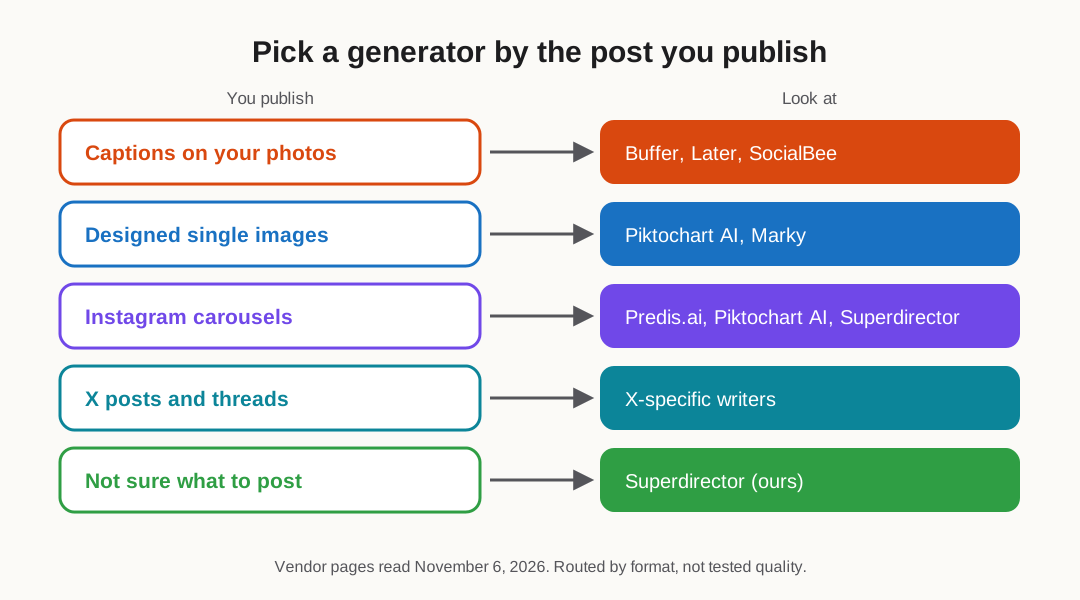
Original editorial map from vendor pages read November 6, 2026. It routes by format, not by tested quality.
Original visual by Superdirector editorial team. Creation date not recorded.
Give the generator a proven idea, not a blank prompt
Every generator in this guide starts from a prompt, and a vague prompt returns the average post. Hootsuite's own roundup calls brand training (voice, style guide, past posts) the biggest single influence on output quality. The second influence is the starting idea: a format your buyers already respond to on other accounts.
- List five accounts your buyers follow: two competitors, two creators, one adjacent brand.
- Once a week, mark the posts running far ahead of that account's norm, and log each in a line: its hook, its format (carousel, list, before and after) and your guess at why it landed.
- Give the generator that line, your product facts and two of your own best posts, and ask for the same structure about your product.
- Write or check every word about your product yourself, and reuse only the structure: no other account's text, images or footage.
How to keep that log is in our competitor content walkthrough; where a generator belongs in your week is in our notes on handing social jobs to AI.
Score five drafts on a brand-fit card
"On-brand" is easy to claim and quick to check. During each trial, give every shortlisted tool the same five briefs, then score every draft 0, 1 or 2 on five lines. The card is ours; the brand-fit scorecard has it ready to fill.
| Line | 2 points | 0 points |
|---|---|---|
| Looks like you | Your colors, fonts and logo used correctly | Generic template look |
| Sounds like you | Reads like your best posts | Hype words you never use |
| Facts | Only facts you supplied | An invented number, claim or feature |
| Platform fit | Right size and length for where it will run | A landscape image for a vertical feed |
| Edits needed | Two small edits or fewer | Rewrote the hook or the design |
Score 1 when a line is in between: usable after a real fix. Our own cut-off, not a published benchmark: a tool averaging 8 of 10 across five drafts is worth paying for; 5 to 7 means retest it with better inputs (more of your posts, clearer facts); under 5, keep looking. Weigh edits needed most, because that is your weekly time.
Compare generators on brand fit, formats, posting and price
How we built this list: prices and features were read from each company's website on November 6, 2026. Superdirector belongs to us; it carries an "ours" label wherever it appears. No side-by-side trial was run, so the list groups tools by job and assigns no quality score. Canva's pages would not load when we checked, so Canva is left out rather than described from memory.
We took each row from the company's pricing or product page on November 6, 2026; "vendor claim" marks what we could not check. The generator worksheet holds the same rows plus your scores.
| Tool | Brand fit | Formats | Publishes | Price (vendor page) |
|---|---|---|---|---|
| Buffer AI Assistant | Rewrites, tone and length per platform | Captions | Yes, its scheduler | Free for 3 channels; Essentials $5 per channel monthly on an annual plan |
| Later | Caption Writer learns tone from your past posts | Captions and ideas | Yes, scheduler | Starter $18.75 a month yearly (5 AI credits); Growth $37.50 (50 credits) |
| SocialBee | Unlimited AI generation included from Bootstrap up | Captions and posts | Yes, scheduler | Bootstrap $29 a month (5 profiles), 14-day trial |
| Ocoya | AI generation metered by credits | AI posts | Connects 5 channels on Starter | Starter $29 monthly: 5 channels, 300 credits; trial is 7 days, card up front |
| Predis.ai | Brand colors, tone and logo applied to designs | Images, carousels, short video | From Rise ($40 a month yearly); Core cannot auto-post | Core $19 a month yearly ($32 monthly), 3-day trial with card |
| Hootsuite | AI posts and images inside a team suite | Captions and images | Yes, up to 10 accounts on Standard | From $99 a user a month billed yearly; 14-day trial |
| Piktochart AI | Prompt to designed post; brand controls not stated on the page we read | Designed Instagram posts incl. carousel sizes | Not stated on its generator page | Free plan with 50 credits a month (per its own roundup) |
| Marky | Designs the image in your brand (vendor claim) | Caption and branded image | Posts to 7 platforms (vendor claim) | From $39 a month |
| Superdirector (ours) | Brand profile from your site or account; remakes formats winning for accounts you track | Carousels, image drafts, X posts and threads | Carousels to Instagram, text posts to X, on Growth | Starter $29 (7-day free trial with 100 credits, card required); Growth $199 for two accounts |
- Buffer's AI Assistant tailors a post's wording for LinkedIn, Threads, X, Instagram and Bluesky; Buffer's plans connect 3 channels free, and Essentials is $5 per channel monthly on an annual plan.
- Later's AI tools page says Caption Writer learns your brand's tone from your past posts; captions cost one credit each, so Starter's 5 credits a month is a taste, not a workflow.
- On Later's pricing, the yearly-billed Starter plan works out to $18.75 monthly and carries 5 AI credits; Growth is $37.50 with 50.
- Predis.ai's pricing puts auto posting on Rise and above; Core lists "No Auto Posting". Its trial lasts three days and takes a card.
- Hootsuite's plans page says every plan can generate posts and images with AI, and trial accounts are limited to 10 to 20 posts a day per organization.
- SocialBee bundles unlimited AI generation from its Bootstrap plan; Ocoya meters AI by credits (300 a month on Starter).
- Piktochart's Instagram post generator makes posts in square, landscape, story and carousel sizes; its own roundup says free users get 50 credits a month.
- Marky's comparison page says it writes the caption, designs the image in your brand and posts to 7 platforms, from $39 a month; these are its own claims.
Check what each tool can publish for you
Generating and publishing are often priced separately. Predis.ai's Core plan makes posts but cannot auto-post them, and Piktochart's generator page says nothing about scheduling. Buffer, Later, SocialBee and Hootsuite each include a scheduler: you approve the post and it goes out at the time you set. Whatever posts for you, you are still the publisher: read each post before it goes out, and label AI content wherever a platform's rules ask for it.
Leaving a tool you already pay for? Our alternatives guides sort replacements by the reason people leave. Beyond post generators, the broader picture is in our roundup of AI marketing tools by job and the small-business AI marketing agent comparison.
How Superdirector differs from a prompt box
We make Superdirector, and its starting point is your brand and your niche, not an empty prompt. It reads your website or a social profile to build a brand profile, follows rivals, creators and search terms you choose across X, Instagram, YouTube and TikTok, and rebuilds the formats gaining ground as carousels, images and X posts with the same kind of hook and structure, written fresh in your look and voice rather than copied. On Growth ($199 a month, which covers two accounts) it can post Instagram carousels and single X text posts once you approve the first or switch on Auto-post; Starter costs $29 a month and has a 7-day free trial with 100 credits (card required). Its headline reads "Autonomous social media growth.*", and the asterisk says "AI video and full autopilot are coming soon", so any filming is still yours to do.