How-To Guide
What are the best Later and Planoly alternatives for Instagram-first brands?
Later and Planoly alternatives for Instagram-first brands: grid planners, prices by billing unit, Instagram's own carousel limits, and how to switch safely.
By the Superdirector editorial team. Vendor pricing pages and Instagram's developer documentation read November 6, 2026.
At a glance
What are the best Later and Planoly alternatives for Instagram-first brands?
Hopper HQ and Plann are the closest grid-first swaps for less money, and Later and Planoly are each other's best alternative. Buffer and Metricool cost less if you also post to other networks; Later Growth, Planoly Growth and Hopper HQ Scale add a second user, and Later and Hopper HQ also list approvals. If you need the carousels made, not only scheduled, Superdirector (ours) builds them from formats working in your niche and posts them on Growth.
- Entry prices: Hopper HQ $6 per account, Planoly from $14, Plann $15, Later $18.75 billed yearly.
- Instagram's API allows 20-slide carousels, crops every slide to the first, and its publishing page lists shopping tags as not supported.
- Rebuild your link-in-bio page before changing the profile link.
The short answer, priced for three common setups
Which planner is cheapest depends on what each one counts. Hopper HQ and Buffer charge per connected account or channel, Later and Planoly per social set (one profile on each network), and Plann and Metricool per brand. So one Instagram account favors a per-account price, three networks for one brand favor a set or brand plan, and a second person who approves posts moves you up a tier almost everywhere. Monthly prices below are from each vendor's page on November 6, 2026, yearly prices in brackets where the page shows them.
| Tool | One Instagram account, one user | Instagram, TikTok and Pinterest for one brand | One brand on two networks, plus an approver |
|---|---|---|---|
| Hopper HQ | Grow: $6 ($5) | Grow: $18 ($15) | Scale: $24 ($20), unlimited users and approvals |
| Buffer | Essentials: $6 ($5) | Essentials: $18 ($15) | Team: $24 ($20), unlimited members and approval workflows |
| Later | Starter: $18.75 billed yearly | The same Starter plan covers all three | Growth: $37.50 billed yearly, 2 users and approvals |
| Planoly | Starter: from $14 | The same Starter plan covers all three | Growth: 2 users; its page lists no approval feature |
| Plann | Power User: $15 ($12.50) | The same Power User plan covers all three | Build: $30 ($25), 2 users and approval flows |
| Metricool | Free (20 posts a month) or Starter $25 ($20) | Free or Starter $25 ($20) | Advanced: from $67 ($53), post approval system |
| Tool | Best for | Bills by | Entry price on its page (Nov 6, 2026) |
|---|---|---|---|
| Later | Grid planning plus a strong link in bio | Social set | $18.75/mo billed yearly |
| Planoly | Grid planning plus DM automation and a link-in-bio store | Social set | From $14/mo |
| Hopper HQ | A grid planner priced per account | Connected account | $6/mo per account, monthly |
| Plann | Instagram auto-posting with product tagging, one brand | Brand | $15/mo monthly |
| Buffer | Cheap per-channel scheduling beyond Instagram | Channel | $6/mo per channel |
| Metricool | Several brands, analytics, a free plan | Brand | $25/mo for up to 5 brands ($20 yearly) |
| Superdirector | Carousels made from formats working in your niche, then posted | Plan | $29/mo Starter; posting on $199/mo Growth |
What Instagram lets any scheduler do, whichever you pick
Some limits people blame on a planner come from Instagram itself. Schedulers that auto-publish go through Instagram's content publishing API, and its rules apply to all of them:
| Instagram's API rule | What it means for your carousels |
|---|---|
| Carousels are limited to 20 images, videos, or a mix | A scheduler can publish up to 20 slides; plan long carousels within that |
| Every carousel image is cropped to the first image, 1:1 by default | Export every slide at the same ratio as slide one, or later slides get cropped |
| Shopping tags are not supported | Plan to add product tags in the Instagram app, unless the tool you pick shows it tags at publish time |
| 100 API-published posts per account in a 24-hour moving period (the carousel section of the same page says 50); a carousel counts as one | Plan well under the lower figure; a brand posting a few times a day is far below both |
Where the API cannot do something, some tools fall back to a reminder. Planoly says it auto-posts when platforms allow it and sends a push notification to post natively, with music and editing tools, when they do not. Ask any tool you trial which of your post types it publishes and which it only reminds you about.
Before you switch, protect your link in bio and media
- Copy every link on your link-in-bio page into a document, with the order and labels.
- Rebuild the page in the new tool first, then change the link in your Instagram bio, so the profile never points at a dead page.
- Download your media library before you cancel, including any images you edited inside the old planner.
- Re-export carousel slides at one ratio. The API crops later slides to the first one.
- Check product tagging. Instagram's publishing documentation lists shopping tags as not supported; if your new tool cannot tag at publish time, add them in the app.
- Check your other networks. If you also post to X, confirm the new tool auto-posts there and does not only send reminders.
Later and Planoly, read from their own pricing pages
Both bill by the social set, which Planoly defines as up to one of each social channel, and both start you with one user. Figures below are from the Later and Planoly pricing pages.
| Later | Planoly | |
|---|---|---|
| Entry price shown | Starter $18.75/mo billed yearly; Growth $37.50/mo billed yearly | Plans from $14/mo |
| Entry plan | 1 social set (8 profiles, one of each), 1 user, 30 posts per profile a month; no extra sets or users | 1 social set, 1 user, unlimited uploads; extra sets and users need Growth |
| Adding more | Growth: 2 social sets, 2 users | Growth: 2 social sets, 2 users, then $10/mo per extra set and $5/mo per extra user |
| Free option | 14-day trial | Free mobile plan with 10 uploads a month; 14-day trial on paid plans |
| Beyond scheduling | Link in bio (a mini web page on Instagram, TikTok and Snap profiles) | Link-in-bio store, automated replies, comments and DMs |
| X (Twitter) | Not supported since August 2025, per Metricool | Reminder only, no auto-post, per Planoly's guide quoted by Blotato |
Later shows yearly-billed prices and Planoly a 'from' price, so compare the checkout total, not the headline figure. The planner comparison sheet lists each tool's billing unit, entry limits and trial.
When enlarged, scroll horizontally to read the diagram.
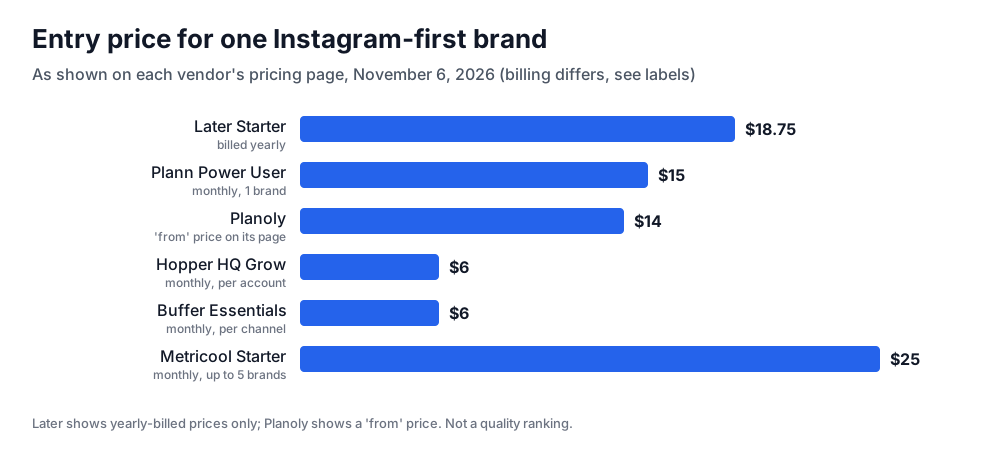
Original chart from each vendor's pricing page, read November 6, 2026. Billing periods differ as labelled; not a quality ranking.
Illustrative worked example by Superdirector editorial team. Creation date not recorded.
If you want the same grid planner for less: Hopper HQ or Plann
Hopper HQ (pricing) prices per connected account: Grow is $6 an account a month ($5 yearly) with one user, unlimited posts, a visual planner and link in bio, after a 14-day trial. For a brand with one Instagram account, that ties Buffer's $6 per channel as the lowest paid entry price in this list. Plann (pricing) bills by brand: Power User is $15 a month ($12.50 yearly) for one brand and one user, with Instagram auto-posting and product, people and location tagging. Its free plan schedules Instagram only, with 5 video posts a month.
If Instagram is first but not only: Buffer or Metricool
Buffer (pricing) costs $6 per channel a month on Essentials and can schedule a first comment with Instagram posts; three channels come to $18. Metricool (pricing) bills by brand, one profile per network: Starter is $25 a month billed monthly ($20 yearly) for up to 5 brands, and the free plan covers one brand and 20 posts a month (it excludes LinkedIn and X). On Starter, X costs $10 per account a month extra, per Metricool's own comparison. Neither is grid-first, so pick them when the calendar matters more than the feed preview.
If a teammate approves posts: Later Growth, Planoly Growth or Hopper HQ Scale
A cofounder or client who signs off on posts needs a second seat. Later Growth ($37.50 a month billed yearly) includes 2 users and 2 social sets. Planoly Growth includes 2 users and 2 social sets, and adds users at $5 a month each. Hopper HQ Scale is $12 per account a month with unlimited users, team permissions and content approvals, which is cheaper than a social-set plan if you run one or two accounts.
If comments and DMs are the bottleneck: Planoly
Planners plan and publish; most leave replies to you. Octonity's comparison says that with Later, once comments and DMs pile up you are back to answering them natively. Later's own pricing page does list a social inbox from the Growth plan up, so check that before you leave for this reason alone. Planoly's pricing page lists Instagram DM automation on each paid plan and auto-responses to repeat questions, which suits a shop whose comments are full of 'link?' and 'price?' questions.
If you need the carousels made, not only scheduled: Superdirector
Every tool above assumes the slides already exist. Superdirector, which publishes this guide, starts earlier. It watches the accounts, competitors and hashtags you choose on Instagram, TikTok, YouTube and X, picks posts and formats that are taking off, and rebuilds them as carousels in your brand, with the same hook and structure but your words and visuals. On Growth ($199 a month, two accounts) it posts Instagram carousels after you approve the first one or under a standing Auto-post setting; Starter ($29 a month) has a 7-day free trial with 100 credits (card required).
It does not post Reels, Stories or video today; AI video and full autopilot are coming soon. You remain the publisher and label AI content where Instagram requires it. See how it works.