How-To Guide
How do you make AI UGC videos step by step?
Write the evidence sheet, script a presenter rather than a customer, generate one master, check it for lip sync, hands and product shape, then test.
By Bell Chen, founder of Superdirector — how the analysis works.
At a glance
How do you make AI UGC videos step by step?
Write down what the product really does before you write a word of script. Then script the AI presenter as a presenter, not as a customer, use a face and voice you own or have permission to use, and generate one short master clip. Review that clip for mouth timing, hands on the product, the product's shape and label, and a voice that sounds read rather than spoken. Cut in real product footage where accuracy matters, make variants that change one thing at a time, and turn on the AI label on platforms that ask for it.
- The script comes from an evidence sheet, so every line can be checked.
- An AI presenter can show and explain a product. It cannot say it used the product.
- Review one master clip before you generate twenty variants.
The seven steps and the check that ends each one
Each step below finishes with a check. Do not start the next step until the clip or document in front of you passes it; fixing a garbled label or a drifting mouth costs one regeneration now and one per variant later.
| Step | Output | Pass it on only when |
|---|---|---|
| 1. Evidence sheet | One page of product facts, approved claims, offer and usable footage | Every claim has a source someone on your team can name |
| 2. Presenter lines | A script with no first-person use or results | No line says the presenter bought, used or benefited |
| 3. Face and voice | An approved presenter as three stills | You can show the licence or the written yes for the face and voice |
| 4. Script blocks | Hook first, split into clip-length blocks | Each block ends at a natural cut and fits the tool's maximum |
| 5. One master clip | A single generated clip, watched with and without sound | Mouth, teeth, eyes, voice, hands, product and captions all pass |
| 6. Real footage | Filmed or recorded proof shots cut into the master | No feature is proven only by a generated shot |
| 7. Variants and label | A small matrix and the platform AI label | Each variant changes one thing and the label is on |
Write the evidence sheet
Vendor tutorials usually open on their own avatar library. Begin with a plain document instead: what the product does, in words your team has already signed off. Generative tools write and perform whatever the prompt suggests, with the same confident delivery whether the line is true or not, so the checking has to happen before the prompt exists.
MakeInfluencer's guide calls this an evidence sheet. For a refillable water bottle, a usable sheet might look like this:
| Row | Example entry |
|---|---|
| What it is | Insulated steel bottle, 750 ml, screw lid with a carry loop |
| What can be shown on camera | Filling it, the lid sealing, ice still in it after a commute |
| Approved claims and their source | Hours cold, from the lab test the product team holds |
| Offer | The current code and its end date, or no offer at all |
| Banned words | Any health claim; 'best' or 'number one' |
| Footage you may use | Studio photos, the packaging shoot, two phone clips of the lid |
| Audience and next step | Commuters; tap through to the product page |
Each line of the script should point to a row here. When something changes, such as a new price or a dropped colour, update the row and regenerate from it, so old facts do not survive in the variants.
Decide what the presenter may say
This is the step that decides whether the ad is honest. A UGC-style video looks like a customer talking to their phone. When the person on screen is generated, they are not a customer and have no experience of the product, so the script must not say they do.
For US ads, the FTC's rule on consumer reviews and testimonials makes it a violation for a business to write or create a consumer testimonial that materially misrepresents that the testimonialist exists or used the product. A consumer testimonial there includes depictions of a person's likeness, and turns on what viewers are likely to believe. The FTC's Endorsement Guides require that endorsements reflect the honest experience of the endorser, and give an example of an actor in an infomercial: even reading from a script, the line "This is the most effective and easy-to-use home exercise machine that I have ever tried" is an endorsement because viewers take it as the actor's own view.
So write the presenter as a presenter. Compare:
| Line a real customer could say | Line an AI presenter can say |
|---|---|
| "I've used this every morning for a month." | "Here's what this does every morning." |
| "It fixed my back pain." | Nothing about results the product has not been shown to produce. |
| "Honestly, I was sceptical until week two." | "If you're sceptical, here's the part to check first." |
| "My skin looks so much better." | A close-up of the product and the claim from the evidence sheet. |
If you want real experience in the ad, it has to come from a real person who had it, with their permission. That is ordinary UGC, and you can mix the two: a real customer's clip for the experience, an AI presenter for the explanation around it.
Choose a face and voice you have rights to
Presenters come from three places: the tool's stock library, a face described in a text prompt, or a real person made into an avatar. For the last, Higgsfield's tutorial says to upload a photo of someone whose face you own or have permission to use, and HeyGen asks for that person's agreement in writing before building their digital twin. Apply the same rule to voices. Never build a presenter that looks or sounds like a real creator or public figure who has not agreed.
Approve the presenter as stills before spending on video: one face-on, one angled, one vertical frame from the waist up. Look at how old they appear, what they wear, their hands and the light, and ask whether anyone could take them for a known spokesperson. Use the same approved presenter across the campaign so variants differ only where you mean them to.
Write for the first two seconds and the clip length
UGC creators usually open with something that earns attention in the first two seconds, according to Higgsfield: an object in frame, a question, a claim that cuts against what the viewer assumes. Everything after the hook pays it off. A simple structure that fits an evidence sheet is hook, who it is for, one proof shown on screen, a limit or condition if there is one, and the next step.
Check the tool's clip length before you write. Higgsfield's Marketing Studio makes clips up to 15 seconds; the Wireflow AI UGC workflow makes an eight-second clip. A 30-second ad is then several generated clips joined in an edit, so write the script in clip-sized blocks and end each block at a natural cut. Short sentences are easier for a synthetic voice to say well and easier to fix when one line goes wrong.
Generate one master and review it
Generate one master clip and stop. Watch it at full size with sound, then again muted, and go through the checks below. Most failures are cheaper to fix now than after they are copied into twenty variants.
| Check | What failure looks like | What to do |
|---|---|---|
| Lip sync | The mouth drifts off the words, often later in the clip or on long sentences | Shorten the sentence, split the clip, regenerate the line |
| Teeth, eyes and face | Teeth change shape, eyes stop blinking or slide, the face shifts between frames | Regenerate; try a different take or starting image |
| Voice | Even pace, wrong stress, mispronounced product name, flat delivery that sounds read | Rewrite for speech, spell the name phonetically, or record a real voice-over |
| Hands on the product | Fingers merge with the product, change number or grip it in a way no hand could | Avoid hand-held actions in the generated shot; cut to real footage |
| Product shape and label | Wrong colour, proportions, ports or logo; label text garbled | Use real product footage for that shot |
| Framing | The product or captions sit outside the vertical frame after the crop | Re-frame the source image or reposition the text |
| Captions | Captions do not match what is said | Generate captions from the final audio and proofread |
| Claims | A line or on-screen text is not on the evidence sheet | Remove it or add the evidence first |
Hands go wrong most visibly. Mockey's guide puts it down to the model having to keep fingers, joints, the product and the motion consistent across frames, and that is hardest where a hand touches an object. MakeInfluencer's list for the talking part adds timing of the mouth, how names are pronounced, the eyes, the teeth, clipped audio and captions that drift from the words. The same checks are in the AI UGC review sheet, one row per check, with a column for each variant.
Do not judge the clip on whether it would pass as real. Judge it on whether a viewer understands the product, the offer and what to do next, and whether anything on screen is untrue.
When enlarged, scroll horizontally to read the diagram.
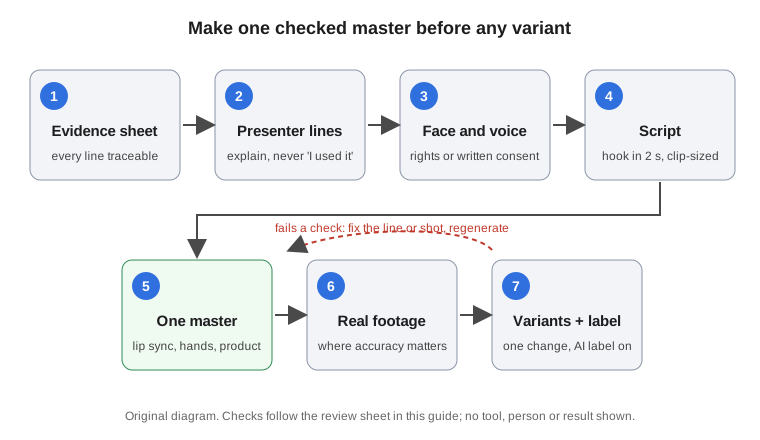
Original diagram; no real tool, person or result shown.
Original visual by Superdirector editorial team. Creation date not recorded.
Add real product footage
The presenter does not need to carry every second. Generated product scenes get packaging, sizes, colours and small parts wrong, so MakeInfluencer's advice is to use real product footage when physical accuracy matters. Film the product on a phone, record the app screen, or use approved photos, and cut them in under the presenter's voice for the proof part of the script. Keep the hands-on moments in real footage, too: that is where generated hands fail.
Assemble the master ad and check it once more as a whole. MakeInfluencer's final check is worth borrowing: the claim in the hook matches the landing page, the product shots are accurate, the offer is still running and the captions can be read. Add two checks of your own: the first frame says what the ad is about, and the sound is clear on a phone speaker and in earphones.
Make variants and label them
Only after the master is approved, make variants. Change one thing per variant so the result tells you something. Higgsfield's example of a hook test keeps the product, creator, preset and setting fixed and changes only the opening line. A first matrix can be this small:
| Variant | Hook | Presenter | Proof shot | Call to action |
|---|---|---|---|---|
| Master | A | A | A | A |
| Hook test 1 | B | A | A | A |
| Hook test 2 | C | A | A | A |
| Presenter test | A | B | A | A |
Then label it. YouTube requires creators to disclose AI-generated or altered content that seems realistic, using the AI use setting during upload, and lists penalties up to removal of content or suspension from the YouTube Partner Program for creators who consistently do not. YouTube does not require disclosure for using AI only to write the script or outline. TikTok's Community Guidelines require a label on AI-generated content that shows realistic-looking scenes or people, and unlabeled content may be removed, restricted or labeled by TikTok. A realistic synthetic presenter falls inside both rules. For paid placements, check the ad platform's own policy as well, since ad rules and organic rules are written separately.
Labels on the platform do not replace honesty in the script. If the ad runs on a real creator's account, the paid relationship also has to be disclosed clearly, as it would for any sponsored post. This is general guidance, not legal advice; check the rules for each market you advertise in.
Finally, judge the variants on your own data: hold rate in the first seconds, completion, clicks, conversions and complaints. A tool can generate an ad; only the campaign tells you whether it worked. When one wins, HeyGen's advice is to localize winners, not drafts.