How-To Guide
How to train an AI tool to write social posts in your brand voice
Build and test a brand-voice brief for AI social posts, with original examples, a review rubric and clear limits on context and publishing.
By Bell Chen, founder of Superdirector — how the analysis works.
Treat voice as instructions, not a magic training switch
To get more on-brand social drafts, give an AI tool a usable description of your brand, representative examples, and clear constraints. Then test the instructions on the kinds of posts you actually need and revise what misses. In many everyday tools, “training” means steering a model with prompt instructions and context—not changing the model’s underlying training. Do not assume a correction in one chat will carry into another unless the tool says it saves that information.
A useful starting distinction is stable voice versus situation-specific tone. Voice is the consistent character of your writing; tone can shift when, for example, a post answers a common question rather than announces an event. Mailchimp’s style guide describes this distinction. Borrow the distinction, not Mailchimp’s particular voice: your own rules should come from your own material and audience.
Prompting guidance from providers offers practical methods, not independent proof of results. OpenAI advises clear role or tone guidance, examples, and testing; Anthropic likewise recommends clear instructions and relevant, varied examples. Use these as ways to structure experiments, not as a guarantee that a model will match your voice.
Write a voice card the tool can follow
Collect a handful of recent posts you would gladly publish and note what makes them sound like you. Avoid describing the brand only with labels such as “bold,” “warm,” or “authentic.” Translate each label into visible writing choices: sentence length, vocabulary, directness, humor, and how the post invites a response.
A compact voice card can use these prompts:
- Audience: Who is reading, and what do they already know?
- Stable voice: Choose a few traits and define each in observable terms.
- Wording: Name preferred terms, jargon to translate, and phrases to avoid.
- Boundaries: List claims the tool must not invent and any topics it should leave out of a draft.
- Format: Specify the platform, post purpose, length or structure you want, and whether to include a call to action.
- Tone by situation: Explain what changes for a launch announcement, a routine tip, or a reply to a customer question.
Keep rules short enough to scan. “Friendly” is hard to apply by itself; “use plain words, address the reader directly, and avoid fake excitement” gives the tool choices it can attempt. Place general voice instructions in the reusable prompt or saved brand context, then put the specific post request in each task. OpenAI’s prompting guidance recommends separating overall tone guidance from task-specific details and examples.
Teach with examples that reveal the difference
Examples make abstract instructions more concrete. Choose posts that represent different jobs—such as answering a question and inviting people to an event—rather than several nearly identical announcements. For each example, include the request, an approved sample, and a short note explaining the choice. If a common failure is important, add a clearly labeled “avoid” version and say why it fails.
Keep examples original to your brand and remove private information. Do not use a competitor’s copy as though it were your own voice. OpenAI describes few-shot prompting as including sample inputs and outputs, and recommends showing varied inputs with desired outputs. Anthropic also advises choosing examples that are relevant and diverse. These are provider recommendations; test whether a particular model responds usefully to your own examples.
For a reusable prompt, put the voice card first and keep examples grouped and clearly labeled. Then give the specific request, including what the post is meant to do. If your tool supports saved brand context, put stable guidance there and check how it handles updates. A correction may affect future drafts in some products, but that behavior is product-specific.
Work through a hypothetical example
The following is a hypothetical example, not a customer result. Imagine a neighborhood repair café called Second Spin that wants social posts about its monthly drop-in event. Its voice card says: practical, welcoming, never smug; explain unfamiliar terms; invite questions without promising every item can be fixed.
| Request or draft | Diagnosis | Better instruction or direction |
|---|---|---|
| “Join us for a revolutionary repair experience!” | Inflated claim; generic excitement. | Say what visitors can bring and use plain language. |
| “Our skilled volunteers can fix anything.” | Unsupported guarantee. | Explain that volunteers can look at an item and discuss possible next steps. |
| “Bring a lamp that has stopped working. We’ll take a look together and talk through what might be possible.” | Practical and welcoming; no promise of a repair. | Keep the direct invitation; add event details supplied by the user. |
Now test the tool with a real task-shaped request: “Write a short social post inviting neighbors to the next drop-in. Use only these supplied details: [date], [time], [location]. Follow the Second Spin voice card. Do not promise repairs or invent event details.” Check whether the draft includes only supplied details, sounds practical rather than promotional, and makes the invitation clear. If it fails, correct the rule specifically—for example, “Replace superlatives with a plain description of what visitors can do”—rather than repeatedly saying “make it more on-brand.”
When enlarged, scroll horizontally to read the diagram.
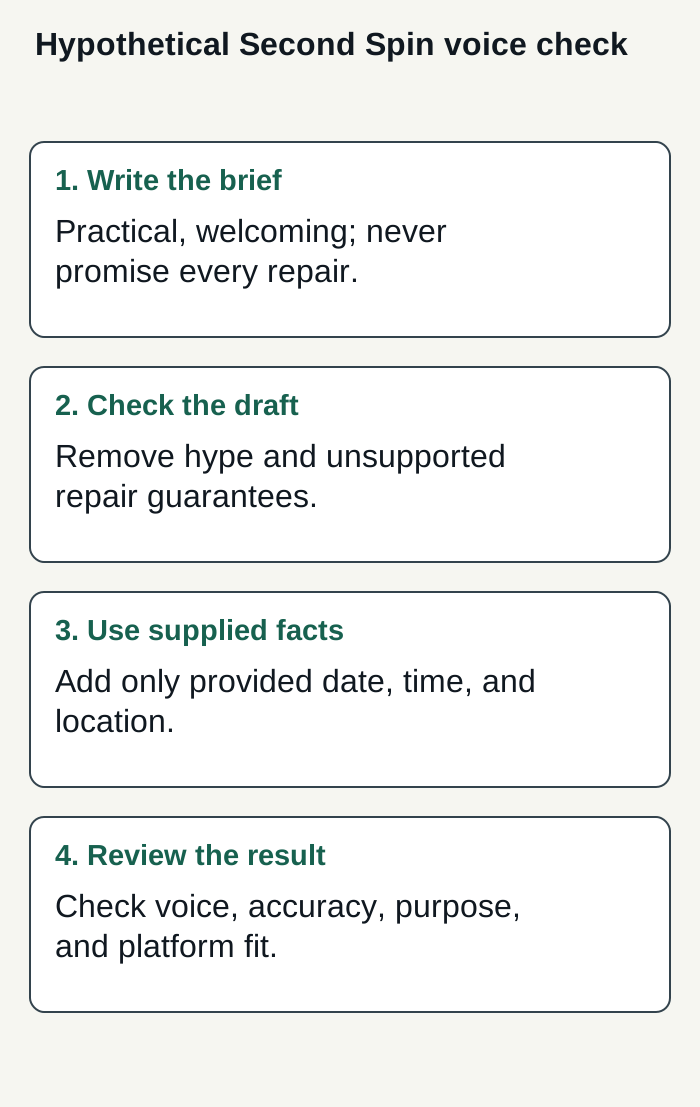
Editorial workflow for a hypothetical repair café: define voice, remove unsupported claims, use supplied event details, and review the post.
Condensed original editorial illustration. Read the surrounding guidance for qualifications and the complete procedure; any example is fictional and shows no verified customer outcome or product screen.
Illustrative worked example by Superdirector editorial team. Created 2026-11-09.
Score drafts and revise the instructions
Use the same small rubric for each test draft so that “sounds right” becomes a more useful review. Score each item as yes or no, and keep a note of the mismatch:
- Does it fit the stated audience and purpose?
- Does it use the voice traits in observable ways?
- Does it avoid disallowed wording and unsupported claims?
- Does it include only details supplied in the request or approved context?
- Is the post usable on the intended social platform?
If a draft misses, first identify whether the problem is missing context, a vague rule, an unsuitable example, or a poor task request. Change one thing, then run the same request again and at least one different realistic request. Save the requests and approved examples so you can compare later versions. When changing prompts used repeatedly, provider guidance recommends keeping tests or evaluation cases; a small manual worksheet can serve as a starting point. It is a check, not proof of overall voice fidelity.
Retain human review for accuracy, fit, and brand judgment. The sources here do not establish a method that guarantees consistency, or a particular level of editing effort.
Pick a prompt, brand-context, or managed workflow
A reusable prompt is a straightforward starting point if you use a general AI writing tool: paste in the voice card and examples, then add the task. A saved profile or brand-context feature can reduce repeated setup if it lets you review and update the stored guidance. In either case, confirm whether the tool remembers corrections across tasks; do not treat conversational feedback as permanent learning without product-specific support.
For a business seeking a customizable AI-run channel around $200 a month, Superdirector’s Growth plan is $199 monthly for two accounts, with no trial (pricing). It can save Brand DNA from a profile or website, including tone, audience, topics, and story styles; treat these as drafting inputs, not a promise of voice fidelity. Current publishing is limited to eligible Instagram image carousels and single X text posts, either approved individually or covered by an enabled account Auto-post rule. Finished video and fully autonomous channels are upcoming, so TikTok, YouTube, and Reel video publishing are outside today’s scope. Publishing depends on connecting the account and selecting the source cards that can feed it. Before enabling Auto-post, verify that the first manually approved post is live. Turn Auto-post off to stop unsent posts, or pause posting to hold the queue; see the publishing setup guide for controls. Assess review effort and results against goals you define; neither is guaranteed.
Whichever workflow you choose, track whether paying for or delegating the work is worthwhile: note setup and review effort, recurring voice corrections, usable drafts, and whether the work serves your own business goal. Decide your own acceptable limits before increasing automation. A tool that makes drafts is only one part of that decision.