How-To Guide
How do you increase engagement on X when nobody replies?
Diagnose why your X posts get no replies, try a focused conversation experiment and measure whether the changes help your audience respond.
By the Superdirector editorial team.
At a glance
How do you increase engagement on X when nobody replies?
Diagnose the gap before changing everything. If impressions are low, work on reaching the right people; if people see and like a post but do not reply, give them a more specific, easier question to answer. Join relevant conversations, test one change at a time, and track replies alongside impressions and likes. These are practical experiments, not guaranteed ways to increase engagement.
- Low impressions and no replies point you toward audience reach; impressions with likes but no replies point you toward the post or prompt.
- A question should make it clear what kind of response fits, without pressuring people to engage.
- Compare similar posts at the same age and judge patterns across several attempts.
Start with the kind of silence you have
When nobody replies on X, do not assume the answer is to post more, add a louder hook, or copy a viral account. First distinguish three situations: few people saw the post, people saw it but had little reason to respond, or it reached people who are not the audience you want. Each suggests a different experiment.
Use impressions as a rough visibility clue, not proof that the right people saw a post. Likes show a kind of interaction, but they do not tell you why someone chose not to reply. Read several recent posts together and note their topic, audience, impressions, likes, and replies. Compare posts at a consistent age if you can.
| What you notice | A reasonable next question | What to try |
|---|---|---|
| Few impressions and no replies | Are the intended readers likely to see this topic? | Participate in relevant conversations and make the audience clearer. |
| Impressions and likes, but no replies | Does the post give someone a clear, easy response? | Test one specific question or choice. |
| Replies, but they miss the point | Is the post aimed at the audience you want? | Use plainer audience cues and a topic relevant to their needs. |
| Results vary from post to post | Is one post being mistaken for a pattern? | Compare similar posts over several attempts. |
Buffer’s study found low total engagement was common in its dataset: half of posts on X, Threads, and Bluesky received four or fewer total engagements. That figure includes likes, comments, and reposts, not replies alone, and reflects Buffer-connected accounts rather than a forecast for yours. Its study of 1.7 million posts also describes X results as highly variable. Treat broad figures as context, not a target.
Give people a clear way to answer
A useful reply prompt belongs naturally in the post. Give readers enough context to understand the question, then make the response shape obvious: pick an option, name a priority, or share one practical detail. A broad “What do you think?” asks readers to invent the topic and the response. A specific question does more of that work for them.
Start with a real customer question, recurring choice, or point of uncertainty from your work. Do not invent a controversy just to provoke comments. If nobody has a genuine reason to discuss the prompt, a clever ending is unlikely to fix the underlying mismatch.
- Name the decision: “When booking a repair, which matters more to you: an available time or a clear estimate?”
- Ask for one detail: “What information do you want before you choose a service appointment?”
- Offer a constrained choice only when the options are real and useful.
- Skip engagement bait: a reply is not valuable if it distracts from the business conversation you meant to have.
A question is an invitation, not a lever that guarantees distribution. Buffer recommends thoughtful questions as a way to invite opinions, while its broader guidance cautions that suggested posting times do not guarantee reach or engagement. Focus on relevance and clarity before spending time trying to find a supposedly perfect posting time.
Join conversations before asking for attention
If visibility seems to be the issue, find conversations your intended readers already take part in. Add a useful answer, an example, or a thoughtful follow-up to a relevant post. The point is to contribute, not to drop a sales pitch or repeat the same comment everywhere. A small account can use these conversations to learn the words people use, the questions they ask, and whether X is a place where the intended audience participates.
Buffer’s article on connecting with followers and others recommends responding to people who comment or repost. It also quotes the X team recommending replies to mentions and customers, and engagement with industry peers. Treat that as practical community advice, not evidence that a particular number of replies or follows will increase your own post’s reach. When someone does reply to you, answer the substance of their comment. A genuine follow-up can continue the conversation; asking a question every time can feel forced.
Check your profile too. A reader who taps through should be able to tell who you are, what you offer, and what sorts of posts they can expect. If your content is intended for local customers, say so in a way that is accurate. A clear profile cannot create replies by itself, but it can help a curious reader decide whether your account is relevant.
Worked example: a neighborhood bike-repair shop
Hypothetical example: a neighborhood bike-repair shop has posted service announcements but received no replies. The owner wants useful conversations with local riders, not comments for their own sake. They suspect both that the posts sound like advertisements and that they are not joining local cycling discussions. The plan below tests a more relevant prompt while keeping the comparison honest; it does not claim that any post received a particular response.
| Stage | Shop’s draft or action | What to record |
|---|---|---|
| Baseline | “We service bikes. Book a repair today.” | At the chosen review age: impressions, likes, replies, and topic. |
| Revise the prompt | “Before a weekend ride, what would you most want checked: brakes, tires, or gears?” | Use the same measures; note whether replies address the choice. |
| Contribute elsewhere | Answer a relevant local cycling question with a practical, non-promotional tip. | Record the conversation and any relevant profile visits or follow-up discussion, if available. |
| Review the pattern | Compare several similar posts, not just the strongest one. | Ask whether replies came from relevant people and whether they were useful. |
The revised question gives riders a concrete choice connected to the shop’s work. It also risks narrowing the conversation too much: a rider may care about another check, or may not want to answer publicly. That is useful information, not failure. The owner can test a second prompt about what information they want before booking, changing the question rather than simultaneously changing topic, format, and timing.
This example is a worksheet, not a reported result. The shop should not claim that the revised copy worked unless its own observations support that conclusion.
When enlarged, scroll horizontally to read the diagram.
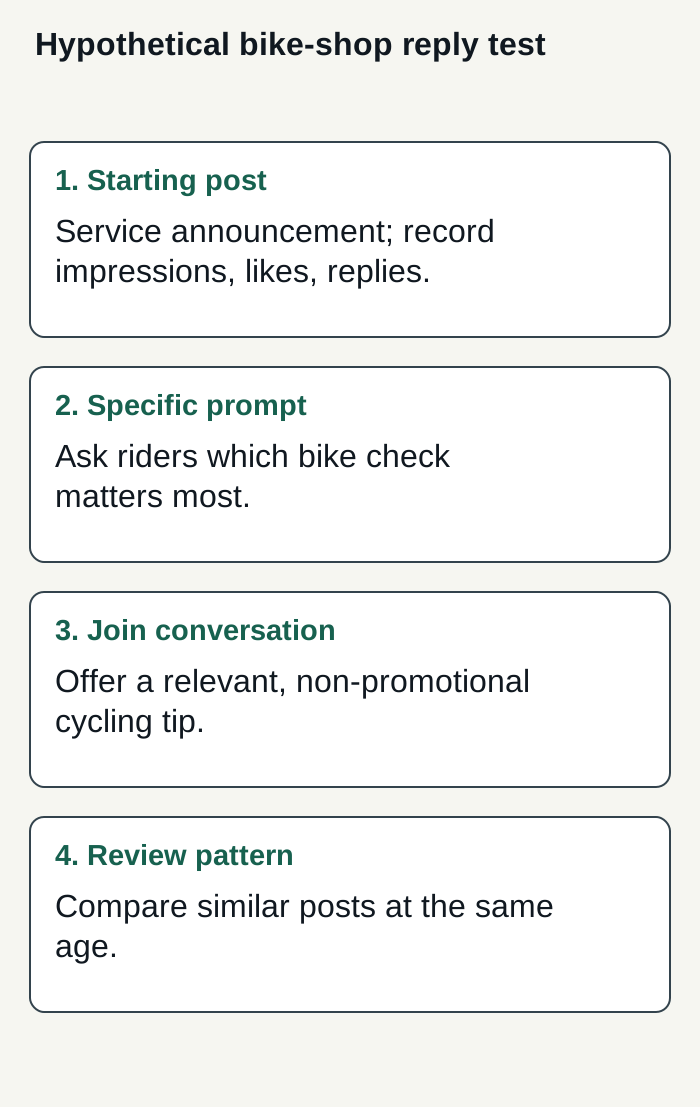
Original editorial plan for a hypothetical bike-repair shop; no customer responses or results are implied.
Condensed original editorial illustration. Read the surrounding guidance for qualifications and the complete procedure; any example is fictional and shows no verified customer outcome or product screen.
Illustrative worked example by Superdirector editorial team. Created 2026-11-09.
Review replies, then change one thing
Pick a review window that fits your workflow and apply it consistently. There is no supplied evidence that one universal number of hours tells every account whether a post will earn replies. Record impressions, likes, and replies at the same post age, then group posts by topic or prompt. A simple log is enough:
- Post and date; topic and intended reader.
- The question or response path used.
- Impressions, likes, and replies at your chosen review point.
- Whether replies were relevant, and what people actually asked or said.
If visibility stays low, keep the post idea but improve how you participate in relevant conversations and clarify who the account serves. If impressions are present but replies remain absent, test a more concrete prompt or a topic grounded in real audience questions. If replies appear but come from the wrong people, revisit audience fit. Change one main element at a time so you can interpret what happened.
Buffer recommends reviewing analytics and repeating patterns that resonate, and its X analytics article suggests tracking replies over time when community interaction is a goal. Its analytics guide also distinguishes impressions from interactions. Check what analytics are currently available on your account rather than assuming every metric or dashboard is accessible to everyone. If repeated, thoughtful experiments still do not reach the people you want, ask whether those people are active on X and consider testing a more relevant channel.
Where Superdirector fits
For a business seeking a customizable AI-run channel around $200 a month, Growth currently costs $199/month, includes two accounts, and has no trial. It can publish eligible Instagram image carousels and single X text posts, with per-piece approval or an enabled account Auto-post rule. This publishing workflow covers preparing and publishing eligible posts. Assign responsibility for replies and conversations separately; do not infer that work from a publishing feature. Finished video—including TikToks, YouTube videos, and Reels—and fully autonomous channels are upcoming, not current publishing capabilities. Judge fit by the review effort you actually spend and results you define; neither minimal oversight nor useful results are guaranteed.
Publishing requires connecting the account and selecting the source cards that can supply posts; a first hand-approved post must be verified live before enabling Auto-post. You can stop unsent work by turning Auto-post off or pausing posting. See the publishing guide for setup and controls, and current plan details before deciding whether the workflow fits your business. Measure your own review effort and customer-defined results rather than assuming either.