How-To Guide
Does scheduling posts hurt reach on Instagram, TikTok and X?
Review the limits of the available evidence, then compare scheduled and native publishing on your own Instagram, TikTok or X account.
By the Superdirector editorial team. Revised November 9, 2026 from the original article.
At a glance
Does scheduling posts hurt reach on Instagram, TikTok and X?
The evidence supplied here does not establish that scheduling itself reduces reach on Instagram, TikTok, or X. It also does not prove that every scheduler is neutral. Instagram has one small vendor-run test; the supplied TikTok and X sources document posting workflows, not reach outcomes. If the decision matters to your account, compare similar posts using a simple, consistent test.
- Instagram: one small vendor experiment is suggestive, not decisive.
- TikTok: official documentation describes ways to post or upload drafts, not reach effects.
- X: no supplied source establishes a scheduled-versus-native reach comparison.
- Use comparable content and track results on your own account before drawing a conclusion.
The short answer: no established penalty
There is not enough evidence in the supplied sources to say that scheduling posts hurts reach on Instagram, TikTok, or X. There is also not enough to promise that any particular scheduler will perform exactly like native posting. Treat “scheduling causes a penalty” as an unproven claim, not a platform rule.
Keep two questions separate: can a tool publish a post, and does the publishing method change how many people see it? Meta’s Instagram Content Publishing guide explains API publishing, supported formats, and limits. TikTok’s Content Posting API overview describes direct posting and draft uploads. These technical descriptions do not establish how a platform ranks content.
For an owner deciding whether to schedule, the useful answer is practical: choose the workflow that reliably gets the right post published, then check performance with comparable posts from your own account. Prefer native publishing when a feature or finishing step requires the app. Don’t read a single disappointing post as proof of an algorithmic penalty.
What the evidence says by platform
Instagram: a limited comparison, not a verdict
The strongest direct comparison in the supplied sources is Hootsuite’s test on one wrestling-business account. It compared five native feed posts with five posts scheduled using Hootsuite. The scheduled group had greater reported reach and engagement in that test. But the company itself notes the small number of posts and that it tested only its own tool. A single account and a handful of posts cannot establish what happens across tools, formats, audiences, or time.
Meta’s guide confirms that its publishing API supports certain content on professional accounts and documents a moving 24-hour publishing limit. It does not say that API-published posts receive equal, lower, or higher reach. Publishing support is not an algorithm statement.
TikTok: posting routes, not reach findings
TikTok documents both direct posting from an app to a creator’s profile and uploading a draft for further editing in TikTok’s creation flow. Its Direct Post announcement describes partner-based sharing and scheduling of long-form video. These sources explain available workflows; they do not compare reach for scheduled and native posts. Use the in-app flow when the edit or finishing step you need is not available in your chosen workflow.
X: no supported reach conclusion here
The supplied dossier contains no platform statement or comparable scheduled-versus-native X reach study. That absence is not evidence of a penalty or proof of neutrality. If X is important to your business, use an account-level comparison rather than importing findings from Instagram or TikTok.
What scheduling can change in practice
Even without an established reach penalty, a scheduling workflow can affect whether a post goes out as intended and how you manage the work around it. Check these operational points before blaming distribution:
- Format and finishing: Confirm your tool supports the format you intend to publish. If you need an in-app feature that the workflow does not provide, finish and publish natively.
- Successful publication: Check that the post is live and appears as intended. A failed or incomplete publish is a workflow problem, not evidence about ranking.
- Timing and content: A scheduled time is not a substitute for a useful post or a reason to assume an audience will respond. Compare similar content and note the time rather than changing several things at once.
- Follow-up: Scheduling does not make someone available to answer questions. Decide who will monitor replies and when; measure whether that work is worthwhile for your business.
Meta documents API publishing limits for Instagram professional accounts and recommends that apps account for those limits when scheduling. Its saved guide gives different figures in its rate-limit and carousel-limit passages; check the current limit applicable to your account and publishing route. This is a technical publishing constraint, not evidence that scheduling lowers reach. Check current platform documentation if your posting volume makes limits relevant.
A hypothetical two-week account test
Here is a hypothetical example for a small shop deciding whether to schedule Instagram image carousels. The figures below are a blank plan, not performance results. The aim is to make a fair comparison—not to claim that a short test can isolate every factor.
| Post | Method | Keep comparable | Record after seven days |
|---|---|---|---|
| 1 | Scheduled | Carousel topic, quality, and usual time | Reach and format |
| 2 | Native | Comparable topic and usual time | Reach and format |
| 3 | Scheduled | Comparable topic and usual time | Reach and format |
| 4 | Native | Comparable topic and usual time | Reach and format |
Continue alternating the method for the remaining posts, making the assignment before you see the results. Use content you would have published anyway. Keep the platform, format, usual posting window, and production effort as similar as you reasonably can. Do not put all scheduled posts in one unusually quiet week and all native posts in another if you can avoid it.
- Write down the question first: does this workflow seem to change reach for this format on this account?
- For every post, record the method, date, format, topic, and any notable difference in the content or publishing process.
- After the same elapsed time for each post, record the reach shown in the platform’s account interface. Do not compare a fresh post with one that has had much longer to circulate.
- Look at the range of results in each group and the overall pattern, not just the single highest post. Note any unusual post that might distort the comparison.
- If the groups look different, repeat with another comparable batch before changing your whole workflow.
A short account test is a decision aid, not a controlled study. Topic appeal, timing, audience activity, and normal variation can all affect individual posts. If results are mixed or close, choose the workflow that saves useful time and preserves the features and review you need. If one method appears consistently weaker across repeated comparable batches, investigate the publishing route and content differences before concluding that scheduling caused it.
This test measures whether a workflow seems worthwhile for your account—not whether scheduling is universally good or bad. You can also record time spent preparing, checking, and responding. That helps answer the business question behind the search: is delegating or paying for this workflow worth the time and results you actually observe?
When enlarged, scroll horizontally to read the diagram.
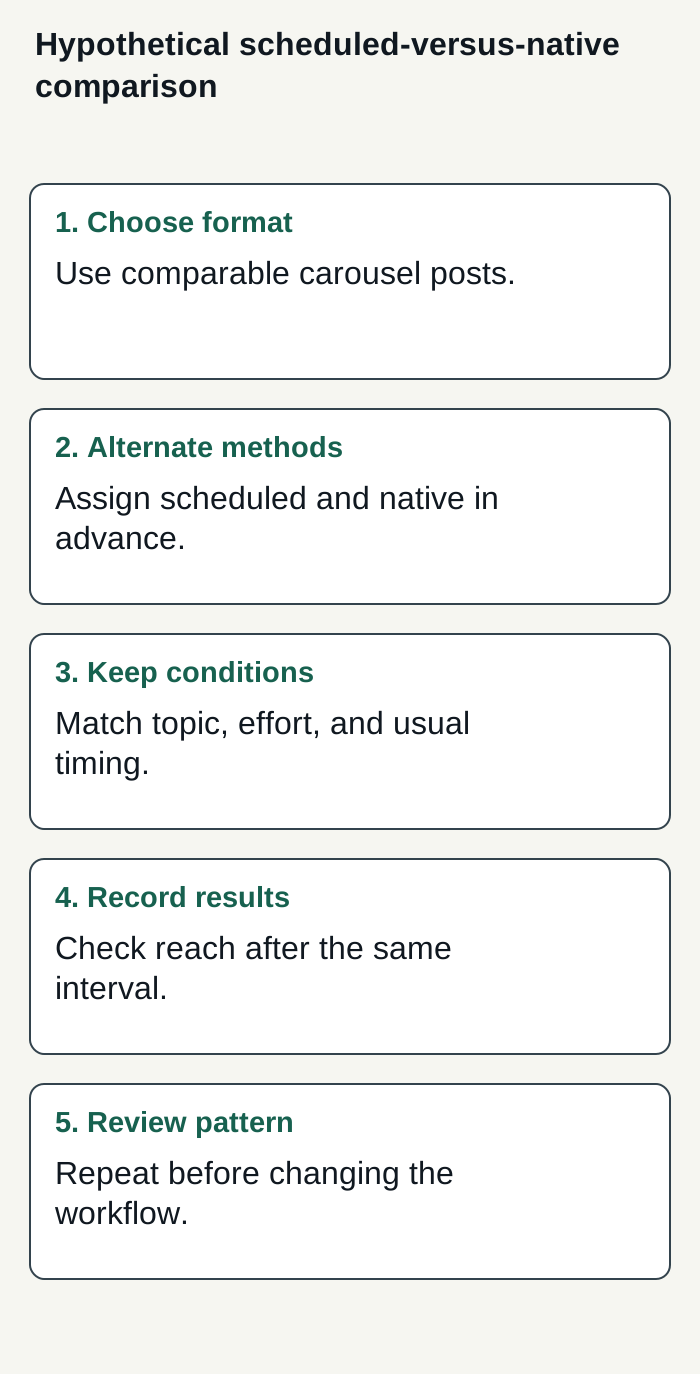
Hypothetical example only: a simple plan for comparing scheduled and native posts on one account.
Condensed original editorial illustration. Read the surrounding guidance for qualifications and the complete procedure; any example is fictional and shows no verified customer outcome or product screen.
Illustrative worked example by Superdirector editorial team. Created 2026-11-09.
Choosing a workflow—and what Superdirector supports
Use native publishing when you need a native-only feature or want to make a final edit in the app. Otherwise, a scheduler may be a convenient way to organize work, provided you check that the post publishes correctly. Evaluate the full workflow: research, brand memory, creation, and publishing matter alongside the time you spend reviewing and following up. Measure whether that delegation is worth its cost for your business; do not assume it produces a particular reach or removes all oversight.
For a business aiming to delegate toward a useful, customer-defined result with a customizable AI-run channel around $200 a month, compare that goal with Superdirector’s current Growth plan: $199 monthly for two accounts, with no trial. Today, publishing is limited to eligible Instagram image carousels and single X text posts, either approved per piece or covered by an enabled account Auto-post rule. Finished AI video—including finished TikToks, YouTube videos and Reels—is upcoming and outside current publishing scope. Connecting an account and selecting source cards define what can publish; before enabling Auto-post, verify that the first hand-approved post is live. The publishing guide explains setup and controls: turning Auto-post off stops unsent posts, and Pause posting holds the queue. Assess review effort and results against your own goals; neither is guaranteed.