How-To Guide
What are the best AI video ad makers for an ecommerce brand?
Choose a product-page, photo or owned-footage ad workflow. Plan SKU shots, review claims and crops, and separate generation charges from placement exports.
By the Superdirector editorial team. Primary product/pricing/help text captured and read November 5, 2026. No ad made, account connected or campaign tested.
At a glance
What are the best AI video ad makers for an ecommerce brand?
Investigate Creatify when product or collection pages supply the facts and assets; Photoroom when product photos and a reviewed shot plan are the starting point; and VEED when owned footage, model choice and editing control matter. Choose the route that preserves the real SKU, supported message and required placement files. Price its generation and editing work separately from the number of exported ads. These are conditional workflow candidates, not tested quality rankings.
- A product-page import is a source to check, not a guarantee that every price, feature or generated scene is correct.
- SKU, shot, master edit, ratio export and live ad are different production units.
- Confirm the actual required plan and billing term: Photoroom video needs Max or Ultra, and the retained VEED pricing text gives no dollar plan quote.
Freeze the SKU facts and input pack
Start with the production input you trust. A product page may contain the current price, an old sale banner or a claim that needs correction. Product photos may show one color or size while the brief names another. An existing demonstration may be more useful than a newly generated imitation. Record which SKU, version and offer the ad is allowed to show.
| Input | Retain with the job | Check before production |
|---|---|---|
| Product or collection page | Exact URL, dated facts and selected SKUs | Price, availability, included items and supported claims |
| Product photos | The real item from useful angles and its source files | Color, label, shape, dimensions and permission to use the images |
| Owned footage | The actual clip, depicted SKU and agreed uses | Whether it shows the action needed and can be recut for this placement |
| Brand materials | Approved logo, fonts, colors, copy and destination | Which parts must stay exact and which creative changes are allowed |
Original fictional job: a desk-organizer brand has three SKUs, product photos, verified dimensions and one owned handling clip for each. It wants two messages per SKU—desktop fit and compartment layout—in vertical and square files. The handling clip and specifications establish the product facts; generated atmosphere or motion cannot establish a fit or capacity that was never demonstrated. No real store, ad, product test or result is represented.
The creative brief guide helps write the message and deliverables. If the unresolved issue is casting a synthetic person, likeness permissions or invented customer experience, use the separate AI UGC actor-tool guide. This page follows the product inputs through shots, editing and file delivery.
Choose the production route you actually need
Keep the choice tied to the work your team lacks. You may need a page-to-first-draft assembler, a photo-led scene plan or an editor for footage you already own. A longer model list or an added avatar does not solve every missing handoff.
| Starting condition | Candidate and documented workflow | Plan or limit to settle |
|---|---|---|
| A product page or collection is the working source | Creatify’s ecommerce page describes product/collection/photo inputs and 9:16, 1:1, 4:5 or 16:9 ads. Its URL help also permits manual assets and product information. | Standard lists 55 monthly credits and one generation at a time. Model choice and concurrency can change the required tier; select the actual model and job. |
| Useful product photos exist but the ad needs a shot plan | Photoroom’s ad maker takes up to six photos of a product, including imports from Shopify, Drive or Dropbox, and exposes a shot plan, script and voiceover before generation. | Its current pricing includes video on Max/Ultra, not Pro. The capture gives no dollar price. Obtain the selected Max/Ultra quote and term; a free image account is not the video plan. |
| You have footage or images and need to choose models and finish an edit | VEED’s ad generator describes text, image and video inputs, selectable models and an editor for clips, branding, captions and voiceovers. | Its tool page shows the credit cost before generation. The current pricing text does not expose dollar plan cards or allocations; confirm required models, watermark-free output, credits and editor seats. |
Creatify’s pricing cards display $15 and $10/month for Standard under an annual-savings banner, without a clear selected-term label in the retained text. Do not turn the lower figure into a flexible monthly quote. VEED charges by editor seat, so a team’s total is not one seat’s entry price. Dollar signs follow vendor displays; confirm currency, term and the full required charge.
For Photoroom, the described review point is before generation: inspect the shot-by-shot plan and edit the voiceover or plan. For VEED, the described handoff is generation into an editor, where the marketer can combine clips and add brand elements. Choose the point at which you need control. Neither description proves that an imported SKU or completed file was accurate in an account we tested.
For the fictional organizers, an existing handling clip can carry the compartment demonstration. A new background or motion shot can support the setting if it stays faithful to the item. Do not generate a replacement demonstration merely because the tool offers that mode.
Build shots before counting deliverables
Write the shot’s purpose, its factual basis and its source before estimating output volume. Decide which shots can be reused within a SKU and which must be new. Reusing an approved close-up is different from generating another close-up; the same clip cannot silently become footage of a different product.
| Fictional production layer | Arithmetic | What is actually counted |
|---|---|---|
| 3 SKUs × 2 messages | 6 master edits | A complete message sequence for each SKU and angle |
| 6 masters × 2 ratios | 12 placement files | Vertical and square exports that each need a crop review |
| 6 masters × 3 shot positions | 18 timeline positions | Not necessarily 18 new clips or AI generations |
| Optional new opening motion: 1 per SKU | 3 new clips planned | Owned footage and approved stills fill other positions where suitable |
One master might use an opening product shot, the owned handling clip and a close-up with the verified dimensions. The second message can reuse suitable media with a different order or emphasis. If the square crop hides the compartment opening, the relevant repair may be reframing or a different source shot; a simple resize is not automatically an acceptable export.
Use the SKU shot and export matrix or blank CSV. Keep a row for each shot/export that needs a different fact, source, operation or review. These are manual local aids; they do not import a store, create a clip, publish or save automatically.
When enlarged, scroll horizontally to read the diagram.
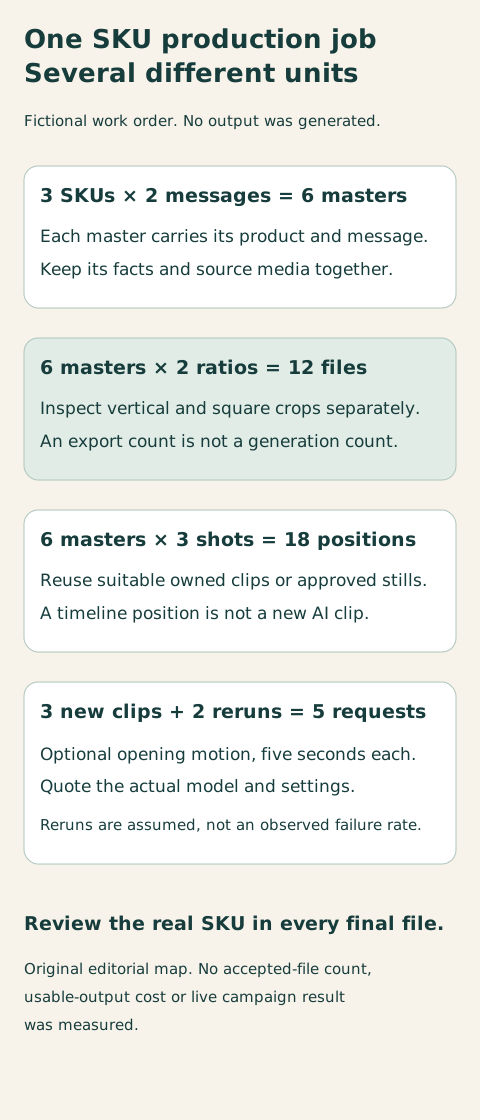
Original editorial production map. Counts describe a fictional work order; generated scenes, accepted files and actual advertising delivery are different units.
Original visual by Superdirector editorial team. Creation date not recorded.
Price generations, edits and placement exports separately
Budget the work, not a single “cost per ad” denominator. Ask what operation consumes credits, what a completed rerun costs, which editing/export actions are included and whether the pool is shared with other work. Keep subscription cash for its whole billing term separate from an allocation to this batch.
| Meter | What changes its use | What it does not count |
|---|---|---|
| Generated scene | Model, duration, resolution and each charged attempt | Every master or placement export using that scene |
| AI image or AI edit | Its own operation and shared credit pool | An ordinary manual crop assumed to use no generation |
| Manual edit/export | The actual plan’s editor/export terms and required seats | An automatic entitlement to every premium model or unlimited media rights |
| Accepted placement file | The specific checked version and ratio | A live campaign, media spend or measured result |
Fictional generation allowance: the three optional opening clips are five seconds each, with two additional completed attempts budgeted. That is five generation requests, not twelve because there are twelve final files. The two extra attempts are a planning assumption, not an observed failure rate. A larger work list of eight equivalent requests needs its own budget.
Creatify’s Standard card illustrates seven five-second Seedance 2.0 videos at 720p from its 55-credit pool; Pro illustrates 36 from 280 credits. Five identical-setting requests sit below the Standard example’s listed count if that pool is devoted to them; eight exceed it. Check the actual displayed operation cost and other usage. Do not derive an exact per-clip charge by dividing 55 by the published whole-video count, or carry the count over to another model, resolution or duration.
Creatify distinguishes manual post-export edits—text, captions, trims, media swaps and layout—from rerunning AI, which uses credits. Photoroom’s Max/Ultra pricing gives up-to-50/150 video-generation ceilings when all credits go to one feature; it also says an ad uses more credits than a product video. Those are not guaranteed finished-ad allowances. Its credit guide makes a later AI image update another generation; the Space shares the pool. Its export FAQ describes an image allowance, which must not be relabeled as a video-ad count.
For VEED, record the cost shown for the selected model and account before generation. Its pricing says credits do not carry over and seats multiply the plan charge. For all three routes, retain the actual subscription term, charges, source-media expense, editing time and accepted files. No cross-vendor cost-per-usable-ad comparison was measured here.
Check the finished ad against the SKU and destination
Review the exact delivered file, not just a storyboard or a generation status. Creatify says its agent keeps page facts as written; treat that as the vendor’s promise and inspect the result. A correct source page does not make a wrong on-screen price, distorted label or invented product action acceptable.
- Compare each shot with the chosen SKU references: visible features, color, label, included parts and the action the viewer may infer. Use real footage for a claim the generated scene cannot substantiate.
- Read the message and offer again, including captions, voiceover and destination. A changed price or product detail may affect more than one master and ratio.
- Inspect every crop at the required size and placement context. Check that product details, claim qualifiers and the viewer action remain readable; confirm the actual destination’s current specifications.
- Retain rights in supplied footage, fonts, music and generated material for the intended use. Record the selected asset/license and any plan-specific condition, rather than treating an export button as clearance.
- Keep the exact approved file/version and its owner. Exported media, a manually uploaded ad and actual paid delivery are separate records.
Repair the right object. Photoroom’s Product Fixer help explicitly says it works with images, not video. A corrected still may become a new reference, but it does not retroactively fix a generated clip. Reinspect the regenerated scene or replace it with a suitable owned shot. Keep the extra operation in the budget.
Read the media conditions. Creatify’s pricing FAQ states that users keep their creatives, but its fresh terms route returned a short shell rather than a full contract. Photoroom’s commercial-image help ties commercial use to paid accounts and keeps third-party image rights with the customer to verify. VEED’s sharing help allows commercial videos; its separate stock guide specifies paid-user stock access, channel safelisting and limits to claim support when editing elsewhere. Confirm the actual media and uses; these help statements are not every model’s complete contract.
The same VEED sharing guide describes MP4 export followed by manual platform upload. Do not count the exported organizer ad as a public post or delivered paid campaign. The account/ad owner still controls publication, destination rules and any required synthetic-media or advertising disclosure.
Publisher interest: we sell Superdirector, whose current work includes brand-context scripts and storyboards. Finished AI video and video posting are upcoming, not available yet. The script guide covers that upstream task; the production route here must supply and review the final media.
Sources and limits
We fully read three retained comparison texts—Pose, AI Content Drop and Content Mavericks—for input/control/handoff structures. They have vendor or affiliate interests, so their rankings, rival prices, output-quality opinions and results are not adopted. Current factual descriptions use full Creatify, Photoroom and VEED product/pricing/help texts captured November 5, 2026.
The remaining gaps are concrete: Creatify’s selected billing-term display and full contract; the actual Photoroom Max/Ultra quote and operation cost; and VEED’s required model/export/credit/seat plan. Longer Photoroom/VEED terms and a Photoroom price blog were fetched but not read in full or used as contract/price authority here. We tested no import, generation, editor, crop, export, account, ad approval or campaign result. Historical demand and panel observations are not current exact-question volume, rank or output evidence.