How-To Guide
What are good first-slide hooks for Instagram and TikTok carousels?
Choose a carousel hook, adapt an example and make slide two deliver the promise. Includes a worked example and platform limits.
By the Superdirector editorial team. Examples are hypothetical illustrations, not tested results.
At a glance
Choose a hook you can pay off
Good first-slide hooks make a clear, relevant promise: a practical question, a specific list, a correction, a comparison, or a story opening. There is no supplied evidence establishing a best-performing format for Instagram or TikTok organic carousels. Make slide two start delivering the promise, and treat examples as drafts to adapt rather than guaranteed performers.
- Use a format that fits the information you can provide.
- Make the next slide show the first useful answer, step, or comparison.
- TikTok's supplied carousel documentation covers ads, not organic-post rules.
Choose a hook format
A first-slide hook is a brief opening that tells a reader what the carousel is about and why its next slide may be worth reading. Pick the format from the material you can actually deliver; no format here is a verified winner for organic Instagram or TikTok posts.
| Format | Draft pattern | Slide two should begin with |
|---|---|---|
| Question | “Are you [specific problem]?” | A direct answer or quick self-check |
| List | “[Number] ways to [useful outcome]” | The first item and what it means |
| Correction | “[Common assumption] may be wrong” | The assumption and a clear explanation |
| Comparison | “[Option A] or [option B] for [reader]?” | The first criterion for choosing |
| Story | “The small change that altered [process]” | The starting situation, without another tease |
These are writing patterns, not platform formulas. Be careful with dramatic statistics, promises of outcomes, and before-and-after claims: a striking first slide still needs accurate support in the rest of the post. A curiosity gap can invite interest, but it should not hide the fact that the carousel has little to say.
Write for one reader and payoff
Name the reader, the subject, and the useful payoff. “Bread tips” gives little direction; “How to keep a sourdough loaf from drying out by tomorrow” names a problem and an intended takeaway. Use language the intended reader would recognize, not a claim about what everyone wants.
- Write the plain-language takeaway of the whole carousel.
- Choose the format that fits that takeaway.
- Draft slide two before polishing slide one.
- Remove any opening claim you cannot explain or support.
As a practical editorial check, ask: if a reader sees only the opening and the next slide, will they understand the subject and receive something useful? That is a test of clarity and follow-through, not a prediction of reach, swipes, saves, or sales.
Work through one example
The following fictional example is a made-up bakery’s order-pickup checklist—not a real shop, customer, published post, or tested result. The scenario assumes the order confirmation displays the pickup day, time, and location.
| Hook format | Hypothetical slide one | Slide two payoff |
|---|---|---|
| Question | “Picking up a bakery order? Check these three details.” | Start with pickup day and time: check the order confirmation. |
| List | “3 details to check before picking up your bakery order” | Start with the pickup day and time shown in the confirmation. |
| Correction | “Don’t guess where to pick up your bakery order” | Check the pickup location in the order confirmation. |
The table compares three possible opening hooks and their initial payoff. It does not show the complete carousel; develop and verify the remaining checks before publishing. A real business should replace the scenario details with information confirmed for its own orders.
To choose among the drafts, check which one fits the bakery's real knowledge, audience language, and available visuals. If none can be supported, revise the subject before designing. The example shows how to connect an opening to its payoff; it says nothing about which version would perform best.
When enlarged, scroll horizontally to read the diagram.
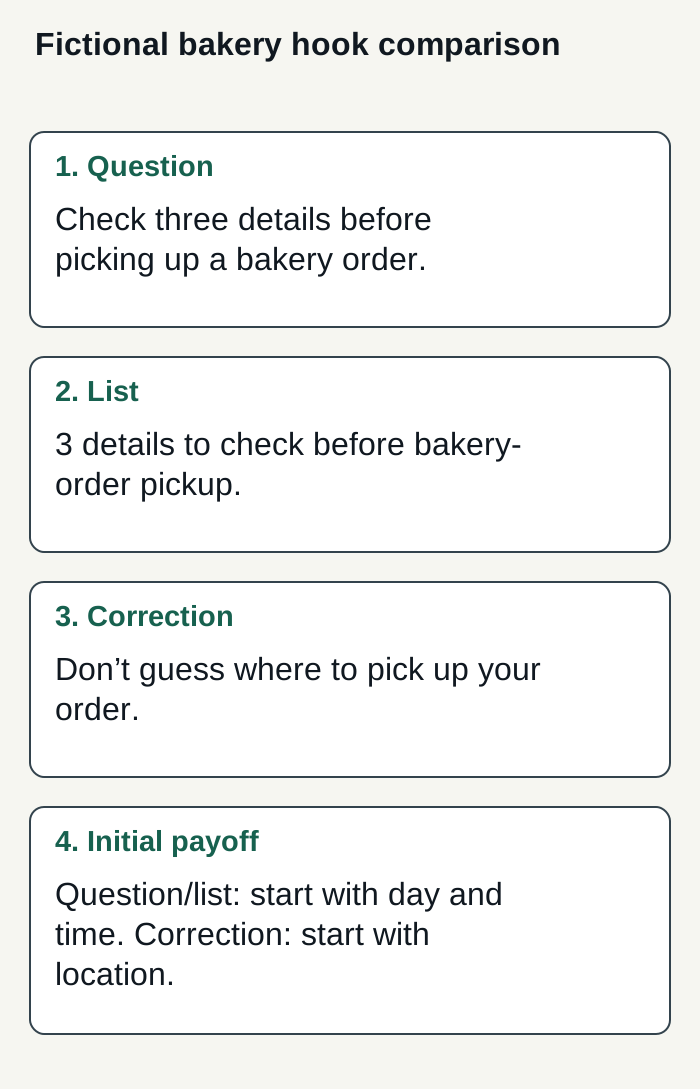
Condensed fictional comparison of three possible bakery order-pickup openings and their initial payoff; not a complete carousel or a tested post.
Condensed original editorial illustration. Read the surrounding guidance for qualifications and the complete procedure; any example is fictional and shows no verified customer outcome or product screen.
Illustrative worked example by Superdirector editorial team. Created 2026-11-09.
Make the first slide easy to read
For either platform, keep the main idea visually prominent, use a legible contrast, and remove decoration that competes with it. These are practical design recommendations, not platform specifications. Preview the slide on a phone and check that the text remains readable in the actual image.
Platform evidence has limits. TikTok's Carousel Ads help page describes a paid in-feed ad format: multiple images display in order and viewers can swipe manually. It does not establish how organic photo posts work or which opening to use. TikTok's video advertising guide discusses hooks for video ads; that advice is not proof of a still-image carousel rule. The supplied references do not establish a current Instagram organic hook formula or a head-to-head comparison.
Adapt the writing logic without claiming the formats behave identically: make the still image understandable on its own, then check the options in the platform's current posting flow.
Test with a useful measure
If you compare hooks, make the comparison interpretable. Keep the subject, supporting slides, visual treatment, audience, and posting conditions as similar as you reasonably can; change the opening you intend to examine. Record what you changed and what you wanted the post to accomplish before comparing results. Ordinary social distribution can vary, so a difference between posts is not proof that the hook caused it.
- For an educational post, check whether readers understood or used the promised information.
- For a conversation goal, review relevant replies rather than treating every interaction as equivalent.
- For a business goal, use the measure tied to that goal and consider other influences on the outcome.
- Keep notes on the wording, date, creative, and context so a later comparison has meaning.
A useful test may tell you which wording to investigate further for your audience. It cannot establish a universal winner from a handful of posts, and the supplied sources provide no controlled comparison of these organic hook formats.
Choose a workflow you can oversee
A content workflow can include idea research, brand memory, drafting, calendar planning, and publishing. Superdirector describes research across specified social platforms and hashtags, a saved Brand DNA profile, and creation of carousels, X posts, and video scripts for a calendar. Those are product descriptions, not independent evidence that the resulting content will improve a business outcome. Review drafts for voice, accuracy, and whether each slide keeps its promise.
For a business weighing a customizable AI-run channel at about $200/month, Growth is $199/month for two accounts, with no trial (pricing). Today, publishing is limited to eligible Instagram image carousels and single X text posts: approve each piece, or enable account Auto-post. Finished video and fully autonomous channels are upcoming; TikTok carousel publishing and finished TikTok, YouTube, or Reel videos are outside current publishing scope. Account connection and the source cards you select define what can publish. Before enabling Auto-post, manually approve the account’s first post and verify it is live. Turn Auto-post off to stop unsent posts, or pause posting to hold the queue; see publishing details. Assess whether delegation serves your goal by tracking your review effort and the results you define, not assuming minimal oversight or guaranteed outcomes.