How-To Guide
How do you build in public on X and Instagram without oversharing?
Decide what to share, generalize or withhold when posting founder progress on X and Instagram. Includes a worked example and review process.
By the Superdirector editorial team. Practical editorial guidance; not a disclosure or legal standard.
At a glance
How do you build in public on X and Instagram without oversharing?
Decide what is yours to share before you post. Share your process and reasoning; generalize details that could identify someone or expose sensitive work; withhold information that is not yours to disclose or that you are not ready to stand behind. Then shape the same lesson to fit X or Instagram, and review it once more before publishing.
- A useful progress post can explain a decision without exposing the underlying private data.
- Treat unfinished ideas as exploration, not commitments or results.
- No supplied source establishes a posting cadence or proves that building in public produces business results.
Start with a disclosure boundary, not a posting schedule
Building in public does not require publishing every detail of running a company. A founder can share the question they are working on, why they chose an approach, and what they learned without sharing a customer’s identity, a private conversation, or a decision that has not been made. The practical test is whether the post helps someone understand your work without making another person or your business bear an unwanted disclosure.
Use four choices: share what is yours and ready to be public; generalize a detail so the lesson remains but identifying specifics do not; ask first when another person’s words or contribution are involved; withhold material that is private, uncertain, or not yours to disclose. These are editorial prompts, not guarantees that a particular post is safe. The supplied sources do not provide a context-specific disclosure protocol.
This approach combines the useful part of documenting work with a boundary around what documentation reveals. Buffer’s advice for creators includes documenting what you are working on or learning. Another Buffer interview describes a founder turning existing work into several content ideas. Neither establishes that every work detail should be public. Basecamp’s Shape Up also cautions against committing to an idea before understanding its implications; for public updates, the related editorial lesson is to describe exploration as exploration rather than imply a settled commitment.
Set a boundary before drafting
Write a short personal rule you can use when you are busy: “I share my process and considered lessons; I remove other people’s identifying details; I do not publish an unresolved commitment as a promise.” Add company-specific boundaries where needed. For instance, decide whether certain internal plans or metrics are simply not topics for your public account.
- Ask: whose information, words, or decision does this post contain?
- Ask: is the point still clear if names, precise figures, or operational detail are removed?
- If another person is identifiable, pause and ask whether their permission is appropriate; permission is not a reason to include unnecessary detail.
- If the information is uncertain or premature, share the question you are exploring—or wait.
Do not treat a screenshot as harmless just because it illustrates your own work. A draft, dashboard, or inbox can contain details belonging to other people. When a post depends on an image, inspect the whole image and consider replacing it with a simple diagram or a text description.
Use a hypothetical example to test the line
Hypothetical example: A small software company is considering changing its onboarding instructions. The founder wants to share the work in progress and later explain what the team learned. No customer outcome or result is assumed here.
| Moment | Could share | Generalize or withhold |
|---|---|---|
| Before deciding | “We’re reviewing where new users get stuck in setup. We’re testing whether clearer instructions would help.” | Do not present the change as decided or imply a measured problem if it has not been established. |
| While exploring | Explain the design question and the options under consideration. | Do not post a customer message, identifiable account details, or an unreviewed internal screenshot. |
| After the decision | Describe the choice and the reasoning the founder can stand behind. | If evidence is not ready to share, do not imply a successful result. |
| Later reflection | Share a lesson about how the team approached the question. | Describe evidence only if it is accurate and appropriate to disclose; remove details that identify individuals. |
The key distinction is between narrating a process and exposing its raw materials. The founder can tell readers what they are investigating without showing private feedback or claiming that the change worked. If a useful lesson cannot be separated from a sensitive detail, hold the post or choose a different lesson.
When enlarged, scroll horizontally to read the diagram.
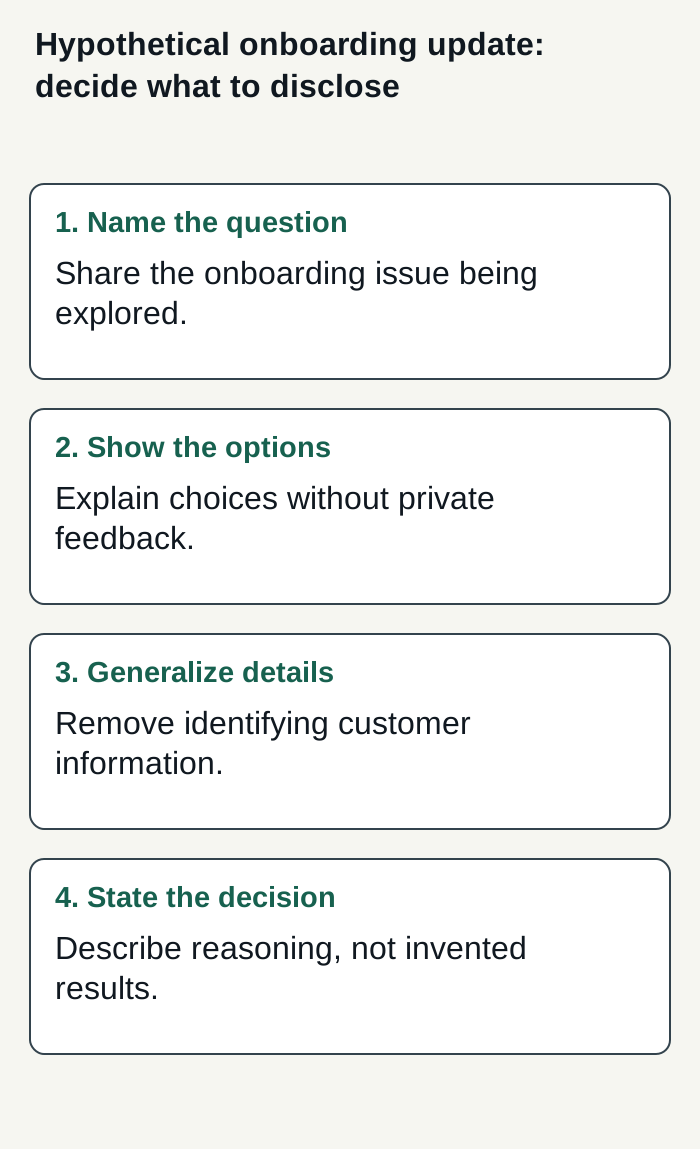
Editorial decision flow using a hypothetical onboarding example; no real customer outcome is represented.
Condensed original editorial illustration. Read the surrounding guidance for qualifications and the complete procedure; any example is fictional and shows no verified customer outcome or product screen.
Illustrative worked example by Superdirector editorial team. Created 2026-11-09.
Adapt the same lesson to X and Instagram
Start with one approved idea, then make a format choice. On X, a single text post can state the question, the decision, or the lesson in a few direct sentences. Keep the distinction between a test and a result explicit. Do not add a thread unless the explanation genuinely needs more room.
For Instagram, a carousel can give the same idea a sequence: the question, the options, the decision, and what remains unknown. Use original, non-identifying visuals—such as a simple process diagram—rather than a real customer record or private dashboard. A carousel is a format choice, not a reason to reveal more than the text version.
These are practical format recommendations, not claims about platform ranking, reach, or what an algorithm rewards. Buffer’s content-creation guide recommends responding to audience comments and feedback; that can inform future topics, but a comment or direct message should not be republished as an example without considering the person’s privacy and permission.
Review the post and learn from replies
- Read the post as a stranger would: what does it claim, and what might someone infer beyond your intended point?
- Check text, images, and context for names or details that could identify another person or expose information you meant to keep private.
- Replace unsupported certainty with what you actually know: a question, a decision, or a lesson—not an invented outcome.
- Before publishing, ask whether this is material you are comfortable standing behind later. If not, revise or hold it.
Treat replies as input, not permission to widen the disclosure boundary. You can answer a question in general terms, take a sensitive conversation to a private channel, or say that a detail is not public. Corrections to a post should be clear; do not leave a misleading claim in place simply because it attracted attention.
If you want to assess whether this practice is worthwhile, choose a business-relevant purpose before you begin—for example, learning which questions prospective customers ask. Review whether the posts helped you gather useful questions or explain your work more clearly. Do not assume engagement proves business value, and do not treat a lack of visible response as proof that the work was useless. The supplied material contains no independent evidence that building in public causes growth.
Choose a workflow you can keep
Capture possible topics in a private note as work happens: a decision, a question, a small lesson, or a repeated customer question rewritten without identifying details. Later, select only items that pass your boundary check. You do not need a prescribed weekly cadence; choose a pace that fits your work and attention, or publish less when there is nothing useful to say.
If you are evaluating a customizable AI-run channel for about $200 a month, Growth is currently $199/month for two accounts, with no trial. It can publish eligible Instagram image carousels and single X text posts, either with per-piece approval or an enabled account Auto-post rule. Finished video—including TikToks, YouTube videos, and Reels—and fully autonomous channels are upcoming, not current publishing capabilities. Superdirector describes its process as finding ideas, remaking them as carousels, X posts, and video scripts in your brand, and filling your calendar; its how-it-works page says corrections guide the next draft. These are descriptions of the service, not evidence of business results. Keep the decision about what is ready to share with someone who understands the work. See how the product works and Growth plan details.
Publishing uses the connected account and the source cards you select; see the publishing setup guide for details. Before enabling Auto-post, verify that the first manually approved post is live. Turning Auto-post off stops unsent posts, and Pause posting holds the queue. Assess the workflow by your review effort and results you define for your business; neither minimal oversight nor results are guaranteed.