How-To Guide
How do you use TikTok Creator Search Insights to plan brand content?
Read Creator Search Insights' popularity, Recommended and content gap labels, pick three searches your product answers and turn them into a week of TikToks.
By the Superdirector editorial team. TikTok newsroom and vendor pages read November 6, 2026.
At a glance
How do you use TikTok Creator Search Insights to plan brand content?
Creator Search Insights is TikTok's free in-app tool that shows what people search for. Open it by typing its name into TikTok search. Filter by your category, then use the content gap filter, which TikTok describes as topics searched for often but not featured in many videos. Pick three searches with a high popularity score or Recommended Topic label that your product honestly answers, watch the top results, and plan a week of posts that cover what they miss, with the exact search phrase in the hook, on-screen text and caption. It is not on every account or in every region.
- Popularity score and Recommended Topic show demand; the content gap filter shows thin supply.
- Searches by followers appears only above 1,000 followers.
- Check each video's search share of views in TikTok Studio after seven days.
What Creator Search Insights shows a brand
Creator Search Insights is TikTok's free in-app tool for seeing what people search for on TikTok. TikTok's launch post of March 13, 2024 calls it a tool, available in select regions, that gives creators insight into topics people are searching for on TikTok. You open it by typing "Creator Search Insights" into the search bar; TikTok said it would also sit under Creator Tools in Settings.
For a brand, its value is that it shows demand and supply side by side. Topics come with a popularity score or a Recommended Topic label, and a filter shows content gap topics, which TikTok describes as searched for often, but not featured in a large number of videos on TikTok. Those can point to questions your buyers ask that few videos answer yet.
Two cautions before planning around it. It is not on every account: TikTok rolled it out by region (its South African post names South Africa, Kenya and Nigeria), and Hubfluence, a creator-marketing vendor, says what it shows is also partly personalized to the account's own activity. And no TikTok page we could read says whether business accounts get it; the Help Center page is script-rendered. Reacher warns not to assume that switching account types will restore access.
How to read the labels
Each label answers a different question. Read them together, not one at a time.
| Label or filter | What it tells you | What it does not tell you | Source |
|---|---|---|---|
| Popularity score | How popular a topic is in search | How it is computed; TikTok does not say | TikTok |
| Recommended Topic | TikTok says these topics have a high potential for engagement | Whether it fits your product | TikTok |
| Content gap | Searched often, but few videos cover it | Whether the few existing videos are good, or that you will rank | TikTok |
| Red growth percentage | Rapid growth within a 14-day period | Whether demand will last | Buffer |
| Searches by followers | What your own followers search for | Shown only above 1,000 followers | Mashable, Buffer |
| Category or For You sort | Topics by category (tourism, sports, science) or related to your content | For You is tuned to your account | TikTok |
TikTok also ties search to its pay system for creators. Its Creator Rewards Program rewards original content over a minute long on four metrics: originality, play duration, search value and audience engagement, and it defines search value as a metric assigned to content based on popular search terms. So creators in monetised markets have a reason to chase the same searches you are looking at, and a content gap can close quickly.
When enlarged, scroll horizontally to read the diagram.
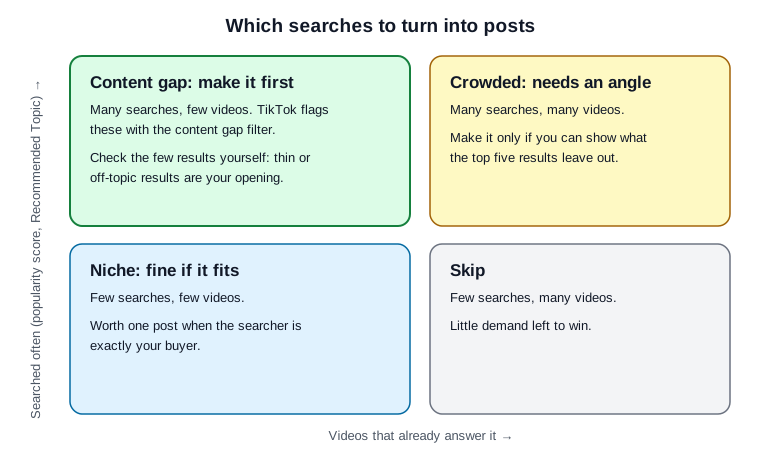
Original diagram for sorting Creator Search Insights topics; labels from TikTok's launch post, no real data shown.
Original visual by Superdirector editorial team. Creation date not recorded.
Open the tool and see what your account gets
Open TikTok on the account you post from, tap search, and type the tool's name. Write down what you see, because accounts differ. Metricool, a scheduling tool, describes three sections: Search analytics, Suggested, and Trending. Under Suggested, Buffer lists the content gap filter and searches by followers; Mashable notes that the follower view is only available if you have over 1,000 followers.
If the tool does not appear, check that the app is up to date and that you are on the right account, then move on. Typing a topic into TikTok search and reading the suggested completions and top results is a slower, manual version of the same research.
Pick three searches where demand meets your product
Filter by the category closest to what you sell, then switch on the content gap filter. Pick three searches that pass all three tests:
- Demand: a high popularity score, a Recommended Topic label or a growth marker.
- Fit: your product, or your team's know-how, genuinely answers it. A coffee-gear brand can answer "how to clean a burr grinder"; it should not chase a celebrity search to borrow traffic.
- Supply: it carries the content gap flag, or the top results are thin when you check them in the next step.
Three is enough for a week. More than that and the posts get rushed, which defeats the point of answering a search better than anyone else. The demand and supply grid shows how to sort the candidates.
Search each phrase yourself and study the top results
A content gap label is TikTok's estimate. Your own eyes are the check. Search each phrase exactly as written and watch the top five results. For each, note:
- Does it answer the search, or only mention it?
- What is missing: a step, a measurement, a before-and-after, the product actually in use?
- How does it open? A searcher has already said what they want, so the best results answer in the first seconds.
What the top results leave out is the brief for your post. If they already answer it well, drop the search and take the next one on your list.
Turn three searches into a week of posts
Here is how three searches become five posts. This is a fictional illustration for a small coffee-gear shop, not a real account or result.
| Day | Search phrase | Post | What it adds over the top results |
|---|---|---|---|
| Mon | how to clean a burr grinder | Video: full clean and reassembly, 60 to 90 seconds | Shows reassembly and how to keep the grind setting |
| Tue | pour over ratio | Photo carousel: one ratio per slide with the scale reading | A number on every slide, not a vague "about 1 to 16" |
| Wed | how to clean a burr grinder | Video: the three mistakes that dull burrs | Answers the follow-up searchers have next |
| Thu | grinder setting for v60 | Video: same beans at three settings, tasted side by side | A visible comparison; most results only name a number |
| Fri | pour over ratio | Video: answer the top comment from Tuesday's carousel | Turns a real question into the next post |
The search-to-week planner has a row per post with the phrase, the label you saw, what the top results miss, the hook, the on-screen text and the caption.
Put the exact phrase where TikTok can read it
A searcher typed specific words. Put those words where the viewer sees them and where TikTok may read them; Wavevision advises putting the phrase in your speech, on-screen text and caption. TikTok's recommendation explainer lists video information, which might include details like captions, sounds, and hashtags, among the things it uses; its current For You standards say the system looks at what people search for, and that a video can still be found through search even when it is not recommended.
- Hook: say the phrase, or the answer to it, in the first seconds.
- On-screen text: show the phrase as the first caption on the video.
- Caption: use the phrase near the start, in plain words, then add what is specific to your post.
Write it the way people search it, not the way your product page says it. For more opening lines, see hooks for TikTok; for a wider view of TikTok research tools, see TikTok trend tools compared.
Check search traffic after a week
After seven days, open the video in TikTok Studio. Wavevision, a video agency, gives the path: open TikTok Studio, go to Analytics, then Content, and tap a video; the traffic sources show the share of views that came from search. Metricool lists the search analytics TikTok shows: search views, search view percentage, search impressions, average CTR and average search ranking, over 7 days, 14 days or a custom period.
Wavevision says search is usually under 5% of traffic for most accounts, cites another guide that treats 5% or more from search as a sign of evergreen content, and calls 10% to 20% from search a win for a content-gap video. Neither figure comes with a stated sample; use them as starting lines and compare against your own posts. Keep the topics that earned search views, write the result in the planner, and pull three new searches next week.
If you want the top of TikTok search on demand, that is a paid product: TikTok announced Search Hubs, which position brand-owned pages at the top of TikTok search results. Creator Search Insights is the free, organic route.
Where Superdirector fits
Superdirector publishes this guide. It does not read TikTok's search data. What it does is the format side of the work: it tracks the accounts, competitors, keywords and hashtags you choose on TikTok, Instagram, YouTube and X, picks the posts and formats taking off in your niche, and remakes them with the same hook and structure in your brand. For TikTok today that means scripts and storyboards you film yourself; finished AI video and posting to TikTok are coming soon. See how it works.