How-To Guide
How do you use TikTok Creative Center to find trends for your brand's organic posts?
Use Creative Center's hashtag, song, creator and video boards for organic TikTok posts, skip the ad-only data, check music rights and score each trend first.
By the Superdirector editorial team. TikTok help pages and vendor guides read November 6, 2026.
At a glance
How do you use TikTok Creative Center to find trends for your brand's organic posts?
Open Creative Center, which TikTok describes as free and public with no login required, and go to Trends. Set the country your buyers live in and compare the 7-day view with the 30-day view. Read the hashtag board for rising topics in your industry, filter the songs board to sounds approved for business use, and open the videos and creators boards to see the format behind a trend. Leave Top Ads and Keyword Insights for ad research, since both come from ads. Score each trend with five quick checks, then remake its format with your own product and post while it is still rising.
- Hashtags, songs, creators and videos describe posts; Top Ads, Keyword Insights and creative patterns describe ads.
- Businesses must use cleared music on TikTok, organic posts included.
- A trend you cannot post within about a week is usually one to skip.
What Creative Center can tell an organic brand
TikTok Creative Center is TikTok's free trend and ad library. Its help page describes it as a free, public home to an ever-growing suite of creative resources, and says a login is not required, though logging in shows all of its features, data and insights. For organic posts, the part you want is Trends. TikTok's Trends help article says it displays trending hashtags by industry and lets you search or filter by industry or time frame; vendor guides such as Metricool's describe the songs, creators and videos boards that sit beside it.
The catch is that Creative Center was built for advertisers. Several of its tools describe ads, not the posts your followers see. Know which board is which before you plan around anything you find there.
| Board | What it shows | Organic or ad data | Use it to |
|---|---|---|---|
| Trends: Hashtags | Trending hashtags by industry and time frame; See Analytics adds trendline, related videos, audience insights and regional popularity (TikTok) | Organic posts | Spot a topic rising in your industry |
| Trends: Songs | Top trending songs; can be filtered by business use approval (Metricool) | Organic posts | Find a sound your business account may use |
| Trends: Creators | Creators gaining followers and likes; filter by audience region and follower count (Metricool) | Organic posts | Pick accounts whose formats to study |
| Trends: TikTok Videos | Trending videos, sorted by hot, likes, comments or shares (Metricool) | Organic posts | See what the format looks like |
| Top Ads | Ads advertisers authorised in Ads Manager, with a second-by-second engagement graph (TikTok) | Ads | Study hook timing |
| Keyword Insights | Pulled from TikTok ads, not organic rankings (Metricool) | Ads | Caption wording ideas |
| Creative patterns | Patterns from high-performing TikTok ads (TikTok) | Ads | Structure ideas, with care |
When enlarged, scroll horizontally to read the diagram.
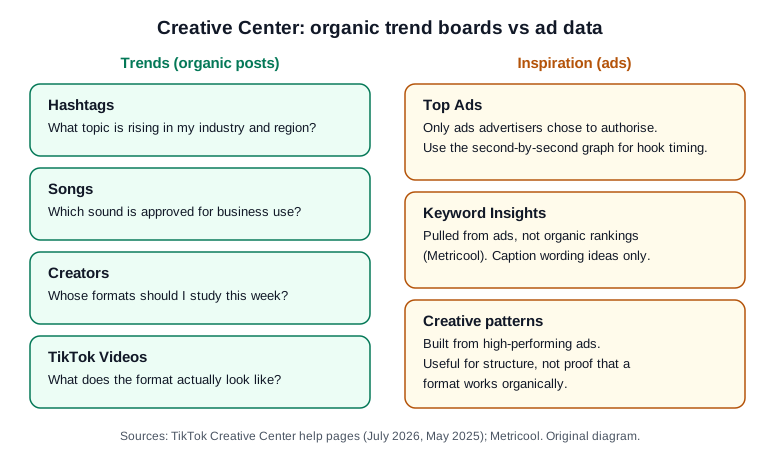
Original diagram based on TikTok's Creative Center help pages and Metricool's walk-through; no real account or result shown.
Original visual by Superdirector editorial team. Creation date not recorded.
Set the region and time window first
A trend is always a trend somewhere. TikTok's Creative Codes point brands to the Trends page to explore what's trending in your region in real time, and each hashtag's analytics include regional popularity. Set the country to where your buyers are, not where your team sits.
Then set the time window. Web Tonic, an agency, lists the windows as 7, 30 or 120 days. Read the short window against the longer one: a hashtag near the top of the 7-day list that is absent or low on the 30-day list is new; one that tops both is established and probably crowded. Early is where a small account has a chance.
Check the songs board for business approval
For a brand account, this is the step that matters most. TikTok's Commercial Music Library page says businesses cannot use the general music library for commercial usage, and that the rule covers organic content, including a duet, react, or stitch with user videos. The library itself is a pre-cleared global library of 1 million songs.
On the songs board, use the business-approval filter that Metricool describes before you fall for a sound. If the trend lives in a sound that is not cleared, keep the format and pair it with a cleared track or your own original audio. TikTok also says that if you want to use another user's original sound or other licensed sounds, you should consult your legal team to ensure you have obtained a proper license. Our guide to finding trending audio goes further on sounds.
Open the videos and creators boards to see the format
A trend you can use is a structure, and you only see the structure in the videos. Open the videos board, sort by shares or likes over your time window, and watch the top few that use the trend. Then check the creators board for accounts in your category; following two or three of them for a week shows you how a format holds up across topics.
For each video, write one line: how it opens, the order of the beats, the length, how the text sits on screen. TikTok itself frames trends this way: its Creative Codes say trends allow brands to capitalize on storytelling templates created by our community. When three videos share the same line, you have found the template. For opening lines that fit common TikTok formats, see hooks for TikTok.
Score the trend before you make anything
Most trends are not for you, and saying no quickly is the skill. Before anyone films, answer five questions with a plain yes or no:
- Is it still rising? It shows on the 7-day view but is not yet at the top of the 30-day view.
- Does it fit what you sell and who buys it, without forcing a joke?
- Can you make it with your own footage, product and words?
- Is the sound cleared for business use, or does the format work without it?
- Can you post within seven days?
Five yeses: make it. Four, with timing the only miss: make it only if you can cut production enough to post within the week; otherwise skip it. Three or fewer: skip it. The seven-day cut-off is our own working rule. No TikTok source gives a trend's lifetime. Web Tonic puts most usable trends, and sounds, at 5 to 14 days from visible acceleration to saturation, but a format or edit at 3 to 8 weeks; Shoplazza says a trending topic stays relevant for 72 to 120 hours. Neither says how it measured this. So the cut-off matters most when a trend rides a sound; a format can still be worth a remake after its sound fades. The trend scorecard holds the five checks and counts the yeses for you.
Remake the format with your product and post it
Now make your version. Keep the template: the opening move, the beats, the length. Replace everything else with your own: your product on screen, your words, your footage, your examples. Do not download and repost the trending video, reuse another creator's original sound or trace their visuals. If the post is paid or made for a partner, switch on TikTok's commercial content disclosure; if it shows realistic AI-generated people or scenes, label it.
Post while the trend is still climbing, then write the result in the scorecard: views after seven days against your usual, and whether the format earned a second try. TikTok's own trend forecast warns brands not to lock content in six months ahead, saying audiences are rewriting theirs every week. A weekly check of the boards, one scored trend and one remake fit that pace. For a repeatable version of this loop inside a team, see the trend monitoring workflow.
Where the ad boards still help
The ad tools are not useless for organic work; they answer narrower questions. TikTok's Top Ads help page says every ad there was authorised by its advertiser in Ads Manager, so you see only what brands chose to share. Each Top Ad has a second-by-second, frame-by-frame graph, which TikTok says helps you find the most successful engagement moment in the video. That is useful when you are deciding how fast your own opening should move.
Keyword Insights is worth a glance for the words people use in your category, but Metricool notes that the list is pulled from TikTok ads and does not reflect organic content rankings. Creative patterns are built from high-performing ads. Treat both as wording and structure ideas, never as proof that something works in the For You feed.
Doing the watching with Superdirector
Superdirector, which publishes this guide, does the watching for you across TikTok, Instagram, YouTube and X: it follows the accounts, competitors, keywords and hashtags you choose, picks the posts and formats taking off in your niche, and remakes them with the same hook and structure in your brand. For TikTok today that means video scripts and storyboards for you to film; finished AI video and posting to TikTok are coming soon, not available yet. You remain the publisher of what goes out. See how it works.