How-To Guide
Help creators find the right gameplay moment with Steam Timeline markers
Plan meaningful Steam Timeline markers and test whether creators can recover a gameplay decision, not just its final event.
A creator may remember the clever rescue in a long session but not where it happened in the recording. A useful Steam Timeline marker should help locate that event without pretending to be the finished clip. Plan markers around recognizable player moments, then check whether a creator can recover the moment and enough context to explain it.
Steam Game Recording works without special integration. Valve's Timeline integration lets a game add contextual information and event markers to that recording experience. The distinction matters: adding a marker is not the same as enabling recording, producing a complete highlight or publishing a social post. Steamworks Timeline documentation
Two historical recording discussions separate finding a moment from preserving it. In Steam's beta forum, Fault in Materimony reported marked footage being lost after a long session and asked about saving around markers. In a separate Reddit recording discussion, pinglyadya's written follow-up described marker-based scanning and sharing as useful to them as a content creator. These individual beta-era experiences are not a current defect report or a performance comparison.
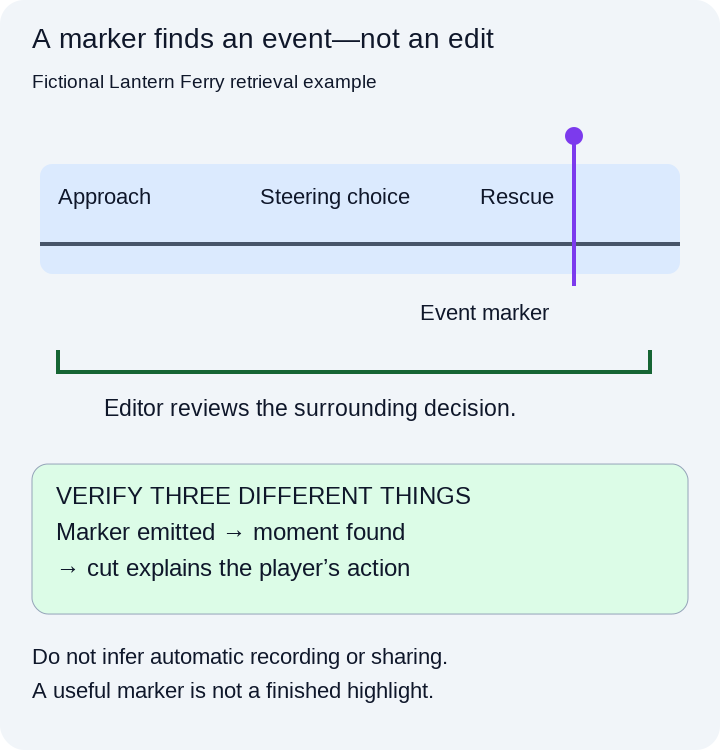
Original editorial decision tool. It is not a platform screenshot or a measured product result.
 Superdirector
Make it work for your brand
Find it. Remake it. Post it. Superdirector turns the viral formats in your niche into your brand's carousels, X posts and video scripts, and keeps the calendar full.
Begin with the retrieval question
Ask what someone reviewing a session would actually look for. “Where did I finally rescue both passengers?” is a useful retrieval question. “Where did anything happen?” produces an indiscriminate stream of markers.
For a fictional game, Lantern Ferry, the player steers a boat, chooses landings and helps passengers. The team proposes three marker concepts: a successful rescue, a difficult landing and the end of a route. These are invented examples, not implemented features or recommendations to instrument every action.
For each proposed marker, write a small editorial specification:
- The exact in-game event it represents.
- The plain-language label a player will recognize later.
- The context needed before and after the event.
- Any story information the label must not disclose.
- The person responsible for verifying the trigger in the build.
A label such as “Special event 7” may be technically unique and practically useless. A label naming a secret passenger may be useful to the player but reveal more than the campaign intends when the timeline appears in a creator's recording.
Mark the event; preserve the surrounding decision
The rescue itself may occupy a moment. The interesting video may require the approach, the risky steering choice and the consequence. Do not ask an implementation owner to solve the entire editorial decision with a marker title.
In the fictional example, the creator needs to see why a direct landing failed and how a different approach worked. A marker at the successful rescue is a starting point for finding that sequence. The editor still chooses the in and out points by reviewing the actual footage. A clip that begins only at the success can make the action look arbitrary or imply a mechanic the viewer never sees.
Create a retrieval note rather than an automatic cut rule: “Find the rescue marker; inspect the approach immediately before it; retain the visible steering decision and the actual passenger response.” Do not prescribe a universal number of seconds. Different play sessions can reach the same event through different actions.
Keep the marker set selective
Review a representative session with the implementation owner. Does the marker set distinguish meaningful events, or is the useful moment buried among repeated routine actions? The answer should come from the actual timeline, not a target count invented for the launch checklist.
If several markers describe essentially the same event, decide which one helps the viewer locate it. If an important moment has no marker, record the omission and whether adding one is feasible. This is a prioritization exercise, not an instruction to add telemetry simply because a content team wants more highlights.
Do not claim the feature automatically identifies a game's “best” moments. A failed attempt may be more explanatory than a win. A quiet decision may make a better tutorial than a spectacular effect. The creator's purpose still determines the selection.
Rehearse retrieval without coaching
Use an authorized recording session and the intended build. Give a reviewer a task such as “find the landing where the player changed their approach.” Do not tell them the timestamp. Observe whether the marker wording helps, whether the selected event is actually the intended one and whether the surrounding footage contains enough context.
Separate three findings: the game emitted the expected marker; the reviewer found the moment; the resulting cut explains the action. One does not prove the others. If the marker fires at the wrong event, send the case to implementation. If it is accurate but obscure, revise its wording. If retrieval succeeds but the clip is confusing, revisit the editorial boundary.
Keep the source recording available during review. A marker is not a replacement for the footage, and a prepared capture plan is not proof that a player's recording settings retained the session.
Give creators a retrieval map, not a compulsory script
The handoff can list a few verified marker labels and what each may help locate. Include the build and any known missing cases. Let creators choose their own interpretation and disclose any staged demonstration footage honestly.
For a YouTube tutorial, the recovered sequence may need a fuller explanation. For an Instagram or X clip, it may support one decision and consequence. Neither destination makes the marker itself evidence of audience interest or campaign performance.
See the planning workflow for turning verified gameplay references into hooks and shot plans. It does not implement Steam Timeline, configure a creator's recording or guarantee that a highlight will be retained or shared.