How-To Guide
Write Steam rich-presence text that does not spoil your story
Review runtime status templates, substituted names and transitions before a spoiler-conscious creator preview.
By the Superdirector editorial team.
A spoiler-safe trailer can still be undermined by the status text shown beside a player in Steam's friends interface. Before a creator preview or narrative-game launch, review what the game says about the current player state, not just what the public video shows.
Steam's enhanced rich presence lets a game supply a localized status string. The available display is one line and may truncate. This guide proposes a spoiler-conscious editorial review of those strings; Valve's documentation does not define your game's spoiler boundary. Steamworks enhanced rich-presence documentation
Historical player discussions reveal a related disclosure concern. In an April 2020 Steam discussion, a player described unwanted attention and spoilers after friends could see their activity. In a September 2020 Obsidian forum question, jimnms wanted the game to remain visible while character and activity details stayed private. The latter is a privacy request, not a reported story-spoiler incident. Neither establishes today's settings; both help explain why the team should decide what information its status text exposes.
Make a state inventory, not a list of attractive slogans
Ask the implementation owner for the statuses the promoted build can actually publish, including the values inserted into their templates. A safe-looking template can become revealing when a chapter, character or location name is substituted.
For each state, record the trigger, the template, the possible visible values and the public knowledge it assumes. Include menus, loading transitions, replay modes and late-game states. A campaign writer does not need to reverse-engineer the game; the implementation owner supplies the actual strings and triggers, and the narrative owner identifies protected information.
Use three editorial outcomes:
| Outcome | When it fits | Action |
|---|---|---|
| Publish the specific activity | The wording adds context without exposing a protected fact. | Review the rendered string and translations. |
| Publish a broader activity | The detailed location, identity or objective reveals too much. | Replace the revealing variable or template with an accurate category. |
| Hold for implementation review | The string is stale, contradictory or cannot express the state safely. | Do not solve a runtime mismatch with campaign copy alone. |
These are team decisions, not Steam approval categories.
Rewrite the information, not just the tone
Consider the fictional mystery game The Quiet Observatory. Its story includes an invented hidden identity and a location that becomes important late in the game. The following strings are teaching examples, not text captured from a real title.
“Confronting the archivist in the hidden observatory” exposes both a person and a destination. A friend who has not reached that scene may learn something the trailer deliberately withheld. “Investigating a late-night lead” preserves an accurate activity without naming the reveal—if that description genuinely fits the scene.
“Chapter 9: The Archivist's Betrayal” cannot be made safe merely by shortening it to “The Betrayal.” The problem is the disclosed event, not the character count. A generic chapter label or an ordinary activity may be more appropriate, depending on what the game already reveals publicly.
“Waiting in the lobby” is harmless only if it is true. If the build leaves that status visible during solo story play, it may wrongly suggest friends can join. Send that issue to the implementation owner. Do not replace it with an equally inaccurate but more exciting phrase.
When enlarged, scroll horizontally to read the diagram.
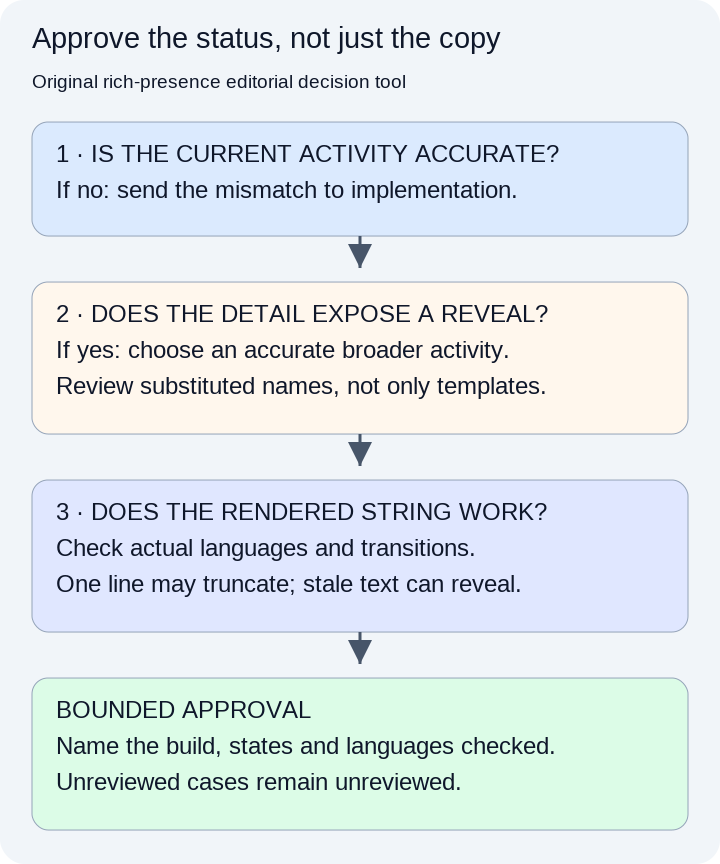
Original decision tool. The sample story and wording are fictional; the diagram is not a screenshot of Steam.
Original editorial decision tool, not a product screenshot or measured result.
Original visual by Superdirector editorial team. Creation date not recorded.
Review combinations and transitions
Read complete rendered examples, not isolated tokens. A localized activity followed by a variable location may repeat words, become awkward or push the meaningful part past the visible line. Put essential, non-spoiling information early, but do not claim one character count will fit every language and display.
Build a small transition sheet for the creator-preview session: menu to game, one ordinary activity to another, return to menu and the approved stopping point. Ask the authorized tester to observe both the game and the status the friend sees. Record the promoted build and the actual results. If the session contains protected states, use the team's approved test setup rather than exposing those states to unrelated contacts.
Check whether a previous status persists when the activity changes. A stale string can disclose where a player was even after they have left. The copy owner can identify the disclosure; the implementation owner decides how the game updates or clears the state. Keep those responsibilities separate.
Include rich presence in the creator handoff
A creator's capture boundary should say more than “avoid spoilers.” Identify approved game sections and any interface overlays that may reveal information outside the video frame. The presence review is one part of that handoff, not a promise that every notification or third-party overlay is safe.
Give the social editor approved public descriptions of the activities shown. These descriptions can also help keep a YouTube title, Instagram caption or X post from naming a protected event. Do not copy runtime strings into campaign text automatically: a useful friends-list status may be too vague to explain a video to someone who has never heard of the game.
Keep an exception log for intentionally public chapter names and previously announced locations. Otherwise each reviewer may invent a different spoiler policy. When a campaign reveals something new, update that policy deliberately; do not silently treat yesterday's protected detail as public because one scheduled post mentions it.
Finish with a bounded approval
A useful approval names the build, inspected states, languages actually reviewed, protected information checked and unresolved cases. It does not claim every possible status in every language is safe. Reopen the review when narrative labels, runtime templates or the creator-preview route change.
See the planning workflow to turn approved, non-spoiling product references into social hooks and shot plans. It does not inspect your runtime strings, implement Steam rich presence or certify a build as spoiler-free.