How-To Guide
Check the commercial license route before promoting a Steam game at a venue
Confirm the released game, venue access route and real station rehearsal before advertising a Steam hands-on event.
A café showcase plan needs more than a working installation and a creator willing to attend. Before advertising that visitors can play your Steam game on the venue's machines, establish which access arrangement the venue will actually use. A retail or review key is not a substitute for checking commercial-use authorization.
Steam's PC Café Program provides a commercial licensing route for participating publishers and venues. Valve's publisher guide says commercial-package creation becomes available after the regular end-user game has launched. Do not present that route as an immediately available solution for an unreleased demo. Steam PC Café publisher guide
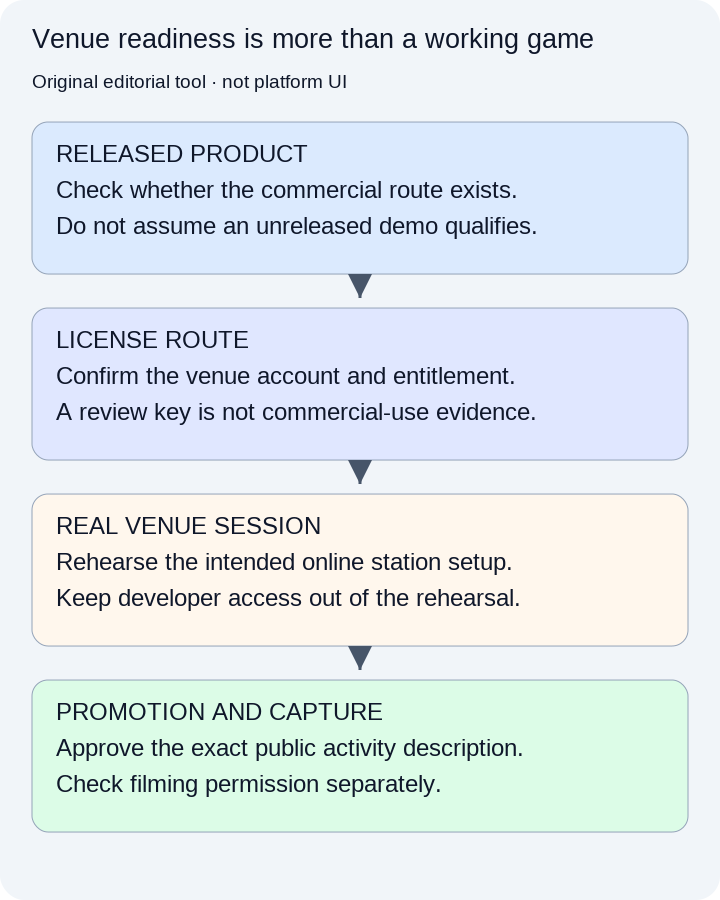
Original editorial decision tool, not platform UI or a measured product result.
 Superdirector
Make it work for your brand
Find it. Remake it. Post it. Superdirector turns the viral formats in your niche into your brand's carousels, X posts and video scripts, and keeps the calendar full.
Begin with the actual venue activity
Describe who supplies the machines, who controls the Steam setup and what visitors will do. A staffed public demo, an ordinary café session and a filmed creator interview are different activities. This guide is an operational planning checklist for a released game, not a legal conclusion that every event uses the same license or that one agreement covers all filming rights.
A historical developer question about an exercise game described gyms interested in using the game commercially and uncertainty about the appropriate Steam route. A separate pop-up gaming organizer asked about games outside the Café catalogue. The gym author later identified the Café route and said it appeared appropriate; that follow-up does not prove a license was obtained. These are different operator contexts. Neither establishes that a particular venue or game is authorized today.
Ask the responsible venue and publisher owners to identify the applicable route. If the game is not available through the program, do not tell an organizer that ordinary Steam ownership automatically fills the gap. The owner needs the appropriate platform or rights-holder clarification before the play claim can be approved.
Put license readiness beside production readiness
For the fictional released game Lantern Ferry, imagine a café wants to host a creator-led play session. Build a small readiness record:
| Area | Evidence needed before promotion |
|---|---|
| Game | The released title and intended build. |
| Access arrangement | The applicable authorized commercial or other approved route. |
| Venue setup | The responsible operator and configured machines. |
| Capacity | The number of simultaneously usable stations actually supported. |
| Connectivity | The venue's tested connection and required online services. |
| Creator capture | Separate permission and practical arrangements for recording. |
| Public promise | Exactly what an attendee can do and any relevant limit. |
This is a fictional planning record. Do not fill unknown fields with the number of chairs in the room or the number of keys available in a spreadsheet.
Rehearse the licensed path, not a developer shortcut
Valve's Café guide describes a concurrent license pool and site-server setup. The venue operator should verify the actual access path using the intended environment. A developer account that already owns the game can conceal a missing commercial setup; a successful launch from that account is not evidence for the visitor route.
The documentation also distinguishes visitors using their own personal copies from the venue's commercial pool. Keep those arrangements separate in the plan. Do not promise every attendee can use the same entitlement regardless of how they enter. Steam PC Café publisher guide
Record which station and access route were tested, what happened at launch and whether the intended playable activity was available. If simultaneous use is part of the event offer, have the authorized operator check that condition. Do not infer concurrency from testing each machine one at a time.
If a rehearsal fails, hold the affected play promise and let the operator investigate. Do not solve it by circulating personal credentials, distributing ordinary review keys to the venue or asking visitors to bypass the intended controls.
Write the event invitation around the checked experience
A creator's YouTube announcement or a café's Instagram post should describe what visitors can actually expect: the named game, the available play format, the event's confirmed timing and any genuine capacity limitation. Do not write “unlimited play” because the footage shows several empty stations.
Keep the creator appearance separate from the game-access offer. A creator can discuss the game without guaranteeing every attendee a playable station. If the licensing or setup is still unresolved, the promotion should not present hands-on access as confirmed.
For the fictional café, an honest internal brief might read: “Creator discussion confirmed; hands-on stations remain pending the operator's access rehearsal.” That is a preparation state, not copy to disguise an incomplete event as ready.
Separate playing permission from capture permission
A commercial game license does not, by itself, establish consent to film attendees or rights to every captured music track. Agree on the recording area, participant consent process and approved game-audio scope through the responsible owners. Do not treat this checklist as legal clearance.
After the event is authorized, preserve the approved public description and the actual setup record. Any later recap should distinguish planned stations from those that operated and avoid inventing attendance or engagement numbers.
See the planning workflow to turn a verified event format and product references into social scripts. It does not obtain venue licenses, configure the Café Program or clear filming rights.