How-To Guide
Explain Steam Families access without promising another permanent copy
Check the copy, DLC and account-bound reward behind a Steam Families demonstration before promising viewers permanent access.
By the Superdirector editorial team.
Do not describe a shared Steam game as a free extra copy for every family member. For a creator demonstration, distinguish the person playing, the copy being borrowed and the content available through that copy. For your game's backend, distinguish temporary sharing access from permanent ownership.
Valve's developer documentation explicitly treats Family Sharing licenses as temporary and warns against granting permanent backend ownership to a borrower. Its player FAQ also explains that ownership remains with the purchaser and that simultaneous access depends on available copies. Steamworks Families documentation · Steam Families FAQ
Separate the promise from the household arrangement
Two public buyer questions show why copy-aware wording matters. In December 2025, Fargotroniac asked whether buying DLC alone would give a borrowing family member full access, then asked how to see which DLC was available. In March 2026, NullityVX asked how simultaneous play works when two people own the game but only one owns DLC; the author acknowledged the copy-selection explanation. These are individual questions, not a measured prevalence claim. Use current Valve documentation—not forum replies—to establish the rules.
Steam Families is a household-oriented feature with eligibility conditions. It is not a campaign referral program or a way to hand review access to unrelated creators. Do not tell viewers to join someone else's family, share credentials or change their household information to obtain your game.
If your game is eligible and the team intends to mention that support, write a bounded claim: the named game supports the checked sharing route, subject to Steam's rules and copy availability. Do not turn the feature label into “buy once and everyone can play together.”
This distinction matters even for a single-player game. A successful borrowed session says who could use an available copy at that time. It does not say the borrower now owns the game permanently or that the same copy will always be available.
When enlarged, scroll horizontally to read the diagram.
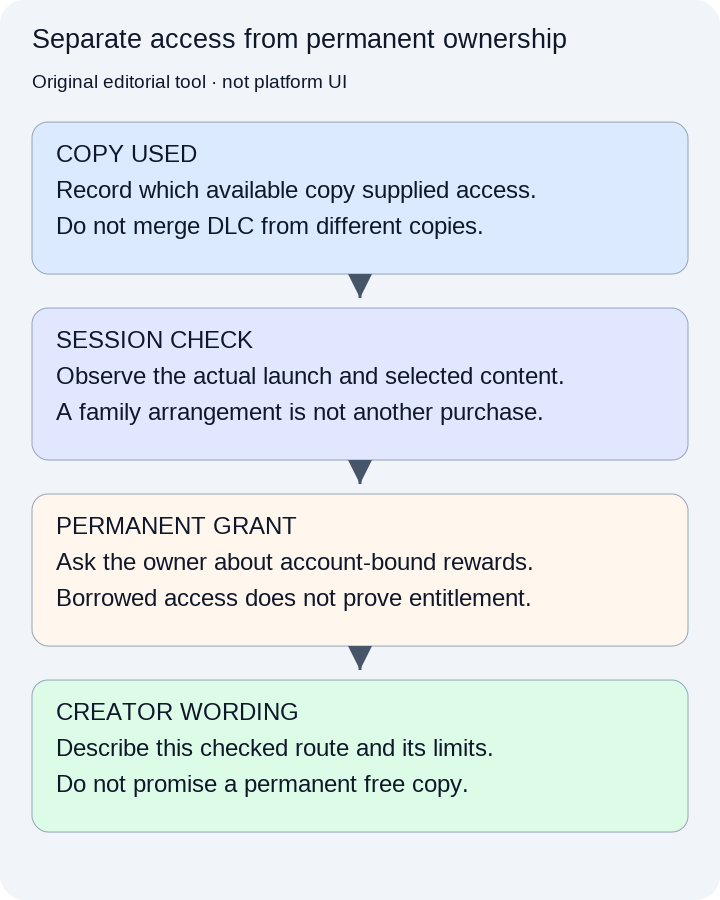
Original editorial decision tool, not platform UI or a measured product result.
Original editorial decision tool, not platform UI or a measured result.
Original visual by Superdirector editorial team. Creation date not recorded.
Build a copy-aware demonstration record
Use an existing authorized test arrangement rather than creating or changing a real family group for a marketing exercise. Keep private account details out of the capture.
| Observation | Why it belongs in the record |
|---|---|
| Playing account | The borrower and owner are not necessarily the same person. |
| Selected copy | The demonstrated access depends on that copy. |
| Relevant DLC | Content can differ between copies of the same base game. |
| Current availability | Another active use can affect the available route. |
| Observed game result | A Library entry alone does not show the intended play. |
| Backend entitlement handling | The game must not silently convert borrowing into permanent ownership. |
The final row is for the implementation owner. The content team needs an accurate confirmation of behavior, not access to private ownership APIs or production account data.
Do not combine the best parts of different copies
For the fictional Lantern Ferry, imagine one household member owns the base game and a harbor expansion, while another owns only the base game. A demonstration that begins using the first copy's expansion and ends by claiming every available copy includes it would be misleading.
Valve's FAQ ties shareable DLC to the selected owner's copy and warns that switching to a different DLC set may affect saves. Keep the specific DLC state visible in your internal record. Do not promise that content from several owners merges into one universal edition, or that every saved state survives a copy change. Steam Families FAQ
If the social video only needs to demonstrate ordinary base-game play, avoid adding an expansion claim it cannot substantiate. If the expansion is central to the offer, explain its verified access conditions directly instead of relying on a generic Families badge.
Review permanent grants with the product owner
Ask whether any first-run reward, account upgrade or one-time currency grant depends on ownership. If so, have the responsible engineer verify how the game distinguishes the borrower from the owner. This is especially important when an external service remembers an entitlement beyond the current Steam session.
Do not infer a defect merely because a reward appears. The product may intentionally offer a benefit to players under documented rules. The review question is whether the actual grant matches the intended policy and the campaign's description. Avoid publishing internal identifiers, private API responses or a workaround for obtaining repeated rewards.
The public explanation can remain simple: borrowing provides the supported access while the applicable conditions hold; it is not another purchased license. The private evidence must be precise enough to justify that sentence.
Make the creator brief match the checked route
Give the creator the exact feature scope and the phrases to avoid. A YouTube walkthrough should not edit a temporary access state into a permanent ownership claim. A short Instagram or X caption should not imply simultaneous household multiplayer merely because different family members can access the game.
Keep Families separate from local co-op, Remote Play Together and native online multiplayer. Those features answer different questions about who participates and how. If the video demonstrates multiplayer, use the actual multiplayer evidence as well; a sharing check does not establish that friends can join a session.
If the borrowed path fails, record the selected copy, available content and observed message, then use the appropriate support route. Do not recommend deleting saves, buying an unnecessary copy or changing security settings as a generic correction.
See the planning workflow to turn verified access conditions and gameplay into a clear content brief. It does not manage Steam Families, grant entitlements or certify save compatibility.