How-To Guide
Move your Steam community CTA into the right store-page field
Keep your Steam description, supported community link and creator instructions consistent without relying on an outdated banner.
If your Steam description still tells visitors to click a Discord banner embedded in the description, review the placement before reusing that instruction in a creator brief. The community destination may be legitimate while the location of its link is wrong. Separate the game description, the designated social-link field and any instructions shown inside the game.
Valve's store-page documentation prohibits external links in the written description and provides social-link fields under Basic Info. It also prohibits imagery that imitates Steam interface elements. A button-shaped graphic in the description is not a substitute for the supported link placement. Steamworks store-page documentation
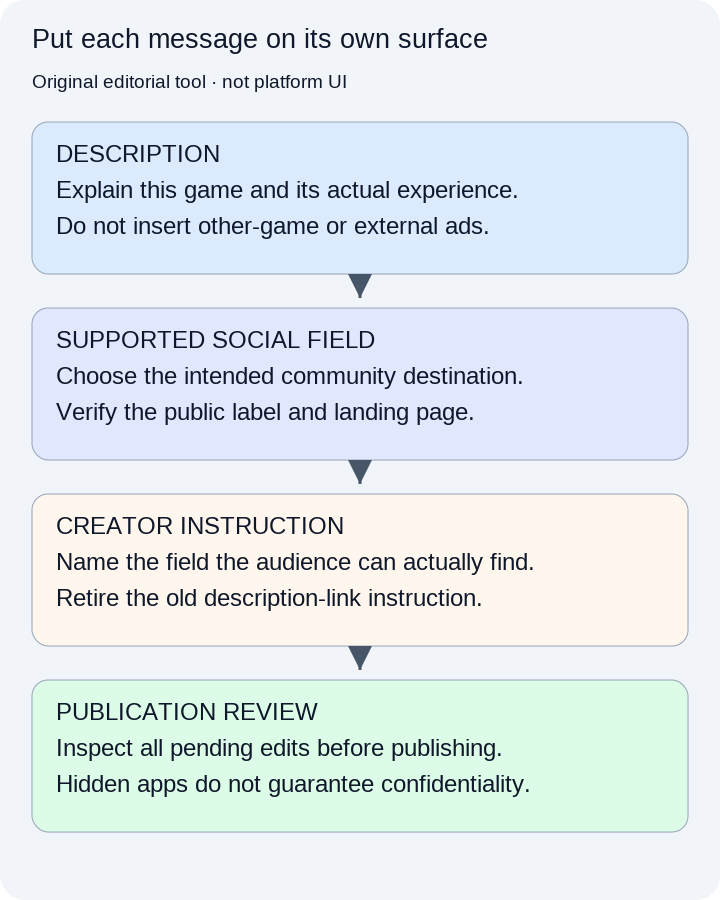
Original editorial decision tool, not platform UI or a measured product result.
 Superdirector
Make it work for your brand
Find it. Remake it. Post it. Superdirector turns the viral formats in your niche into your brand's carousels, X posts and video scripts, and keeps the calendar full.
Do not merge different surfaces into one rule
A developer asking about external links combined two questions: links inside the game and links on its Steam page. Replies described different personal experiences before another participant distinguished the description from designated link fields. The discussion demonstrates the ambiguity; it is not an approval record or current authority for every in-game link.
Make a placement inventory before changing copy:
| Surface | Review question |
|---|---|
| Store written description | Is it explaining this game without an external-link workaround? |
| Designated social field | Does the entered destination belong to the intended public community? |
| Creator's social post | Does the instruction describe a route a viewer can actually find? |
| In-game menu | Has the responsible owner checked this separate implementation and applicable rules? |
This guide focuses on the first three. It does not certify links inside your executable or decide whether an external commerce destination is acceptable.
A separate historical Steam customer comment by Aasjiel on August 14, 2024 said side social links were easy to miss. That is a visibility concern from one customer, not conversion evidence. Together, these contexts suggest checking both permitted placement and the instruction that helps a viewer find it.
Give the description back to the game
Removing a promotional banner leaves useful space. Replace it with information that helps a visitor understand the playable offer: what they do, which decisions matter and what the current release includes. Do not fill the gap with an unlinked image that still pretends to be an interactive Steam control.
For the fictional Lantern Ferry, an old description opens with a large “Join the crew” community banner. A better revision could open by explaining the ferry routes and passenger decisions, while the community link lives in its supported field. The example is an editorial layout choice, not a measured improvement in wishlists or community joins.
Keep other-game promotion separate too. A description for one game should not advertise other games, including related titles. Use applicable supported bundle, franchise or developer-homepage surfaces for those relationships rather than treating every empty paragraph as promotional inventory.
Check the destination before briefing the route
Ask the community owner to verify the actual public invitation. Does it reach the intended community, with the expected onboarding and public identity? Is it still valid? Does it accidentally point to a private test space? Do not create a new account, join a private server or send invitations merely to complete an editorial checklist without authorization.
Then inspect the viewer-facing store page after an authorized change. Record the date, the relevant client or browser surface and the visible link label. A saved admin field is not proof that the public page is serving the intended destination.
If a community link cannot be verified, hold the community-specific CTA rather than substituting a teammate's personal invite. The game can still be explained without pretending that an untested destination is ready.
Update the creator instruction, not only the page
A creator may have an old brief saying “click the Discord banner below the trailer.” Once the placement changes, that instruction can fail even though the link itself still works elsewhere. Supply a refreshed description of the observed route, and do not hard-code a position that you have not checked on the intended surface.
For a YouTube demonstration, a brief screen capture can show the actual destination label without exposing administrative controls. For Instagram or X, an accurate short instruction may be enough. Avoid telling people to click a rendered image or a link location that does not exist in that format.
Keep community participation optional. Joining a community should not be presented as necessary to understand the basic game offer unless there is a real, clearly disclosed product requirement. A person looking for support also needs an appropriate support route; this placement review is not a replacement for that separate task.
Review pending edits as a release bundle
Before an authorized publisher pushes a store-page update, have them inspect the full set of pending changes. Valve notes that publishing exposes the store data and assets, even for hidden or unreleased products. Do not use an unreleased page's visibility setting as a confidentiality promise.
The editorial handoff should identify the intended description revision, designated destination, removed outdated instruction and public verification still required. If other unpublished material is present, let the release owner decide what can safely be published together.
Your completion record is not “Discord added.” It is “the game description serves its purpose, the supported public link reaches the intended destination, and the creator instruction matches the checked route.” That is a useful production outcome without inventing a conversion result.
See the planning workflow to turn the verified game explanation and destination into social hooks and scripts. It does not edit Steam fields, approve external links or operate your community.