How-To Guide
Keep your Steam anti-cheat declaration and launch explanation consistent
Carry verified anti-cheat facts from the implementation owner into the Steam declaration and creator launch brief.
By the Superdirector editorial team.
Before a creator describes your game's anti-cheat, reconcile the store declaration with the integration in the promoted build. The useful public explanation identifies what is installed and the relevant conditions without promising perfect security, universal compatibility or zero false detections.
Valve provides a dedicated anti-cheat field in the store-page tools. Its announcement requires disclosure for new submissions that install client-side kernel-mode anti-cheat and describes provider, kernel-level integration and uninstall-cleanup information. Non-kernel anti-cheat disclosure is described as optional. Check the actual integration rather than inferring its properties from a provider's name. Valve's anti-cheat disclosure announcement
Two public reader questions show the communication gap. Galactic_T0ast asked what differences between anti-cheat notices meant, including whether visual treatment implied a different access level. Separately, NuSu_SubZero asked in a WARDOGS discussion whether the store's named anti-cheat was still accurate. These are questions about interpreting and maintaining disclosure, not verified findings about those games' software. Do not answer such questions by guessing from badge color or repeating another player's technical assertion.
Ask the implementation owner for facts the content team can use
A marketer should not determine operating-system behavior from a launch screenshot. Request a dated integration note from the responsible engineer or release owner, covering the exact build and the modes being promoted.
The note should identify the provider or internal system, whether the relevant integration installs or modifies kernel-level files, when it is required and what the tested uninstall process leaves behind. If the owner cannot substantiate a property, keep it unresolved instead of converting a vendor slogan into a product fact.
Do not include private security architecture, detection rules, credentials or a bypass recipe in the creator packet. The public explanation needs enough information for an informed player decision, not operational details that enable evasion.
When enlarged, scroll horizontally to read the diagram.
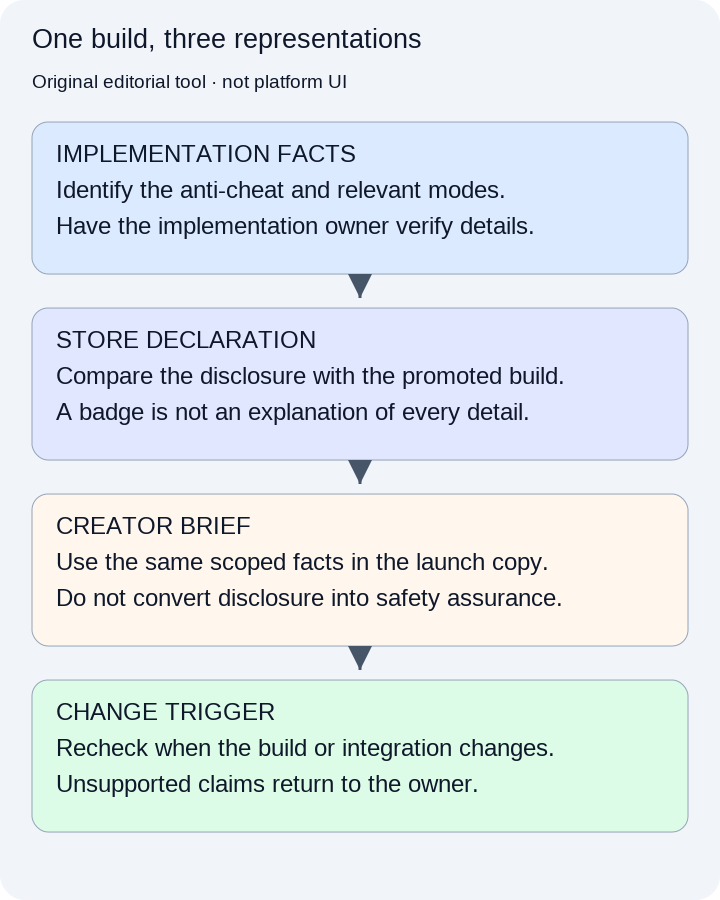
Original editorial decision tool, not platform UI or a measured product result.
Original editorial decision tool, not platform UI or a measured result.
Original visual by Superdirector editorial team. Creation date not recorded.
Compare three representations of the same build
| Representation | What to compare |
|---|---|
| Implemented integration | The release owner's verified technical facts. |
| Steam declaration | The actual provider and relevant disclosures visible for the game. |
| Creator brief | The plain-language description and any limitations. |
A match between the last two is not enough if both copied an outdated launch plan. Start with the actual build. A new integration, removed component or changed mode requirement should reopen the comparison.
For the fictional multiplayer game Harbor Relay, imagine an early brief says “no extra anti-cheat installation,” but the release candidate adds a component. The correct response is to hold that sentence, obtain the verified integration facts and update the authorized store disclosure and creator brief through their owners. Do not quietly remove a warning screen from the video while leaving the old promise in the caption.
Separate disclosure from reassurance
A disclosed component is not a certification that it cannot cause problems. A successful rehearsal on one machine is not proof of universal compatibility. Likewise, a player concern is not evidence that the system is malicious.
Use specific, supportable wording: identify the integration and the relevant player-facing requirement, then point to the official product information and support route. Avoid broad assurances such as “completely safe,” “cannot affect performance” or “works on every Linux system” unless the claim has the extraordinary scope of evidence it would require.
This article does not evaluate the security of any anti-cheat product or recommend weakening device protections. It also does not adjudicate an antivirus warning. If the exact distributed build triggers an unresolved security warning, treat that as a separate release investigation, not a disclosure-copy problem.
Make the demonstration represent the promoted mode
Ask which mode the creator will show. If the product has different requirements across modes, the brief should explain the relevant distinction based on verified behavior. Do not generalize a solo demonstration to a competitive multiplayer launch path that was never tested.
Use an authorized capture that includes the ordinary player-facing steps necessary for the shown experience. The public edit can be concise, but it should not imply that a required installation or restart never happens. Label any omitted setup step accurately and retain the uncut rehearsal for internal review.
If a creator cannot run the intended mode, record the actual condition and let the release owner decide whether another supported demonstration is appropriate. Do not ask the creator to disable protection, modify the anti-cheat or conceal an unsupported workaround.
Keep uninstall wording tied to evidence
Valve's disclosure announcement explicitly raises cleanup after uninstall. If the brief claims that everything is removed, have the responsible owner substantiate that scope for the promoted build. “The game no longer appears in the Library's installed list” is not the same observation as “all related components were removed.”
The content team should not publish manual deletion instructions based on a casual file inspection. If there is a known remaining component, provide the owner's accurate explanation and supported help route. Do not imply that a disclosure checkbox makes the underlying behavior true.
Give collaborators a correction trigger
The approval record should identify the build, modes, technical owner, checked declaration and creative revision. Reopen it when the integration changes. Give creators the current wording before their YouTube video, Instagram caption or X post goes live, and identify any older material that contains a superseded claim.
See the planning workflow to turn verified product facts and limitations into a social brief. It does not audit anti-cheat, approve security claims or validate platform compatibility.