How-To Guide
Show what ships first when a Shopify cart mixes ready-stock products and preorders
Explain whether a mixed ready-stock and preorder basket splits, waits or needs separate orders; shipping speed is not shipment grouping.
A video can show a ready-stock accessory beside an unreleased product and unintentionally suggest that both will arrive together. Calling one item a preorder does not explain what happens when the buyer adds both to the same cart.
For a mixed-stock campaign, the central promise is the shipment arrangement: whether ready items leave first, whether the whole order waits, or whether the store requires separate orders. Explain the arrangement your store actually supports before inviting the buyer to combine the products.
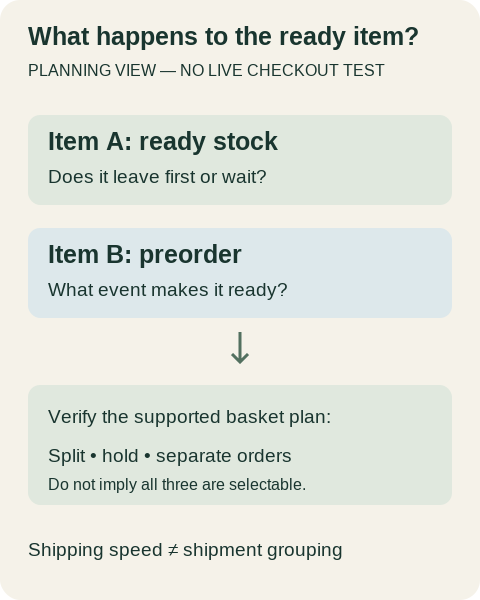
Planning diagram only. It does not show tested checkout behavior, actual dates or a delivery guarantee.
 Superdirector
Make it work for your brand
Find it. Remake it. Post it. Superdirector turns the viral formats in your niche into your brand's carousels, X posts and video scripts, and keeps the calendar full.
The buyer is choosing a shipment plan, not just two products
In a public mixed preorder and in-stock order discussion, a merchant compared holding the whole order, charging for separate shipments and preventing mixed carts. A separate collectible-figure preorder question described products with release dates months apart and asked for a choice between holding them and shipping individually.
Those are independent merchant questions, not evidence that a particular app or store configuration solves the problem. The second discussion also contains payment requirements and vendor replies; do not turn a proposed workflow into a verified Shopify capability.
The creative task is narrower: help a buyer understand what the basket means for receiving the items. Payment timing still needs its own accurate explanation, but “charged now” and “ships now” are different statements.
Do not mistake shipping-speed selection for shipment grouping
Shopify's split-shipping documentation, checked October 26, 2026, describes checkout showing separate shipments for eligible mixed carts, including preorder and available items. It also states that customers cannot choose how products in the cart are split. Selecting an available shipping method for a shipment is not the same as choosing to hold all products for one later parcel.
The documentation includes configuration and compatibility qualifications. A store's shipping setup, local delivery and third-party fulfillment integration can change the checkout experience. Stores upgraded to shipping options by market also have different settings and rate behavior. Inspect the actual store rather than making a tutorial from an old screenshot or assuming every checkout presents the same controls.
In particular, do not advertise “choose ship together at checkout” merely because checkout displays multiple shipping options. That promise needs a real, supported choice that carries through to fulfillment.
Define the promise at the basket level
Before recording the campaign, complete this decision table for the exact products and destination being promoted:
| Basket | What must be established | What the buyer needs to hear |
|---|---|---|
| Ready-stock item alone | Actual availability and dispatch arrangement | The ready-stock promise for this item |
| Preorder alone | Current release estimate and supported fulfillment plan | That the item is not ready to ship now |
| Ready stock plus preorder | Whether fulfillment splits, waits or requires separate orders | What happens to the ready-stock item in this basket |
| Two preorders with different releases | Whether each release creates another shipment or all wait | Which release governs each shipment |
| Mixed cart with a faster shipping option | Which shipment receives the faster service | Faster transit does not make an unreleased item available |
This is a proposed audit, not a claim that these routes have been tested. Record the observed behavior only after checking the relevant configuration and a permitted test checkout. If a fulfillment app is involved, confirm that the arrangement reaches that system—not merely that the storefront displays persuasive wording.
Use a two-line timeline instead of a single delivery arrow
Consider a fictional shop selling an available display stand and a figure expected later. A one-line animation showing both moving from “ordered” to “delivered” hides the decision that matters.
A clearer concept shows the stand on one line and the preorder on another. Label each with its actual status and the store's supported shipment arrangement. If the store holds both, join the lines at the later dispatch point. If the store ships separately, keep the lines separate and explain the applicable shipping charges before checkout. If the policy is unknown, the animation is not ready for publication.
Avoid adding a precise arrival date merely to make the timeline look complete. An estimated release, a warehouse receipt, dispatch and delivery are different events. Show only the events the evidence supports.
Write the short caption around the consequential choice
These are fictional copy patterns, not interchangeable claims:
- Verified hold arrangement: “Adding this preorder means the ready-stock item waits too. See the current release estimate before placing the combined order.”
- Verified split arrangement: “These items ship separately. Review the shipment details and shipping charges shown for your basket.”
- Verified separate-order requirement: “Order ready-stock items separately from this preorder. The store explains the shipping charges for each order.”
Choose the one that describes the real store. Do not offer all three as though customers can necessarily select among them.
For an Instagram Reel, put the mixed-cart consequence on screen when the two products appear together. For a YouTube product comparison, explain the arrangement before the purchase prompt. For an X post, a short sentence about the ready item's fate is more useful than a vague “preorder terms apply” after an enticing bundle image.
Keep shipping charges separate from the visual grouping
One order does not automatically mean one shipping charge, and a displayed split does not justify inventing a universal fee formula. Shopify's current documentation distinguishes rate types and includes a specific exception for preorder items combined with items that ship immediately under shipping options by market.
The safe campaign promise is the verified one for the actual basket and destination. Avoid a blanket “one shipping fee” or “free second shipment” unless the store's offer and observed checkout support it. A later manual adjustment is not the same experience as the price a buyer sees before ordering.
Recheck when the preorder changes state
When the preorder becomes available, the old mixed-cart explanation may no longer describe the offer. Recheck the product status, checkout grouping, fulfillment handling and campaign copy together. Likewise, a slipped release can change how long a held ready-stock item waits.
Ask a reviewer to explain the basket without help: What ships first? Can the buyer actually change the grouping? Which charges and estimates apply? If they cannot answer, the campaign needs clearer evidence or narrower copy.
See the planning workflow to keep the product statuses, shipment explanation and approved social cuts aligned. The goal is an informed basket decision, not a promise that split-shipping copy will increase conversion.