How-To Guide
Check an influencer discount against your automatic Shopify sale before filming the offer
Check influencer codes against automatic Shopify promotions, discount classes and actual combination settings before filming a price claim.
An influencer code can be valid and still fail to deliver the saving described in a video. The important question is not merely whether the code exists. It is what happens when that code meets the store's other active promotions in the buyer's actual basket.
Before recording “use my code for an extra discount,” rehearse that interaction. Write the creator's offer from the verified result—not from two percentages displayed on separate admin screens.
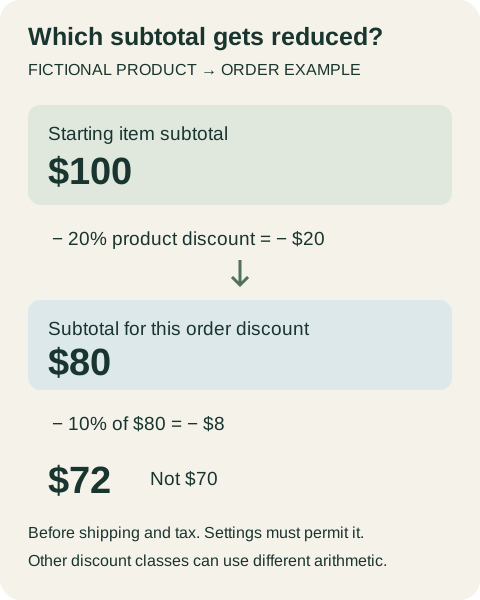
Illustrative product-then-order arithmetic: $100 becomes $80, then $72 before shipping and tax. This is a fictional compatible-discount example, not a tested Shopify checkout.
 Superdirector
Make it work for your brand
Find it. Remake it. Post it. Superdirector turns the viral formats in your niche into your brand's carousels, X posts and video scripts, and keeps the calendar full.
Start with the offer the creator intends to communicate
There are at least three different campaigns hidden inside “use my code”:
- Additional saving: the code adds a benefit to an existing promotion.
- Alternative saving: the buyer gets whichever eligible offer applies, rather than both together.
- A different eligible basket: the creator's code works on products or quantities excluded from the automatic offer.
These are not interchangeable. A creator may reasonably read “extra 10%” as ten percentage points off the original price. A merchant may intend 10% off the already-reduced subtotal. Even when the checkout is working as configured, that difference can make the spoken promise wrong.
A public Shopify merchant question about a referral code during a sale illustrates the problem: the merchant wanted a creator offer alongside an automatic spend-tier promotion without excessive stacking. That is one historical question, not evidence of how frequently shoppers encounter the issue. The older vendor response is not a substitute for current platform documentation.
Identify the discount classes before doing the arithmetic
Shopify's current combination documentation, checked October 26, 2026, distinguishes product, order and shipping discounts. Automatic discounts and codes can combine when the applicable conditions and combination settings permit it; both discounts need compatible settings. Some combinations have additional store or plan requirements. Do not infer your eligibility from another merchant's screenshot.
For the campaign worksheet, record:
| Field | Why it changes the creative |
|---|---|
| Code and discount class | A product reduction is not necessarily an order-wide benefit |
| Eligible products and exclusions | The filmed product must qualify |
| Minimum purchase or quantity | A one-item demonstration may not activate the offer |
| Customer eligibility and usage limits | An existing customer may see a different result |
| Active dates and timezone shown in your configuration | An evergreen video can outlive the offer |
| Other active discounts and combination settings | The code may combine, replace an offer or be unavailable |
| Checkout channel | A result on your online store does not establish external-platform checkout behavior |
This is an offer record, not an attribution record. Whether a creator is credited for a sale is a separate question requiring the relevant tracking or affiliate system. A displayed discount does not prove commission attribution.
Calculate a fictional example, then test your actual basket
Suppose a fictional store sells an eligible item for $100. A product promotion reduces it by 20%, leaving $80. If a compatible 10% order discount then applies to that reduced subtotal, the item subtotal becomes $72 before any shipping or taxes. That is a $28 reduction from $100—not $30.
Shopify documents product discounts before order discounts, followed by shipping discounts. It also describes different arithmetic for multiple percentage-based order discounts: those percentages use the same applicable subtotal rather than compounding sequentially. So the $72 illustration is not a universal formula for every pair of discounts. It represents the stated product-then-order scenario only. Check the documented combination rules.
Never publish the fictional $72 as a real checkout result. Replace the example with a recorded result from your own eligible basket, or explain the offer without a numerical demonstration until it is verified.
Rehearse the cases that can contradict the video
Use the same destination and checkout route the audience will use. Shopify documents previewing discounts in the cart and checkout without completing payment. Stay before payment for this rehearsal; a full purchase test is a separate authorized task.
| Case | What to record | If it contradicts the script |
|---|---|---|
| Featured product alone | Discount labels and item subtotal | Remove an unconditional “extra” claim |
| Basket that meets the automatic threshold | Which discounts apply and their amounts | Explain the qualifying basket or change the offer |
| Basket just below the threshold | Code result and missing automatic offer | Avoid showing a threshold-dependent saving as universal |
| Excluded product mixed with an eligible item | Which lines receive each reduction | Limit the statement to eligible products |
| Customer or usage condition not satisfied | Actual message and available alternative | Make the restriction visible before the CTA |
| Promotion inactive | Code response and destination copy | Retire the promotional version of the video |
Use only legitimate test conditions you can actually create. If you cannot reproduce a first-time-customer state, label that case untested; do not infer it from an ordinary returning-customer session. Record the observation date, currency, products, quantities and configuration version. Redact personal details before sharing the capture with the creator.
Give the creator a sentence and a boundary
For a verified additional-saving offer, a brief might say: “Use the code on eligible items; the checkout shows the final discount.” Add the real qualification alongside it. If the offer does not combine, do not keep “extra” in the voiceover and hope a caption fixes it.
A fictional replacement script could be: “The code applies to these full-price items. It does not add another saving to the current sale.” That sentence is useful only if it matches the actual configuration. Do not use it as a default Shopify rule.
Provide the creator with the approved product, basket assumptions, exact offer wording, restrictions and end condition. Include one disallowed sentence—for example, “30% off everything”—so a later edit does not recreate the rejected promise. Review spoken words, overlays, thumbnail, caption and pinned comment together. One inaccurate surface can undo four accurate ones.
Decide whether to launch, revise or hold
Launch the offer version only when the demonstrated basket, discount settings and campaign wording agree. Revise if a narrower statement accurately describes the intended benefit. Hold the promotional CTA when the observed result remains unexplained; the product demonstration can be retained without the unverified price claim.
After launch, repeat the check when another sale starts, the code changes, eligibility changes or the campaign is extended. The useful outcome is an offer a shopper can understand and reproduce under the stated conditions—not a promised conversion lift.
If you are organizing creator scripts and approval notes, see the planning workflow. Keep the discount record and checkout evidence beside the creative brief so the final offer can be checked before it is recorded.