How-To Guide
A Safari extension launch video needs a website action, not an app-home-screen tour
Build a Safari-extension creator brief around a supported website action, permission boundary and repeatable result, with separate setup help.
If your app's value happens inside Safari, film the value inside Safari. Then give a new customer a separate, tested route from installation to the first useful website action. A beautiful tour of the containing app can leave viewers unable to find the feature they came for.
The founder's decision is what belongs in the discovery video and what belongs in setup help. Trying to compress every setting into the opening seconds can obscure the benefit. Omitting setup entirely can make the benefit look automatic when it is not.
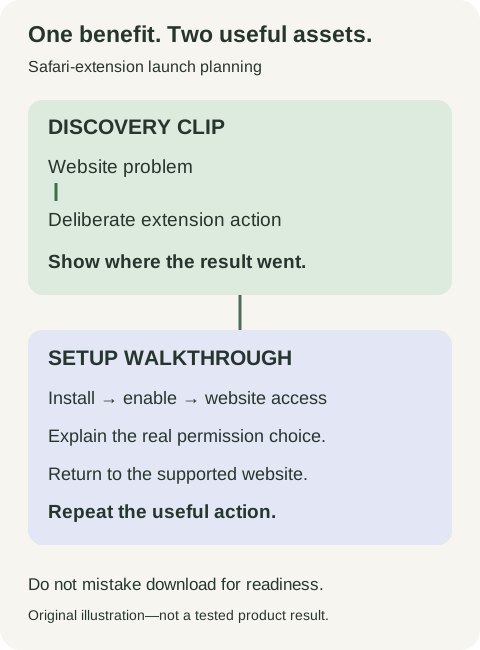
Original production plan: discovery and setup assets answer different questions.
 Superdirector
Make it work for your brand
Find it. Remake it. Post it. Superdirector turns the viral formats in your niche into your brand's carousels, X posts and video scripts, and keeps the calendar full.
Separate three things the viewer may call “installed”
An extension can be downloaded, enabled, and usable on a particular website. Treat those as separate checkpoints rather than synonyms. Apple's iPhone Safari-extension guide describes extension settings, profile-specific activation and controls for individual websites. The exact screens depend on the device and software version; record the version used in your instructions.
The editorial implication is not “tell everyone to allow everything.” Explain the access your real feature needs, on the site where the demonstration occurs. If narrower permission works, do not present broader access as mandatory for a cleaner-looking tutorial. Conversely, do not call the extension local-only or unable to read page content without checking its implementation and disclosures.
Two historical user questions make the distinction concrete. In an October 2024 support conversation, a longtime customer had enabled the extension but could not find where to change website permission. In a January 2025 question, another customer had installed the app but could not find its Safari extension. The visible reply proposed a cause, but no customer resolution is shown.
These are two user-authored problems on a vendor-hosted forum, not a representative survey or proof of a current defect. They support testing the distinction between app installation, extension activation and website access. They do not justify telling viewers to disable restrictions or grant blanket access.
Choose a scene that starts outside your app
For a fictional extension named PagePocket, suppose the verified feature saves a webpage link and a user-written note. Start on an original, harmless example webpage. The viewer sees a useful sentence, opens the extension, adds “Read before Saturday,” and later finds that same link and note in PagePocket.
This is a storyboard, not a claim about an existing product. Do not imply that PagePocket downloads an entire page for offline use, extracts a full article, or works in every browser. Those are separate capabilities requiring their own evidence and rights review.
Keep these four identities visible in the filming record:
- The source website and page used in the demonstration.
- The extension action the user deliberately invokes.
- The exact object saved: link, selected text, image or another supported type.
- The destination where the user can find that object again.
The retrieval shot matters. A brief “Saved” toast can look persuasive while leaving the viewer unsure what was saved or where it went.
Produce two connected assets
The discovery clip begins with the source-page problem and shows the actual result. It includes one short qualifier such as “After enabling the Safari extension” where that is accurate. The call to action identifies the setup guide rather than promising that downloading alone activates the feature.
The setup walkthrough begins from the genuine newly installed state. It shows the relevant settings, the permission decision, the supported website and the return to the task. Do not secretly pre-enable access, record a successful action, then edit the sequence to imply a fresh install worked without setup.
For Instagram, the short clip can introduce the useful action and point to the currently available link destination. For YouTube, a longer demonstration can have distinct chapters for the result and setup. For X, a concise screen recording plus a clear setup link may be enough. Verify each actual posting surface; a familiar-looking URL is not necessarily usable wherever the creator places it.
Brief the creator on the permission boundary
Ask the creator to narrate what they are choosing, not to dismiss the prompt as a nuisance. “Enable access on this example website so the extension can save the link” is a useful explanation only if that is the real purpose and scope. “Just accept everything” is not.
Provide an approved demonstration page, a clean test account if needed, and a short capability list. Use synthetic content. A creator's open tabs, bookmarks or browsing history can expose private information even when the app itself contains no customer data.
Also identify a supported non-success branch. If access is denied, what does the user see? Can they continue using other app features? Where can they change the choice later? Film the actual message or use a clearly labeled explanatory card when a safe reproduction is unavailable. Do not invent a recovery button.
Review a second website before broadening the claim
Success on one page supports a one-page demonstration. It does not establish compatibility with every site, embedded player, paywall or signed-in view. Ask the implementation owner for the supported scope and choose a second representative page within that scope for a separate rehearsal.
If the second page fails, keep the failure in the internal record. Decide whether to narrow the public claim, improve the product, or choose a different supported use case. Do not hide the difference by replacing the failed website with footage from the first.
What should the founder measure?
Start with a modest question: after watching the two assets, can a consenting tester enable the extension appropriately and complete the website action without coaching? Record where they stop: store installation, extension settings, website permission, invoking the action or finding the result.
Those observations are not a conversion forecast. If you later compare creative versions, retain the audience, destination and measurement window so a different source of traffic is not mistaken for better instruction. Installation, first website action and repeat useful use remain distinct outcomes.
The final brief should make one promise: a specific action on a supported website, with an honest path to enabling it. That is more useful than a broad claim that the app “works everywhere.”