How-To Guide
Review the microtrailer Steam makes from your first trailer
Inspect the preview Steam generates, classify unclear fragments and choose a defensible source-trailer correction.
Your social edit and Steam's microtrailer are different deliverables. Before sending viewers from YouTube, Instagram or X to a newly updated store page, inspect the short preview Steam actually serves. A strong full trailer does not prove that its automatically selected fragments explain the game.
Steam describes microtrailers as six-second loops assembled from six one-second clips from the first visible trailer. It says developers cannot customize them. That makes the useful task reviewing the generated result, not promising a precise edit recipe for controlling it. Steamworks trailer documentation
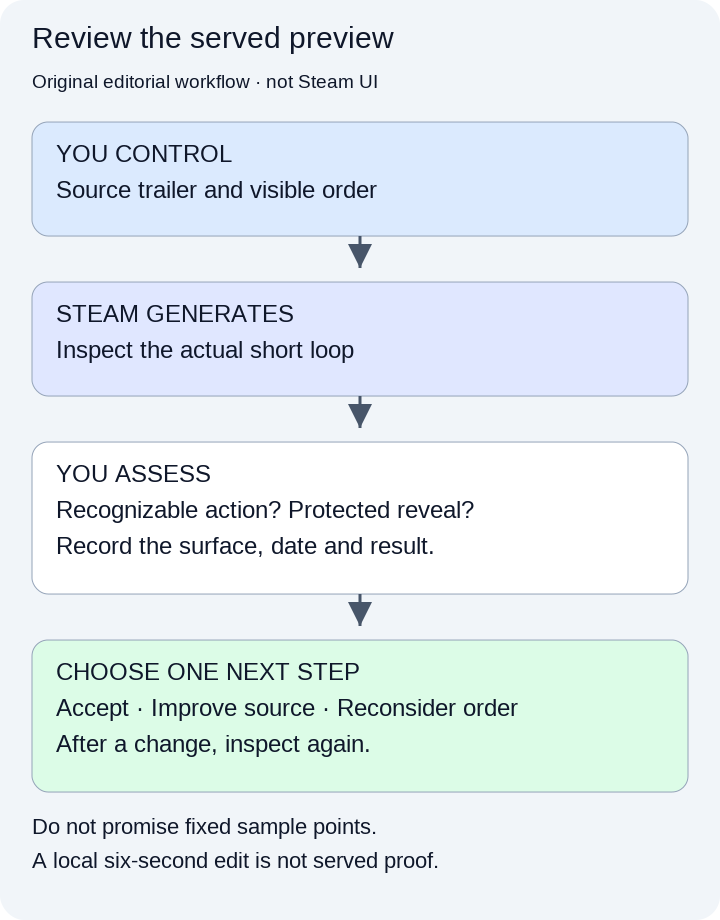
Original workflow diagram. The Lantern Ferry game and its preview observations are fictional teaching examples, not a Steam interface or a tested result.
 Superdirector
Make it work for your brand
Find it. Remake it. Post it. Superdirector turns the viral formats in your niche into your brand's carousels, X posts and video scripts, and keeps the calendar full.
Why the source trailer deserves a separate review
Two first-person developer reports illustrate different versions of this task. The Light Dude developer described a preview omitting the darkness central to the game’s concept. Another trailer editor described music-synchronized cuts becoming fragmented when transitions landed inside the selected excerpts. The latter discussion links earlier advice, so these are related conversations, not an independent experiment. Their proposed algorithm workarounds are not verified rules. The useful shared question is whether the served preview communicates the intended play.
Start with the preview someone will actually encounter
Look for the preview on an applicable quick-view surface, such as a category hub or a special-sale page; do not assume your game is featured on every surface. Make a review record with four fields: the first visible trailer's name, the inspected store surface, the inspection date, and what the generated preview shows. Keep a screen recording privately if the page or trailer order will change. Do not substitute your own six-second export and call it the Steam preview.
Watch once without pausing. Write a plain description before judging polish: “a character crosses a bridge, a menu opens, two bright flashes, then a logo.” If you cannot name a player action, that is a specific comprehension problem. “Needs more energy” is not a useful correction brief.
Next, watch frame by frame. Classify each fragment by what it contributes:
| Fragment observation | Question to answer | Possible production response |
|---|---|---|
| A readable player action | Does the action represent ordinary play? | Preserve its clarity in the main trailer. |
| A transition or flash | Is the important information outside this fragment? | Review whether the parent edit depends excessively on transitions. |
| A menu or inventory | Can a newcomer understand the decision? | Keep it if it explains play; do not reject interfaces automatically. |
| A title or cinematic image | Does the whole loop still communicate the playable activity? | Review the first trailer's purpose and ordering. |
| A late-game reveal | Does this disclose something the public campaign should protect? | Revisit the source trailer's spoiler boundary. |
This is an editorial classification, not a description of Steam's selection algorithm. Do not infer fixed sample timestamps from one generated loop.
Choose a correction you can defend
There are three reasonable outcomes after review.
Accept the preview. It need not summarize every system. If the loop conveys representative play and contains no unacceptable reveal, a difference from your preferred social edit is not automatically a defect.
Improve the source trailer. Make the full trailer clearer on its own merits. If you lengthen a gameplay hold, remove an unnecessary fade or replace an ambiguous opening, record the editorial reason. Do not claim a certain shot length guarantees selection. After an authorized upload and processing, inspect the newly served preview again.
Reconsider which trailer is first. A gameplay-oriented trailer may be a better first encounter than a cinematic piece, depending on the actual assets. Review the entire store gallery after an authorized reorder. A better generated loop is not worth making the main trailer sequence misleading.
Keep any genuinely useful cinematic or interview material in its appropriate role. The decision is about first-impression clarity, not a universal ban on non-gameplay footage.
Make the campaign handoff explicit
Give the social editor two separate approvals: the approved social export and the approved store-destination review. Include the destination's current access message—wishlist, available game or available demo—as verified by the owner of the launch plan. A beautiful social clip should not send viewers to an unreviewed page simply because both assets came from the same capture session.
A compact handoff can read: “Source trailer revision LF-04; generated preview inspected on the named surface; steering action recognizable; no protected story reveal observed; social export approved separately; recheck after trailer order changes.” This is a fictional record format, not a completed check for a real game.
Keep performance claims out of that receipt. Preview clarity is an editorial observation. Clicks, visits and purchases require separate measurements with their own dates and definitions. The immediate win is a defensible production decision: you know what was inspected, what remained unclear, and which controlled asset should change.
Turn the review into a content brief
Use the accepted player actions and unresolved questions to brief the next social cut. See the planning workflow for turning verified product references into hooks, scripts and shot plans. The workflow does not configure Steam, control its generated previews or guarantee campaign results.