How-To Guide
Make an App Shortcut demo that does not depend on the creator's private setup
Separate the supplied App Shortcut action, user-owned input and creator-added automation before promising viewers the same result.
A creator says a phrase, taps an Action button or opens Spotlight, and your app completes a useful task. It looks effortless. But can a new customer repeat it, or does the scene depend on a shortcut, saved object and permission configuration that only exist on the creator's phone?
Before promoting the clip, separate the app's supported action from the creator's personal automation. The deliverable is a repeatable action card, not a broad claim that Siri can do anything in your app.
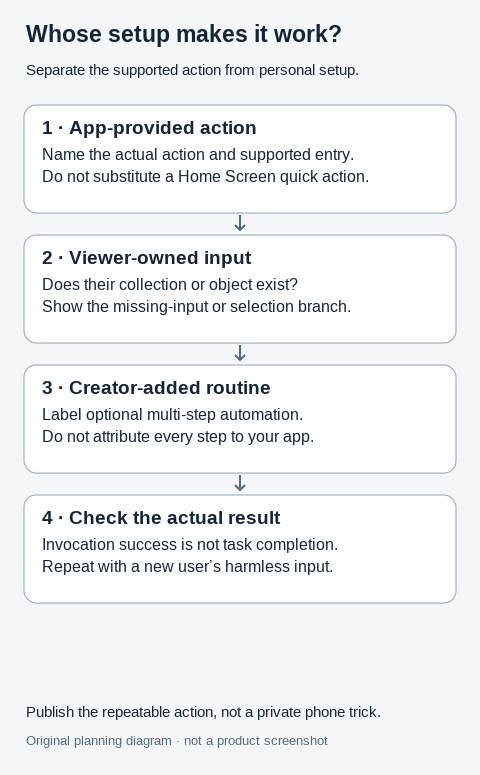
Original action-card model: distinguish the supported action, viewer input and creator-added automation.
 Superdirector
Make it work for your brand
Find it. Remake it. Post it. Superdirector turns the viral formats in your niche into your brand's carousels, X posts and video scripts, and keeps the calendar full.
Name what is actually being demonstrated
An App Shortcut supplied by your app is not the same thing as a multi-step shortcut someone assembled. Nor does an app's Home Screen quick action automatically establish the corresponding Shortcuts action.
Apple's current App Shortcuts design guidance and its App Shortcuts session explain how app-provided actions are exposed through Siri, Spotlight and Shortcuts, including input parameters and situations requiring a choice. Use that architecture to ask precise questions of your implementation owner; do not treat a successful voice command in an old presentation as proof of your current build's behavior.
A historical user question about an app's long-press action shows why naming matters. The user could open an app but wanted a particular function. Later replies describe a URL-based approach and a remaining locked-phone question. This is one conversation, not a current compatibility verdict or a prevalence estimate.
Write the action card before recording
For a fictional study app called Recall Basket, imagine that the verified action starts a review of a selected collection. The action card should contain:
| Part | Example specification—not a tested product |
|---|---|
| Action | Start review of a selected collection |
| Entry | The exact supported App Shortcut or spoken phrase |
| Input | A collection that exists in this user's account |
| Preparation | App installed; any genuinely required first-run or account step disclosed |
| Result | Review begins with the selected collection, not a generic home screen |
| Unresolved input | Product's actual collection-selection or missing-collection behavior |
| Boundary | Device, OS, language and app build used in the rehearsal |
Keep the example collection harmless and original. A creator's personal list name can accidentally become part of the instructions. “Start my Biology Finals collection” is not repeatable for a viewer who has not created that collection.
Show two valid runs, not one lucky phrase
The first run uses the prepared example collection. Keep the invocation and resulting app state connected in the recording. Do not replace a failed recognition attempt with a successful result from another take while implying a continuous interaction.
The second run starts without that particular collection. What happens next? If the app offers a selection step, show it. If it requires creating a collection first, teach that prerequisite. If the action fails, preserve the failure for the implementation owner and narrow the public promise until the route is usable.
The second run is not an invitation to break a real customer's configuration. Use an authorized test account or a labeled prototype. It tests whether your explanation survives a normal difference between people, not whether the creator can reproduce their own phone setup.
Keep personal automation outside the product promise
Suppose the creator adds a sequence that turns on a Focus, starts the study action and plays a playlist. The app may supply only the middle action. Label the larger sequence as the creator's custom setup and identify its other dependencies.
Do not say “the app automatically starts your entire study routine” unless the product really provides that behavior. A permission, confirmation or manual trigger that appears during the supported journey belongs in the explanation. Do not advise people to disable security controls to make the footage match a slogan.
Likewise, a voice demonstration is not proof of availability on every device or in every language. A translated caption does not establish recognition of the translated command. Keep the demonstrated context explicit and verify additional contexts before claiming them.
Give short-form viewers a usable phrase and a tap alternative
A Reel can show the task, the invocation and the resulting collection. Display the tested wording in readable text rather than relying only on audio. Where the app supports it, identify a tap-based entry for someone watching in a public place who does not want to speak.
A longer YouTube tutorial can explain the difference between the supplied app action and the optional custom automation. If you share a shortcut file or link, check exactly what it contains and what access it requests. Do not distribute a creator's personal accounts, private endpoints or data through a demonstration asset.
An X clip can focus on the one action. Avoid presenting a highly edited routine as a benchmark for speed or reliability. No number of taps saved establishes time saved for every user.
Decide what would make this a useful acquisition angle
Ask a prospective user to explain when they would choose the shortcut instead of opening the app normally. If the answer is merely “it looks clever,” you may have a feature teaser rather than a meaningful reason to adopt the product.
Then ask them to repeat the action with their own harmless input. Record invocation, input selection and successful task completion separately. A Siri response is not necessarily the intended product result.
Use the findings to choose between three actions: publish the narrow repeatable demo, add the missing prerequisite to the instructions, or lead with a different app benefit. The objective is a routine the viewer can understand and reproduce—not an impressive phone trick they cannot use.