How-To Guide
Explain a paid app bundle without promising every viewer the same checkout price
Explain included apps, purchase history and the customer’s displayed offer without inventing a universal bundle price or upgrade credit.
By the Superdirector editorial team.
A paid app bundle can tell a coherent product story: several tools belong together because they help with a related set of tasks. But a creator's checkout screen is not necessarily the price every viewer will see. Existing purchases can matter, and “upgrade bundle” is not a promise that every earlier customer qualifies for the same offer.
Before commissioning the launch video, decide who the message is for: someone new to all the included apps, someone who bought an individual app, or someone with a different purchase history. Keep the bundle's contents and the viewer's purchase decision separate.
Start with the actual bundle, not a discount slogan
Apple's app-bundle guidance says paid bundles offer a discount against separate purchases and support Complete My Bundle credit for apps already purchased within the bundle. It also distinguishes paid bundles from bundles of free apps offering subscriptions. This article concerns paid app bundles; do not transfer its examples to a subscription offer.
Write down the included app identities, actual storefront availability and current bundle listing. Do not imply every app works on every device merely because the products are sold together. Apple also ties bundle availability to the territories where all constituent apps are available.
For a fictional pair called Sketch Shelf and Palette Notes, the value story might be “make an original sketch, then organize your own color references.” That is a proposed example, not verified app functionality. The bundle does not automatically establish data transfer, a shared account or synchronization between the apps. If they are separate tools, show them as separate tools.
Treat purchase history as a creative branch
Create a small review matrix before writing price overlays:
| Viewer situation | What the creative can explain | What remains to check |
|---|---|---|
| Owns none of the included apps | Which apps are included and why they fit together | Current offer shown in the relevant storefront |
| Previously bought one included app individually | Complete My Bundle may account for an earlier purchase | Actual account-specific offer and current eligibility |
| Previously bought an app through another bundle | Purchase history may not match the individual-app example | Do not assume the same credit; investigate the displayed offer |
| Cannot establish their purchase history | Where to inspect the current listing and seek private help | Do not label them a new buyer or tell them to purchase again |
This is an editorial matrix, not an algorithm for calculating Apple's checkout. Avoid inserting assumed prices for the unknown cases.
A historical Ask Different question asks whether a bundle displaying Get after an earlier app purchase is free. The answer explains the participant's situation. Treat the 2016 exchange as evidence of a buyer interpretation problem, not current proof that a particular viewer owes nothing.
Do not turn an upgrade workaround into a universal promise
In his January 2024 account of app-bundle problems, developer Jeff Johnson describes customers who had bought an earlier Mac bundle and did not see the expected price for a later bundle. He explicitly qualifies his interpretation of the support responses. The report is a firsthand historical account, not a current platform-wide rule or evidence that your bundle has the same behavior.
The practical implication is narrower: include prior bundle purchases in your review instead of testing only a straightforward individual-app buyer. If you have not checked a purchase-history branch, do not advertise it as solved.
A campaign line such as “Every existing customer upgrades for the same price” requires much more evidence than a screenshot from one account. Prefer explaining that existing buyers should inspect the offer shown for their purchase history, while clearly presenting the actual included products. Do not hide an unresolved branch behind “terms apply.”
When enlarged, scroll horizontally to read the diagram.
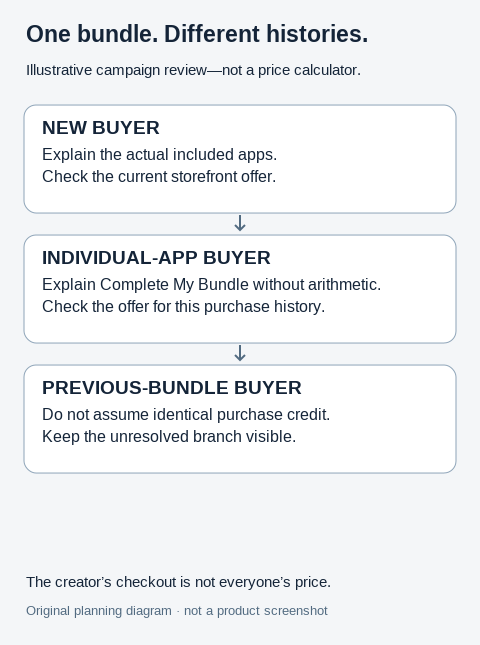
Original review matrix: purchase history changes the offer that must be checked.
Original visual by Superdirector editorial team. Creation date not recorded.
Film the reason to own the tools together
A short Instagram or X clip can show a task in each app and label which app performs it. Use original sample material and make the change of app visible. If a file must be exported and imported manually, show that boundary rather than implying seamless transfer.
A YouTube explanation can cover the bundle contents and the separate existing-buyer route. If it includes a real checkout screen, identify its date, storefront and relevant purchase context without exposing account details. Do not let an old video become the only place viewers can find current offer information.
For the fictional sketching pair, a creator could make a simple geometric drawing in one app and independently organize three color references in the other. The story is two complementary jobs. It is not “one integrated studio” unless the product actually provides that integration.
Give the campaign a price-update owner
Record where each price appears: spoken narration, video overlay, caption, pinned reply and destination page. An editable caption cannot correct a confident price claim permanently spoken in the video. Consider keeping volatile account-specific prices out of the main narration and pointing to the current offer instead.
Name the person responsible for checking the destination when the bundle contents, availability or pricing change. If a constituent app becomes unavailable, verify the resulting bundle route before continuing to use the old campaign asset. The original creative brief should include what can be replaced and what requires retiring the asset.
Do not run purchases, refunds or account changes merely to produce a screenshot. Use appropriately authorized existing evidence or a clearly labeled planning mockup, and keep unknown customer cases unknown.
Judge comprehension before counting sales
Ask a reviewer to explain which apps they receive, what each does, whether the apps exchange data, and where their own price is determined. If they believe the bundle includes every future app or a subscription that was never offered, revise the message.
After an authorized campaign, keep bundle-page visits, completed purchases and questions about earlier purchases separate. A sale is not evidence that every buyer understood the scope. No conversion improvement is established by this planning exercise.
The useful deliverable is a contents-first campaign with explicit purchase-history branches. It should help a buyer understand the offer in front of them, not persuade them that the creator's account-specific checkout is a promise made to everyone.