How-To Guide
For an iPhone web-app launch, show where the social link opens before saying install
Plan an iPhone web-app invitation around the starting browser, useful first task, versioned installation help and first reopen from the icon.
A web app's launch link and its Home Screen icon are two different entry points. Before asking an Instagram, YouTube or X audience to “install the app,” check where that exact link opens and show the route your intended iPhone users can actually follow.
The immediate decision is whether the viewer needs Home Screen installation now. If the useful first task works in the browser, let the demonstration say so. If a promised capability requires the installed experience, make that requirement visible before the viewer invests time.
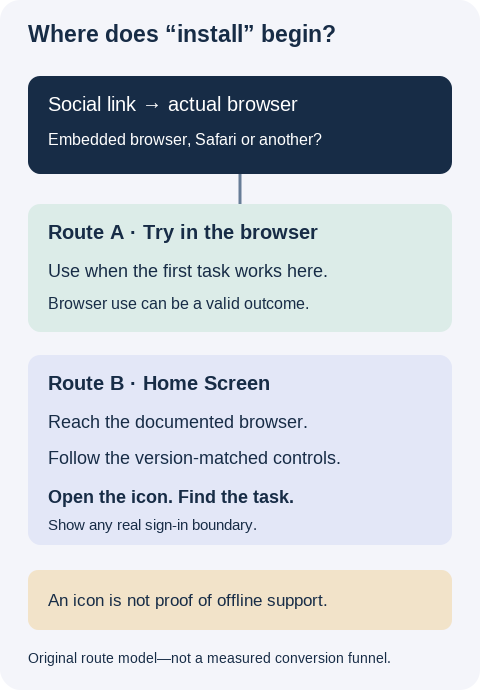
Original route map: choose browser use or a tested Home Screen route before promising installation.
 Superdirector
Have your AI do this for your brand.
7 days free, then $29 a month.
Do not make the install step the whole value proposition
Suppose a fictional app, SetList Desk, helps an amateur musician organize a practice list. Its opening clip should show a meaningful action—reordering three pieces and finding tomorrow's practice list—not a long sequence of browser menus before explaining why anyone should care.
Then choose one truthful next step:
- Try in the browser: appropriate when the advertised first task works there and no install-only capability is promised.
- Add to Home Screen: appropriate when the customer has a reason to return through that entry point and the setup instructions match their context.
- Use the native app: appropriate only if there is an actual supported native-app destination; do not label a website link an App Store download.
These are proposed choices for the fictional example, not evidence that any version of SetList Desk exists or converts better.
Inspect the real starting browser
Open the final campaign destination from the actual social surface on the device you intend to document. Record whether it opens in an embedded browser, Safari or another browser. Do not infer the starting context from a desktop preview.
If your instructions require Safari, show how the viewer reaches Safari using the controls actually available in that starting context. When those controls differ, provide context-specific help rather than an imaginary universal “Open in Safari” button. A safe fallback is a clearly identified address that the user can deliberately open in Safari, provided you test it and explain any resulting sign-in step.
Avoid asking consumers to install configuration profiles or change security settings merely to make your acquisition flow shorter. The goal is a comprehensible supported route, not the fewest possible taps at any cost.
Keep the installation guide versioned
Apple's current Safari web-app guide describes adding a website to the Home Screen, including the Open as Web App option. It also distinguishes menu access by Safari tab layout. This is why a rigid “tap the button at the bottom” instruction can be wrong for someone with a different layout.
Create a small instruction record:
| Field | Record before filming |
|---|---|
| Device context | iPhone model and installed OS version |
| Browser context | Browser, version where available, and relevant layout |
| Starting point | Exact social post/link placement used in the rehearsal |
| Target address | Public web-app URL, without private tokens |
| Visible controls | Labels and icons actually present in this recording |
| Completion | Icon opens the intended app and a useful task can continue |
| Review trigger | A browser/OS change or credible mismatch report |
Do not paste this record into a tiny video footer. Use it to maintain the help page and identify when the footage needs replacing. The viewer needs concise instructions and a clear context label, not your entire testing log.
Make the return trip part of the demonstration
For the fictional practice app, film three connected moments. First, open the website from the campaign route and create a harmless example list. Next, demonstrate the supported Home Screen installation path. Finally, leave the browser, launch the new icon and locate the intended list or explain the actual sign-in step.
Do not assume browser-session state automatically carries over. If a customer must authenticate again, show that boundary with synthetic credentials and no secrets. If the product intentionally starts a fresh session, say so rather than splicing the old list into the new context.
Installing a web app does not by itself prove offline operation, background activity or data preservation. Verify those product promises separately. This article addresses the acquisition and first-reopen route, not a browser-storage or offline-architecture test.
What the public questions do and do not establish
One developer discussion asks how to explain iOS PWA onboarding. A separate Home Screen discussion includes a practitioner describing difficulty with event customers. Its original poster also promotes a related tool, so the conversation is not a clean independent study.
These reports identify a real question worth testing. They do not prove a general abandonment rate, establish Apple's motives, or show that every web app should become native. Avoid importing the threads' unsupported percentages or platform accusations into your launch strategy.
Build one short asset and one durable help destination
The short discovery asset should demonstrate the task and identify the correct next step. The durable help page should show the current installation route, state which context it covers, and offer a browser-use alternative when the product supports one.
For a YouTube demonstration, make installation a chapter rather than making returning viewers watch it repeatedly. For a Reel, keep the main promise understandable without audio and put setup help at the verified destination. An X post can lead with the actual browser task rather than saying “download” when no download is involved.
Ask a consenting new user to follow the final content without live coaching. Record whether they reached the right browser, found the relevant controls, opened the icon and completed the task. If they choose to stay in the browser and accomplish their goal, do not automatically label that a failed acquisition.
The campaign is ready when “install” names a route the viewer can recognize—and the route ends in something useful.
Frequently asked questions
Must every viewer install the web app before trying the first task?
SuperdirectorHave your AI do this for your brand.
7 days free, then $29 a month.