How-To Guide
Show an offline travel app working without faking connectivity loss
Record an offline travel-app proof sequence that shows download preparation, actual network state, a working feature and a failure.
My offline travel app is useful when mobile data fails. How can I demonstrate that on TikTok without making fake connectivity claims?
Demonstrate a controlled offline test: prepare the required download while online, turn off the relevant connections, show what still works and deliberately show what does not. Describe exactly what you tested on that device and build. Do not imply that a short recording proves the app will work in every destination or emergency.
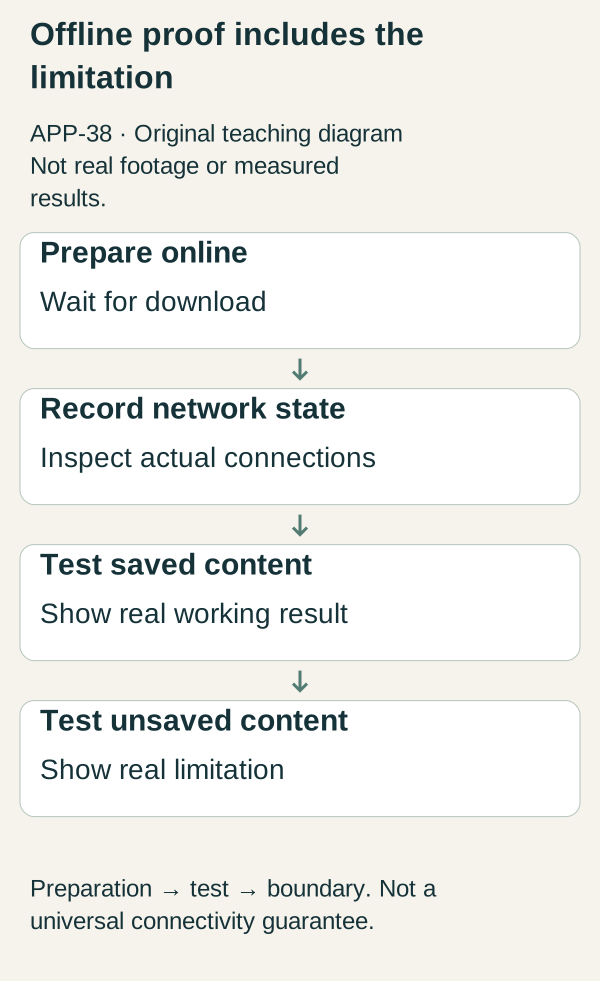
Original illustrative teaching diagram. Prepare saved content online, record network state and demonstrate both offline success and the unsaved-content boundary. This is planning guidance, not product footage, customer evidence or measured results.
Demonstrate a controlled offline test: prepare the required download while online, turn off the relevant connections, show what still works and deliberately show what does not. Describe exactly what you tested on that device and build. Do not imply that a short recording proves the app will work in every destination or emergency.
The original research question concerned TikTok. This editorial version uses Instagram Reels and YouTube Shorts as proposed distribution channels; that adaptation has not been separately validated. The product-proof method is channel-independent, but current export, linking and presentation requirements need checking for each destination before publication.
 Superdirector
Make it work for your brand
Find it. Remake it. Post it. Superdirector turns the viral formats in your niche into your brand's carousels, X posts and video scripts, and keeps the calendar full.
Define “offline” before you use it as a hook
Our fictional app, CarryMap, can open a previously downloaded guide and saved text notes without an internet connection. Fresh searches and unsaved guide pages require connectivity. The example does not assume offline maps, positioning, navigation, live transport data or emergency functionality.
Write the exact capability statement: “Downloaded guides and saved notes remain readable in the tested offline state.” That is narrower and more useful than “travel anywhere without data.” If your app supports additional functions, test each separately and explain its preparation requirements.
Airplane mode alone should not be treated as visual proof that every radio is off. For an iPhone test, Apple explains that Wi-Fi and Bluetooth can be used in Airplane Mode, and its Control Center guidance distinguishes disconnecting from completely disabling those connections. Check the tested device rather than relying on the icon alone. Inspect the actual Wi-Fi and mobile-data state on the test device. If Bluetooth or location matters to the feature, record that state as well. Do not claim a satellite, GPS or positioning capability merely because a location dot remains visible.
Make a test card before filming
Record device model, operating-system version, app build, test date, downloaded content, account state and the exact network configuration. Note whether the app was already open or launched fresh. Cached screens can create a misleading impression if a viewer assumes fresh retrieval.
Use a non-sensitive sample guide and invented notes. Remove notifications, account identifiers and personal itineraries from the recording environment. Keep the raw capture so the final edit can be checked against what actually happened.
This is a demonstration protocol, not a certification. Its purpose is to make the scope of the claim inspectable and reproducible.
Three complete videos
Video 1: Preparation is part of the feature
First frame: “Offline starts before you lose your connection.” Show the real download control while the device is connected. Wait for the actual completion state; do not replace a pending indicator with an edited checkmark.
Narration: “I am downloading this sample guide while online. The app reports that the download is complete. This is the content I will test without internet.” If completion takes longer than the clip, label the cut “download wait shortened” and keep the finished state visible.
End frame: “Download required. Not every page is included.” Link to a real explanation of supported offline content. The viewer should understand that seeing a page once is not necessarily equivalent to saving it for offline use.
Video 2: Show the tested offline state and result
First frame: “Here is what still opens in this test.” Show the device's relevant connection controls and the disabled network state. Return to the app and open the downloaded guide. Where practical, include a fresh app launch rather than relying only on an already-rendered screen.
Narration: “On this device and build, with these connections disabled, this downloaded guide and these saved notes open. This demonstration does not test every feature.” Keep the content label and the tested scope on screen.
Avoid adding a fake “No signal” graphic as if it came from the operating system. An explanatory overlay is fine when clearly presented as your own label, not fabricated system evidence. Do not film near dangerous roads or isolated locations merely to make the loss of connectivity look dramatic.
Video 3: Show the limitation without hiding the error
First frame: “What does not work offline?” Attempt a supported example of a network-dependent action, such as opening an unsaved guide. Show the actual message or failure state. Do not invent a graceful fallback if the real product has none.
Narration: “This unsaved content does not load in this test. Download the supported material beforehand; live information still needs a connection.” Then return to the downloaded guide so viewers can distinguish the two states.
If the app silently shows old information, address that ambiguity before promotion. A cached result should not be described as current simply because the screen does not display an error.
A complete proof checklist
Worked example: CarryMap sample guide downloaded while online; completion checked; Wi-Fi and mobile data disabled and recorded; app relaunched; saved guide opened; saved note opened; unsaved guide failed with the actual product message; video labels preparation and tested scope; no claim about navigation or emergency use.
Blank record: device/OS ___; build/date ___; content downloaded ___; completion evidence ___; network state ___; fresh-launch result ___; working feature ___; nonworking feature ___; cached-data caveat ___; edits and waiting periods ___; final claim ___; reviewer ___.
If any field is unknown, narrow the claim or repeat the test. Do not fill unknowns with what similar apps usually do. Your marketing should describe your build, not a category expectation.
Adapt the recording without changing the evidence
Create one clear master capture, then frame it for each intended channel. Keep network-state evidence readable rather than cropping it away to enlarge the app. Use explanatory text that remains understandable without sound. If a vertical crop makes the preparation or limitation disappear, make a separate shot instead of forcing everything into one screen.
Do not assume identical music licences, links or export rules across platforms. An original voiceover and owned graphics simplify the asset-rights problem, but they do not remove the need to check current platform requirements. For this worked example, assume a $100 ceiling. It is a limit, not a reason to purchase a template before the evidence is ready.
A dramatic edit can accidentally reverse the sequence: offline badge first, then download footage, then a working guide. Keep preparation before the test, and label any return to an online state. Viewers should not have to infer which connection state produced each result.
Evaluate comprehension before reach
Ask someone who has not used the app: “What must you do before travelling?” “Which features worked in this test?” and “What would still need internet?” If they answer “everything works anywhere,” revise the video.
Track useful questions and beta attempts separately from views. One successful demonstration is not reliability evidence across all devices. Preserve failures and fix them; do not select only the most flattering take while presenting it as representative testing.
Your next action is to record preparation, one working feature and one nonworking feature in the same session. That gives you an honest launch asset and a small reproducible product test.
Supporting reference and scope
Rawcut's existing-footage guide, inspected in the supplied study, informs the use of readable overlays and coherent sequencing. It is not evidence of this app's offline capability. All connectivity claims above are conditional on actual testing, and the Reels/Shorts distribution adaptation remains unvalidated.