How-To Guide
Before saying your idle browser game keeps running, test the hidden tab
Verify what happens while an idle game is hidden and when it returns before promising off-tab progression in social creative.
By the Superdirector editorial team.
“Keep earning while you do something else” is a product promise, not a synonym for leaving a browser tab open. Before a creator repeats it, establish what the promoted build does when the page becomes hidden, when the player returns and when the game is closed. Those are different conditions and may produce different results.
Browsers can throttle timers and stop animation callbacks in hidden pages. The Page Visibility API reports visibility changes; it does not itself implement idle progression or guarantee continuous background execution. MDN's Page Visibility guide
Define the benefit before the mechanism
A developer-side question about tabbed-out progress asks why some incremental games progress in another tab while others stop. The replies propose different technical explanations. They are historical discussion, not a tested repair for your build. The launch team's immediate job is narrower: find out which experience it can accurately describe.
For the fictional browser game Moss Mill, imagine a mill that accumulates material while the player manages other tasks. The word “idle” alone does not specify whether it simulates continuously, calculates elapsed progress on return or pauses intentionally. Ask the implementation owner which behavior is intended and what limits apply.
Write one claim in plain language. “The mill calculates eligible material when you return” means something different from “the simulation runs continuously in a hidden tab.” A player may care primarily about the resulting progress, but the wording must not imply unverified actions, battles or resource decisions happened while they were away.
A separate historical Kittens Game player report described progress stopping or slowing when the game was not the active view. It is an individual report, not a current browser compatibility test. Do not turn community workaround suggestions into instructions to disable browser safeguards.
When enlarged, scroll horizontally to read the diagram.
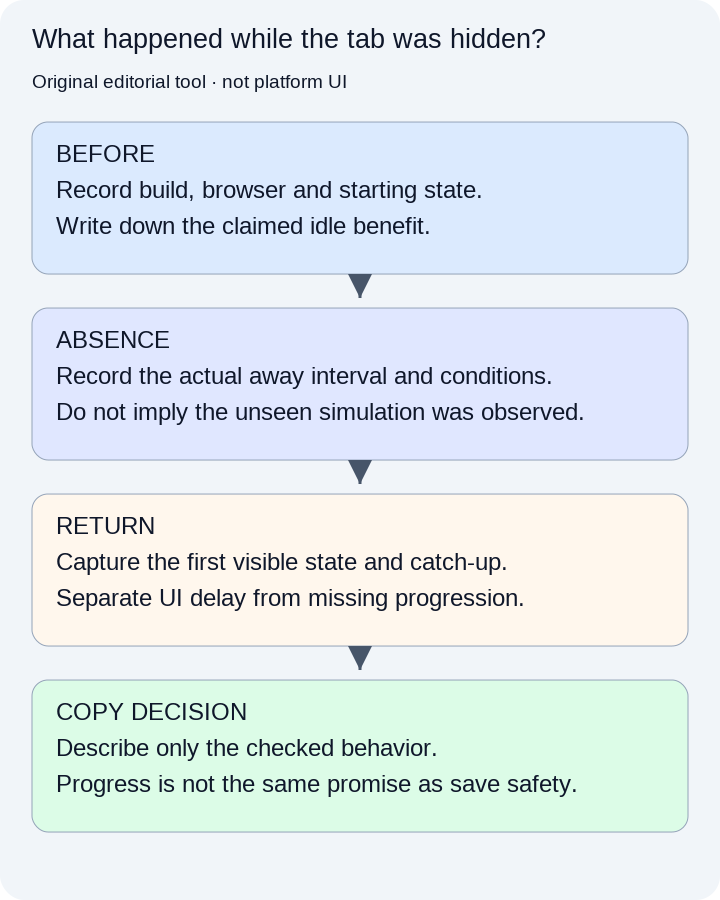
Original editorial decision tool, not platform UI or a measured product result.
Original editorial decision tool, not platform UI or a measured result.
Original visual by Superdirector editorial team. Creation date not recorded.
Use a before-and-return record
Choose one observable resource or progression state. Record the build, exact hosted destination, browser and operating-system versions, relevant game mode and starting state. Keep the test's elapsed duration as an observation, not a universal promise.
Then inspect the conditions the campaign actually describes:
| Condition | What to record |
|---|---|
| Page visible | Ordinary progress and any required player input. |
| Different tab selected | State before hiding, elapsed time and state on return. |
| Browser window minimized | The same observations, kept separate from tab switching. |
| Game closed and reopened | Only if the offer includes closed-game progress; do not infer it from a hidden-tab result. |
Use authorized test data. Do not clear storage, change the system clock or weaken browser settings to make the result look better. A phone locking its screen is also not interchangeable with a desktop tab switch; add that route only if it is part of the supported audience promise.
Inspect the return, not just the final number
Suppose fictional Moss Mill shows more material after the player returns. That observation alone does not reveal whether every intermediate simulation step ran. Ask the implementation owner to explain the expected calculation and compare the visible result with that expectation.
Look for limits that change the buyer's interpretation: a capped accumulation period, a storage ceiling, a resource that stops production or a mode that deliberately pauses. Do not invent those features for the test. Record only the rules the actual game uses, and keep unknown cases visible.
The return screen matters too. If it presents an accumulation summary, check that its explanation matches the resulting state. If the number updates after a delay, do not edit that delay away and claim the update is immediate. If the outcome is inconsistent, hold the broad background-progression claim and give engineering the observed sequence.
Keep progress, persistence and connectivity separate
A game may retain its previous save without adding any elapsed progress. It may calculate progress on return while requiring a connection for another feature. It may pause a risky simulation intentionally. None of these should be collapsed into a generic “offline supported” label.
This review does not certify save durability, cross-device synchronization or offline access. Its deliverable is a dated progression statement with explicit conditions. If the campaign needs those other promises, use their separate evidence rather than stretching one successful observation.
See the planning workflow to turn the verified progression behavior into a clear demonstration brief. It does not implement background execution, test your browser build or guarantee idle-game results.