How-To Guide
How do you find local Instagram influencers?
Find local Instagram influencers through place pages, local business and event accounts, then check where each creator's audience actually is.
By the Superdirector editorial team. Meta newsroom posts (February 2024, August 2025), Meta's Instagram insights documentation, FTC guidance, and guides from Meltwater, IQFluence and Lilach Bullock read November 6, 2026.
At a glance
How do you find local Instagram influencers?
Search by place first: location pages of local venues and neighborhoods, tagged posts on local business and event accounts, and the creators who keep showing up there. Then check each one's location, recent local content and audience location, using a recent screenshot of their top cities from Instagram insights.
- Instagram cannot search a hashtag and a place together; a hashtag is a lead, not proof of a local audience.
- The city list in Instagram insights shows only the top 45 entries and counts only viewers with demographic data.
- Compare creators on the share of audience in your area, not on total followers.
Search by place, then check the audience
To find local Instagram influencers, start from places, not hashtags: open the location pages of venues and neighborhoods your customers use, look at local business and event accounts, and note the creators who keep turning up there. Then check three things separately for each one: where they are based, whether their recent posts are about your area, and where their audience is, using a screenshot of their Instagram audience insights showing top cities. Keep the creators whose audience is actually in your area.
The second half is the part most searches skip. As IQFluence's guide puts it, a city tag can lead you to a profile but cannot prove the profile reaches a local audience. A creator who lives in your city may have most of their followers somewhere else.
What follows suits a brand or local business searching Instagram by hand. It covers six search routes, how to read an audience screenshot, and a shortlist sheet to record the evidence.
Six places to look on Instagram
Work through these in order. Each one turns up different creators, and the same name appearing on two or three of them is a good sign.
| Route | What to do | What it tells you |
|---|---|---|
| Location pages | Search the Places tab for specific venues, parks, markets and neighborhoods, then open Recent as well as Top | Who posts from your area now, not who went viral there once |
| Local business accounts | Open the tagged posts on cafés, gyms, salons and shops near you | Creators local businesses already work with or get tagged by |
| Event accounts | Check posts and reposts from markets, races, festivals and openings in your area | Creators who show up in person and get invited back |
| Local hashtags | Search neighborhood and city tags, then open posts to see their location tags | Leads, not proof: a tag says nothing about where the audience is |
| Your own tagged posts and followers | Look at who tags you and who comments often | Customers who already make content about you |
| Instagram map (where available) | Open the map from the top of your DM inbox and browse tagged content in your area | Recent location-tagged posts from accounts you follow |
A few details make these routes work better. Lilach Bullock points out that Instagram has no combined hashtag-plus-place search; you search one, then read posts for the other. Her own example shows how weak a hashtag is as a sign of place: of 340 posts using a conference's hashtag over its three days, only 61 also tagged the venue. The other 279 came from people who posted from elsewhere or tagged no location, so the hashtag alone cannot tell you who was there.
The map is newer. Meta's August 2025 announcement says any content with a location tag can show up on the map, gives the example of finding a place to hang out from a local creator's reel, and says the feature rolled out in the US first. Posts from people you follow appear there for 24 hours, so it works best once you follow a few local accounts.
Use the creator marketplace if you have access
If your brand is eligible, Instagram's creator marketplace adds a filtered search. According to Meta's February 2024 announcement, brands join it in Meta Business Suite, can search for creators while filtering for creator and audience attributes, and can send one project to several creators at once. Creators receive those messages in a dedicated Partnership Messages folder at the top of their Primary inbox tab, where they can also see the rate and requirements.
Meta first tested the marketplace in the US in 2022 and in 2024 said it would invite brands and creators in Canada, Australia, New Zealand, the UK, Japan, India and Brazil. Check availability in your own account. Filters narrow a list; they do not replace the content and audience checks below.
Run three checks on every creator
IQFluence's guide splits "local" into three checks, and the split is worth keeping because a creator can pass one and fail the others. Which check matters most depends on what you want people to do. A café opening needs followers who can walk in this month; a holiday rental may care more about people planning a trip from somewhere else.
- Creator location: where they live or work regularly. Evidence: bio, recurring places in posts, local press. Easy to see, and the weakest of the three.
- Local content: whether their recent posts are about your area. Open their last 12 posts and count how many are tagged at, or clearly filmed in, places your customers know. One trip or one tagged visit is not a pattern.
- Audience location: where their followers are. This needs data you cannot see from outside the account, so ask for it.
Comments are a useful tie-breaker. Questions like "where is this?", "is it near the station?" or "do they deliver to us?" come from people who could act on the post.
When enlarged, scroll horizontally to read the diagram.
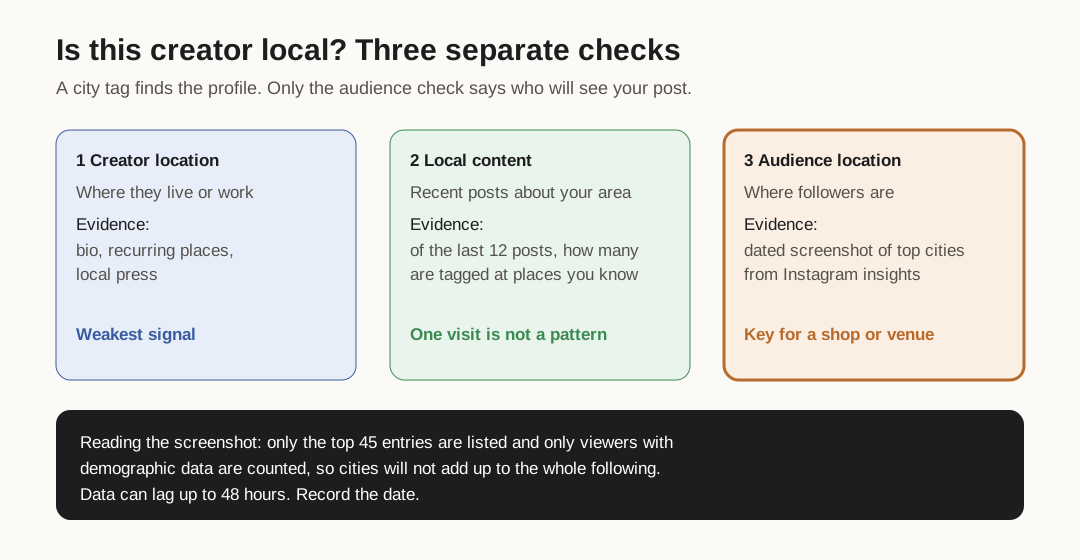
Original diagram. The audience check decides; the other two explain why.
Original visual by Superdirector editorial team. Creation date not recorded.
Ask for the audience screenshot and read it carefully
Ask each shortlisted creator for a screenshot of their Instagram audience insights showing top cities and countries, taken in the last week. A simple request works: "Could you send a screenshot of your audience top cities from Instagram insights? We're looking for creators whose followers can visit our shop in [area]."
Instagram's own developer documentation for account insights explains what those city numbers are and are not. It is written for developers using the API, and the in-app screen may not match it line for line, but it is the clearest description Meta publishes of how the city numbers are built:
- Follower demographics break down by country and city, and Instagram does not report them at all for an account under 100 followers.
- Demographic metrics only return the top 45 entries, and only viewers Instagram has demographic data for are counted. The cities on a screenshot will not add up to the whole following, so do not treat the missing share as zero.
- Data can be delayed by up to 48 hours. A screenshot is a snapshot, so note its date.
- There is a separate breakdown for the engaged audience, the people who interacted with posts, also by city. If the creator can show that too, it is closer to the people who will see your post.
Decide your own threshold before you read the screenshots, based on how far customers travel to you. Then compare creators on the share of audience in your area, not on total followers. Our page on reading partial creator audience geography covers what to do when a creator can only show part of the picture.
Record the evidence and make contact
Put every candidate in one sheet with the same columns, so you can see which evidence each decision rests on. The local creator shortlist has columns for the route that found them, the three checks, the screenshot date and the top cities as shown.
When you write, be specific about the local reason: the place you saw them, the post you liked, and what you would like them to make. Our Instagram collaboration message templates have first messages you can adapt. Many local creators are not full-time, so make the offer and the work clear in the first message.
If you send free product or pay them, the post needs a disclosure. The FTC's guide for influencers counts free or discounted products as a material connection, wants the disclosure right next to the recommendation, written in the language the post uses. That matters for local campaigns in more than one language.
For a broader manual method that is not tied to a place, see how to find micro-influencers manually.