How-To Guide
A hardware-app launch demo should prove the device action, not just the permission tap
Separate hardware compatibility, network permission, discovery and the completed physical action before asking more viewers to install.
A phone finds a device, the creator taps a button, and something happens in the room. That is a strong demonstration only if the app actually controls the pictured hardware in the setup being offered. A successful permission prompt is not the same as discovery, connection or a completed device action.
For a founder promoting a hardware-companion app, the useful brief names the supported hardware and shows the result at both ends: the phone's command and the physical device's response. It also explains the permission boundary without pretending that one setting fixes every connection problem.
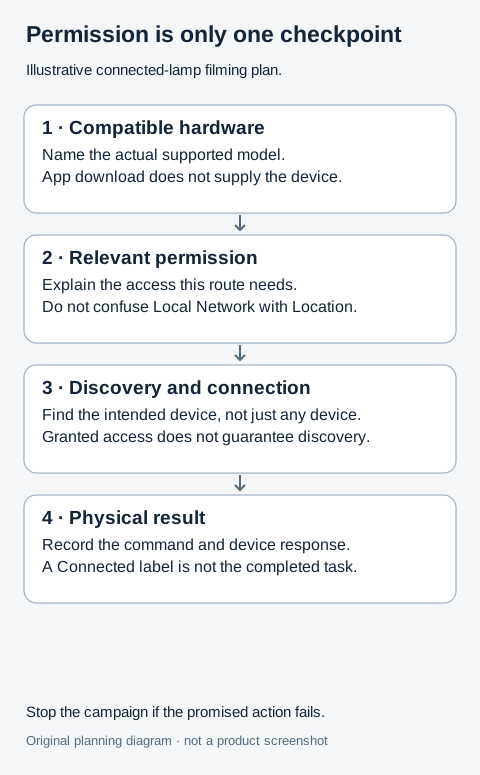
Original illustrative planning diagram, not a product screenshot or measured result.
 Superdirector
Make it work for your brand
Find it. Remake it. Post it. Superdirector turns the viral formats in your niche into your brand's carousels, X posts and video scripts, and keeps the calendar full.
Keep four checkpoints separate
Use four labels in the internal filming plan:
- Compatibility: the exact device and relevant firmware are supported by the app.
- Permission: the app has the access genuinely required for this route.
- Discovery and connection: the intended device is found and reached.
- Useful action: the requested operation actually happens on that device.
A green result at one checkpoint does not prove the next. The app can be permitted to browse a network and still fail to find the intended hardware. It can list a device and still fail to perform the requested action.
In a public iOS printing-app discussion, a developer describes discovery failures despite granted permission and later mentions users arriving with unsupported printer types. The report is self-reported, not a verified failure rate. It nevertheless exposes two different campaign problems: overstating what connection requires and attracting people whose hardware does not fit.
Explain what the permission means—and what it does not
Apple's local-network privacy explanation says apps request permission when browsing the local network, and users can allow or decline access. It also explains that denying an app's access does not necessarily prevent internet use or interaction through system services such as AirPrint. Therefore, do not claim that every printing or hardware action universally requires this permission.
Ask the implementation owner which route your app actually uses. Is it direct local discovery, a system-mediated interaction, or something else? The answer determines the explanation. Do not use the appearance of a prompt to infer a product's entire network architecture.
Local Network, Bluetooth and Location Services are not interchangeable labels. In a historical HP support conversation, a Mac customer seeking scanning access had changed Location Services rather than Local Network; the customer later described resolving that distinction. Another participant still reported a problem after granting the relevant permission. This is an adjacent desktop example of permission-language confusion, not proof of an iPhone fix or a current HP defect.
Use a physical outcome that is easy to verify
For a fictional app called Lamp Cue, suppose the supported task changes a compatible desk lamp from steady light to a particular reading preset. The example is a storyboard, not a tested app or a recommendation to buy hardware.
Show the exact model identifier in the setup notes. If the app download is free but compatible hardware is separately required, put that fact before the install invitation. Do not let a close-up of the phone imply that downloading the app supplies the lamp.
Record the phone and lamp together when practical. The viewer should understand which device receives the command. If two camera angles are necessary, do not combine unrelated takes to imply a response that was not captured. A status label reading Connected is weaker evidence than the intended light change occurring on the intended lamp.
Rehearse the refusal and not-found states
Use an authorized test setup, not a customer's home network. Inspect what the app does when the required permission is declined. Does it explain the specific blocked task? Does it preserve unrelated functions? If an alternative is offered, test that alternative before placing it in customer help.
Then inspect the state where permission is granted but the device is not found. The public explanation should not repeat “allow access” indefinitely when access is already allowed. Give the viewer the product's actual supported next step or support route, with the information needed to investigate privately.
Do not advise broad network scans, router security changes or disabling isolation as a generic marketing fix. A technical owner may need to diagnose a particular authorized environment, but a creator brief is not permission to weaken someone else's network. Keep unknown causes unknown.
Build the acquisition asset around the required setup
An Instagram Reel can show the reading preset changing on the compatible lamp, with “compatible hardware required” visible where viewers can read it. The caption should identify the tested context and point to the current compatibility information.
A YouTube walkthrough can cover the first supported setup and the two failure branches. Make clear which steps were necessary for that app and device rather than presenting them as universal iPhone instructions. An X clip can focus on the actual command and response, linking to the same checked requirements.
Do not describe the connection as instant merely because the final clip removes preparation time. If setup is already complete, label the demonstration as an existing configured setup. If the claim is first-time setup, show or explain the real prerequisites.
Diagnose the campaign before adding more traffic
Keep unsupported hardware reports separate from denied permission, device-not-found reports and failed actions. Those categories suggest different next steps: clarify the audience, explain access, investigate discovery, or fix the product operation. Do not count every failure as an onboarding-copy issue.
For broader phone and OS compatibility, use the existing device-eligibility guide. This article's narrower test is the external-device action after the access choice.
Ask a reviewer to name what must be owned, what permission is requested and what physical result was demonstrated. If they believe the download alone creates the result, or permission guarantees connection, revise the creative. Publish the task the setup can actually deliver—not the optimism of a successful tap.