How-To Guide
Your game demo triggered an antivirus warning. What should the launch message say?
Write a version-specific demo warning notice that separates investigation, vendor submission and a scoped recheck without asking players to weaken protection.
An antivirus warning is not a marketing objection to talk a player out of. It is an unresolved release condition. The useful deliverable is a short, version-specific status note that lets someone stop safely, understand what is being checked and find the eventual result.
Do not ask players to disable protection, add an exclusion or bypass a browser warning to finish your demo. Do not say “false positive” simply because you wrote the game or because other scanners returned no detection. This article describes a communication and evidence workflow, not a malware verdict or a technical repair recipe.
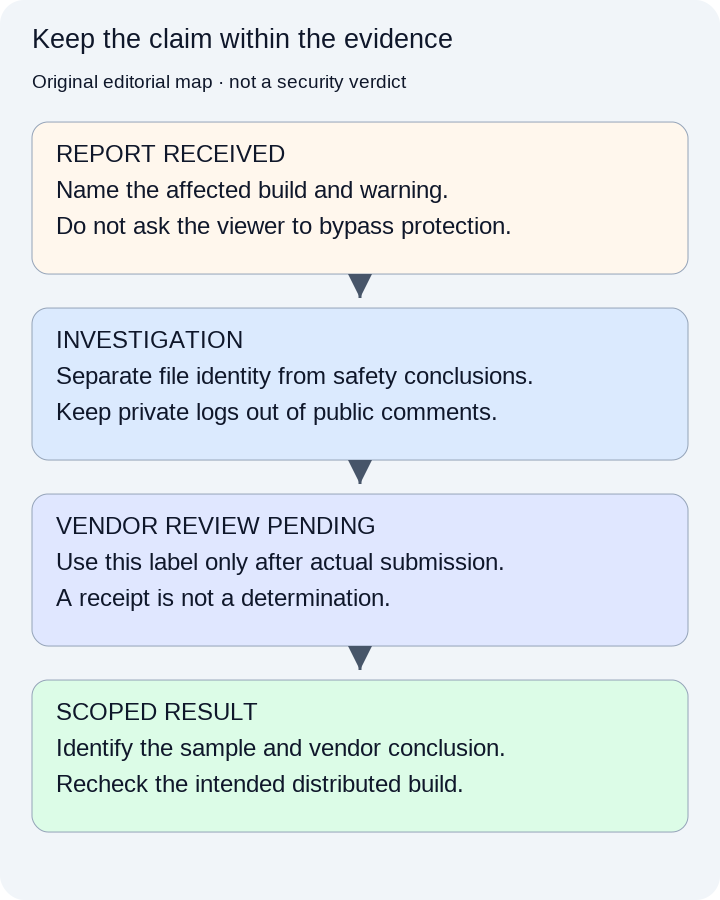
Original editorial status map, not a security-product interface or a malware verdict.
 Superdirector
Have your AI do this for your brand.
7 days free, then $29 a month.
Separate three questions before writing the reply
First, which file did the player obtain? Second, what did their security product report? Third, what has actually been established about that exact file? Treat each answer as a separate field.
A store listing, a download URL and a packaged executable are different things. The version in a creator's old email might not be the version you just uploaded. Keep your own release record with the demo name, build identifier, official download destination, package filename, build date and file hash. A hash identifies bytes; it does not prove that those bytes are safe. Do not ask a player to run an unfamiliar tool just to provide it.
Ask for the security product, detection text and approximate time. A screenshot can help, but tell the reporter to remove personal account names and local folder paths. A public comment is not the place for private logs or executable attachments. Do not make a person download the file again merely to reproduce the problem.
Keep the claim within the verified current status
Use a small release record with four states:
- Report received: a warning was described; its cause is not yet known.
- Investigation: the developer is comparing the report with the exact distributed build and reviewing the build inputs.
- Vendor review pending: a sample was actually submitted through the relevant security vendor's official process, with a receipt retained privately.
- Scoped result: a determination exists for a named sample and product, followed by a documented recheck of the intended distribution build.
These are proposed editorial states, not names of universal security-platform statuses. Do not advance a row because a teammate says they are “looking into it.”
For Microsoft detections, Microsoft's official guide provides a software-developer submission route and distinguishes receipt, analysis and a final determination. A submission alone is not clearance. A conclusion about one sample is not approval of every future build. See Microsoft's submission guide.
Use a calm notice with one next action
Here is a hypothetical notice, not an incident report for any named game:
“We have received a security-warning report for the Windows demo build identified below. We are investigating and have not established the cause. Please do not bypass the warning or turn off protection to play. The next status update will be posted on this same page. If you already saw a warning, you can share the security product and detection text through our support route, without personal details.”
Before using that wording, fill in the actual build and official support/status links. Add a time for the next update only if someone owns it. If you have temporarily removed the download, say so only after checking the real destination. If you have submitted a sample, add that fact only after retaining its receipt.
The notice should not imply that viewers must install anything to stay involved. You may offer an existing gameplay video as an alternative only if it accurately represents the build and does not mislabel itself as hands-on access.
Keep the creator invitation consistent with the status
A YouTube description can outlive the demo build it originally linked to. Give the creator the same verified status destination as the public launch page, and identify which hands-on invitation is paused. Do not silently replace the download while leaving an old assurance next to it.
On Instagram or X, a short update should name the affected demo and the next place to check; it should not squeeze uncertainty into an unreadable footnote beneath a play-now CTA. If the creator has not tried the affected build, do not script a first-person reassurance on their behalf. A recorded gameplay excerpt can explain the game, but it cannot certify the downloadable file.
Finish the loop in the same place
When a security vendor returns a decision, record its scope and date. Check whether it concerns the file players actually received. A new export or packaging change may produce a different artifact. Do not silently edit an old “all clear” statement to cover a later binary.
The public update should distinguish “review submitted,” “vendor determination received” and “distribution build rechecked.” If the issue remains uncertain, say that. If a real security incident is suspected, stop treating the case as a launch-copy task and escalate to appropriate security expertise.
A focused launch QA exercise
Before inviting creators, give one teammate the public invitation and another the release record. Ask them independently which demo build is offered, where it is downloaded, where a warning should be reported and whether the copy asks anyone to weaken protection. A mismatch is a release-communication defect to fix, not a reason to persuade the reviewer.
This exercise is proposed, not performed here. It does not establish the safety of your game or predict download conversion. Its purpose is to prevent an unsupported reassurance from being copied across email, Discord, YouTube descriptions and your launch page.
Why this question is worth addressing
Two separate developer conversations show why the communication needs to stay scoped: a Godot developer's demo warning report and an itch.io developer asking what to check before distribution. The Godot author later assumed that distributing through Steam made the warning immaterial; that is not a safety determination this guide endorses. The itch.io author updated their post to report a Microsoft determination and a subsequent clean Defender scan. That is a self-reported resolution for their submitted files, not independent verification of the download or every future build. These are different engine and distribution contexts, not a frequency estimate. Advice in their replies is not an authoritative safety guarantee.
See the planning workflow to turn verified product references and an approved status note into social scripts. It does not scan binaries, submit samples, clear security warnings or determine whether software is safe.
Frequently asked questions
Does submitting a sample clear a security warning?
SuperdirectorHave your AI do this for your brand.
7 days free, then $29 a month.