How-To Guide
Check an itch.io browser build before sending players to it
“Uploaded successfully” is a distribution status. “A visitor completed the first playable action” is a product observation. Before promoting a browser…
By the Superdirector editorial team.
“Uploaded successfully” is a distribution status. “A visitor completed the first playable action” is a product observation. Before promoting a browser game, establish the second without confusing it with the first.
This checklist is for an indie developer whose itch.io page opens but whose game may stall, display an empty frame or fail before input works. It covers technical loading readiness, not search indexing, store discoverability or device-based campaign routing.
Define the smallest playable proof
Choose one action that proves the game initialized and accepts input. For a puzzle game, that might be moving a tile and seeing the board respond. For a narrative game, it might be choosing a dialogue option and reaching the next passage. A splash screen alone is not that proof.
Write the expected action and response before testing. Also record the archive or build identifier, upload date, engine version, export settings, browser version and operating system. This proposed test record lets a teammate distinguish a corrected build from a different environment that merely hides the failure.

A fictional garden scene uses moving a crate onto a matching plate as its first meaningful browser-game action. It is not an itch.io capture or a successful compatibility test. Original AI-generated editorial illustration.
Original visual by Original editorial illustration generated with OpenAI’s built-in image tool. Created 2026-10-24.
Check the package before guessing at browser bugs
For a multi-file itch.io HTML game, the platform requires a ZIP with an index.html entrypoint and the needed assets. Asset paths must be relative and match filename case. External resources must use HTTPS. A file that works on a case-insensitive local filesystem can therefore fail after upload. itch.io HTML5 documentation
Inspect the export you actually uploaded, not an older working directory. Ask whether the requested asset exists in that archive and whether its path matches exactly. If a request points to a directory instead of a file, changing the game’s loading animation will not repair it.
Do not rename a collection of generated engine files ad hoc to make the archive look tidy. Re-export using the appropriate entrypoint configuration and preserve the resulting relationships. Keep the previous artifact available so that you can compare one change at a time.
Locate the first failed checkpoint
Use the browser’s developer tools to record the first relevant console or network error, its resource path and the visible symptom. Redact tokens, personal information and private endpoints before sharing diagnostics.
Work through this original diagnostic sequence:
- Page reached: the intended itch.io page opens.
- Launch started: the visitor’s launch action reaches the game frame.
- Resources loaded: required files are requested and available.
- Frame rendered: actual game content appears beyond the loader.
- Input accepted: the defined first action changes game state.
A failure at step three calls for different evidence from a failure at step five. Do not use an empty screen as a diagnosis. It is a symptom that can come from different layers.
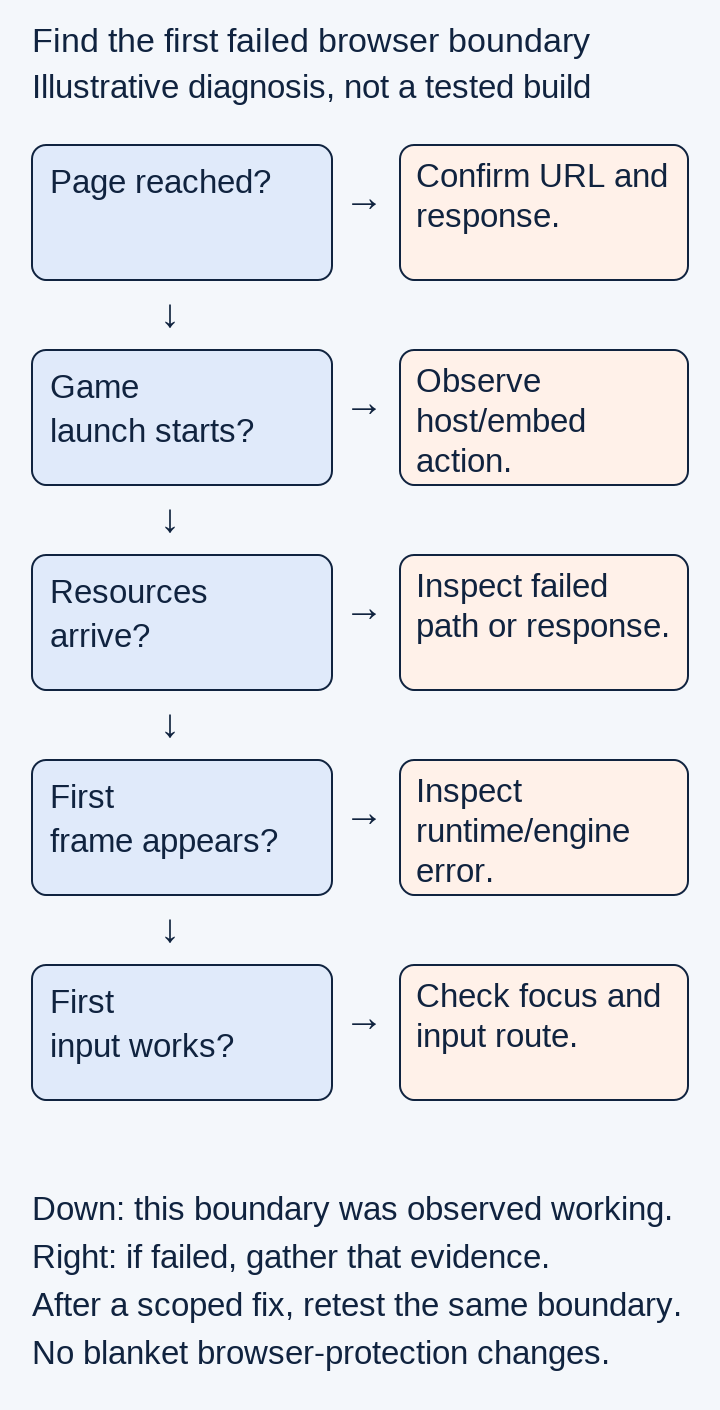
Original readiness ladder. Passing it describes the tested build and environment, not universal browser support or discovery performance.
Original visual by the Superdirector editorial team. Creation date not recorded.
Apply engine guidance only to the engine you use
For Godot 4, the current web-export documentation specifies WebAssembly and WebGL 2.0 support, the Compatibility renderer and particular constraints for threaded exports. Its console guidance helps expose engine and JavaScript errors. The same documentation currently says Godot 4 C# projects cannot export to the web: check that basic eligibility before debugging a browser symptom. These are Godot-specific checks, not rules for every browser-game engine. Godot web export guide
If a Godot build’s errors point to export compatibility, compare the exact engine version and preset with its matching documentation. Do not toggle threading, rendering or hosting configuration at random and then declare the first working combination the root cause. Record the hypothesis, change and result.
For another engine, use its own current export documentation. A forum answer for a different engine version may be a useful lead, but it is not evidence that your build has the same fault.
Treat a working second browser as a clue, not a universal fix
Illustrative case: a game produces audio but no visible playfield in one browser and works in another. That observation narrows the investigation; it does not establish whether the cause is rendering support, an extension, caching, export settings or a game defect.
Reproduce under a documented, supported configuration. Keep ordinary security protections intact. Do not ask every visitor to disable protection or bypass a warning just because one forum participant reported a workaround. If your distribution depends on a configuration visitors are unlikely to understand, describe the limitation honestly and consider whether this build is ready for promotion at all.
A successful clean session also does not prove that returning players receive the corrected build. Where caching may matter, record first-visit and return-visit checks separately rather than silently clearing all state and forgetting the original symptom.
Repeat the first playable action after the fix
Retest from the actual itch.io page with the corrected artifact. Capture the first playable action, any remaining errors and the environment. If you claim mobile support, perform an actual mobile check; resizing a desktop window does not establish touch input or mobile-browser behavior.
Measure launch-to-playable time only if you record how it was measured, the environment and whether the load was cold or cached. There is no universal time threshold in this checklist. Set a project-specific acceptance rule before comparing builds, and retain failures rather than averaging them out of sight.
Your release note can now say what was tested: “Build X reached the first puzzle interaction in the recorded browsers; environment Y remains unverified.” That is more useful than “works everywhere.” It gives the promotion owner a bounded readiness decision and the developer a concrete remaining test.