How-To Guide
Announce an Etsy crochet-pattern correction without making previous buyers purchase it again
Give previous Etsy pattern buyers a verified correction route while explaining the revised offer to new buyers, without automatic-update promises.
A revised crochet pattern has two audiences: someone deciding whether to buy it now, and someone already working from an older file. A launch-style Reel that says “new version available” can send both audiences to the same checkout even when the seller intends to supply the correction to existing buyers without another purchase.
Before making the announcement, distinguish the changed instructions, the buyer's existing entitlement and the route that actually delivers the intended file. Updating the listing is only one part of that work.
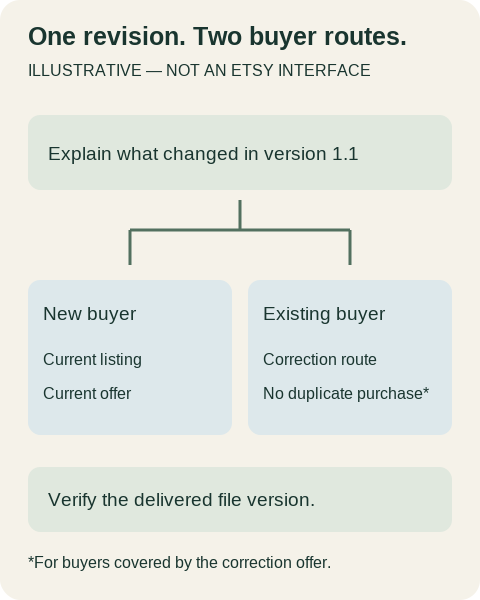
Illustrative routing plan, not a tested Etsy interface or an automatic-update claim.
 Superdirector
Make it work for your brand
Find it. Remake it. Post it. Superdirector turns the viral formats in your niche into your brand's carousels, X posts and video scripts, and keeps the calendar full.
Start with the unfinished project, not the relaunch
A designer in a public crochet-pattern update question asked how to tell previous buyers about a clearer version after feedback and testing. In a separate digital-download discussion, a seller reported adding a help PDF to a live listing but hearing that a previous buyer could not see it in their purchase downloads.
These historical questions expose different problems: deciding what an earlier buyer needs to know, and confirming that they can obtain it. They do not establish current Etsy behavior for every order. In particular, a comment suggesting what previous buyers can download is not platform documentation.
For the buyer halfway through a project, “improved pattern” is incomplete. They need to know whether a change affects their current row, a later step, the finished dimensions or only the wording. A new cover does not answer those questions.
Separate a correction from a new product
Create a small change record before editing the promotional copy:
| Change | Existing buyer's decision | Announcement requirement |
|---|---|---|
| Corrected instruction | Whether their copy contains an error | Name the affected version and location; provide the verified correction route |
| Added explanation or photograph | Whether the clarification helps their current project | Say what was clarified without implying the old pattern is unusable |
| Changed construction or sizing | Whether to continue an existing project or start the revised design | Explain the transition and any incompatibility before suggesting a switch |
| Separate pattern or paid expansion | Whether to buy another product | Describe it as a separate offer, not as the way to fix an earlier purchase |
This is an editorial classification, not a ruling on any buyer's legal entitlement. Resolve the actual correction and support obligations before turning them into a campaign. Do not invent a universal “all future versions free” policy if that is not the shop's offer.
For a fictional bandana pattern, version 1.1 might clarify where an increase belongs without changing the stitch count. The seller's note could identify the affected step and say whether the existing project can continue. If that continuity has not been checked, do not claim that buyers can safely switch instructions mid-project.
Do not equate a listing upload with an old-order update
Etsy's digital-listing help, checked October 26, 2026, explains how sellers remove and add listing files. It also says uploaded file names are visible to buyers and cannot be edited after upload. Those instructions do not establish that replacing a listing file automatically updates every previous purchaser's available files or sends those purchasers a correction notice.
The same page describes an email notification when a made-to-order digital order is completed. Do not transfer that statement to a different event: revising an instant-download listing after earlier orders.
Name the corrected file meaningfully before uploading it. A fictional Bandana_v1-1_2026-10.pdf is easier to distinguish from final-final.pdf. Put the same version inside the document, since files can be renamed after download. Retain a private copy of the earlier version so support can identify the instructions a buyer is actually following.
Build two routes before publishing one announcement
For a new buyer, check that the current listing accurately describes and supplies the current version. For an existing buyer covered by your correction offer, establish a separate support route that does not require another purchase.
Do not promise a particular file-transfer method until you have confirmed its present support and permissions. A contact route can be described honestly while the delivery method is checked: “Already bought this pattern? Contact us through your Etsy order so we can help you obtain the correction.” That is different from promising “your downloads have automatically updated.”
Use only the order information needed to match the purchase. Do not ask people to post receipts, email addresses or order numbers in Instagram comments. Do not put a paid pattern in a publicly accessible link merely because a short video needs a convenient destination.
Check the handoff, not just the upload
Before release, have a reviewer answer four questions: Which version changed? Does the change affect an ongoing project? What should an existing buyer do without purchasing again? What evidence confirms that the delivered file is the intended revision?
If the old-order download behavior remains unknown, keep that uncertainty explicit and use the verified support route. Do not publish an automatic-update promise as a shortcut.
The useful marketing asset is a clear explanation of the revision and the two audience paths—not an invented claim that updates increase repeat sales. See the planning workflow to organize the correction record, demonstration and audience-specific copy before announcing the revised pattern.